


Jak przenieść Spotify Playlista do YouTube Music (2 sprawdzone metody)
Jeśli szukasz sposobu na przeniesienie Spotify Przenosząc playlistę do YouTube Music, prawdopodobnie próbujesz przenieść starannie przygotowane playlisty bez utraty utworów, struktury i wrażeń słuchowych. Niestety, Spotify i YouTube Music nie oferują funkcji bezpośredniego, natywnego transferu, co oznacza, że użytkownicy muszą polegać na narzędziach innych firm lub metodach obejścia problemu. W tym przewodniku przedstawimy dwa niezawodne rozwiązania. Obie metody są praktyczne, ale odpowiadają różnym potrzebom użytkowników w zależności od szybkości, kontroli i jakości dźwięku.
Przewodnik po zawartości Dlaczego nie można dokonać bezpośredniego transferu Spotify do YouTube Music Metoda 1: Konwertuj Spotify Playlista do MP3 (Najlepsze do sterowania offline)Metoda 2: Przeniesienie Spotify Playlista do YouTube Music (migracja bezpośrednia)FAQPodsumowanie
Dlaczego nie można dokonać bezpośredniego transferu Spotify do YouTube Music
Przed przystąpieniem do analizy potencjalnych rozwiązań konieczne jest zrozumienie związanych z nimi ograniczeń technicznych.
Bo Spotify i YouTube Music działają w oparciu o zupełnie różne systemy licencjonowania, playlist nie można bezpośrednio migrować między tymi dwiema platformami. Co więcej, struktury bibliotek i metadane są w dużej mierze niekompatybilne, a poszczególne utwory są chronione surowymi zabezpieczeniami DRM. Dlatego każdy, kto szuka sposobu na przeniesienie… Spotify playlista w YouTube Music musi polegać na rozwiązaniach firm trzecich.
Metoda 1: Konwertuj Spotify Playlista do MP3 (Najlepsze do sterowania offline)
Jak przenieść Spotify playlistę do YouTube Music? Jednym z najpewniejszych rozwiązań jest skorzystanie z profesjonalnego konwertera, takiego jak DumpMedia Spotify Music ConverterTa metoda jest idealna, jeśli chcesz mieć pełną kontrolę nad swoimi plikami muzycznymi lub wolisz ręcznie przesyłać utwory do YouTube Music.
Darmowe pobieranie Darmowe pobieranie
🏅Dlaczego warto wybrać DumpMedia Spotify Music Converter:
- ⭐Integracja z Spotify odtwarzacz internetowy
- ⭐Praca dla obu stron Spotify Premium i Spotify Darmowe użytkownicy
- ⭐Zapewnia konwersję wsadową z prędkością do 35x
- ⭐konwertować Spotify piosenki do MP3, WAV lub FLAC
- ⭐Zachowaj tagi ID3, takie jak artysta, okładka, grafika itp.
- ⭐Zachowaj oryginalną jakość dźwięku
- ⭐100% czyste. Nie ma ryzyka w użyciu
Przewodnik krok po kroku
Krok 1. Pobierz i zainstaluj oprogramowanie na swoim komputerze. Działa ono z obydwoma systemami. WinDows i Mac. Interfejs jest przyjazny dla użytkownika, co ułatwia pracę początkującym.
Darmowe pobieranie Darmowe pobieranie
Krok 2. Otwórz wbudowany Spotify odtwarzacz internetowy w środku DumpMedia i zaloguj się za pomocą Spotify konto. Przeglądaj Spotify i przeciągnij piosenki, albumy lub playlisty, które chcesz pobrać, do konwertera.

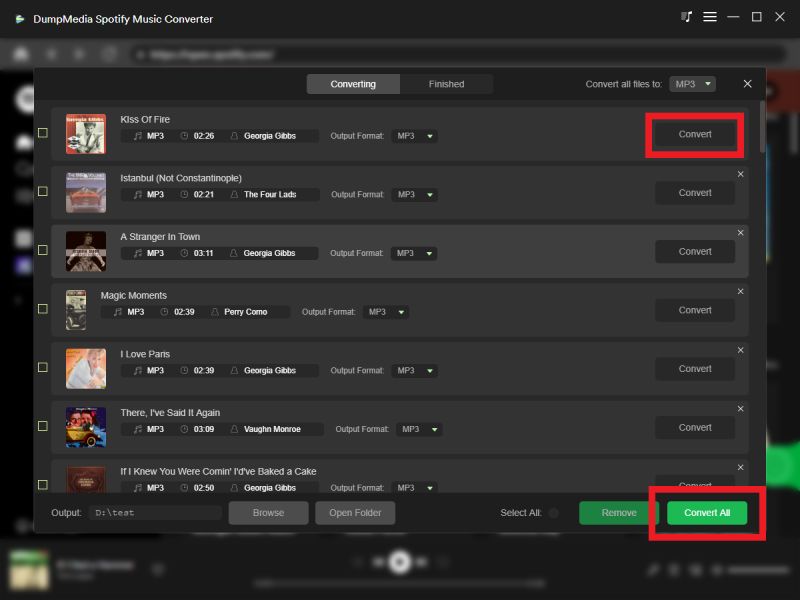
Krok 3. W panelu ustawień wybierz MP3 jako format wyjściowy umożliwiający MP3 pobieranie wybranych utworów.

Krok 4. Kliknij Konwertuj i pobierz utwory bezpośrednio jako MP3 akta.
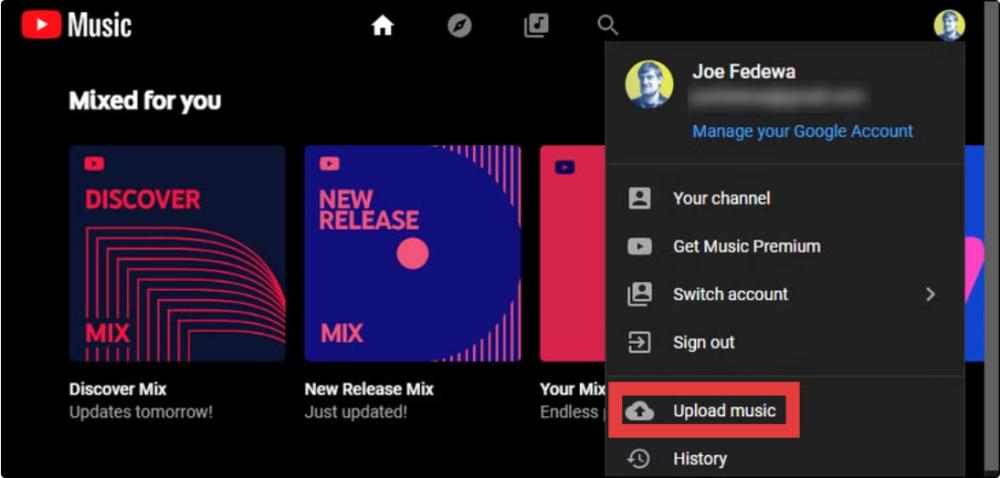
Krok 5. Jak przenieść Spotify Playlistę do YouTube Music? Otwórz music.youtube.com w przeglądarce. Kliknij swoje zdjęcie profilowe w prawym górnym rogu strony i wybierz Prześlij muzykę.
Zalety
- Wysokiej jakości konwersja dźwięku
- Pełna kontrola nad plikami
- Brak zależności od interfejsów API platformy
Wady
- Wymaga ręcznego przesłania
- Nieco dłuższy proces
Metoda 2: Przeniesienie Spotify Playlista do YouTube Music (migracja bezpośrednia)
Jak przenieść Spotify playlistę do YouTube Music? Jeśli zależy Ci na szybkości i wygodzie, zautomatyzowane narzędzie, takie jak Transfer playlisty Any Music Converter Funkcja ta jest lepszym rozwiązaniem. Ta metoda łączy się bezpośrednio Spotify i konta YouTube Music, a także automatyczne przenoszenie playlist.
Przewodnik krok po kroku
Krok 1. Otwarte DumpMedia Dowolny konwerter muzyki na Twoim komputerze. Zobaczysz przejrzysty i intuicyjny interfejs zaprojektowany tak, aby konwersja była prosta, nawet dla początkujących użytkowników.
Krok 2. Wybierz Narzędzia > Przesyłanie listy odtwarzania.
Krok 3. Dodaj Spotify jako źródło.

Krok 4. Wybierz YouTube Music jako platformę, na którą chcesz przenieść swoją playlistę.
Krok 5. Znajdź listy odtwarzania, z których chcesz przenieść Spotify do YouTube Music i wybierz wszystkie playlisty, które chcesz przenieść.
Krok 6. Rozpocznij proces migracji. Narzędzie automatycznie dopasuje i przeniesie utwory. Kliknij „Przejdź do YouTube Music”. Twoje playlisty zostały przeniesione do nowej usługi i możesz zacząć korzystać z nowego serwisu streamingowego.
Zalety
- Transfer jednym kliknięciem
- Brak ręcznego pobierania
- Szybki i przyjazny dla początkujących
Wady
- Dopasowywanie utworów może nie być możliwe 100% dokładny
- Wymaga stabilnego połączenia API
- Niektóre utwory mogą być brakujące lub zastąpione
FAQ
1. Czy mogę dokonać bezpośredniego przelewu? Spotify playlisty do YouTube Music?
Nie. Nie ma oficjalnej wbudowanej funkcji transferu między Spotify i YouTube Music.
2. Jaki jest najłatwiejszy sposób na przeniesienie Spotify playlistę do YouTube Music?
Najłatwiejszą metodą jest skorzystanie z automatycznego narzędzia do przesyłania list odtwarzania, które synchronizuje oba konta.
Uwaga: DumpMedia Każdy subskrybent usługi Any Music Converter może bezpłatnie korzystać z funkcji przesyłania playlist. Nie jesteś jeszcze subskrybentem? Kup najpierw usługę Any Music Converter, aby cieszyć się płynnym, błyskawicznym przesyłaniem i pełną kontrolą.
Darmowe pobieranie Darmowe pobieranie
3. Jest DumpMedia Spotify Music Converter bezpieczny w użyciu?
Tak, jest on przeznaczony do osobistej konwersji muzyki i pozwala na przechowywanie utworów w trybie offline.
4. Czy wszystkie utwory zostaną pomyślnie przeniesione?
Nie zawsze. Automatyczne narzędzia mogą nie być w stanie dopasować niektórych utworów ze względu na różnice w licencjach.
5. Czy potrzebuję Spotify Premium umożliwiający przesyłanie playlist?
Nie. Większość narzędzi innych firm działa z darmową wersją Spotify Konta.
Podsumowanie
Jeśli próbujesz dowiedzieć się, jak przenieść Spotify playlisty do YouTube Music, istnieją dwa główne podejścia, Spotify Music Converter lub funkcję przesyłania playlisty Any Music Converter. Oba rozwiązania są skuteczne w zależności od Twoich priorytetów.

30% zniżki >>>