


轉讓 Spotify Apple Music:完整指南(2026)
許多最初使用過的聽眾 Spotify 最後決定將他們的音樂庫遷移到 蘋果音樂 為了更好地與蘋果設備整合、改進音樂庫管理或滿足個人喜好。然而,切換平台的一大挑戰在於如何保留精心創建的播放清單。
幸運的是,有幾種工具可以幫助你。 轉讓 Spotify 到蘋果音樂 快速有效率地完成轉帳。在本指南中,我們將為您介紹最佳的轉帳方法。 Spotify 我們將介紹如何將播放清單遷移到 Apple Music。此外,我們還將介紹其他線上工具和實用技巧,以確保遷移過程順利且準確。
內容指南 第一部分:用戶為何想要轉移 Spotify 新增到 Apple Music 的播放列表第 2 部分. 最佳轉移方式 Spotify 新增到 Apple Music 的播放列表第三部分:其他線上傳輸工具 Spotify 新增到 Apple Music 的播放列表第 4 部分。 常見問題解答部分5。 結論
第一部分:用戶為何想要轉移 Spotify 新增到 Apple Music 的播放列表
在探索可用工具之前,了解許多用戶選擇遷移的原因很有幫助。 Spotify 首先是 Apple Music。
- 切換音樂生態系統:對於嚴重依賴蘋果硬體的用戶來說,Apple Music 提供了更流暢的聆聽體驗。
- 保留現有播放清單:平台切換過程中遺失播放清單會令人沮喪。這就是為什麼播放清單遷移工具如此重要的原因。
- 手動傳輸效率低下:這種方法有幾個問題,例如逐首搜尋歌曲需要幾個小時;可能會遺漏一些曲目,播放清單順序可能與原曲不符等等。
由於這些挑戰,大多數用戶依賴專門的工具進行傳輸。 Spotify 自動同步到 Apple Music。
第 2 部分. 最佳轉移方式 Spotify 新增到 Apple Music 的播放列表
在可用的工具中, DumpMedia 任何音樂轉換器 對於想要轉帳的用戶來說,這是最可靠的解決方案之一。 Spotify 快速且準確地遷移到 Apple Music。其專用的播放清單傳輸功能簡化了整個遷移過程,並確保播放清單能夠正確重建。
DumpMedia 適用於兩者 Win它相容於 Windows 和 macOS,因此可供眾多用戶使用。播放清單傳輸功能專為跨平台播放清單遷移而設計。以下是它的一些最有價值的功能:
- 大量傳輸播放清單:您可以一次傳輸多個播放列表,而無需逐一傳輸。
- 智慧曲目配對:軟體可自動辨識 Apple Music 中的對應歌曲,提高傳輸準確率。
- 元資料保留:遷移過程中可以保留歌曲標題、藝人、專輯和播放清單順序等重要資訊。
轉移分步指南 Spotify 到蘋果音樂
請依照以下簡單步驟完成遷移過程。
步驟二 下載並安裝 DumpMedia 任何音樂轉換器 Win適用於 Windows 或 Mac 電腦。安裝完成後,啟動程式即可存取主介面。
步驟二 在程式中找到「播放清單傳輸」功能。選擇 Spotify 作為資訊來源。

步驟 3.選擇 Apple Music 作為要將播放清單移到的平台。
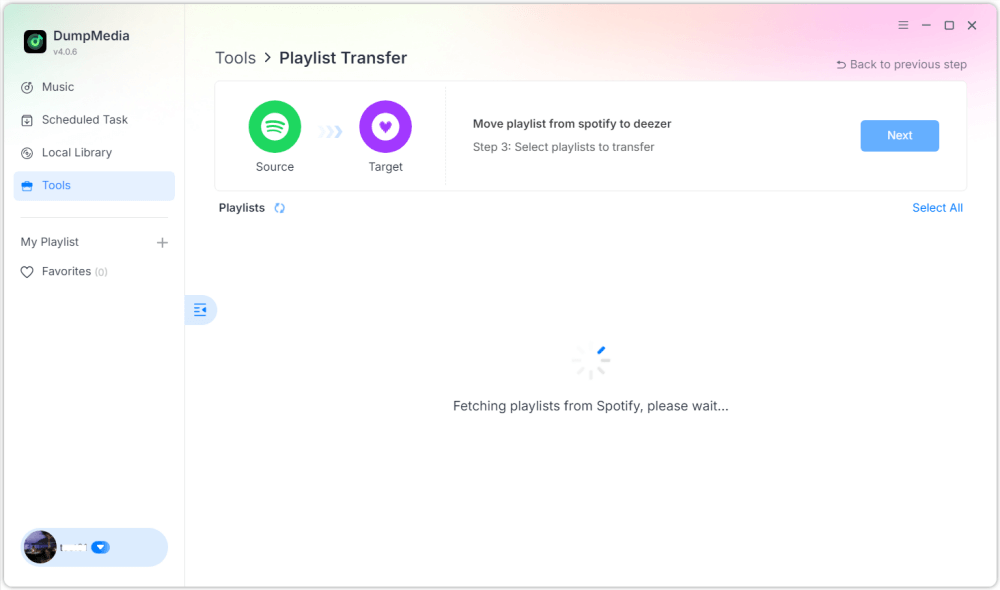
步驟二 找到你想從中遷移的播放列表 Spotify 開啟 Apple Music,選擇所有要遷移的播放清單。

步驟 5.點選「轉換」開始傳輸。
步驟 6:傳輸完成。點擊“前往 Apple Music”。您的播放清單已遷移到新服務,您可以開始享受新的音樂串流服務了。
對於擁有大量音樂收藏的用戶來說,這種解決方案提供了最簡單的傳輸方式。 Spotify 上傳到 Apple Music 時不會出現錯誤或曲目缺失的情況。
第三部分:其他線上傳輸工具 Spotify 新增到 Apple Music 的播放列表
雖然桌面軟體通常是最可靠的選擇,但有些用戶更喜歡線上工具,因為它們無需安裝。一些基於網路的軟體服務允許您傳輸資料。 Spotify 可直接透過瀏覽器存取 Apple Music。兩個比較受歡迎的選擇是 TuneMyMusic 和 Soundiiz。
使用 TuneMyMusic
TuneMyMusic 是一款簡單易用的線上歌單傳輸服務,支援多種音樂平台。它為想要在不同音樂平台間遷移歌單的使用者提供了一個方便的介面。
步驟 1.造訪 TuneMyMusic 網站,然後點選「開始」。
步驟二 選擇 Spotify 選擇您的來源平台並登入您的帳戶。
步驟 3.選擇要遷移的播放清單或貼上播放清單 URL。
步驟 4.登入您的 Apple Music 帳戶以授權傳輸。

第五步:點選「開始移動我的音樂」。該服務將匹配歌曲並在 Apple Music 中建立播放清單。
使用 Soundiiz
Soundiiz 是另一個功能強大的線上播放清單管理平台,支援多種串流服務。
步驟 1.註冊或登入 Soundiiz 控制面板。
步驟二 授權 Spotify 這樣 Soundiiz 就可以存取你的播放清單了。
步驟 3.新增 Apple Music 作為已連線的服務。
步驟 4.選擇要傳輸的播放清單。
步驟 5.點選“轉換”,然後選擇 Apple Music 作為目標位置。
流程完成後,播放清單應該會出現在您的 Apple Music 資料庫中。
線上工具的局限性
雖然線上工具很方便,但它們也可能存在一些缺點:
- 免費版本通常會限制傳輸的歌曲數量。
- 匹配準確度可能有所不同
- 大型播放清單的處理時間可能會更長。
- 網路連線會影響效能
第 4 部分。 常見問題解答
我可以轉學嗎 Spotify 免費使用 Apple Music?
有些線上工具提供免費的播放清單傳輸服務,但可能會限制歌曲數量。付費工具通常提供更快的傳輸速度和更多功能。
所有歌曲都能成功轉移嗎?
兩個平台上的大部分歌曲都可以匹配,但偶爾也會因為版權差異而導致某些曲目無法使用。
傳輸播放清單需要多長時間?
所需時間取決於播放清單的大小。較小的播放清單可能只需幾分鐘即可傳輸完畢,而較大的音樂庫則可能需要更長時間。
我可以一次傳輸多個播放清單嗎?
是的。一些工具,包括 DumpMedia Any Music Converter 支援批量傳輸,因此您可以同時移動多個播放清單。
使用播放清單傳輸工具安全嗎?
信譽良好的工具會使用安全的身份驗證方式連接到您的串流媒體帳戶。傳輸資料時,請務必選擇可信賴的服務。 Spotify 到蘋果音樂。
部分5。 結論
在串流媒體服務之間遷移播放清單不再困難。借助合適的工具,您可以輕鬆完成傳輸。 Spotify 快速遷移到 Apple Music,同時保留您的音樂庫完整無損。這得歸功於其強大的播放清單傳輸功能。 DumpMedia 允許您轉移 Spotify 將歌曲準確匯入 Apple Music,保持播放清單結構完整,輕鬆遷移多個播放清單。選擇合適的方法,即可在 Apple Music 上享受您喜愛的音樂,而無需擔心丟失您多年來精心創建的播放清單。