如何轉讓 Spotify 亞馬遜音樂的播放列表?

羅西(Rosie)撰寫

上次更新時間:2026-03-11

2最小讀取

Music streaming services have transformed how people listen to music. However, switching platforms can sometimes be inconvenient, especially when you have carefully curated playlists built over time. Many users who previously relied on Spotify may decide to try 亞馬遜音樂 for its integration with Amazon devices, extensive music library, and compatibility with Alexa-enabled smart speakers.

Fortunately, several tools now make it possible to move playlists between streaming services automatically. In this guide, we’ll explain the most effective methods to 轉讓 Spotify 亞馬遜音樂的播放列表 using online tools, desktop software, and mobile apps. Whether you are using Windows, Mac, iOS, or Android, you’ll find a solution that helps you migrate your playlists quickly and accurately.

內容指南 第 1 部分. 轉移 Spotify Playlists to Amazon Music Online第 2 部分. 轉移 Spotify Playlists to Amazon Music on Win道/麥第 3 部分. 轉移 Spotify Playlists to Amazon Music on iOS第 4 部分. 轉移 Spotify Playlists to Amazon Music on Android第 5 部分。 常見問題解答部分6。 結論

第 1 部分. 轉移 Spotify Playlists to Amazon Music Online

For users who want a quick and simple method without installing software, online playlist transfer tools are a convenient option. These services allow you to connect your streaming accounts through a web browser and automatically migrate playlists between platforms.

One of the most popular online tools for this purpose is TuneMyMusic. TuneMyMusic is a web-based playlist migration tool that supports many streaming platforms. It allows users to transfer Spotify playlist to Amazon Music with only a few steps.

產品特色

  • Works directly in your web browser
  • Supports many streaming platforms
  • Simple interface with step-by-step guidance
  • 無需安裝軟件

轉移步驟 Spotify Playlist to Amazon Music with TuneMyMusic

步驟二 Visit the TuneMyMusic website and click the “Let’s Start” button to begin the process.

步驟二 選擇 Spotify as the source platform and sign in to your account. The tool will request permission to access your playlists.

步驟二 Once connected, you can select the specific playlist you want to migrate or paste the playlist link. The system will load all songs in that playlist.

步驟二 Next, choose Amazon Music as the destination service and log in to your Amazon account to authorize the transfer.

轉讓 Spotify Playlist TuneMyMusic

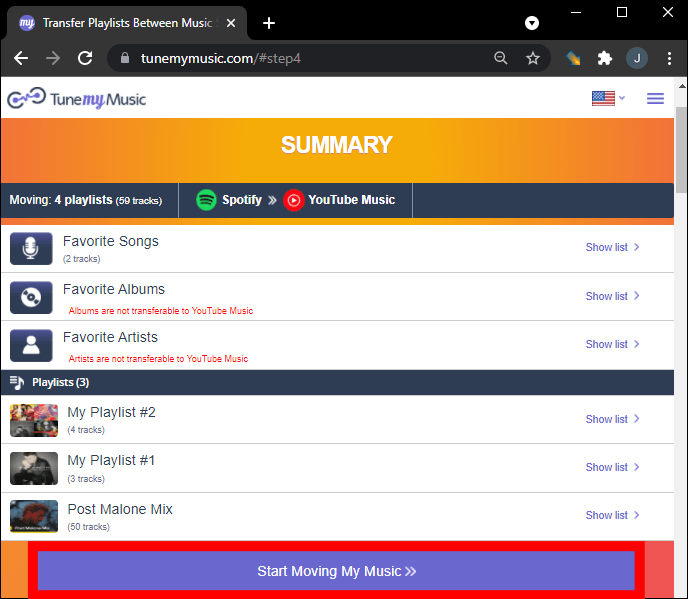
步驟二 Click “Start Moving My Music.” The tool will automatically match songs from Spotify with the Amazon Music catalog.

TuneMyMusic 開始移動我的音樂

步驟二 After the process is complete, open your Amazon Music library to confirm that the playlist has been created successfully.

Using an online tool like TuneMyMusic is one of the fastest ways to transfer Spotify playlist to Amazon Music for small or medium-sized playlists. However, for users with large music libraries or those who want more stability, a desktop solution may be a better choice.

第 2 部分. 轉移 Spotify Playlists to Amazon Music on Win道/麥

If you want a more reliable and feature-rich solution, using desktop software is often the best option. DumpMedia 任何音樂轉換器 is a powerful program designed to manage and convert music while also offering a dedicated Playlist Transfer feature. DumpMedia allows users to transfer Spotify playlist to Amazon Music efficiently while preserving playlist information and song metadata.

免費下載 免費下載

產品特色

  • 支持 Win作業系統和 macOS
  • Dedicated Playlist Transfer feature
  • Batch playlist migration
  • Smart track matching
  • Maintains metadata such as artist, album, and track titles
  • Stable local processing without browser limitations

These features make it one of the most efficient ways to transfer Spotify playlist to Amazon Music for users with large playlists.

分步指南

步驟二 下載並安裝 DumpMedia 任何音樂轉換器 Windows 或 Mac 電腦。安裝後啟動程式。

免費下載 免費下載

步驟二 選擇“工具”>“播放清單傳輸”。選擇 Spotify 作為資訊來源。

DumpMedia 播放清單傳輸

步驟二 Select Amazon Music as a destination.

步驟二 選擇要傳輸的內容,我們支援您最喜歡的歌曲、歌手、專輯和您精心挑選的播放清單。

選擇要傳輸的播放列表

步驟二 點擊“轉換”開始傳輸。

步驟二 The transfer is finished. Click "Go to Amazon Music". Your playlists have been moved to a new service, and you can start enjoying a new playlist on Amazon Music.

Compared to online services, this method provides more stability and better accuracy when you transfer Spotify playlist to Amazon Music.

第 3 部分. 轉移 Spotify Playlists to Amazon Music on iOS

If you prefer using a mobile device, several apps can help you transfer Spotify playlist to Amazon Music directly from your iPhone or iPad. One of the most popular options is SongShift. SongShift is a well-known playlist migration app designed for iOS users. It supports many music streaming services and offers an intuitive interface for transferring playlists.

產品特色

  • 易於使用的行動介面
  • 支援多種串流媒體平台
  • Allows batch playlist transfers
  • Built specifically for iOS devices

轉移步驟 Spotify Playlist to Amazon Music with SongShift

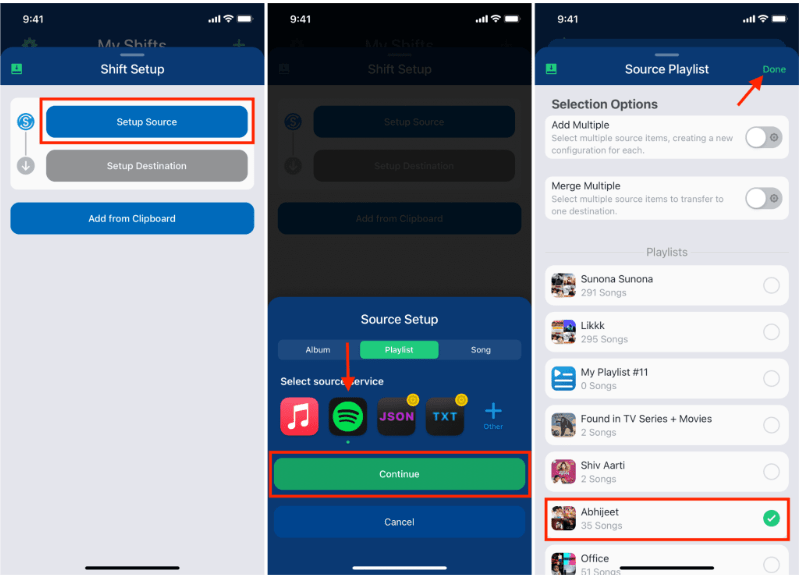
步驟二 Download SongShift from the App Store and open the app. Authorize Spotify so the app can access your playlists.

SongShift Transfer Spotify 播放列表

步驟二 Add Amazon Music as your destination service by logging into your Amazon account.

步驟二 選擇 Spotify playlist you want to migrate.

步驟二 Tap Start Shift and let the app match songs across platforms.

After the process is complete, your playlist should appear in Amazon Music. SongShift is a convenient option for users who want to transfer Spotify playlist to Amazon Music without using a computer.

第 4 部分. 轉移 Spotify Playlists to Amazon Music on Android

Android users can also transfer playlists between streaming services using dedicated apps. One widely used solution is FreeYourMusic. FreeYourMusic is a cross-platform music transfer tool that works on Android, iOS, Windows, and macOS. It allows users to move playlists between streaming services with minimal effort.

產品特色

  • Supports many streaming platforms
  • Simple transfer process
  • 適用於多種設備
  • Allows batch playlist transfers

轉移步驟 Spotify Playlist to Amazon Music with FreeYourMusic

步驟二 Download FreeYourMusic from the Google Play Store and open the application. Select Spotify as the source platform and log in to your account.

步驟二 Choose Amazon Music and sign in to your account.

步驟二 選擇 Spotify playlist you want to migrate.

步驟二 Tap Transfer to begin the migration. The app will match songs and recreate the playlist in Amazon Music.

第 5 部分。 常見問題解答

1.我可以轉讓嗎 Spotify playlist to Amazon Music for free?

Some tools provide free playlist transfers with limitations, such as a maximum number of songs per transfer. Premium versions usually remove these restrictions.

2. 所有歌曲都能成功傳輸嗎?

Most songs will transfer successfully, but occasionally some tracks may not be available on both platforms due to licensing differences.

3. 傳輸播放清單需要多長時間?

The time required depends on the size of your playlist. Smaller playlists may transfer within minutes, while larger ones may take longer.

4. 使用播放清單傳輸工具安全嗎?

Reputable tools use secure authentication to access your accounts. Always choose trusted applications when you transfer Spotify playlist to Amazon Music.

部分6。 結論

Whether you prefer an online service, a desktop program, or a mobile app, there are several ways to transfer Spotify playlist to Amazon Music quickly and efficiently. For users who want the most stable and accurate results, especially for large playlists, DumpMedia Any Music Converter offers one of the best solutions.

免費下載 免費下載

註冊即可享 30% 折扣 註冊獲取
30% 折扣 >>>