如何轉讓 Spotify Music to YouTube: Full Guide for All Devices

羅西(Rosie)撰寫

上次更新時間:2026-03-11

2最小讀取

Moving your playlists between streaming platforms is a common need, especially when switching apps or consolidating your music library. If you want to 轉讓 Spotify music to YouTube, the good news is that modern transfer tools make the process seamless across web, desktop, and mobile. This guide will walk you step-by-step through every method. With support for Spotify and YouTube on all major devices, you can migrate your playlists effortlessly and keep your music accessible wherever you listen.

內容指南 第 1 部分. 轉移 Spotify Playlist to YouTube Online第 2 部分. 轉移 Spotify Playlist to YouTube on Win道/麥第 3 部分. 轉移 Spotify Playlist to YouTube on iOS第 4 部分. 轉移 Spotify Playlist to YouTube on Android第 5 部分。 常見問題解答第6部分。

第 1 部分. 轉移 Spotify Playlist to YouTube Online

If you want the quickest way to transfer Spotify music to YouTube without installing software, an online playlist-syncing tool is the most convenient option. One widely used solution is TuneMyMusic, a browser-based service that supports direct playlist migration between major streaming platforms.

How TuneMyMusic works online:

  1. Open TuneMyMusic in your browser.
  2. 選擇 Spotify as the source platform and log in.
  3. Select the playlist you want to move.
  4. 選擇 YouTube 作為目的地。
  5. Confirm the track list and start the transfer.

轉讓 Spotify Playlist Online

This method is fast, cross-platform, and does not require local installation. It’s ideal for users who simply want to transfer spotify music to youtube in the most frictionless way possible.

第 2 部分. 轉移 Spotify Playlist to YouTube on Win道/麥

For desktop users seeking more control, higher conversion stability, and automated playlist handling, DumpMedia 任何音樂轉換器 provides a dedicated Playlist Transfer module. It is especially advantageous for users who regularly transfer Spotify music to YouTube in bulk or who need predictable and repeatable playlist mapping.

免費下載 免費下載

Key advantages of the Playlist Transfer feature:

  • Supports bulk playlist migration
  • Handles metadata, cover art, and track ordering
  • Provides robust matching logic to minimize mismatched tracks
  • 適用於兩者 Win作業系統和 macOS

如何使用它:

步驟二 開啟 Any Music Converter。選擇“工具”>“播放清單傳輸”。
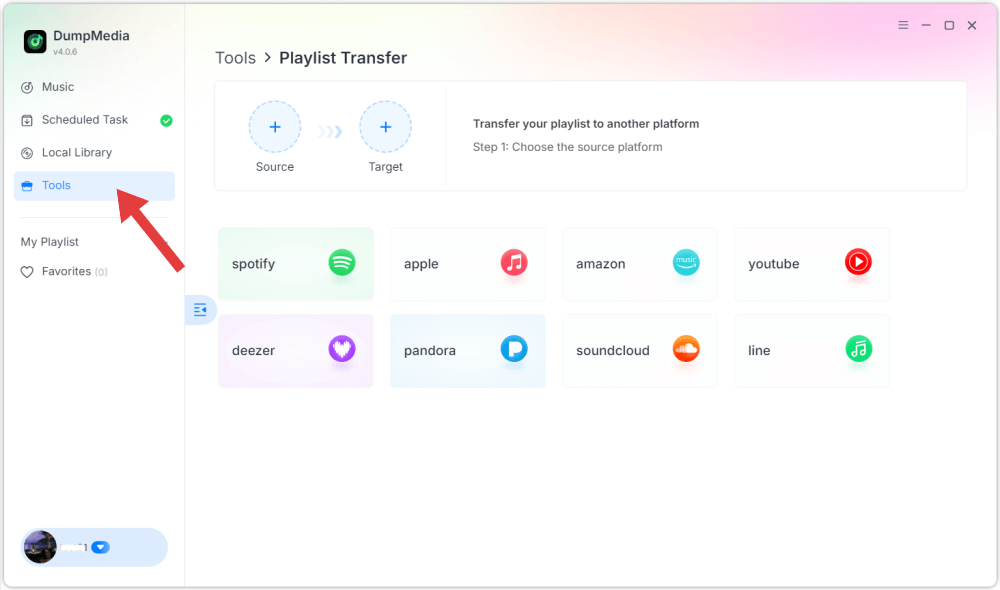
DumpMedia 播放清單傳輸

步驟二 選擇 Spotify 作為資訊來源。

選擇 Spotify 作為來源

步驟二 Select YouTube Music as a destination.

Select YouTube Music As Destination

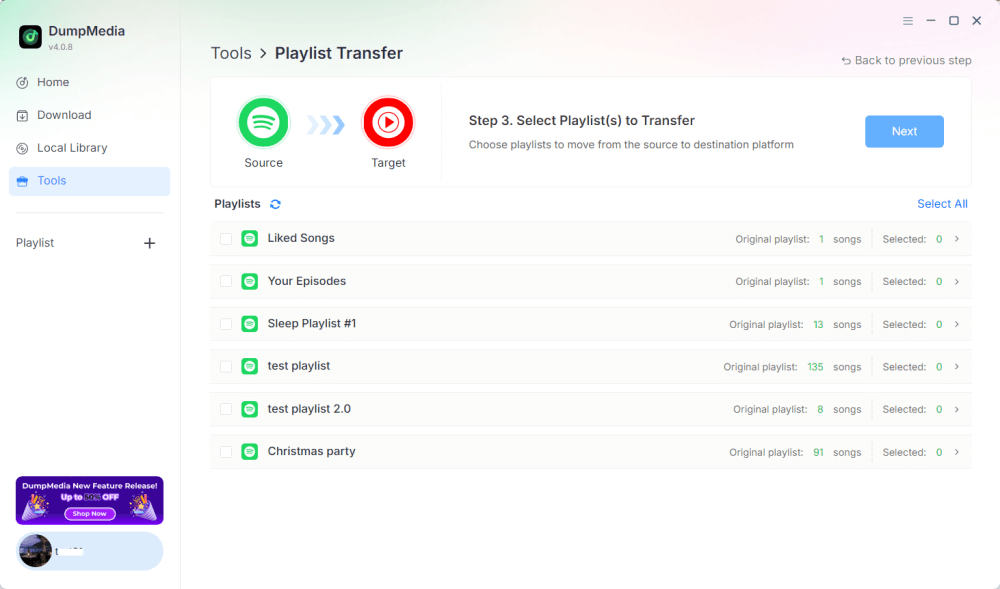
步驟二 選擇要傳輸的內容,我們支援您最喜歡的歌曲、歌手、專輯和您精心挑選的播放清單。

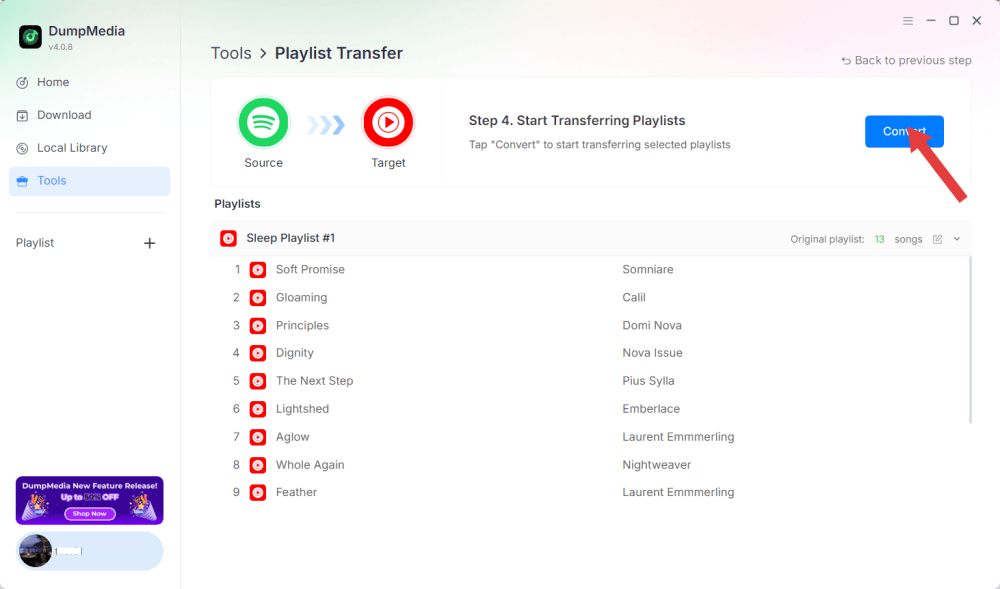
步驟二 點擊“轉換”開始傳輸。

轉讓 Spotify 播放列表到 YouTube

步驟二 The transfer is finished. Click "Go to YouTube Music". Your playlists have been moved to a new service, and you can start enjoying a new playlist on YouTube Music.

Because all operations run locally, this solution is more stable than browser-based tools, perfect for users who frequently need to transfer spotify music to youtube for multiple playlists or large libraries.

第 3 部分. 轉移 Spotify Playlist to YouTube on iOS

If you’re using an iPhone or iPad and want to transfer spotify music to youtube, a mobile-optimized migration tool such as SongShift is a proven option. It is designed specifically for Apple ecosystems and offers intuitive playlist-mapping workflows.

How SongShift works:

    1. Install SongShift from the App Store.
    2. 連接你的 Spotify 帳戶。
    3. Connect your YouTube account.
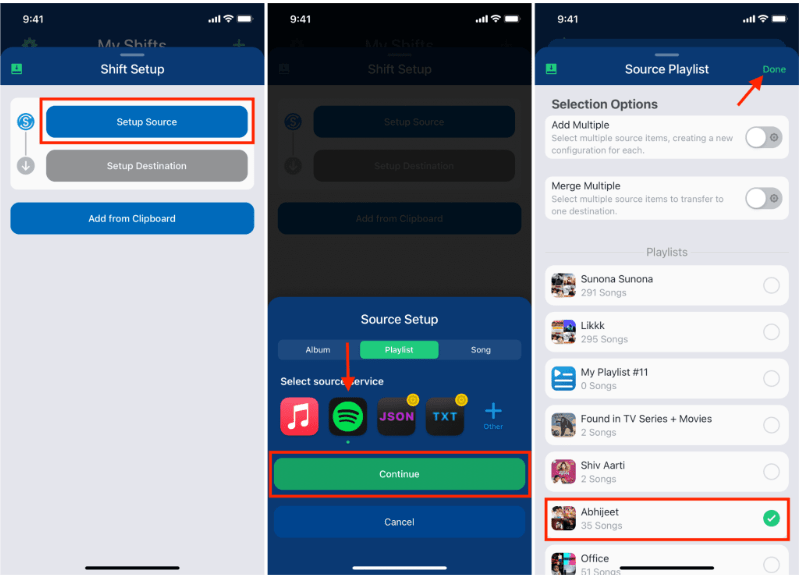
    4. Create a new Shift task and choose the Spotify playlist as the source.
    5. Set YouTube as the destination and confirm the track matches.
    6. Execute the transfer.

轉讓 Spotify Playlist SongShift

SongShift’s strength lies in iOS-native UI interactions, making the task of transfer Spotify music to YouTube smooth for users who primarily work on mobile devices.

第 4 部分. 轉移 Spotify Playlist to YouTube on Android

On Android devices, the easiest way to transfer Spotify music to YouTube is with Soundiiz Mobile Web, which works well inside mobile browsers and supports Android-friendly interfaces.

Steps for Soundiiz Mobile Web:

    1. Open the Soundiiz website in your Android browser.
    2. 登錄你的 Spotify 帳戶。
    3. Pick the playlist you want to move.
    4. Select YouTube as the target service.
    5. Confirm and start the synchronization.

This workflow is convenient for users who do not want to install extra apps yet still need a straightforward way to transfer Spotify music to YouTube while on the go.

第 5 部分。 常見問題解答

1. Will playlist order remain the same when I transfer Spotify music to YouTube?

Most tools try to maintain order, but exact preservation depends on track availability and recognition accuracy.

2. 都是 Spotify tracks available on YouTube?

Not always. Copyright differences, regional restrictions, and unavailable songs may cause gaps.

3. Do these tools require access to my accounts?

Yes. They need authorization to read your Spotify playlists and add them to your YouTube library. Reputable tools use secure OAuth authentication.

4. How long does it take to transfer Spotify playlists to YouTube?

It depends on playlist size, small playlists complete within seconds; large libraries may take several minutes.

第6部分。

Finding the best method to transfer Spotify music to YouTube depends on your workflow and device. With the right tool, you can effortlessly transfer Spotify playlists to YouTube and maintain musical continuity across platforms.

免費下載 免費下載

註冊即可享 30% 折扣 註冊獲取
30% 折扣 >>>