


如何將 Apple Music 轉移到 Spotify:完整指南
數位忠誠度是不斷變化的。隨著音樂愛好者尋求更好的跨平台相容性和全新的發現演算法,許多人正在從 蘋果音樂 至 Spotify然而,最大的障礙並非訂閱費,而是擔心失去十年來累積的音樂史。幸運的是,現在有許多工具可以解決這個問題。 將 Apple Music 傳輸到 Spotify 自動傳輸。在本指南中,我們將探討將 Apple Music 歌曲傳輸到其他裝置的最有效方法。 Spotify 跨不同裝置。
內容指南 第一部分:將 Apple Music 播放清單傳輸到 Spotify on Win道/麥第一部分:將 Apple Music 播放清單傳輸到 Spotify Online第一部分:將 Apple Music 播放清單傳輸到 Spotify 在 iOS/Android 上第 4 部分。 常見問題解答第5部分。
第一部分:將 Apple Music 播放清單傳輸到 Spotify on Win道/麥
將 Apple Music 傳輸到其他平台最可靠的方法之一 Spotify 方法是使用提供進階播放清單遷移功能的專用桌面工具。強烈推薦的方案是 DumpMedia 任何音樂轉換器其中包括強大的播放清單傳輸功能。
DumpMedia Any Music Converter 是一款專業的桌面應用程序,旨在跨平台管理和轉換音樂。它適用於 Windows 和 iOS 系統。 Win支援 Windows 和 macOS。透過其內建的播放清單傳輸功能,使用者可以有效地將 Apple Music 傳輸到 Windows 和 macOS。 Spotify 同時保留播放清單結構和歌曲元資料。
主要特色
- 播放清單傳輸功能: DumpMedia 它可以讓你一次移動整個播放列表,而無需逐首傳輸歌曲。這在處理龐大的音樂庫時可以節省大量時間。
- 大量播放清單遷移:您可以選擇多個播放清單並同時傳輸,從而更輕鬆地管理大型音樂庫。
- 穩定的桌面效能:自 DumpMedia 它在您的電腦上本地運行,與許多基於瀏覽器的工具相比,它提供了更穩定的傳輸過程。
- 智慧歌曲配對:此軟體會自動辨識對應的歌曲 Spotify的目錄,確保傳輸的播放清單包含正確的曲目。
- 元資料保留:歌曲標題、藝人名稱、專輯和播放清單順序在傳輸過程中保持不變。
分步指南
步驟二 首先,下載 DumpMedia 從官方網站下載任何音樂轉換器。將該程式安裝到您的裝置上。 Win在 Windows 或 Mac 電腦上啟動程式。開啟應用程序,然後選擇“工具”>“播放清單傳輸”。
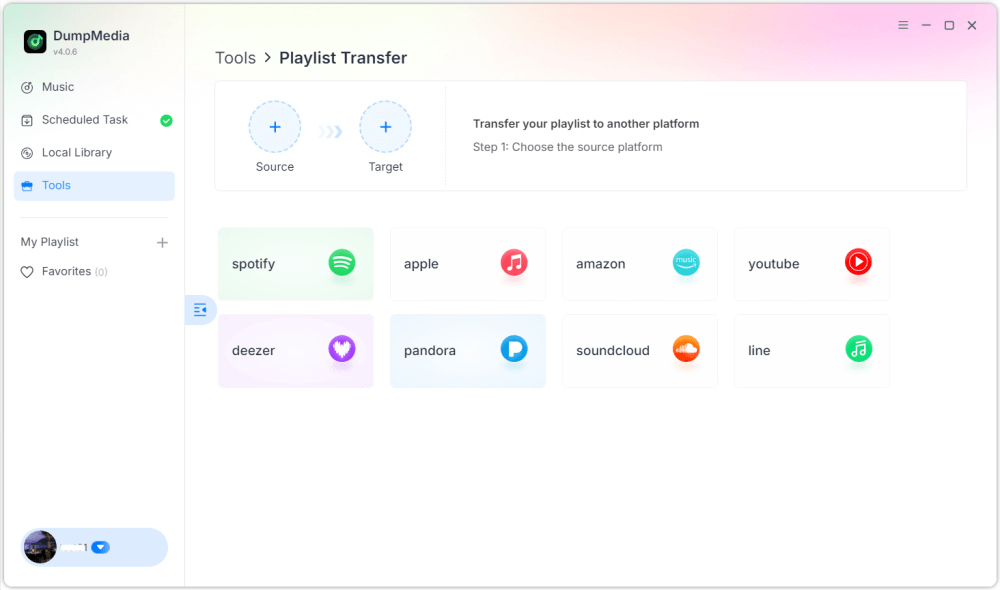
步驟二 選擇 Apple Music 作為音源。然後選擇 Spotify 作為目標平台。
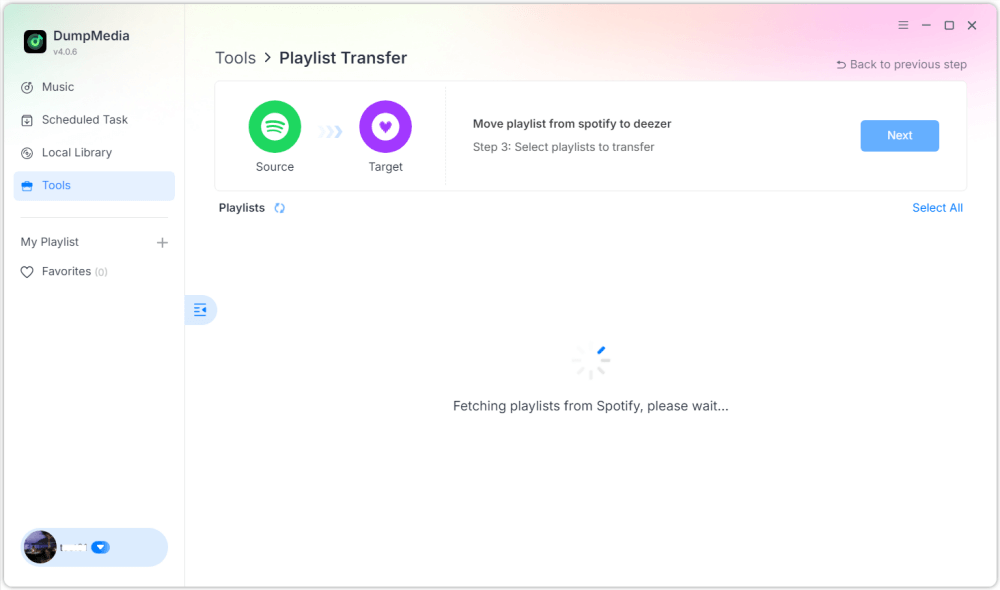
步驟二 找到你想從 Apple Music 傳輸到其他平台的播放清單 Spotify然後選擇所有要移動的播放清單。

步驟二 點擊“轉換”按鈕開始遷移播放清單。 DumpMedia 將在…自動重新建立播放列表 Spotify.
步驟二 轉帳已完成。點擊“前往” Spotify您的播放清單已遷移到新的服務,您可以開始享受新的音樂串流服務了。
使用這種桌面方法是將 Apple Music 傳輸到行動裝置的最有效方法之一。 Spotify尤其是當你擁有多個播放清單或龐大的音樂庫時。
第一部分:將 Apple Music 播放清單傳輸到 Spotify Online
如果您不想安裝額外的軟體,也可以使用線上播放清單傳輸工具將 Apple Music 傳輸到其他平台。 Spotify 快速方便。一個熱門選擇是 Soundiiz。 Soundiiz 是一個基於雲端的播放清單管理平台,允許用戶在多個音樂串流服務之間傳輸播放清單。由於它完全在瀏覽器中運行,因此幾乎可以在任何設備上使用。
主要特色
- 基於Web的介面,無需安裝
- 支援多種音樂串流平台
- 播放清單轉換工具
- 批量播放清單管理
將 Apple Music 傳輸到 Spotify 與 Soundiiz
第一步:造訪 Soundiiz 網站並註冊一個帳戶。登入您的 Apple Music 帳戶,並授予 Soundiiz 存取您播放清單的權限。
步驟二 接下來,連接您的 Spotify 帳戶。
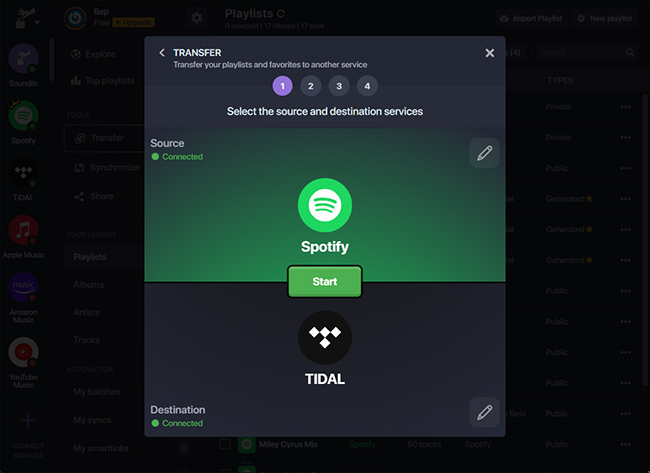
步驟二 瀏覽您的 Apple Music 播放列表,選擇要傳輸的播放清單。點擊“轉換”,然後選擇 Spotify 作為目標平台。
步驟二 Soundiiz 將開始匹配歌曲並重新建立播放清單 Spotify.
Soundiiz 等線上工具為想要將 Apple Music 歌曲傳輸到其他裝置的用戶提供了一個便利的選擇。 Spotify 無需安裝桌面軟體。但是,它們可能存在一些限制,例如傳輸限製或處理大型播放清單時速度較慢。
第一部分:將 Apple Music 播放清單傳輸到 Spotify 在 iOS/Android 上
如果您喜歡直接透過智慧型手機管理播放列表,一些行動應用程式可以幫助您將 Apple Music 傳輸到其他裝置。 Spotify 很簡單。最常用的兩款應用程式是 FreeYourMusic 和 SongShift。
使用 FreeYourMusic(iOS 和 Android)
FreeYourMusic是一款跨平台音樂傳輸工具,可在iOS和Android裝置上使用。它允許用戶直接透過手機在不同的串流媒體服務之間傳輸播放清單。
- 從 App Store 或 Google Play 安裝 FreeYourMusic 應用程式。
- 開啟應用程序,選擇 Apple Music 作為來源平台。
- 登入您的 Apple Music 帳戶。
- 選擇 Spotify 作為目標平台。
- 選擇要遷移的播放清單。
- 點選「轉帳」開始轉帳流程。
幾分鐘內,您的播放清單應該就會出現。 Spotify.
使用 SongShift(僅限 iOS)
SongShift是另一款專為iOS用戶設計的熱門行動應用程式。它允許用戶在多個音樂服務平台之間快速傳輸播放清單。
- 從 App Store 下載 SongShift。
- 連接您的 Apple Music 和 Spotify 帳戶。
- 點選「建立班次」。
- 選擇 Apple Music 作為音樂來源 Spotify 作為目的地。
- 選擇要傳輸的播放清單。
- 開始轉帳流程。
如果您想將 Apple Music 傳輸到其他設備,使用行動應用程式是一個絕佳的選擇。 Spotify 無需使用電腦,即可直接透過手機操作。
第 4 部分。 常見問題解答
1. 我可以把 Apple Music 轉移到 Spotify 免費?
有些工具提供免費的播放清單傳輸服務,但會有一些限制,例如歌曲數量上限。付費版本通常允許無限量傳輸,並且處理速度更快。
2. 所有歌曲都能成功傳輸嗎?
大多數歌曲都能正確傳輸,但如果目標平台上沒有某些曲目,則偶爾可能不會顯示。
3. 轉帳需要多久時間?
所需時間取決於播放清單的大小。較小的播放清單可能只需幾分鐘即可傳輸完畢,而較大的播放清單則可能需要更長。
4. 使用播放清單傳輸工具安全嗎?
信譽良好的工具會使用安全的身份驗證方法連接到您的音樂帳戶。將 Apple Music 傳輸到其他平台時,請務必選擇可信賴的軟體。 Spotify.
第5部分。
切換音樂串流平台不再意味著丟失您精心創建的播放清單。透過現代播放清單遷移工具,將 Apple Music 遷移到其他平台比以往任何時候都更輕鬆。 Spotify 無需手動重建音樂庫。透過選擇最適合您的裝置和播放清單大小的方法,您可以成功地將 Apple Music 歌曲傳輸到您的裝置。 Spotify 在新串流媒體平台上繼續無縫暢享您最喜愛的歌曲。