Streaming platforms offer vast music libraries, but users often switch services to seek better features. If you are moving from 亞馬遜音樂 至 Spotify, the biggest hurdle is transferring your carefully curated playlists without the tedious task of manual rebuilding. This guide compares both platforms and explores the most efficient ways to help you 將 Amazon Music 轉移到 Spotify without rebuilding playlists from scratch.
內容指南 Part 1. Overview: Amazon Music vs. SpotifyPart 2. Transfer Amazon Music Playlist to Spotify on Win道/麥Part 3. Transfer Amazon Music Playlist to Spotify OnlinePart 4. Transfer Amazon Music Playlist to Spotify iOS /安卓第 5 部分。 常見問題解答部分6。 結論
亞馬遜音樂和 Spotify offer extensive music libraries and convenient streaming experiences, but they differ in several important ways that influence user preferences.
定價和訂閱計劃
Amazon Music offers several subscription tiers, including a free version, Amazon Music Prime for Amazon Prime members, and Amazon Music Unlimited. Spotify also offers both free and premium plans. Spotify’s free tier includes advertisements and limited playback features, while Spotify Premium provides ad-free listening, offline downloads, and unlimited skips.
音頻質量
Amazon Music is known for offering high-resolution audio options through Amazon Music Unlimited, which includes HD and Ultra HD tracks. Spotify also provides high-quality streaming and is widely recognized for its consistent playback performance across devices. For many listeners, both platforms deliver excellent sound quality, although Amazon Music focuses more heavily on high-resolution audio options.
Features and Music Discovery Tools
Spotify is widely praised for its advanced recommendation system and algorithm-driven playlists such as Discover Weekly and Daily Mix. These personalized playlists help users discover new music based on listening habits. Amazon Music provides curated playlists and voice integration with Amazon Alexa, making it especially convenient for smart home environments.
設備相容性和生態系統集成
Amazon Music integrates deeply with Amazon devices such as Echo speakers, while Spotify works seamlessly with a wide range of third-party devices, including smart TVs, gaming consoles, and car systems. Because of these differences, many listeners decide to transfer Amazon Music to Spotify 從中獲利 Spotify’s discovery features and broader device compatibility.
One of the most reliable ways to transfer Amazon Music to Spotify is by using desktop software that includes playlist migration features. A recommended solution is DumpMedia 任何音樂轉換器這對兩者都有效 Windows and macOS. This software includes a Playlist Transfer feature designed to help users migrate playlists between streaming platforms quickly and efficiently.
DumpMedia Any Music Converter allows users to connect their music accounts and automatically recreate playlists on the destination platform. Instead of manually searching for each track, the program scans your playlist, matches songs between services, and builds the playlist again on Spotify. This approach saves a significant amount of time, especially for users who maintain large music libraries.
分步指南
步驟二 下載並安裝 DumpMedia 任何音樂轉換器 Windows 或 Mac 電腦。安裝後啟動程式。
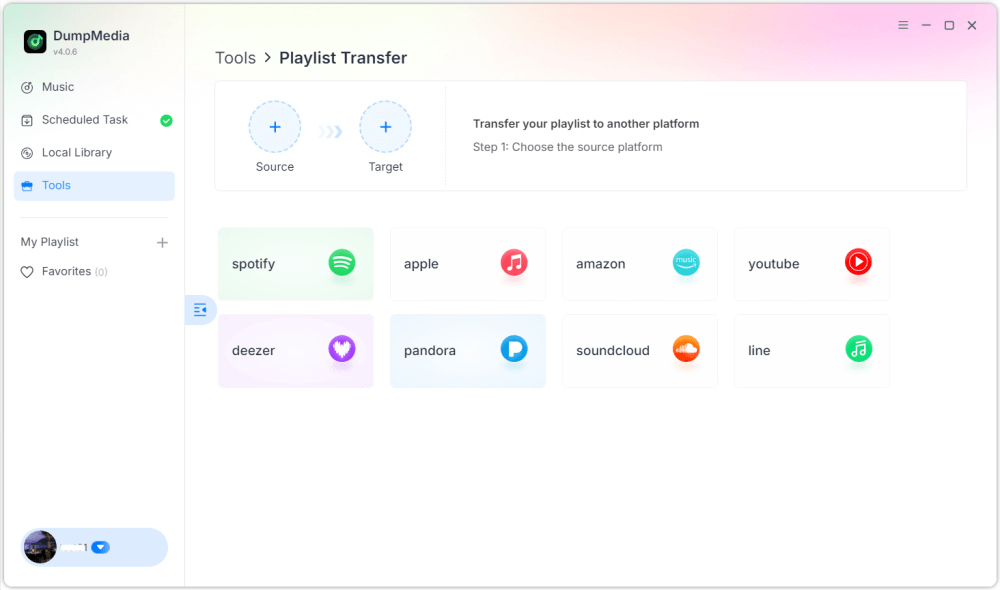
步驟二 Once your library loads, navigate to the Playlist Transfer section of the program.

步驟二 Choose Amazon Music as a source.
步驟二 選擇 Spotify 作為目的地。
步驟二 選擇要傳輸的內容,我們支援您最喜歡的歌曲、歌手、專輯和您精心挑選的播放清單。
步驟二 點擊“轉換”開始傳輸。
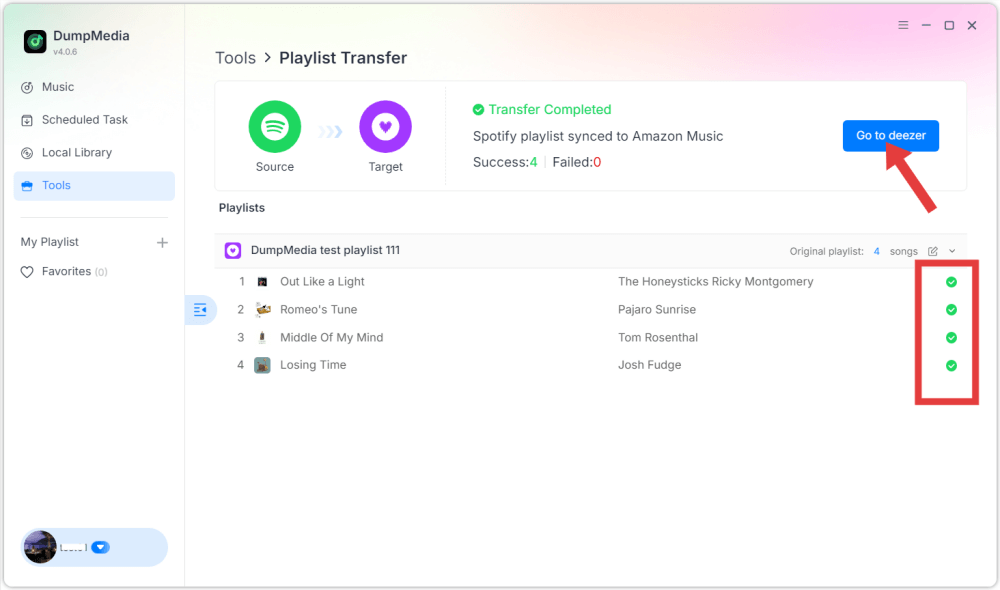
步驟二 轉帳已完成。點擊“前往” Spotify". Your playlist should now appear with matched songs.

Using this method, users can efficiently transfer Amazon Music to Spotify while preserving playlist order and track information.
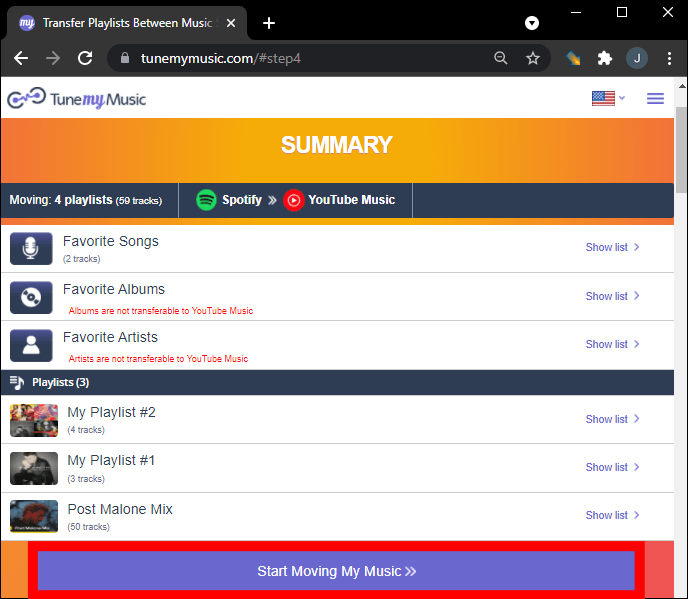
Another convenient way to transfer Amazon Music to Spotify is by using an online playlist migration service. One widely used tool is TuneMyMusic, which works directly in a web browser and requires no installation. Online tools are especially useful for users who want a quick solution without installing additional software.
分步指南
步驟二 To begin, visit the TuneMyMusic website and start a new transfer process. Choose Amazon Music as the source platform and sign in to your account so the service can access your playlists.
步驟二 After connecting your account, the platform will display your available playlists. Select the playlist you want to migrate and proceed to the next step.
步驟二 接下來,選擇 Spotify as the destination platform and log in to authorize the connection. TuneMyMusic will then analyze your playlist and attempt to match each track with Spotify的目錄。
步驟二 Once the process finishes, the playlist will be recreated automatically in your Spotify library. This makes it easy to transfer Amazon Music to Spotify without needing technical skills.

Although online tools are convenient, they sometimes have limitations such as transfer limits or slower performance for large playlists. For users with extensive libraries, desktop tools may provide a more stable solution.
If you prefer using your smartphone to manage music libraries, several mobile apps can also help you transfer Amazon Music to Spotify. These apps allow users to migrate playlists directly from their mobile devices. One popular mobile solution is FreeYourMusic, which works on both iOS and Android devices. The app supports multiple streaming platforms and provides a simple interface for transferring playlists.
分步指南
步驟二 After installing the app, open it and select Amazon Music as the source platform. Sign in to your account so the app can access your playlists.
步驟二 然後選擇 Spotify 作為目標平台並授權連線。
步驟二 Next, select the playlist you want to move and start the transfer. The application will automatically search for matching tracks in Spotify’s catalog and recreate the playlist.
Mobile apps like FreeYourMusic provide a convenient way to transfer Amazon Music to Spotify directly from a smartphone, especially for users who prefer not to use a computer.
Will every song transfer successfully?
In most cases, the majority of tracks will transfer correctly. However, some songs may not appear if they are unavailable on the destination platform.
轉移過程需要多長時間?
The time required depends on the number of songs in your playlist and the tool used. Small playlists may transfer within minutes, while larger libraries can take longer.
使用播放清單傳輸工具安全嗎?
Reputable tools use secure authentication systems that allow access to playlists without exposing personal information. It is important to use trusted services when attempting to transfer Amazon Music to Spotify.
Switching music streaming platforms does not mean losing your favorite playlists. With the help of modern playlist migration tools, it is now possible to transfer Amazon Music songs to Spotify quickly and efficiently. By choosing the right method, you can successfully transfer Amazon Music to Spotify and continue enjoying your favorite music collection on one of the world’s most popular streaming platforms without rebuilding your playlists manually.