


The Best Music Converter in 2026: Top 5 Tools Compared
Finding the best music converter can be challenging with so many options available. Whether you want to convert streaming music, remove DRM, or download songs as MP3 files, choosing the right tool makes a huge difference in quality, speed, and usability. In this guide, we’ve tested and compared the top music converter tools to help you find the perfect option for your needs.
內容指南 Part 1: How We Picked the Top Music Converter?Part 2: Top 5 Best Music Converters You Should Try Part 3: Comparison (Quick Overview)Part 4: Which Is the Top Music Converter for You?第 5 部分:常見問題解答第 6 部分:結論
Part 1: How We Picked the Top Music Converter?
Before choosing the best music converter, here are the key factors to consider:
- ???? 音頻質量 – Does it preserve original sound quality?
- ⚡ 轉換速度 – Fast batch processing or slow real-time?
- 🔒 DRM刪除 – Can it handle protected content?
- 📱 平台支援 - Spotify, Apple Music, etc.
- 🧭 易於使用 – 適合初學者的介面
The best music converter should balance all these factors.
Part 2: Top 5 Best Music Converters You Should Try
🥇 #1 DumpMedia Any Music Converter (Best Overall)
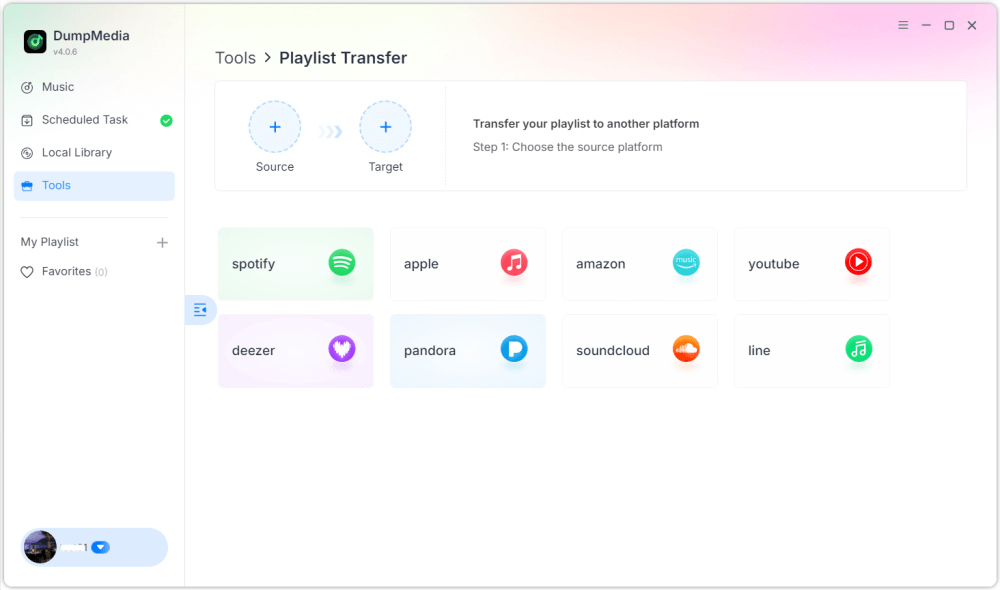
If you're looking for the best music converter with the best balance of performance and usability, DumpMedia 是首選。 DumpMedia 任何音樂轉換器 is a versatile all-in-one solution that supports music extraction from a wide array of streaming platforms. Whether your library is hosted on Spotify, Apple Music, Amazon Music, or other major services, it handles them with ease.
DumpMedia 提供高品質 MP3 output (up to 320kbps), ensuring that your converted files maintain the clarity and depth of the original digital stream. With its advanced batch conversion technology, you can process entire discographies or massive playlists simultaneously. Its high-speed engine significantly reduces the time spent waiting for files to render. By the end of 2025, DumpMedia Any Music Converter also introduced new features, such as playlist transfer and local file format conversion.
✅ 優點:
- 支持多平台
- 高品質的 MP3 產量
- 快速批量轉換
- Stable and user-friendly
❌ 缺點:
- Not fully free
🥈 #2 AMusicSoft Any Music Converter
AMusicSoft Any Music Converter is a robust and highly capable alternative, known for its focus on speed and its ability to handle multiple streaming sources with precision. It can handle large libraries of tracks in a fraction of the time it takes for real-time recording methods. Beyond just MP3, this tool supports a variety of output formats, including M4A, WAV, and FLAC. This makes it an excellent choice for users who want to maintain high-fidelity audio or need specific files for different devices.
✅ 優點:
- 良好的兼容性
- Decent speed
❌ 缺點:
- Interface not as intuitive
- 有限的高級功能
🥉 #3 TuneFab All-in-One Music Converter
TuneFab All-in-One Music Converter is one of the best music converters for users who want to manage content from a vast array of streaming services in a single application. It has gained popularity for its integrated approach, bundling several specialized converters into one comprehensive interface. This software is a true "all-in-one" solution, supporting major platforms including Spotify, Apple Music, Amazon Music, Tidal, Deezer, Pandora, and even Audible for audiobooks.
✅ 優點:
- 多平台支持
- 良好的輸出質量
❌ 缺點:
- Slightly slower performance
#4 NoteBurner Music One
NoteBurner Music One is recognized as one of the most comprehensive and powerful all-in-one music converters on the market. It is designed specifically for users who need a centralized solution to archive music from a vast array of streaming platforms while maintaining professional-grade audio quality. It is capable of converting music from over 15 major services, including Spotify, Apple Music, Amazon Music, Tidal, YouTube Music, Deezer, Pandora, and even social platforms like SoundCloud and TikTok.
✅ 優點:
- 可靠的性能
- Supports multiple services
❌ 缺點:
- 價格較高
- 資源密集型
#5 TuneSolo All-in-One Music Converter
TuneSolo All-in-One Music Converter is a budget-friendly option among the best music converter tools. The software boasts impressive performance, offering a maximum conversion speed of up to 16X on certain platforms, significantly reducing wait times for large libraries. The tool automatically retains all essential ID3 tags and metadata information, such as the title, artist, album, and artwork, keeping your local music library perfectly organized.
✅ 優點:
- 使用方便
- 经济适用
❌ 缺點:
- 高級功能較少
Part 3: Comparison (Quick Overview)
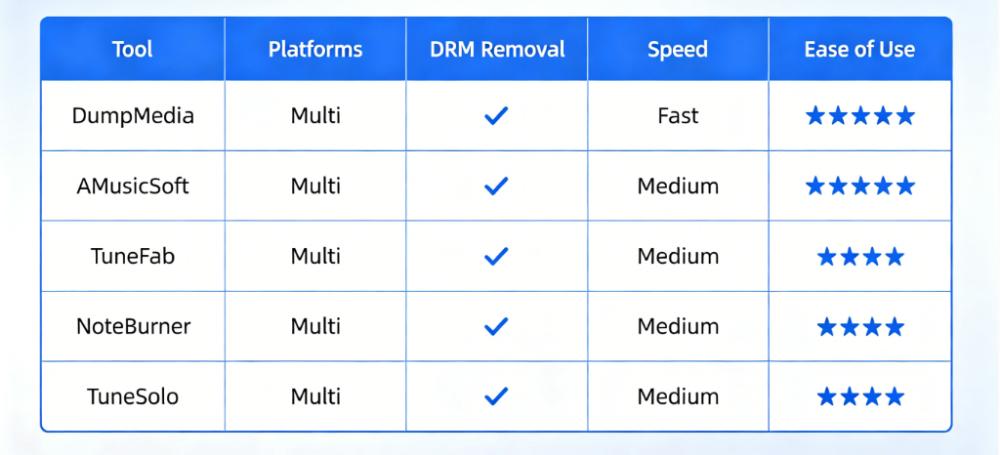
This comparison helps you quickly identify the best music converter based on your needs.
Part 4: Which Is the Top Music Converter for You?
Choosing the best music converter depends on your situation:
- 🧑💻 Beginners → Easy-to-use tools
- 🎧 Audiophiles → High-quality output
- ⚡ Power users → Fast batch conversion
對於大多數用戶而言, DumpMedia Any Music Converter is the best music converter due to its balance of speed, quality, and ease of use.
第 5 部分:常見問題解答
What is the best music converter?
Based on performance and usability, DumpMedia Any Music Converter is one of the best options.
有免費的音樂轉換器嗎?
Yes, but free tools often have limitations in speed and quality.
Can music converters remove DRM?
Many of the best music converter tools support DRM removal or workaround solutions.
*DumpMedia works by decrypting and downloading songs into DRM-free files, allowing you to obtain a clean, unrestricted copy of your library for any device. Its functionality does not include the conversion of local audio files.
Which converter is best for beginners?
Tools with simple interfaces like DumpMedia 是理想的。
第 6 部分:結論
Choosing the best music converter depends on your needs, but having a reliable, high-quality tool makes all the difference. While several tools offer similar features, some stand out for their performance and ease of use. If you want a fast, stable, and beginner-friendly solution, DumpMedia Any Music Converter is the best music converter to start with.

30% 折扣 >>>