


긁힌 DVD 복구: DVD 데이터 복원, 수리 및 복구
DVD는 영화, 홈 비디오, 개인 기록 보관소 등 중요한 저장 매체로 여전히 널리 사용되고 있습니다. 디스크가 읽히지 않거나, 재생 중 끊김 현상이 발생하거나, 아예 로드되지 않을 때, 모든 사용자가 가장 먼저 묻는 질문은 바로 " 긁힌 DVD는 어떻게 복구할까 ?"입니다. 다행히 긁힌 DVD는 대부분 복구, 수리 또는 최소한 데이터를 추출하거나 백업할 수 있을 정도로 읽을 수 있게 만들 수 있습니다.
이 완벽한 가이드는 DVD에 흠집이 생기는 원인, 집에서 흠집 난 DVD 표면을 복구하는 방법, 손상된 디스크에서 데이터를 복구하는 방법, 그리고 복구된 비디오 콘텐츠를 디지털 형식으로 변환하는 방법을 설명합니다. 이 가이드를 마치면 흠집 난 DVD를 복구하고, 추가 손상을 방지하고, 미디어를 영구적으로 보존하는 최선의 방법을 알게 될 것입니다.
목차 1부: DVD에 흠집이 생기는 원인 2부: 흠집 난 DVD를 물리적으로 복구하는 방법 3부: 흠집 난 DVD를 다시 재생 가능하게 만드는 방법 4부: 흠집 난 DVD에서 데이터를 복구하는 방법 (가장 중요한 단계) 5부: 자주 묻는 질문 6부: 결론
파트 1: DVD에 흠집이 생기는 원인은 무엇일까요?
긁힌 DVD를 고치기 전에 DVD가 손상되는 원인을 이해하는 것이 중요합니다.
- 표면 사이에 낀 먼지, 지문, 오물
- 마찰이 심한 물질에 문지르는 것
- 보관 상태가 좋지 않음
- 디스크 부식 또는 반사층 노화
- 슬롯 로딩 드라이브로 인한 수직 긁힘
- 구동 장치 고장으로 인한 원형 긁힘 (수리하기 가장 어려움)
대부분의 경우 문제는 데이터 층이 아닌 폴리카보네이트 표면에 있습니다. 즉, 긁힌 DVD도 상당수 수리가 가능하여 데이터를 복구하거나 추출할 수 있습니다.
파트 2: DVD에 생긴 흠집을 물리적으로 복구하는 방법
DVD 재생 중 끊김, 멈춤 또는 재생 불가 현상이 발생할 경우, 가장 먼저 물리적 복구를 시도해 보세요. 이러한 방법들은 표면의 긁힘을 메우거나 매끄럽게 하여 디스크의 읽기 기능을 복원하는 데 도움이 됩니다. 다음은 집에서 긁힌 DVD를 복구하는 가장 효과적인 방법들입니다.
방법 1: 순한 비누와 물로 DVD를 닦으세요
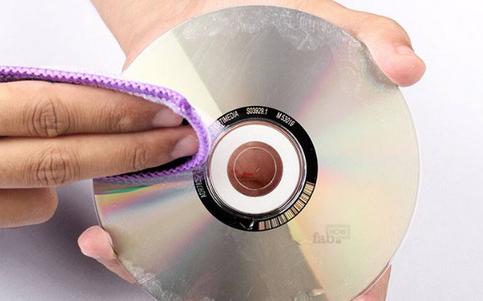
재생 문제의 원인은 긁힘이 아니라 먼지나 기름때인 경우가 많습니다. 디스크를 따뜻한 물과 순한 비누로 부드럽게 닦아주세요. 디스크 중앙에서 바깥쪽으로 직선으로 닦아내면 됩니다. 자연 건조시킨 후 다시 테스트해 보세요.
방법 2: 이소프로필 알코올을 사용하여 제거하기 어려운 잔여물 제거
지문이나 기름때가 남아 있으면 70~90% 이소프로필 알코올로 디스크를 닦으십시오. 이렇게 하면 플레이어가 섹터를 더 정확하게 읽을 수 있습니다.
방법 3: 치약을 이용해 가벼운 흠집 제거하기
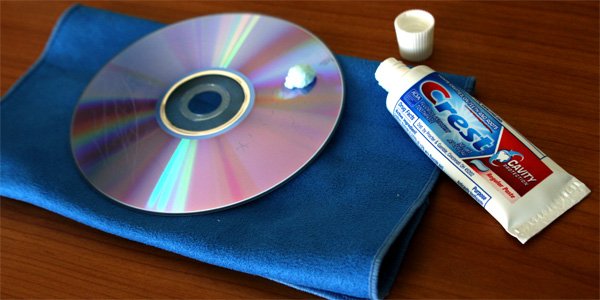
젤 타입이 아닌 치약을 소량 사용하면 미세 연마제 역할을 하여 플라스틱 표면을 매끄럽게 만들어 긁힌 DVD를 복구할 수 있습니다. 중앙에서 바깥쪽으로 부드럽게 문지른 후 헹구고 말린 다음 다시 테스트해 보세요.
방법 4: 바나나 또는 베이킹소다 활용법
완벽한 해결책은 아니지만, 가벼운 흠집에는 종종 효과적입니다. 이러한 제품은 레이저 초점을 다시 맞추는 데 도움이 되는 충전재 역할을 합니다.
방법 5: 시중에서 판매하는 디스크 복구 키트 사용하기
JFJ Easy Pro나 SkipDr 같은 도구는 긁힘이 심한 DVD를 복구하도록 특별히 설계되었습니다. 이러한 도구는 얇은 플라스틱 층을 제거하여 더욱 매끄러운 읽기 표면을 복원합니다.
이러한 물리적 수정은 리더기가 디스크를 더욱 안정적으로 처리할 수 있도록 도와줍니다. 하지만 DVD를 여전히 읽을 수 없다면 어떻게 해야 할까요?
파트 3: 긁힌 DVD를 다시 재생 가능하게 만드는 방법
때로는 디스크 자체에만 문제가 있는 것이 아닐 수도 있습니다. DVD가 영구적으로 손상되었다고 단정하기 전에 다음 사항들을 확인해 보세요.
- 다른 DVD 드라이브에서 DVD를 테스트해 보세요.
- 감도가 높은 리더기를 사용하십시오(구형 드라이브가 더 잘 작동하는 경우가 많습니다).
- DVD 드라이브 렌즈를 청소하세요
- Nero DriveSpeed와 같은 도구를 사용하여 읽기 속도를 줄이세요.
- 오류 수정 소프트웨어를 사용하여 불량 섹터를 우회하십시오.
이러한 단계를 통해 부분적으로 읽을 수 없는 디스크를 데이터를 추출할 수 있을 만큼 충분히 복구할 수 있는 경우가 많습니다. 드라이브가 디스크를 읽을 수 있게 되면(완벽하지 않더라도) 데이터 복구를 진행할 수 있습니다.
파트 4: 긁힌 DVD에서 데이터 복구하는 방법 (가장 중요한 단계)
긁힌 DVD를 복구하고 영상을 영구적으로 보존하려면 데이터 복구가 필수적입니다. DVD 영상 데이터는 일반적으로 VOB /IFO/BUP 파일 형식으로 저장됩니다. 디스크에 흠집이 생기면 대부분의 플레이어는 이러한 파일에 접근할 수 없지만, 복구 도구를 사용하면 가능합니다.
권장되는 소프트웨어 기반 복구 방법:
ISOBuster 또는 DVD Decrypter를 사용하십시오. 이러한 프로그램은 손상된 섹터를 읽고 손상된 VOB 파일을 복구하려고 시도합니다.
읽기 속도를 매우 낮춰보세요. 읽기 속도가 느리면 오류 발생률이 크게 줄어듭니다.
읽을 수 있는 데이터는 모두 추출하세요. 부분적으로 손상된 DVD라도 복구할 수 있는 경우가 많습니다.
긁힌 DVD에서 데이터를 복구하고 나면 일반적으로 다음과 같은 결과가 나타납니다.
- VOB 파일
- 조각난 비디오 파일
- 플레이 불가능한 형식
- 메타데이터가 누락된 파일
복구된 데이터를 모든 기기에서 사용할 수 있도록 하려면 변환기가 필요합니다. 바로 이 부분이 변환기가 필요한 이유입니다. DumpMedia 비디오 컨버터 왜 가치가 있는지, 그리고 왜 워크플로에 자연스럽게 들어맞는지 설명합니다.
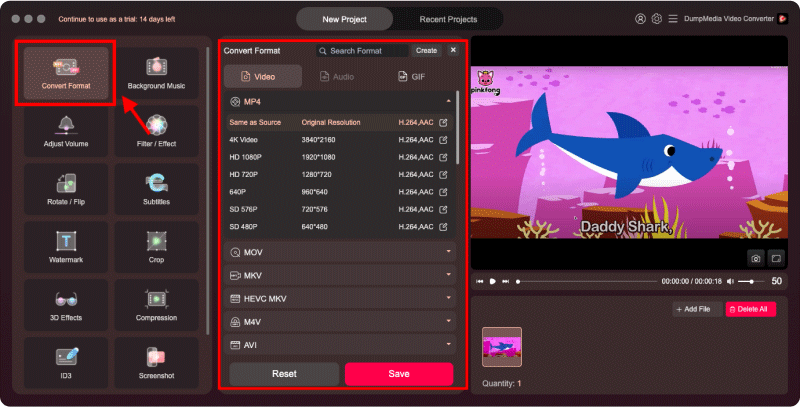
DumpMedia 비디오 변환기는 긁힌 DVD를 복구하는 도구는 아니지만, 손상된 디스크에서 읽을 수 있는 데이터를 복구한 후에는 매우 효과적인 도구입니다.
무엇을 할 수 있습니까?
- VOB 파일을 MP4로 변환MOV, AVI, MKV 또는 기타 범용 형식
- 안정적이고 최신 비디오 파일을 만들면서 품질을 유지하세요
- 조각난 DVD 파일을 하나의 재생 가능한 파일로 통합합니다.
- 오래된 DVD 콘텐츠를 모든 기기(휴대폰, TV, 태블릿)에서 이용할 수 있도록 만드세요.
언제 사용 하는가? DumpMedia 비디오 변환기 :
- DVD에 흠집이 있지만 물리적으로 수리한 후에는 읽을 수 있습니다.
- 복구 도구를 사용하여 VOB 데이터를 추출했습니다.
- DVD를 영구적으로 백업하고 싶으신가요?
- 더 이상 오래된 디스크에 의존하지 않는 디지털 라이브러리를 원하시나요?
파트 5 : FAQ
Q1: 긁힌 DVD를 집에서 정말로 고칠 수 있을까요?
네. 치약과 같은 순한 연마제를 사용하거나 올바르게 세척하면 긁힌 DVD를 다시 읽을 수 있을 정도로 복구할 수 있습니다.
Q2: 긁힌 DVD를 복구하는 데 가장 효과적인 방법은 무엇입니까?
치약이나 시중에서 판매하는 디스크 수리 키트는 물리적인 흠집 제거에 가장 효과적인 경우가 많습니다.
질문 3: 깊은 흠집은 수리할 수 있나요?
깊은 원형 흠집은 복구하기 어렵지만, 디스크 복원 장비를 사용하면 때때로 디스크를 다시 읽을 수 있게 만들 수 있습니다.
질문 4: 복구된 DVD 비디오를 어떤 형식으로 변환해야 하나요?
MP4는 가장 보편적인 형식입니다. 사용하세요. DumpMedia VOB 파일을 깔끔하고 최신 형식으로 변환하는 비디오 변환기입니다.
Q5: DVD를 수리하고 디지털화하는 것은 합법적인가요?
개인 소장 DVD를 디지털화하는 것은 일반적으로 허용됩니다. 하지만 저작권이 있는 콘텐츠를 공유하거나 배포하는 것은 금지되어 있습니다.
Part 6 : 결론
DVD에 흠집이 생겼다고 해서 소중한 추억이나 미디어가 영원히 사라진 것은 아닙니다. 물리적 복구, 세심한 재생 기술, 데이터 추출 및 비디오 변환을 적절히 조합하면 흠집 난 DVD를 복구하고, 손상된 부분을 복원하여 재생 가능한 콘텐츠를 되찾을 수 있습니다. 데이터가 복구되면, 와 같은 도구를 사용하여 변환할 수 있습니다. DumpMedia 비디오 변환기는 미디어를 미래에도 문제없이 모든 기기에서 접근 가능하고 영구적으로 보존할 수 있도록 해줍니다.