


2026년에 오프라인 재생을 위해 Audible DRM을 제거하는 방법
많은 오디오북 사용자들이 오디블 DRM을 제거 하는 방법을 찾고 있습니다 . 공식 오디블 파일에는 재생 제한과 기기 제한이 있기 때문입니다. 오디블은 편리한 오디오북 스트리밍 및 다운로드 서비스를 제공하지만, 구매한 콘텐츠를 재생할 수 있는 방법과 장소를 제한하는 DRM 기술로 보호됩니다. 이 가이드에서는 오디블 DRM이 무엇인지, 오디블 파일에 제한이 있는 이유, 그리고 오디블 오디오북을 오프라인 청취에 적합한 보다 유연한 재생 형식으로 변환하는 가장 좋은 방법을 설명합니다.
목차 1부. 오디블 DRM이란 무엇인가요? 2부. 오디블에서 DRM을 직접 제거할 수 있나요? 3부. 유연한 재생을 위해 오디블 책을 변환하는 가장 좋은 방법 4부. 자주 묻는 질문(FAQ) 5부. 결론
1부. Audible DRM이란 무엇인가요?
오디블 DRM 제거 방법을 논의하기 전에 오디블 보호 시스템이 어떻게 작동하는지 이해하는 것이 중요합니다.
오디블 오디오북은 일반적으로 AA 또는 AAX 형식으로 배포됩니다. 이러한 파일에는 오디오북 재생 및 계정 인증을 제어하기 위한 DRM(디지털 저작권 관리) 보호 기능이 포함되어 있습니다.
오디블 DRM 때문에 오디오북은 오디블 계정에 연결되어 있어 일반 전자책처럼 자유롭게 전송할 수 없습니다. MP3 파일. 이것이 바로 많은 사용자들이 오디블 DRM을 제거하고 더 유연한 청취 옵션을 얻기 위한 해결책을 찾는 이유입니다.
파트 2. 오디블에서 DRM을 직접 제거할 수 있을까요?
"오디블 DRM 제거"를 검색하는 많은 사용자는 간단한 DRM 제거 버튼을 기대하지만, 실제로는 훨씬 복잡합니다. 오디블 DRM 보호 기능은 오디블 오디오북 인증 시스템에 긴밀하게 통합되어 있습니다. 따라서 직접적인 DRM 제거 방법은 신뢰할 수 없거나, 구식이거나, 기술적으로 어려운 경우가 많습니다.
파트 3. 오디오북을 유연한 재생을 위해 변환하는 가장 좋은 방법
이제 많은 사용자는 단순히 DRM 제거에만 집중하는 대신, 오디블 오디오북을 다양한 재생 형식에 맞춰 변환하는 보다 실용적인 해결책을 선택합니다. 이러한 방식을 통해 사용자는 다음과 같은 표준 오디오 형식을 사용할 수 있습니다. MP3 또는 M4A. "Audible DRM 제거"를 검색하는 사용자에게 가장 좋은 해결책 중 하나는 다음과 같습니다. DumpMedia 가청 변환기.
이 도구는 기술적인 DRM 제거 과정에 집중하기보다는 사용자가 오디블 오디오북을 보다 유연한 오디오 형식으로 변환하여 쉽게 재생할 수 있도록 도와줍니다. 실용적인 오디오북 활용성을 중시하는 사용자에게는 변환 기반 재생 방식이 기존의 DRM 제거 방식보다 안정적이고 사용하기 편리한 경우가 많습니다.
🏆사용 이유 DumpMedia 가청 변환기?
- Audible 오디오북을 다음으로 변환 MP3 그리고 M4A
- 오프라인 오디오북 재생을 활성화합니다.
- 기기 호환성을 개선합니다
- Audible 앱을 계속 열지 않고 듣기
- 오디오북 음질을 유지하세요
- 여러 기기에서 재생을 지원합니다.
오디블 오디오북을 변환하는 방법
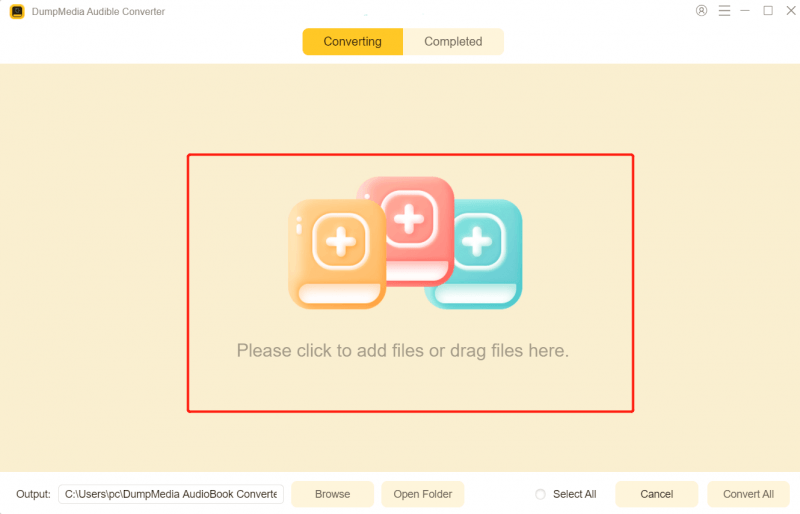
1 단계 다운로드 및 설치 DumpMedia Mac/PC에서 Audible Converter를 실행하세요. 그러면 인터페이스가 나타납니다. Audible 계정을 사용하여 로그인하세요.
2단계. 변환하려는 오디오북을 찾으세요. "변환 목록에 추가" 아이콘을 클릭하여 전체 목록을 변환기에 불러오세요.
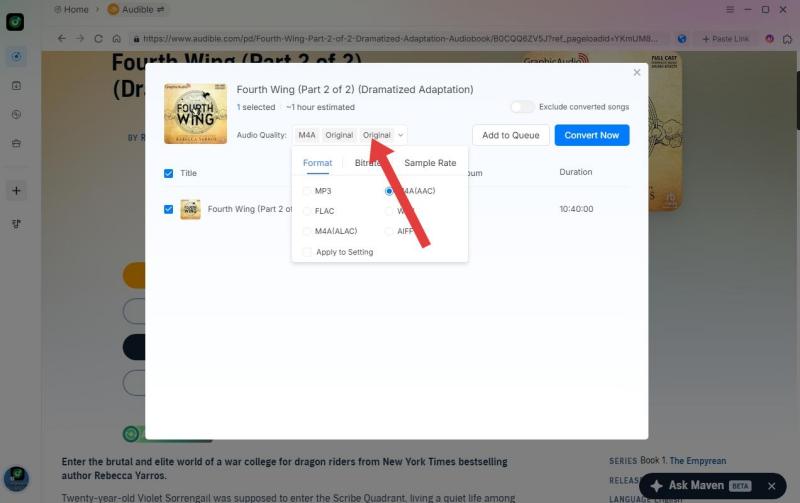
3단계. 원하는 형식을 선택하세요. 비트 전송률이나 샘플링 속도를 변경할 수도 있습니다. 최적의 균형을 위해서는 320kbps를 선택하세요.
4 단계 설정이 완료되면 사용자는 "변환" 아이콘을 눌러 변환을 진행할 수 있습니다. DumpMedia 이 프로그램은 초고속으로 오디오북을 DRM이 없는 형식으로 몇 초 만에 변환해 줍니다.
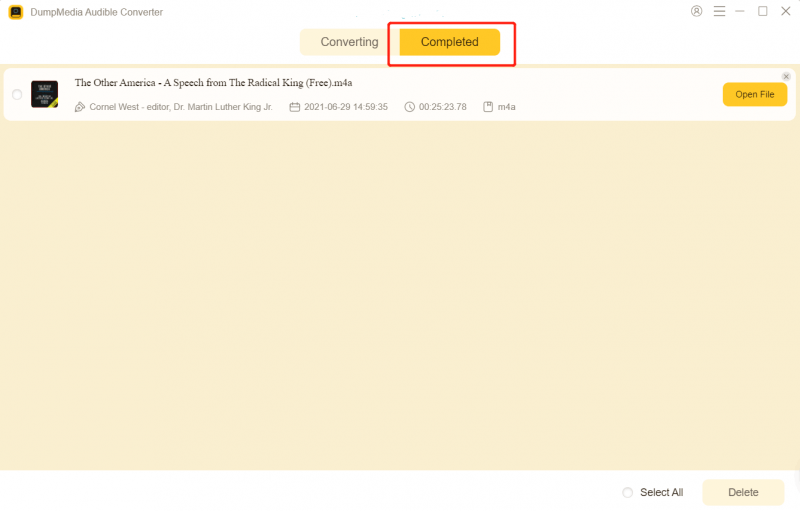
변환 후에는 다양한 기기와 미디어 플레이어에서 오디오북을 더욱 유연하게 재생할 수 있습니다.
파트 4. FAQ
오디블 파일에 접근이 제한된 이유는 무엇인가요?
오디블 오디오북은 DRM 기술을 사용하여 승인된 기기와 계정에서만 재생이 가능하도록 제한합니다.
오디오북을 다른 형식으로 변환할 수 있나요? MP3?
네. 많은 사용자들이 사용합니다. DumpMedia 오디블 오디오북을 다른 형식으로 변환하는 오디블 변환기 MP3 보다 유연한 재생을 위한 형식입니다.
오디오북을 오프라인에서 들을 수 있나요?
네. 오디블은 오프라인 청취를 지원하지만, 재생은 승인된 환경 내에서만 가능합니다.
오디블 앱 없이도 오디블 오디오북을 들을 수 있나요?
변환된 오디오북 파일은 추가 미디어 플레이어 및 기기에서 재생을 지원할 수 있습니다.
Is DumpMedia 오디블 컨버터는 안전한가요?
네. 오디오북 변환 및 유연한 오프라인 청취를 위해 설계되었습니다.
5 부. 결론
많은 사용자들이 오디블 DRM을 제거하는 방법을 찾고 있습니다. 오디블 오디오북 파일에는 재생 및 기기 제한이 있기 때문입니다. 여러 기기에서 오디오북을 더 쉽게 재생하고 싶은 사용자들을 위해, DumpMedia Audible Converter는 Audible 오디오북을 오프라인에서 감상하기에 더 편리한 다양한 오디오 형식으로 변환해주는 간편한 방법입니다.
*DumpMedia 이 프로그램은 Audible 오디오북을 암호 해독하고 DRM이 없는 파일로 다운로드하여 모든 기기에서 제약 없이 깨끗한 오디오북 라이브러리 사본을 얻을 수 있도록 합니다. 단, 로컬 오디오 파일의 DRM 제거 기능은 포함하지 않습니다.