


Audible 오프라인 청취 방법 (모든 기기, 2026년 가이드)
많은 들리는 많은 사용자들이 인터넷 연결 없이 오디오북을 즐기고 싶어합니다. Audible 오프라인 이용 방법을 찾고 계신다면 제대로 찾아오셨습니다. Audible은 기기에 오디오북을 다운로드할 수 있도록 지원하지만, 몇 가지 제한 사항이 있습니다. 이 가이드에서는 모든 기기에서 Audible 오디오북을 오프라인으로 듣는 방법과 신뢰할 수 있는 도구를 사용하여 영구적으로 제한 없이 이용하는 방법을 안내합니다.
컨텐츠 가이드 파트 1. 오디오북을 오프라인에서 들을 수 있나요?파트 2. Android/iOS에서 Audible 오디오북을 오프라인으로 듣기파트 3. 오디오북을 오프라인에서 듣기 Win다우즈/맥파트 4. 모든 기기에서 오디오북을 오프라인으로 듣기파트 5. FAQ6 부. 개요
파트 1. 오디오북을 오프라인에서 들을 수 있나요?
Audible은 오프라인 모드를 제공하여 구매한 오디오북을 휴대폰, 태블릿 또는 컴퓨터에 다운로드할 수 있도록 합니다. 인터넷 연결 없이도 다운로드한 오디오북을 들을 수 있습니다. 하지만 한 가지 주의할 점이 있습니다. 다운로드한 오디오북은 DRM으로 보호됩니다. 즉, 다음과 같은 의미입니다.
- 승인된 기기 또는 Audible 앱에서만 재생할 수 있습니다.
- 다른 기기로 파일을 전송하는 것이 제한되어 있습니다.
- 그것들을 다른 것으로 변환할 수 없습니다. MP3 또는 범용 재생을 위한 기타 형식
기술적으로는 오디블을 오프라인에서 들을 수 있지만, 완벽하게 제어하려면 다른 접근 방식이 필요합니다.
파트 2. Android/iOS에서 Audible 오디오북을 오프라인으로 듣기
오디블(Audible)을 오프라인에서 듣는 것은 간단합니다. 오디오북을 오프라인 청취용으로 준비하는 가장 직접적인 방법을 알려드립니다.
1 단계 안드로이드 또는 iOS 기기에서 Audible 앱을 엽니다.
2 단계 Audible 계정에 로그인하세요. 라이브러리로 이동하여 오프라인으로 듣고 싶은 책을 선택하세요.
3 단계 다운로드 버튼을 누르세요. 다운로드가 완료되면 언제든지 오프라인에서 Audible을 감상하실 수 있습니다.
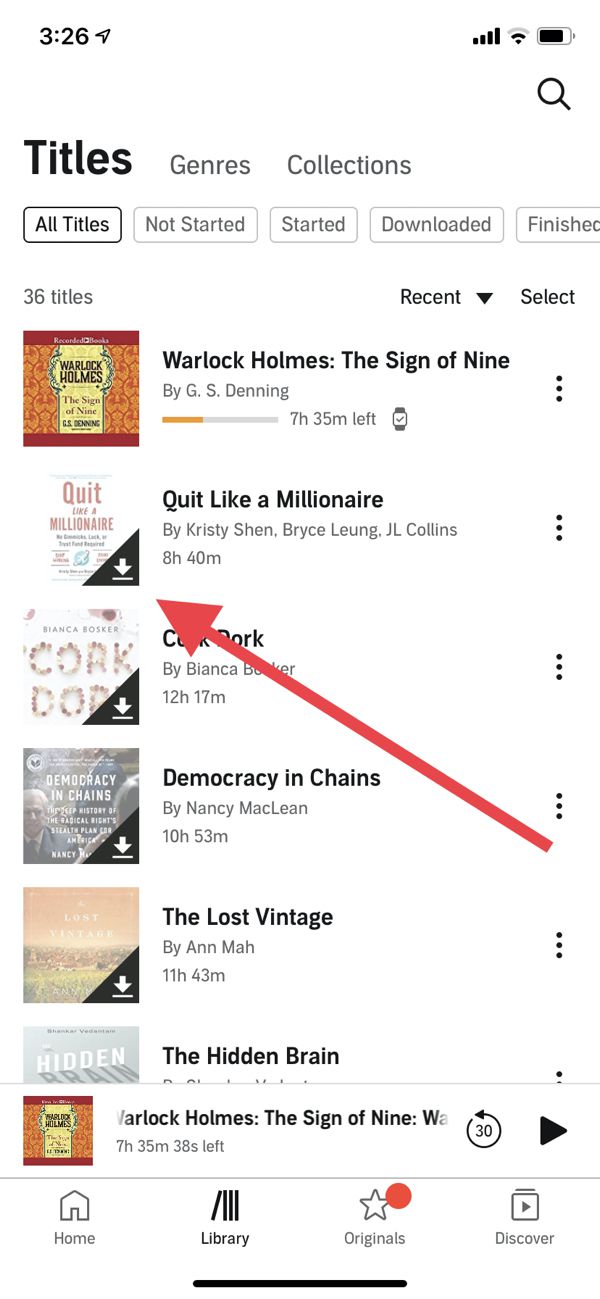
이 방법은 효과가 있지만, DRM 때문에 Audible 앱에서만 재생할 수 있다는 단점이 있습니다.
파트 3. 오디오북을 오프라인에서 듣기 Win다우즈/맥
많은 사용자들이 컴퓨터에서 오프라인으로 오디오북을 듣고 싶어합니다. 하지만 올해는 상황이 예전과 다릅니다. Audible은 더 이상 데스크톱용 앱을 완벽하게 지원하지 않습니다. Windows. 그러니까 Audible 오프라인 재생을 하려면 다음과 같은 방법을 사용해야 합니다. Win다우존스 지수와 관련해 공식적인 선택지는 극히 제한적입니다.
맥 사용자라면 이 기능이 매우 편리하다는 것을 알게 될 것입니다. Audible이 Apple Books에 완벽하게 통합되어 있기 때문입니다. "Audible"이라는 별도의 앱을 다운로드할 필요가 없습니다. 웹 브라우저에서 Audible 웹사이트에 접속하여 책 제목 옆에 있는 "다운로드"를 클릭하기만 하면 됩니다. 다운로드가 완료되면 Mac의 Apple Books에서 바로 책을 열 수 있습니다.
파트 4. 모든 기기에서 오디오북을 오프라인으로 듣기
어떤 기기에서든 어디서든 오디오북을 듣고 싶다면, 진정한 Audible 오프라인 자유를 누리려면 DRM 보호를 제거해야 합니다. 바로 이 부분이 그 방법입니다. DumpMedia 가청 변환기 들어 온다.
사용 DumpMedia Audible Converter를 사용하면 다음과 같은 작업을 수행할 수 있습니다.
- 오디블 오디오북에서 DRM*을 제거하세요
- Audible 책을 다음으로 변환하세요 MP3 또는 다른 형식
- 책을 영구히 보관하세요
- 휴대폰 등 어떤 기기에서든 청취하세요. MP3 플레이어, 컴퓨터 또는 자동차 시스템
사용하여 DumpMedia이 방법을 사용하면 오디오북을 완벽하게 제어하고 Audible 앱의 한계를 극복할 수 있습니다. 콘텐츠를 진정으로 소유하고 싶은 사람들에게 가장 확실한 해결책입니다. Audible 오디오북을 오프라인에서 재생하는 방법을 알아보겠습니다. DumpMedia.
1 단계 다운로드 및 설치 DumpMedia 오디블 변환기. PC 및 Mac 버전이 제공됩니다. 열기 DumpMedia그런 다음 Audible 탭으로 이동하세요.
2 단계 Audible 라이브러리에서 변환할 책을 선택하세요.
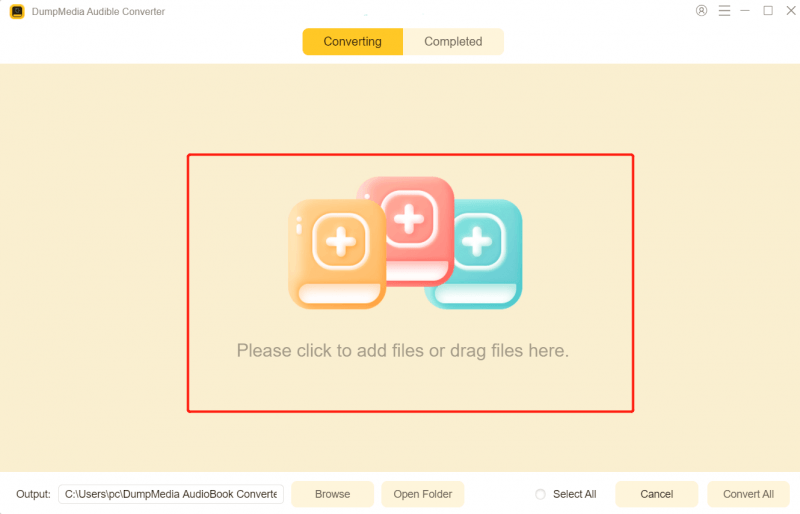
3 단계 출력 설정을 선택하고 변환을 시작하세요.

4 단계 변환이 완료되면 출력 파일을 확인하세요.

이는 모든 기기에서 Audible을 오프라인으로 청취할 수 있는 가장 확실한 방법입니다.
파트 5. FAQ
앱 없이 오프라인에서 Audible을 들을 수 있나요?
네, 하지만 그러려면 오디오북을 변환 도구(예: ...)를 사용해야 합니다. DumpMedia 가청 변환기.
변환 과정이 음질에 영향을 미칠까요?
그렇지 않습니다. DumpMedia 변환 과정에서 무손실 품질을 유지합니다.
변환한 파일을 모든 기기에서 재생할 수 있나요?
예. MP3 이 파일들은 휴대폰과 태블릿에서 재생할 수 있습니다. MP3 플레이어, 컴퓨터 및 차량용 오디오 시스템.
오디블 구독을 취소하면 책이 사라지나요?
구매한 책은 라이브러리에 남아 있지만, 변환하지 않으면 오프라인 재생은 여전히 Audible 앱으로 제한됩니다.
6 부. 개요
인증된 기기에서는 Audible을 오프라인으로 간편하게 들을 수 있지만, DRM으로 인해 유연성과 자유도가 제한됩니다. 모든 기기에서 영구적으로 오프라인에 액세스하려면 다음을 수행하세요. DumpMedia Audible Converter는 최고의 솔루션입니다. 이 프로그램을 사용하면 Audible 오디오북을 다른 형식으로 변환할 수 있습니다. MP3 이제 어떤 기기에서든 오프라인으로 감상하세요. DRM 때문에 청취 경험이 제한되지 않도록 하세요. 지금 바로 DRM을 활용하여 언제 어디서든 오디오북을 즐겨보세요.
*DumpMedia 이 서비스는 오디오북을 암호 해독하고 DRM이 없는 파일로 다운로드하여 모든 기기에서 제약 없이 깨끗한 오디오북 라이브러리 사본을 얻을 수 있도록 해줍니다.

30% 할인 >>>