


최고의 음악 플레이어 Win다우존스 10과 애플 뮤직 재생 팁
신뢰할 수있는 찾기 음악 플레이어용 Win다우 10 부드러운 재생, 유연한 형식 지원, 그리고 기본 앱보다 뛰어난 음악 라이브러리 관리 기능을 원한다면 iOS 11은 필수적입니다. WinOWS에는 기본적인 음악 플레이어가 포함되어 있지만, 많은 사용자는 고급 기능과 더 폭넓은 오디오 호환성을 지원하는 강력한 대안을 찾습니다. 이 가이드에서는 최고의 음악 플레이어 몇 가지를 소개합니다. Win다우존스 지수 10/11을 분석하고 대처 방법을 설명하세요. 애플 음악 재생 제한 Win다우.
컨텐츠 가이드 파트 1: 전용 음악 플레이어가 필요한 이유 Win다우파트 2. 최고의 음악 플레이어 5가지 Win다우즈 10/11파트 3. 최적의 해결책: Apple Music을 모든 기기에서 사용할 수 있도록 변환하기 Win다우스 뮤직 플레이어파트 4. FAQ5 부. 결론
파트 1: 전용 음악 플레이어가 필요한 이유 Win다우
이기는하지만 Windows에는 Groove Music이 포함되어 있습니다. WinWindows Media Player의 기본 옵션은 상당히 제한적입니다. 많은 사용자는 음악 플레이어를 원합니다. Win다우존스 지수 10/11은 다음과 같은 특징을 가질 수 있습니다:
- 대규모 로컬 음악 라이브러리를 효율적으로 관리하세요
- 다음과 같은 다양한 오디오 형식을 지원합니다. MP3FLAC, WAV 및 AAC
- 더 나은 음질과 맞춤 설정 옵션을 제공합니다.
- 다운로드한 음악과 오프라인 음악을 원활하게 이용하세요.
애플 뮤직과 같은 스트리밍 서비스를 이용하는 사용자에게는 호환성이 더욱 중요해지며, 때로는 문제가 되기도 합니다.
파트 2. 최고의 음악 플레이어 5가지 Win다우즈 10/11
다음은 음악 플레이어를 찾을 때 고려할 만한 인기 있고 신뢰할 수 있는 몇 가지 선택 사항입니다. Win다우 지수 10/11.
1. VLC 미디어 플레이어
VLC는 가장 널리 사용되는 미디어 플레이어 중 하나입니다. WinVLC는 거의 모든 오디오 형식을 지원하며 로컬 파일과도 잘 작동합니다. 가볍고 무료이며 안정적이어서 형식 호환성을 중시하는 사용자에게 탁월한 선택입니다.
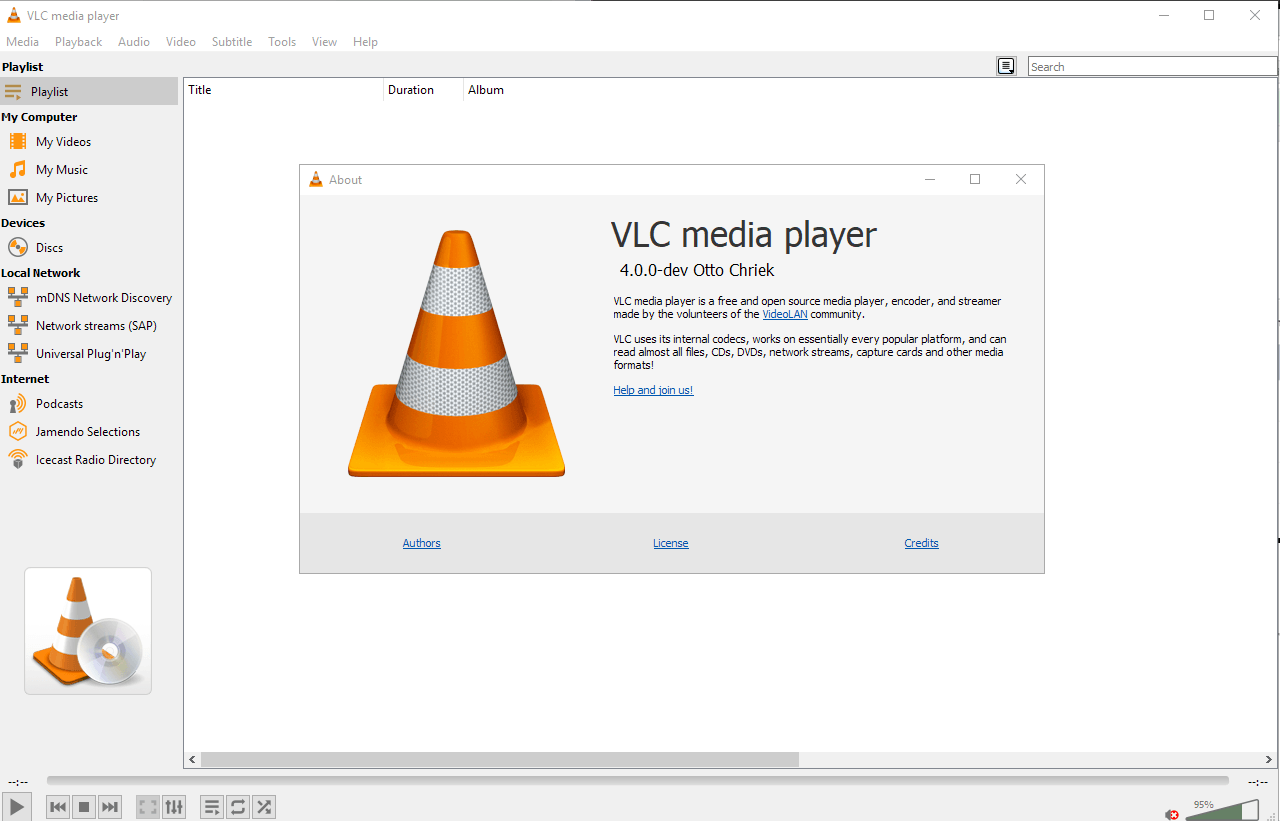
하지만 VLC는 DRM으로 보호된 Apple Music 트랙을 직접 재생할 수 없습니다.
2. 뮤직비
MusicBee는 대규모 로컬 음악 라이브러리를 관리하는 데 탁월한 선택입니다. 고급 태그 지정, 재생 목록 관리 및 플러그인 지원 기능을 제공합니다. 사용자 지정 가능한 음악 플레이어를 원하는 사용자에게 적합합니다. Win강력한 라이브러리 기능을 갖춘 MusicBee는 최고의 경쟁자 중 하나입니다.
대부분의 타사 플레이어와 마찬가지로 MusicBee는 Apple Music DRM 파일을 지원하지 않습니다.
3. 푸바2000
foobar2000은 가벼운 디자인과 높은 수준의 맞춤 설정 기능으로 유명합니다. 재생 및 오디오 출력을 정밀하게 제어하고자 하는 고급 사용자에게 이상적입니다. 다양한 형식을 지원하지만 최상의 사용 경험을 위해서는 수동 설정이 필요합니다.
4. AIMP
AIMP는 음질과 간편함에 중점을 둡니다. 인기 있는 포맷을 지원하며 깔끔한 인터페이스를 제공합니다. 이 음악 플레이어는 다음과 같은 용도로 사용됩니다. WinDows 10은 불필요한 기능 없이 부드러운 재생을 원하는 사용자에게 적합합니다.
5. 미디어몽키
MediaMonkey는 방대하고 복잡한 음악 컬렉션을 보유한 사용자를 위해 설계되었습니다. 음악을 정리하고, 태그를 지정하고, 기기 간 동기화하는 데 탁월합니다. 고해상도 오디오 지원과 광범위한 라이브러리 관리 도구를 갖춘 MediaMonkey는 로컬 음악을 고급 수준으로 관리하고자 하는 사용자에게 강력한 선택입니다. Win다우즈 10.
다른 타사 플레이어와 마찬가지로 MediaMonkey는 사전 변환 없이 DRM으로 보호된 AAC Apple Music 파일을 지원하지 않습니다.
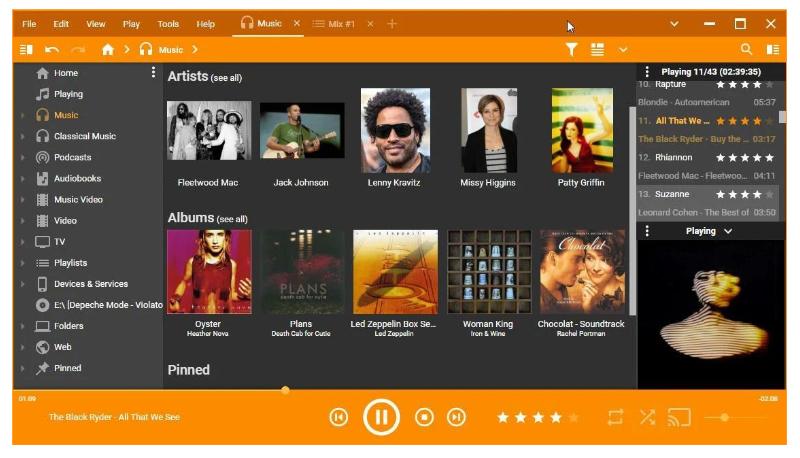
이 음악 플레이어에서 Apple Music을 재생할 수 있나요? Win다우존스 지수 10/11?
많은 사용자들이 여기서 문제를 겪습니다. Apple Music의 노래는 DRM(디지털 저작권 관리)으로 보호됩니다. 공식 앱을 사용하여 Apple Music 트랙을 다운로드하더라도 대부분의 타사 음악 플레이어에서는 재생되지 않습니다. WinWindows 10에서는 해당 파일을 재생할 수 없습니다. 이로 인해 노래가 회색으로 표시되거나, 재생 오류가 발생하거나, 플레이어를 전환할 때 호환성 문제가 발생할 수 있습니다.
VLC, MusicBee 또는 다른 앱에서 Apple Music 트랙을 감상하려면 Win다우스 뮤직 플레이어, DRM 보호 기능을 제거해야 합니다. 먼저.
파트 3. 최적의 해결책: Apple Music을 모든 기기에서 사용할 수 있도록 변환하기 Win다우스 뮤직 플레이어
애플 뮤직 재생 제한을 해결하려면 전용 변환 도구가 필요합니다. DumpMedia 애플 뮤직 변환기 이 제품은 바로 이러한 목적을 위해 설계되었습니다. 이 제품을 사용하면 다음과 같은 작업을 수행할 수 있습니다. Apple Music 노래를 다음과 같은 표준 형식으로 변환합니다. MP3M4A, WAV 또는 FLAC 형식으로 제공되므로 사실상 모든 음악 플레이어와 호환됩니다. Win다우 지수 10/11.
주요 이점 DumpMedia 애플 뮤직 변환기
- Apple Music 트랙에서 DRM을 제거합니다.
- 원본 음질을 유지하면서 노래를 변환합니다.
- ID3 태그 및 메타데이터 유지
- 재생 목록 및 앨범 일괄 변환을 지원합니다.
- 원활하게 작동합니다 Win다우 10
변환이 완료되면 Apple Music 트랙을 VLC, MusicBee, foobar2000 또는 기타 원하는 앱에서 오프라인으로 재생할 수 있습니다. Win다우스 10 뮤직 플레이어.
즐겨 사용하는 기기에서 Apple Music을 재생하는 방법 Win다우스 10 뮤직 플레이어
1 단계. 설치 DumpMedia Apple 음악 변환기 Win다우 10/11 PC.
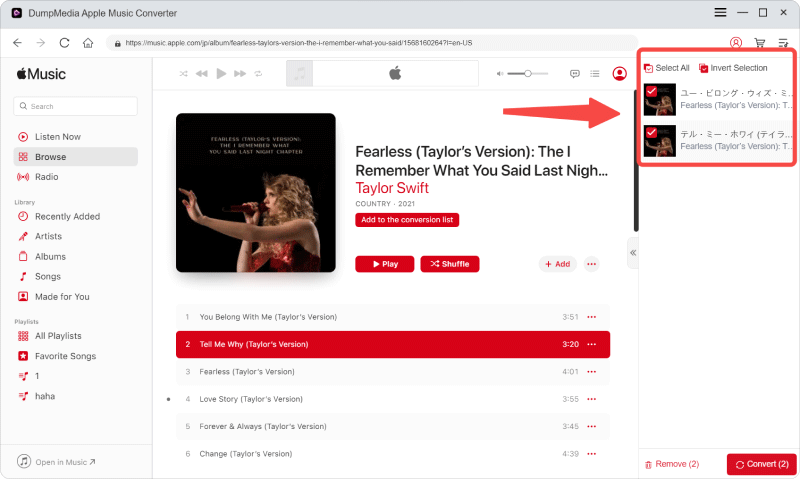
2단계. 변환할 노래/재생목록을 추가하세요. 이 도구의 장점은 한 번에 여러 파일을 처리할 수 있다는 것입니다. 따라서 여러 파일을 변환해야 하는 경우 이 도구를 사용하면 됩니다.
3단계. 호환되는 출력 형식을 선택합니다.MP3 권장).
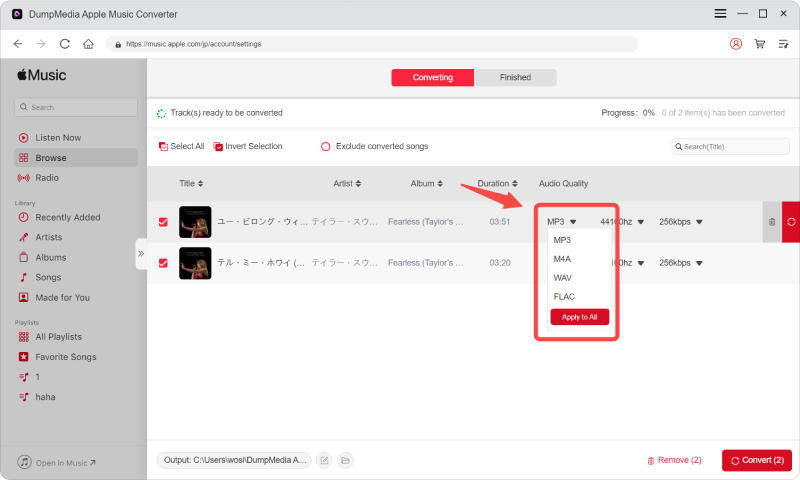
4단계. 노래를 변환하여 로컬에 저장합니다. 변환된 파일을 아무 음악 플레이어에서 열어보세요. Win다우즈 10.

이 방법을 사용하면 재생 제한 없이 음악 라이브러리를 완벽하게 제어할 수 있습니다.
파트 4. FAQ
어떤 음악 플레이어가 가장 좋을까요? Win다우?
최고의 음악 플레이어 WinWindows 10/11은 사용자의 필요에 따라 다릅니다. VLC는 다양한 형식을 지원하는 데 이상적이며, MusicBee는 대규모 로컬 라이브러리 관리에 적합하고, foobar2000은 고급 사용자 지정 기능에 적합하며, AIMP는 음질에 중점을 두고, MediaMonkey는 방대한 음악 컬렉션을 정리하는 데 탁월합니다.
VLC로 애플 뮤직을 재생할 수 있나요? Win다우?
아니요, VLC 및 대부분의 다른 타사 음악 플레이어는 WinWindows 10은 Apple Music 파일이 DRM으로 보호되어 있기 때문에 Apple Music 트랙을 직접 재생할 수 없습니다. Apple Music 앱에서 다운로드한 노래조차도 변환 없이는 VLC에서 열 수 없습니다.
Apple Music에서 내 노래가 재생되지 않는 이유는 무엇인가요? Win다우스 뮤직 플레이어?
Apple Music의 노래는 DRM 보호 기능을 사용하여 Apple에서 승인한 앱에서만 재생할 수 있습니다. 따라서 이러한 노래는 대부분의 앱에서 회색으로 표시되거나 재생되지 않습니다. Win다우스 10 음악 플레이어.
Apple Music을 다른 음악 플레이어에서 재생하려면 어떻게 해야 하나요? Win다우?
Apple Music을 모든 음악 플레이어에서 재생하려면 WinDows 10/11을 사용하려면 트랙을 표준 오디오 형식으로 변환해야 합니다. MP3 또는 M4A. 다음과 같은 도구들. DumpMedia Apple Music Converter는 DRM을 제거하여 Apple Music 노래를 VLC, MusicBee, MediaMonkey 및 기타 플레이어에서 사용할 수 있도록 해줍니다.
애플 뮤직을 개인 용도로 변환하는 것은 합법적인가요?
많은 지역에서 개인적인 오프라인 사용을 위해 음악을 변환하는 것은 일반적으로 허용됩니다. 단, 변환된 파일을 공유, 재배포 또는 상업적으로 사용해서는 안 됩니다. 사용자는 항상 현지 저작권법과 Apple의 서비스 약관을 준수해야 합니다.
법적 고지: Apple Music 파일 변환은 개인적인 용도로만 사용하도록 되어 있습니다. 변환된 콘텐츠를 배포, 공유 또는 상업적 목적으로 사용해서는 안 됩니다. 항상 현지 저작권법 및 Apple 서비스 약관을 준수하십시오.
5 부. 결론
적합한 음악 플레이어 선택하기 WinDows 10은 음악 감상 방식과 필요한 파일 형식에 따라 다릅니다. VLC, MusicBee, AIMP와 같은 인기 플레이어는 로컬 오디오 파일을 잘 처리하지만, DRM 제한으로 인해 Apple Music 트랙은 재생할 수 없습니다. Apple Music을 표준 형식으로 변환하면 재생이 가능합니다. DumpMedia Apple Music Converter를 사용하면 어떤 기기에서든 끊김 없는 재생을 즐길 수 있습니다. WinDows 10 음악 플레이어를 사용하여 진정으로 유연한 음악 라이브러리를 구축하세요.