


Spotify 応答しませんか?2026年に修正しましょう
多くのユーザーが次のようなイライラする問題に遭遇します Spotify 応答していません 音楽を再生したり、プレイリストを開いたり、オフラインモードを使用しようとしたときに、 Spotify アプリ 再生中に完全にフリーズしたり、予期せずクラッシュしたり、動作が停止したりする。 Spotify アプリの問題は非常に一般的です。このガイドではその理由を説明します。 Spotify 突然動作しなくなった場合の対処法 Spotify アプリの問題点と、より安定したオフライン音楽再生を楽しむ方法について。
コンテンツガイド パート1。なぜですか Spotify アプリケーションが応答しませんか?パート2。 直し方 Spotify アプリケーションが応答しませんか?パート 3. 回避する最善の方法 Spotify 再生の問題パート4。よくある質問パート5:結論
パート1。なぜですか Spotify アプリケーションが応答しませんか?
多くの理由があります Spotify 音楽再生中やアプリ使用中に応答しない。
インターネット接続が悪い
Spotify ストリーミングとアカウント認証には安定したインターネットアクセスが不可欠です。ネットワーク接続が弱いと、 Spotify フリーズしたり、応答しなくなったりする。
破損した Spotify キャッシュ
一時ファイルは内部に保存されます Spotify 時間の経過とともに破損する可能性があり、アプリのクラッシュや再生の問題を引き起こす可能性があります。
古い Spotify アプリ
より古い Spotify バージョンには、Spotify 「応答していません」エラー。
Spotify サーバーの問題
時々 Spotify サーバー障害は、世界中のユーザーの再生状況やアプリのパフォーマンスに影響を与えます。
背景となるソフトウェアの競合
ウイルス対策ソフトウェア、ファイアウォール設定、またはハードウェアアクセラレーションの競合も原因となる可能性があります Spotify 応答を停止する。
デバイスの互換性の問題
古いオペレーティングシステムやサポートされていないデバイスでは、最新バージョンの実行に問題が生じる可能性があります。 Spotify アプリがスムーズに動作します。
これらは「Spotify 「応答していません」という問題。
パート2。 直し方 Spotify アプリケーションが応答しませんか?
If Spotify お使いのデバイスで応答がない場合は、以下の解決策をお試しください。
修正1.再起動 Spotify
完全に近い Spotify アプリを再度開いてください。この簡単な対処法で、一時的な再生の問題が解決することがよくあります。
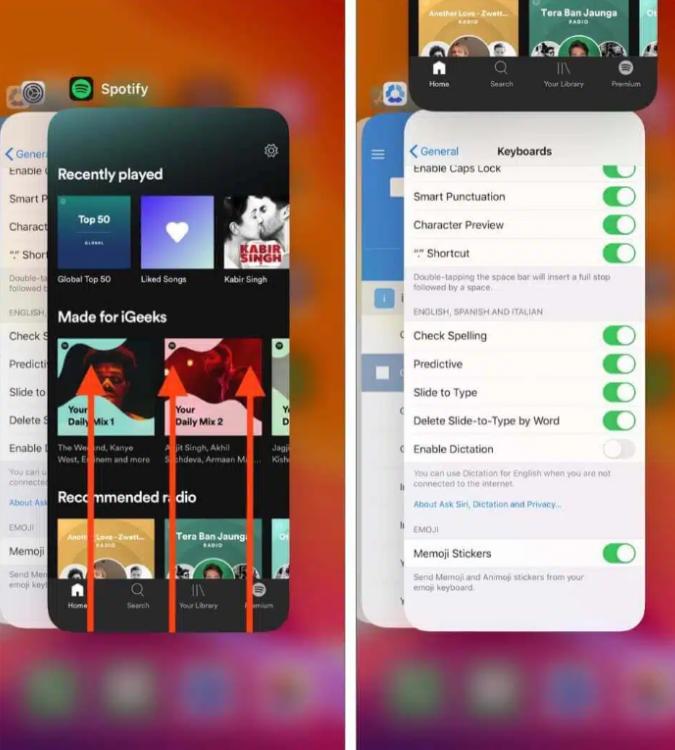
iOS(iPhone / iPad)の場合: 画面の下端から上にスワイプして中央で一時停止します(または、古いデバイスの場合はホームボタンをダブルクリックします)。 Spotify プレビューカードを表示し、画面から完全に上にスワイプして消してください。
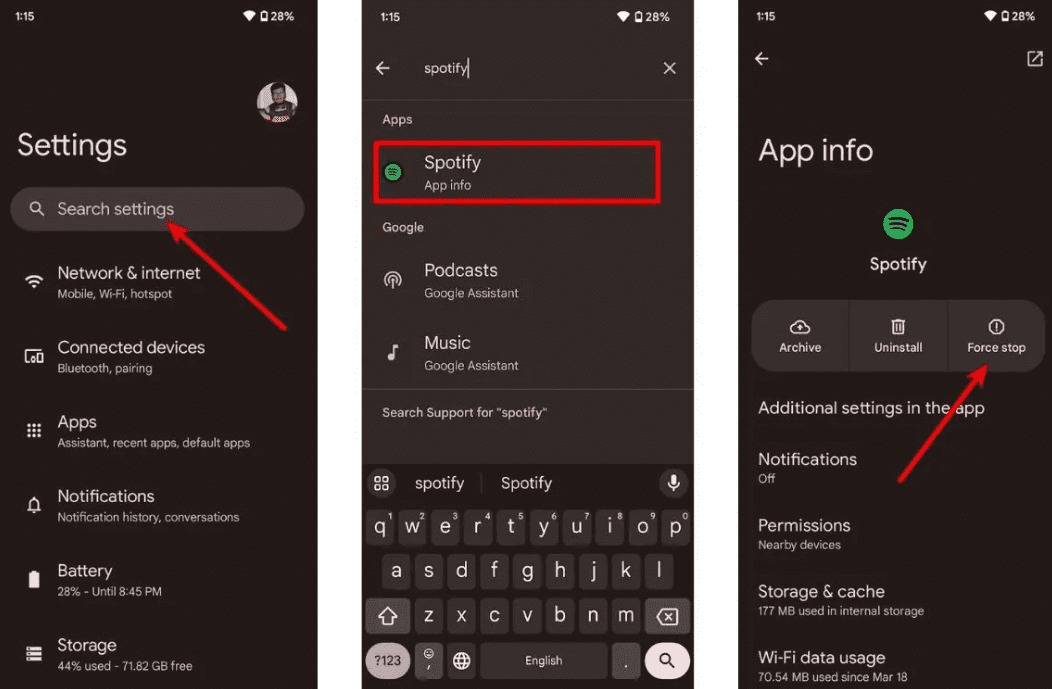
Androidの場合: 設定 > アプリ > Spotify そして「強制停止」をタップします。これにより、バックグラウンドで待機しているすべてのタスクが終了します。 Spotify アプリドロワーから。
macOS の場合: 詳しくはこちら Spotify 上部のメニューバーで「終了」を選択します。 Spotifyまたは、単にウィンドウをクリックして、Command (⌘) + Q を押します。
On Winダウ平均株価(10/11): 左上隅の「ファイル」をクリックします。 Spotify ウィンドウを開き、「終了」を選択します(右上隅の「×」を押すと、閉じるのではなくシステムトレイに最小化されることが多いです)。
修正2. インターネット接続を確認する
Wi-Fiとモバイルデータ通信を切り替えて、接続の安定性をテストしてください。
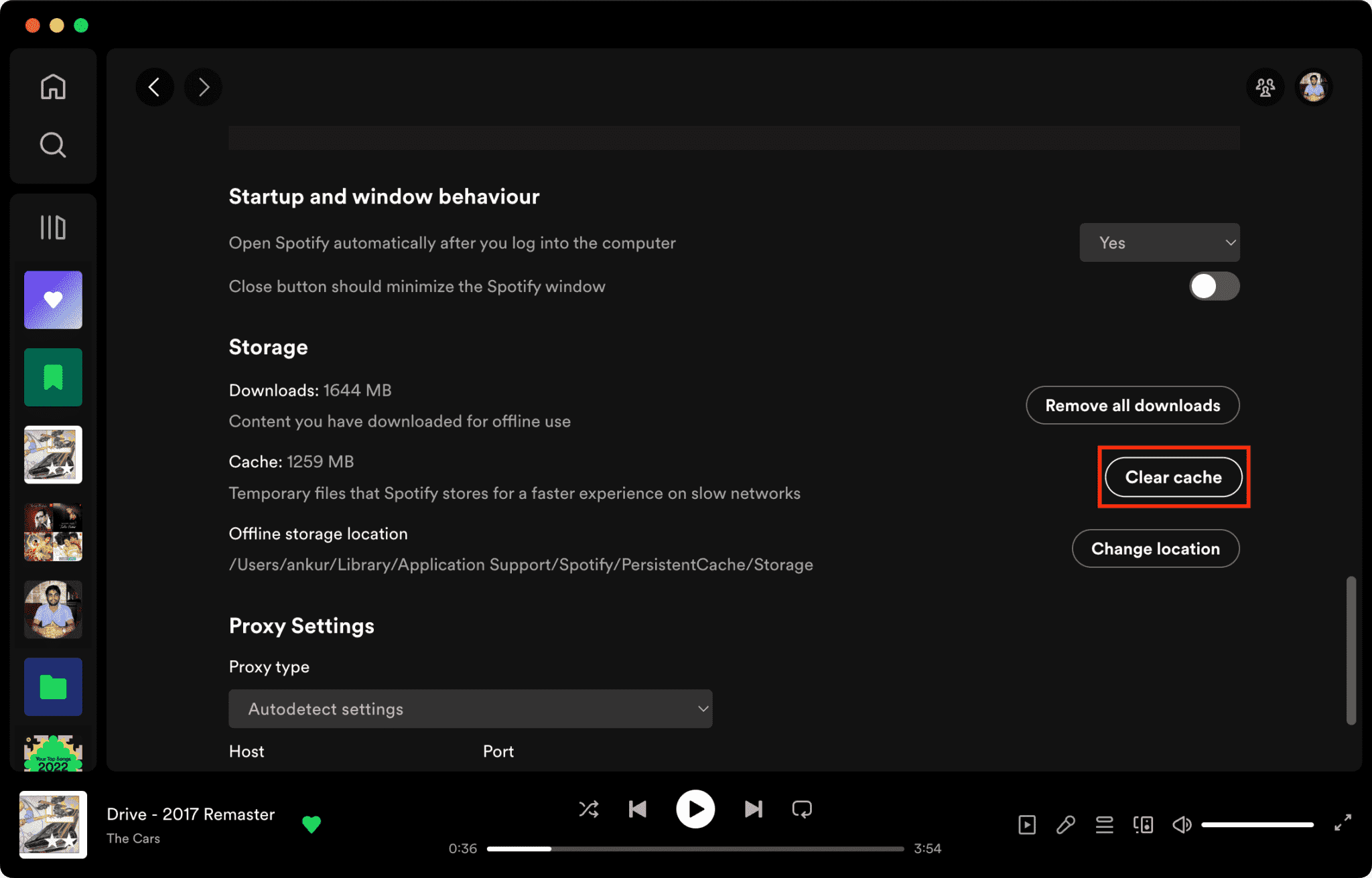
修正3. クリア Spotify キャッシュ
キャッシュファイルが破損していることが主な理由の一つです。 Spotify 応答がありません。
クリアする方法 Spotify Macのキャッシュ/Winダッシュ/iPhone/Android >>>>
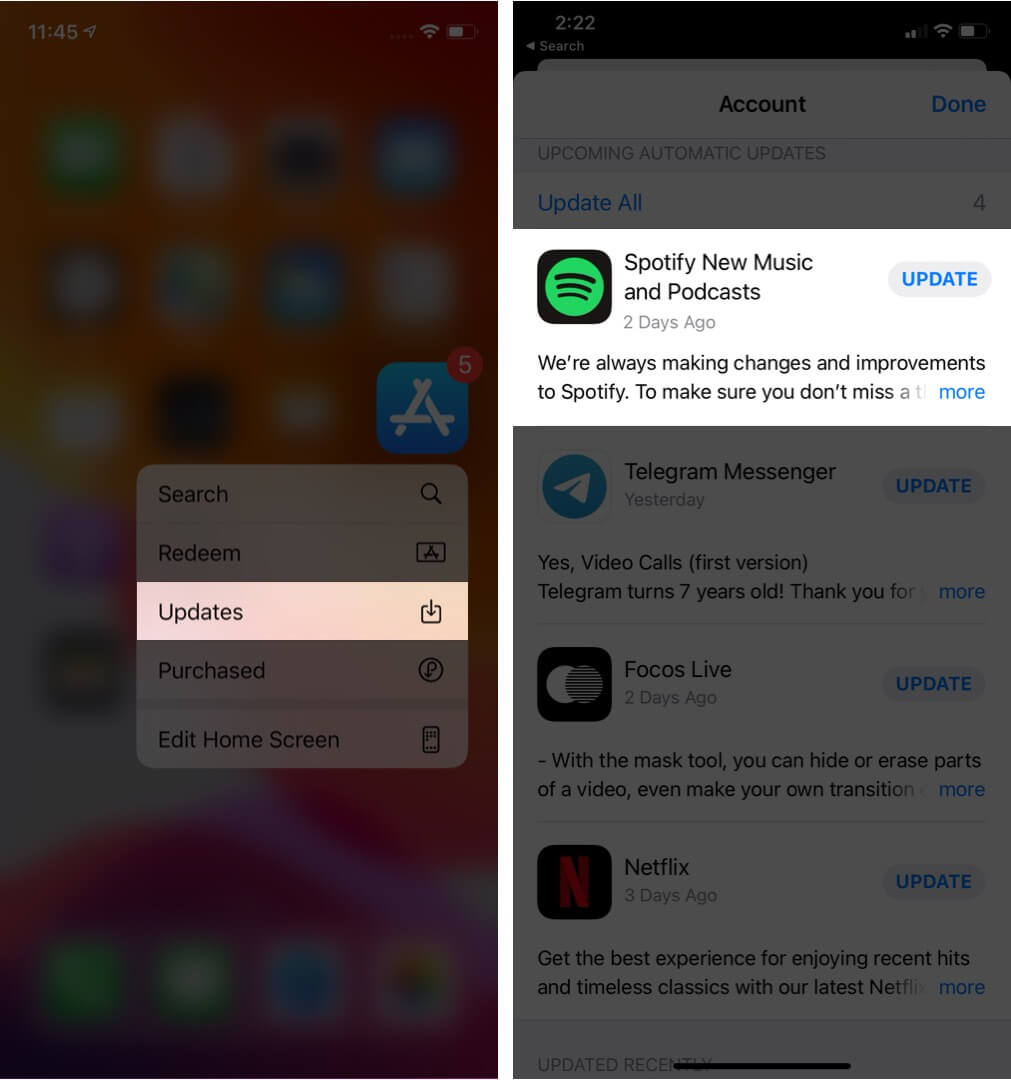
修正4.アップデート Spotify アプリ
最新版をインストール中 Spotify このバージョンでは、既知のソフトウェアバグが修正されている可能性があります。
解決策5:デバイスを再起動する
コンピューターやスマートフォンを再起動すると、システムリソースがリフレッシュされます。
解決策 6. ハードウェア アクセラレーションを無効にする
ハードウェアアクセラレーションを無効にすると、フリーズの問題が解決する場合があります。
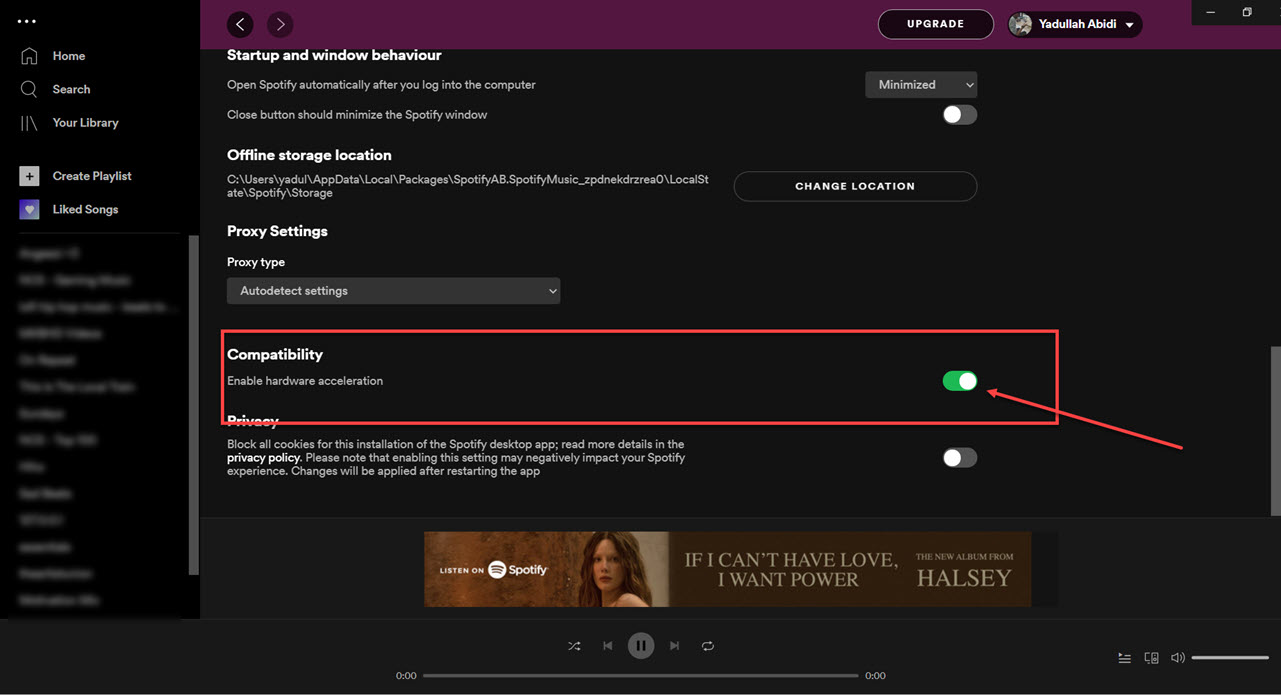
修正7. チェック Spotify サーバーの状態
Spotify まれに、サービス停止により再生およびログインサービスに影響が出る場合があります。
パート 3. 回避する最善の方法 Spotify 再生の問題
多くのユーザーがダウンロードしたと想定している Spotify 曲は常にオフラインで再生できますが、ダウンロードした曲はDRMで保護されているため、音楽はストリーミングアプリ内でのみ再生できます。ダウンロードした曲は自由に転送できません。Spotify 「応答しない」問題、人気のあるツールの1つは DumpMedia Spotify Music Converterこのソフトウェアを使用すると、ユーザーは変換できます。 Spotify 音楽をローカルオーディオ形式に変換して、より柔軟なオフライン再生を実現します。 Spotify アプリがデバイスで動作しない場合は、 遊びます Spotify オフラインの曲 すぐに別の音楽プレーヤーで再生してください。
🏆主な特徴 DumpMedia Spotify Music Converter
- ダウンロード Spotify に音楽 MP3WAV、FLAC、AAC
- 削除します Spotify DRM保護*
- オリジナルの音質を維持
- プレイリストとアルバムを一括ダウンロードする
- 高速変換速度
- 楽曲のメタデータとID3タグを保持する
- あらゆるデバイスでオフライン再生に対応
不満を感じているユーザーのために Spotify アプリの不安定さを考えると、ローカルでの音楽再生の方がはるかに安定しているように感じられることが多い。
変換 Spotify 〜へ MP3 ステップバイステップ
ステップ 1: ダウンロードしてインストール DumpMedia Spotify Music Converter Mac/PC 上で起動すると、インターフェースが表示されます。 Spotify ログインするにはプレミアム/無料アカウントが必要です。
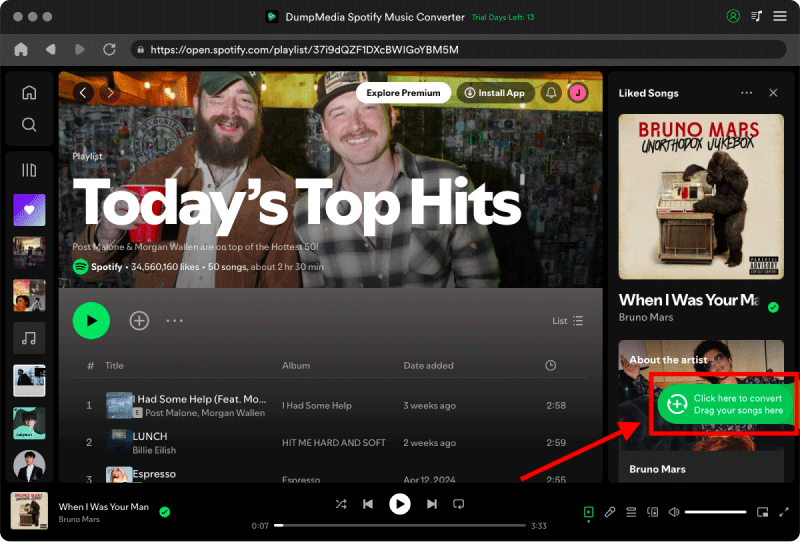
ステップ2:変換したいプレイリスト、アルバム、または特定の曲を探します。画面右側の「+」アイコンに曲をドラッグすることもできます。または、プレイリスト/アルバム全体を開き、「変換に追加」アイコンをクリックして、リスト全体をコンバーターに読み込むこともできます。
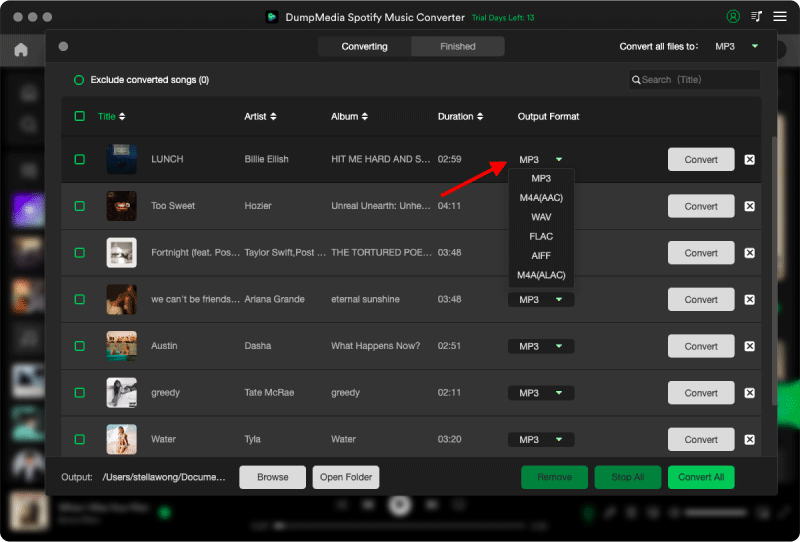
ステップ 3: 選択 MP3 (最も互換性が高い)また、ビットレートまたはサンプリングレートを変更することもできます。最適なバランスを得るには、320kbpsを選択してください。
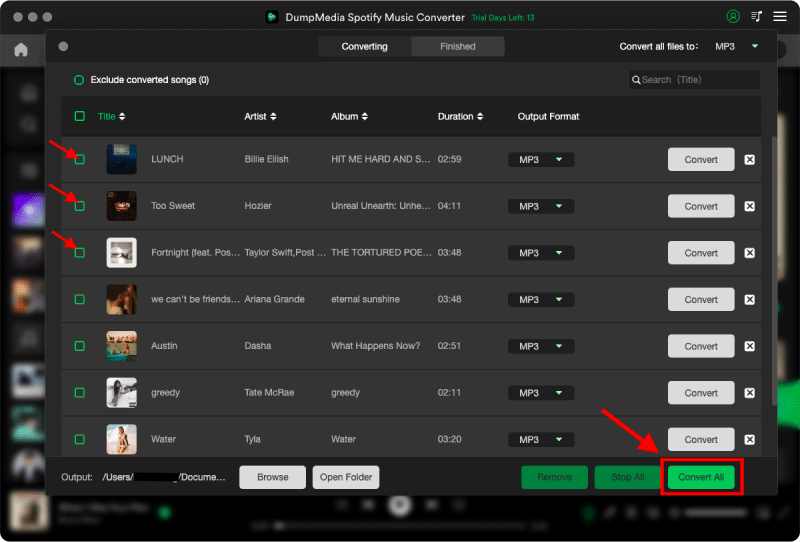
ステップ 4: 設定が完了したら、ユーザーは「変換」アイコンをクリックして変換処理を開始できます。 DumpMedia ダウンロードします Spotify に歌 MP3 その超高速性により、数秒以内に。
パート4。よくある質問
なぜですか Spotify 反応がない?
Spotify インターネット接続の問題、キャッシュファイルの破損、ソフトウェアのバージョンが古い、またはサーバーの問題などが原因で、応答しなくなる場合があります。
どして Spotify 凍結し続ける?
Spotify フリーズ問題は、キャッシュの破損やハードウェアアクセラレーションの競合に関連していることが多い。
なぜですか Spotify 私のスマホがクラッシュする?
モバイル Spotify クラッシュの原因としては、ストレージ容量不足、アプリのバージョンが古い、またはソフトウェアの競合などが考えられます。
なぜですか Spotify オフラインモードが動作しない?
オフライン再生は依然として Spotify 認証とアプリの安定性。
Is DumpMedia Spotify Music Converter 安全?
はい。これは Spotify 音楽変換とローカル再生管理。
注: ストリーミングプラットフォームには独自のルールと監視システムがあります。サードパーティツールとして、 DumpMedia Spotify Music Converter また、それらの制限事項にも従う必要があり、場合によっては使用に影響が出る可能性があります。 Spotify 利用規約に違反する行為を検出した場合、措置を講じる場合があります。これは完全に Spotifyの裁量。
パート5:結論
「Spotify 「応答していません」という問題は、インターネットの不安定性、キャッシュファイルの破損、ソフトウェアの古さ、または Spotify アプリの問題。多くの一時的な解決策は再生を回復するのに役立ちますが、 Spotify ストリーミングは依然としてアプリの安定性とオンライン認証に大きく依存しています。より安定したオフラインリスニングを求めるユーザーにとって、 DumpMedia Spotify Music Converter 変換するための実用的な方法を提供する Spotify 歌を地元の MP3 さまざまなデバイス間で柔軟に再生できるファイル。
*DumpMedia 復号化してダウンロードすることで機能します Spotify 楽曲をDRMフリーのファイルに変換することで、あらゆるデバイスでライブラリのクリーンで制限のないコピーを入手できます。ただし、ローカルオーディオファイルのDRM解除機能は含まれていません。