


プレイ方法 Spotify オフラインでも問題なく動作します
その他にもたくさんのグーグルの Spotify ユーザーは 遊びます Spotify オンライン 旅行中、通勤中、運動中、またはモバイルデータの節約中。 Spotify オフライン再生を公式にサポートしています Spotify プレミアムサーマルバッグ ユーザーの多くはすぐに気づく Spotifyのオフラインモードにはいくつかの制限があります。このガイドでは、のプレイ方法を説明します。 Spotify 楽曲が公式にオフラインになった理由 Spotify オフラインモードが時々失敗するので、柔軟なオフラインを楽しむ最良の方法は Spotify 複数のデバイス間で再生が可能。
コンテンツガイド パート1。プレイできますか Spotify Music Offlineが正式に登場?パート 2. 最適なプレイ方法 Spotify 制限なしでオフライン音楽を楽しめますパート3。よくある質問パート4:結論
パート1。プレイできますか Spotify Music Offlineが正式に登場?
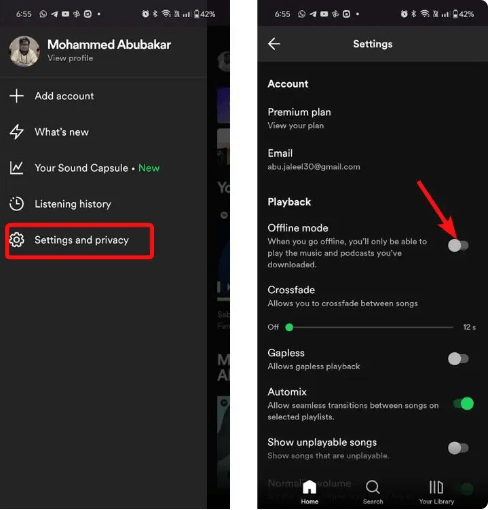
Yes. Spotify プレミアム会員は公式にプレイできます Spotify オフラインで使用 Spotify オフラインモード。ただし、 Spotify オフライン再生は標準を所有することとは異なります MP3 音楽ファイル。
認定条件 Spotify オフラインモードが機能する
ユーザーがプレイするとき Spotify 公式にオフライン:
- 楽曲は暗号化されたままです
- 音楽は Spotify アプリ
- Spotify プレミアムが必要です
- 定期的なオンライン認証が必要です
これはあなたのルーティーンで、 Spotify オフライン再生は依然として大きく依存している Spotify 認可システム。
Spotify オフラインモードの制限
しかし Spotify オフラインモードは便利ですが、いくつかの制限があります。 Spotify アプリへの依存、プレミアムサブスクリプションの必要性、そして限られたデバイス互換性。これらの制限があるため、多くのユーザーはより良いプレイ方法を探しています。 Spotify オフライン
パート 2. 最適なプレイ方法 Spotify 制限なしでオフライン音楽を楽しめます
「プレイ」を検索している多くのユーザー Spotify オフライン」は実際にはそれ以上のものを望んでいます Spotifyの公式オフラインモード。人々はインターネット認証なしで音楽を再生したいと考えている。ストリーミングアプリよりもローカルメディアプレーヤーを好むユーザーもいる。これがローカルの理由である。 MP3 再生はますます人気が高まっている Spotify ユーザー。
遊びたいユーザーにとって最も人気のあるソリューションの1つ Spotify オフラインの方がより柔軟に DumpMedia Spotify Music Converterこのソフトウェアを使用すると、ユーザーは変換できます。 Spotify 曲をローカルオーディオ形式に変換して、安定したオフライン再生を実現します。 Spotify 応答していません お使いのデバイスでプレイできます Spotify オフラインで再生した曲は、すぐに別の音楽プレーヤーで再生できます。
🏆なぜ選ぶのか DumpMedia Spotify Music Converter
- ダウンロード Spotify に音楽 MP3WAV、FLAC、AAC
- オリジナルの音質を維持
- プレイリストとアルバムを一括ダウンロードする
- 高速変換速度
- 楽曲のメタデータとID3タグを保持する
- あらゆるデバイスでオフライン再生に対応
プレイしたいユーザー向け Spotify オフラインで永久的にローカルオーディオ再生すると、より柔軟性が高まります。 Spotify オフラインモードのみ。
プレイ Spotify 音楽オフラインステップバイステップ
ステップ 1: ダウンロードしてインストール DumpMedia Spotify Music Converter Mac/PC 上で起動すると、インターフェースが表示されます。 Spotify ログインするにはプレミアム/無料アカウントが必要です。
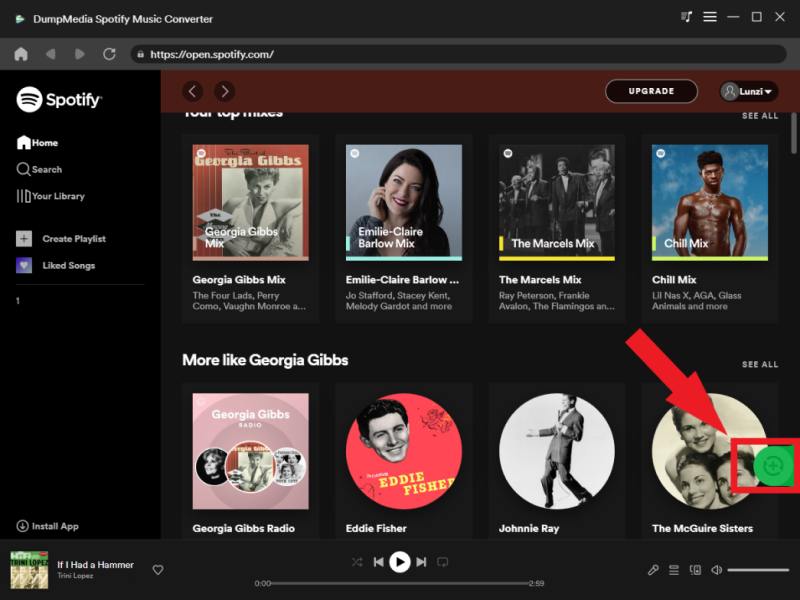
ステップ 2: 変換したいプレイリスト、アルバム、または特定の曲を探してください。画面右側の「+」アイコンに曲をドラッグすることもできます。または、プレイリスト/アルバム全体を開き、「変換に追加」アイコンをクリックして、リスト全体をコンバーターに読み込むこともできます。
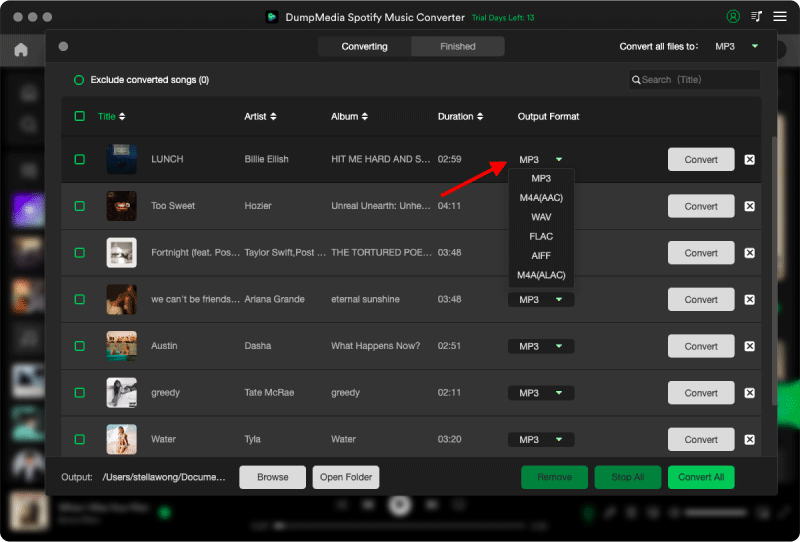
ステップ 3: 選択 MP3 (最も互換性が高い)また、ビットレートまたはサンプリングレートを変更することもできます。最適なバランスを得るには、320kbpsを選択してください。
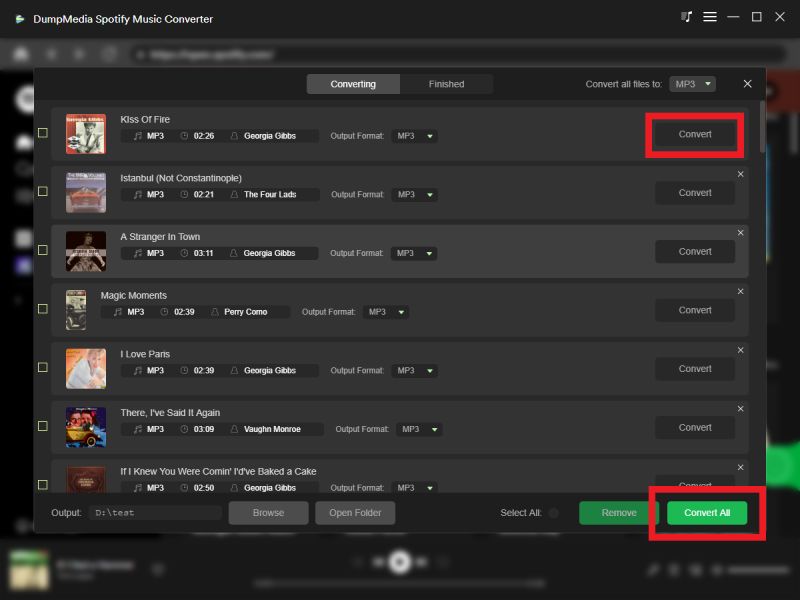
ステップ 4: 設定が完了したら、ユーザーは「変換」アイコンをクリックして変換処理を開始できます。 DumpMedia ダウンロードします Spotify に歌 MP3 その超高速性により、数秒以内に。
変換後、 Spotify 音楽は多くのデバイスでオフラインで再生できます Spotify アプリの依存関係。
パート3。よくある質問
遊べる Spotify オフライン?
Yes. Spotify プレミアムユーザーは公式に使用できます Spotify オフラインモード。
プレイするにはプレミアム会員になる必要がありますか? Spotify 曲はオフライン?
はい。公式 Spotify オフライン再生にはプレミアム会員登録が必要です。
なぜ私の Spotify オフラインで保存した曲が再生されない?
オフライン再生は、検証エラー、キャッシュの破損、またはアプリの問題が原因で失敗する場合があります。
できる Spotify ダウンロードの有効期限はありますか?
Yes. Spotify オフラインダウンロードは、アカウント認証と購読状況によって引き続き左右されます。
遊んでいい Spotify オフラインで Spotify アプリ?
多くのユーザーが DumpMedia Spotify Music Converter より柔軟なオフライン再生を可能にするため。
パート4:結論
Spotify 公式にユーザーがプレイできるようにする Spotify オフラインモードでオフライン再生が可能ですが、公式ダウンロードには依然としてDRM制限、アプリへの依存、プレミアム認証要件が伴います。より安定した柔軟なオフライン再生を求めるユーザー向けには、ローカル MP3 再生は、より信頼性の高い体験を提供します。 DumpMedia Spotify Music Converterユーザーは変換できる Spotify 楽曲をローカルオーディオファイルに保存すれば、複数のデバイスでいつでもオフライン再生を楽しめます。

30% オフ >>>