


Can You Listen to Audiobooks on Kindle Paperwhite? Full Guide (2026)
多くのユーザーから次のような質問が寄せられます。 Kindle Paperwhiteでオーディオブックを聴くことができますか ? The short answer is yes, but with some important limitations. If you’re trying to enjoy audiobooks on your Kindle, it’s important to understand how it works, what formats are supported, and what options you have if your audiobooks aren’t compatible. In this guide, we’ll explain everything you need to know about whether you can listen to audiobooks on Kindle Paperwhite and how to make it work smoothly.
コンテンツガイド Part 1. Can I Listen to Audiobooks on Kindle Paperwhite?Part 2. How to Listen to Audible Audiobooks on Kindle Paperwhite?Part 3. Best Way to Listen to Audiobooks Freely on Kindle Paperwhiteパート4。よくある質問パート5:結論
Part 1. Can I Listen to Audiobooks on Kindle Paperwhite?
So, can you listen to audiobooks on Kindle Paperwhite? Yes, but only under specific conditions. Kindle Paperwhite supports audiobooks through 聞こえる, Amazon’s official audiobook platform. This means you can:
- Purchase audiobooks from Audible
- Download them directly to your Kindle
- Listen using Bluetooth headphones or speakers
However, there is one major limitation. Kindle Paperwhite does NOT support standard audio formats like MP3 or WAV. So even though you can technically listen to audiobooks on Kindle Paperwhite, you are restricted to Audible content only.
Part 2. How to Listen to Audible Audiobooks on Kindle Paperwhite?
How can you listen to audiobooks on Kindle Paperwhite? It is a seamless experience, provided you have a model from the 10th Generation (2018) or later. Since Kindle Paperwhite devices do not have built-in speakers, the process requires Bluetooth headphones or a speaker.
しくみはこうです:
Here is the official method to get your audiobooks playing:
ステップ 1: Ensure your Paperwhite is a Kindle Paperwhite 10th Gen (2018) or a Kindle Paperwhite 11th Gen (2021/2024).
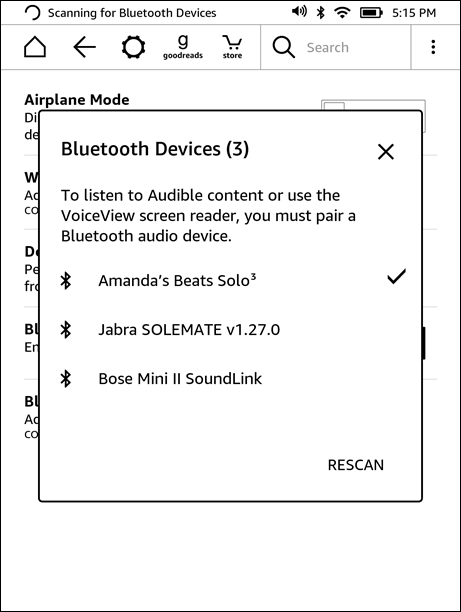
ステップ 2: On your Kindle Home screen, swipe down to open Quick Settings. Tap the Bluetooth icon to turn it on. Put your headphones or speaker into Pairing Mode. Tap Bluetooth Devices on your Kindle and select your device from the list.
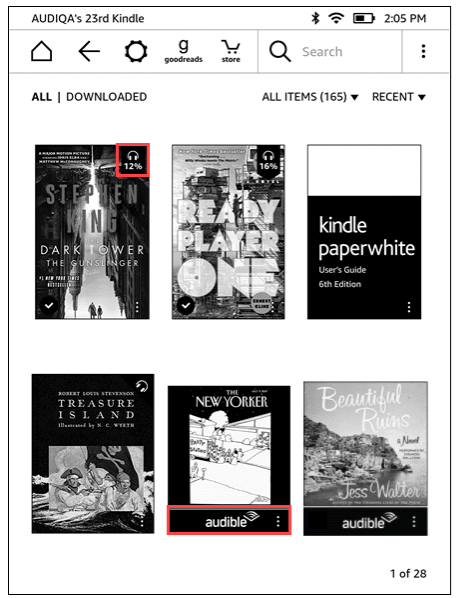
ステップ 3: Go to your Library. Tap the Filter icon and select Audible (or Audible/Audiobooks). Tap the cover to begin the download. (Ensure you are connected to Wi-Fi, as audiobooks are much larger than E-books).
ステップ 4: Open the E-book. Tap the center of the screen to show the menu. Tap the Headphones icon in the bottom right corner. The Kindle will sync your progress so you can switch between reading and listening without losing your place.
This is the official way if you want to listen to audiobooks on Kindle Paperwhite.
知っておくべき制限事項
While the answer to “can you listen to audiobooks on Kindle Paperwhite” is yes, the experience comes with several restrictions.
- Audible-Only Support: You cannot play audiobooks from other sources.
- DRM Protection: Audible files are protected and tied to your account.
- いいえ MP3 Playback: Kindle Paperwhite does not support common formats like MP3.
- Limited Flexibility: You cannot freely transfer or manage audiobook files.
This means if your audiobooks are not from Audible, you won’t be able to listen to audiobooks on Kindle Paperwhite directly.
Part 3. Best Way to Listen to Audiobooks Freely on Kindle Paperwhite
While Kindles offer native support, they are strictly tied to the Audible ecosystem. For true flexibility across all your devices, you need a way to remove these playback restrictions. DumpMedia 可聴コンバーター is the ideal solution, allowing you to bypass DRM and take full control of your library.
選ばれる理由 DumpMedia 可聴コンバーター?
By utilizing a professional converter, you gain the freedom to:
- Universal Format Conversion: 即座に transform protected Audible audiobooks into MP3、M4A、または FLAC。
- Total DRM Removal*: Strip away playback restrictions to ensure your library is truly yours.
- マルチデバイスの互換性: Listen on any MP3 player, car stereo, or smart speaker without needing the Audible app.
- Permanent Ownership: Keep your purchased audiobooks forever, even if you cancel your subscription.
*DumpMedia works by decrypting and downloading your audiobooks into DRM-free files, allowing you to obtain a clean, unrestricted copy of your library for any device.
While the Kindle Paperwhite itself doesn’t support direct MP3 playback, converting your audiobooks gives you complete control over how and where you listen. For users who want to move beyond the walled garden of Audible, this is the most practical and reliable solution.
Convert Audible Audiobooks (Step-by-Step)
ステップ 1: 内蔵プレーヤーから自分の Audible アカウントを使用してログインします。
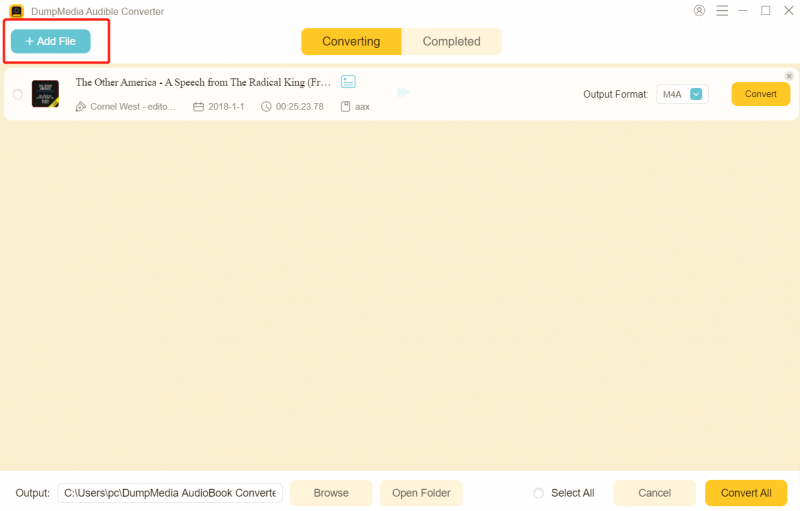
ステップ 2: 変換したいオーディオブックを参照または検索します。「変換に追加」ボタンをクリックするか、変換パネルにドラッグすることで追加できます。
ステップ 3: 希望する出力形式と品質設定を選択します。

ステップ 4: 「変換」ボタンをクリックしてダウンロードを開始します。変換が完了するまでお待ちください。

パート4。よくある質問
Can you listen to audiobooks on Kindle Paperwhite without Audible?
No, Kindle Paperwhite only supports Audible audiobooks officially.
Why can’t I play MP3 audiobooks on Kindle?
Because Kindle does not support standard audio formats.
Do I need Bluetooth to listen to audiobooks?
Yes, Kindle Paperwhite requires Bluetooth audio devices.
Can I transfer audiobooks manually?
Not unless they are in a supported format.
パート5:結論
So, can you listen to audiobooks on Kindle Paperwhite? Yes, but only within a limited ecosystem. If you want more control over your audiobooks, such as playing them on multiple devices or keeping permanent copies, you’ll need an alternative approach like DumpMedia Audible Converter. By understanding these limitations and using the right tools, you can go beyond the default restrictions and create a more flexible audiobook experience that fits your needs.

30% オフ >>>