


音声スリープタイマー:設定方法とよくある問題の解決方法
オーディオブック愛好家にとって、就寝前に聴くことは日課の一部です。しかし、オーディオブックを聴きながら眠ってしまうと、翌日どこまで聴いたか分からなくなることがあります。そこで役立つのが、Audibleのスリープタイマー機能です。このガイドでは、Audibleアプリのスリープタイマーの使い方、タイマー設定のカスタマイズ方法、よくある問題の解決方法、そしてオーディオブック体験全体の向上方法について解説します。
目次ガイドパート1. Audibleのスリープタイマーとは?パート2. Audibleアプリでスリープタイマーを設定する方法パート3. スリープタイマーが動作しない場合の対処法パート4. Audibleオーディオブックをより柔軟に管理する方法パート5. よくある質問パート6. まとめ
パート1:Audibleのスリープタイマーとは?
Audibleのスリープタイマーは、指定した時間が経過するとオーディオブックを自動的に一時停止または停止する内蔵再生機能です。
これは主に就寝時のリスニング用に設計されており、いくつかの利点があります。
- オーディオブックが一晩中再生されるのを防ぎます
- リスニングの進捗状況を把握するのに役立ちます
- デバイスのバッテリー寿命を延ばします
- 不要な再生を削減します
多くのAudibleユーザーは、より快適なリスニング体験を実現するために、毎晩Audibleアプリのスリープタイマーを利用しています。
パート2:Audibleアプリでスリープタイマーを設定する方法
Audibleのスリープタイマーの設定は、素早く簡単です。
iPhoneで
- Audibleアプリを開いてください。
- オーディオブックの再生を開始してください。
- プレーヤー画面をタップしてください。
- スリープタイマーのアイコンを探してください。
- お好みのタイマー時間を選択してください。
- タイマーがカウントダウンしている間、引き続きお聴きください。
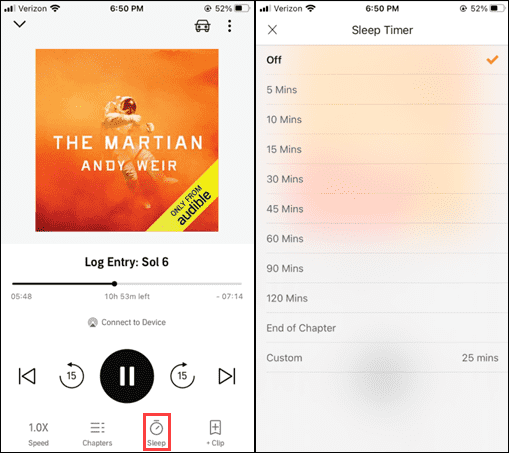
タイマーがゼロになると、再生は自動的に停止します。
Androidの場合
- Audibleを起動する。
- オーディオブックを再生する。
- 再生コントロールを開きます。
- スリープタイマーをタップします。
- タイマーオプションを選択してください。
Audibleのスリープタイマーは、選択した時刻になると自動的に再生を停止します。
スリープタイマーオプション
Audibleのスリープタイマーが人気を集めている理由の一つは、その柔軟性です。お使いのデバイスのバージョンによっては、以下のようなオプションが利用できる場合があります。
- 5 minutes
- 10 minutes
- 15 minutes
- 30 minutes
- 45 minutes
- 60 minutes
- 90 minutes
- 章の終わり
「章の終わり」オプションは、オーディオブックが章の区切りで自然に停止できるため、特に便利です。
パート3.スリープタイマーが動作しない場合は、以下の解決策をお試しください。
Audibleのスリープタイマーで問題が発生する場合があります。幸いなことに、ほとんどの問題は簡単に解決できます。
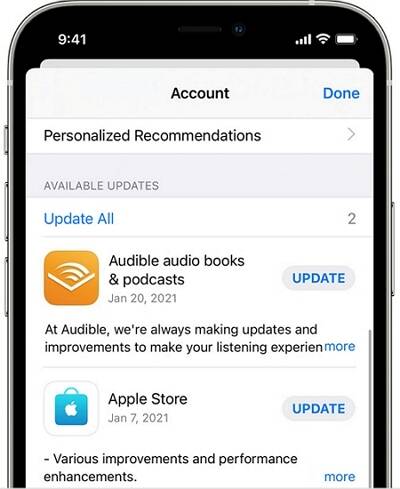
Audibleアプリをアップデートする
古いバージョンのソフトウェアは、タイマー関連の不具合を引き起こす可能性があります。Audibleの最新バージョンを使用していることを確認してください。
デバイスを再起動する
簡単な再起動で、一時的な再生の問題は解決することが多い。
Audibleを再インストールしてください
Audibleのスリープタイマーが引き続き誤動作する場合は、アプリケーションを再インストールすることで、破損した設定が修復される可能性があります。
バックグラウンド権限を確認する
一部のデバイスはバックグラウンドプロセスを積極的に管理します。画面がオフの状態でもAudibleが動作を継続できるよう、必要な権限を付与してください。
アプリキャッシュをクリア
Android端末では、キャッシュファイルをクリアすることでタイマー関連の問題が解決する場合があります。
第4部:Audibleオーディオブックをより柔軟に管理する方法
Audible スリープタイマーは、オフライン再生と組み合わせると特に効果的です。就寝前にオーディオブックをダウンロードしておくと、ネットワークの中断がなくなり、アクセスが速くなり、モバイルデータ使用量が減り、頻繁に聴くユーザーにとってより安定したセッションが実現するため、よりスムーズなリスニング体験が保証されます。オーディオブックコレクションをより細かく管理したいユーザー向けに、 DumpMedia 可聴コンバーター さらなる柔軟性を提供する。
DumpMedia Audible オーディオブックをオフライン再生用の一般的なオーディオ形式に変換するのに役立ちます。 Audibleアプリが動作しません お使いのデバイス上で、オーディオブックを別のメディアプレーヤーですぐに再生できます。
🏅 なぜ選ぶのか DumpMedia 可聴コンバーター
- ???? Audible AAXを変換する MP3WAV、AACなど
- 📖 Audibleウェブプレーヤーとの連携
- 📖 最大35倍速でバッチ変換を提供
- 📖 アーティスト、カバー、アートなどのID3タグを保持します。
- 📖 オリジナルの音声品質を維持する
- ???? 100% クリーン。使用してもリスクはありません
Audibleをオフラインで再生する手順
ステップ 1: ダウンロードしてインストール DumpMedia Mac/PCにAudible Converterをインストールしてください。起動するとインターフェースが表示されます。Audibleアカウントでログインしてください。
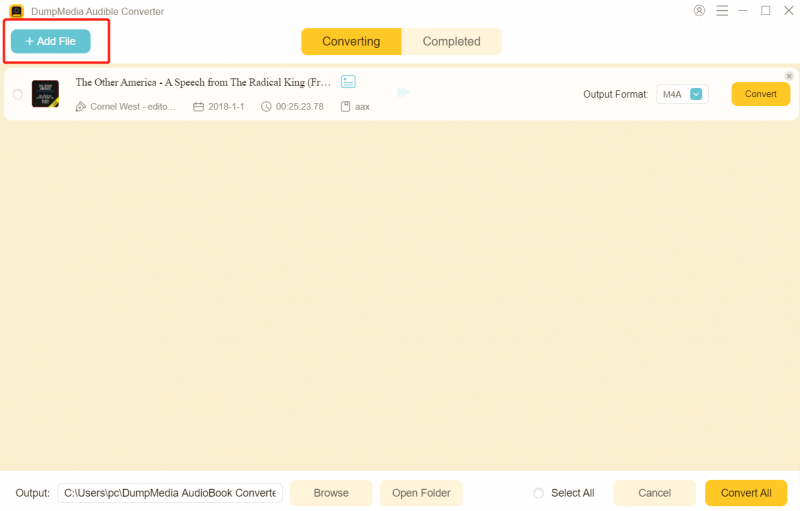
ステップ2:変換したいオーディオブックを探します。画面右側の「+」アイコンにドラッグ&ドロップできます。または、プレイリスト/アルバム全体を開き、「変換に追加」アイコンをクリックして、リスト全体をコンバーターに読み込むこともできます。
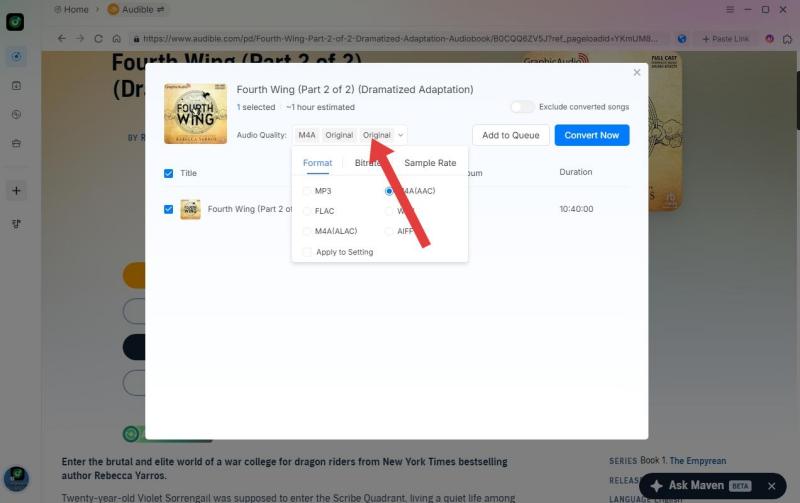
ステップ 3: 選択 MP3 (最も互換性が高い)また、ビットレートまたはサンプリングレートを変更することもできます。最適なバランスを得るには、320kbpsを選択してください。
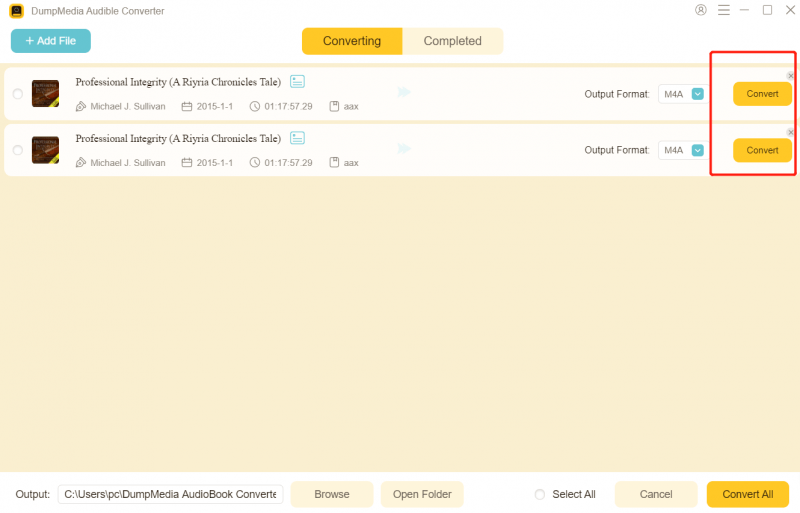
ステップ 4: 設定が完了したら、ユーザーは「変換」アイコンをクリックして変換処理を開始できます。 DumpMedia Audibleの本をダウンロードします MP3 その超高速性により、数秒以内に。
パート5。よくある質問
Audibleにはスリープタイマー機能はありますか?
はい。Audibleには、設定した時間が経過すると自動的にオーディオブックの再生を停止するスリープタイマー機能が内蔵されています。
章の終わりにスリープタイマーを設定できますか?
はい。Audibleの多くのバージョンには、「章の終わり」タイマー機能が搭載されています。
Audibleのスリープタイマーが動作しないのはなぜですか?
一般的な原因としては、アプリのバージョンが古い、ソフトウェアのバグ、キャッシュの問題、またはデバイスの権限設定などが挙げられます。
スリープタイマーはバッテリーを節約できますか?
はい。再生を自動的に停止することで、長時間のリスニング時のバッテリー消費を抑えることができます。
Audibleのオーディオブックはオフラインで聴くことができますか?
はい。Audibleは、オフライン再生用のオーディオブックのダウンロードに対応しています。
パート6:結論
Audibleのスリープタイマーは、オーディオブックリスナー、特に就寝前に聴くのが好きな人にとって最も便利な機能の1つです。オーディオブックコレクションでさらに柔軟性を求めるユーザー向けには、次のようなツールがあります。 DumpMedia Audible Converterは、オフラインでのアクセスとオーディオブックの管理を強化するのに役立ちます。