


Audibleをオフラインで聴く方法(あらゆるデバイス対応 2026年版ガイド)
Audibleユーザーの多くは、インターネット接続なしでオーディオブックを楽しみたいと考えています。Audibleをオフラインで聴く方法をお探しなら、まさにここが最適な場所です。Audibleではオーディオブックをデバイスにダウンロードできますが、制限事項があります。このガイドでは、あらゆるデバイスでAudibleのオーディオブックをオフラインで聴く方法、そして信頼できるツールを使って永続的かつ無制限のアクセス権を取得する方法をご紹介します。
コンテンツガイド パート1:Audibleのオーディオブックはオフラインで聴くことができますか?パート2:Android/iOSでAudibleのオーディオブックをオフラインで聴くパート3。Audibleの書籍をオフラインで聴く Winダウズ/マックパート4:あらゆるデバイスでAudibleのオーディオブックをオフラインで聴くパート5。よくある質問パート6。 概要
パート1:Audibleのオーディオブックはオフラインで聴くことができますか?
Audibleにはオフラインモードがあり、購入したオーディオブックをスマートフォン、タブレット、またはコンピューターにダウンロードできます。インターネット接続がなくてもこれらのオーディオブックを聴くことができます。ただし、注意点があります。ダウンロードしたオーディオブックはDRMで保護されたままです。つまり、次のようになります。
- 再生できるのは、認証済みのデバイスまたはAudibleアプリのみです。
- 他のデバイスへのファイル転送は制限されています
- それらを変換することはできません MP3 またはユニバーサル再生用のその他のフォーマット
つまり、技術的にはAudibleをオフラインで聴くことはできますが、完全にコントロールするには別の方法が必要です。
パート2:Android/iOSでAudibleのオーディオブックをオフラインで聴く
Audibleのオーディオブックをオフラインで聴くのは簡単です。ここでは、オーディオブックをオフライン再生用に準備する最も簡単な方法をご紹介します。
ステップ1: AndroidまたはiOSデバイスでAudibleアプリを開きます。
ステップ2: Audibleアカウントにサインインします。ライブラリに移動し、オフラインで聴きたい本を選択します。
ステップ3.ダウンロードボタンをタップします。ダウンロードが完了したら、いつでもオフラインでAudibleをお楽しみください。
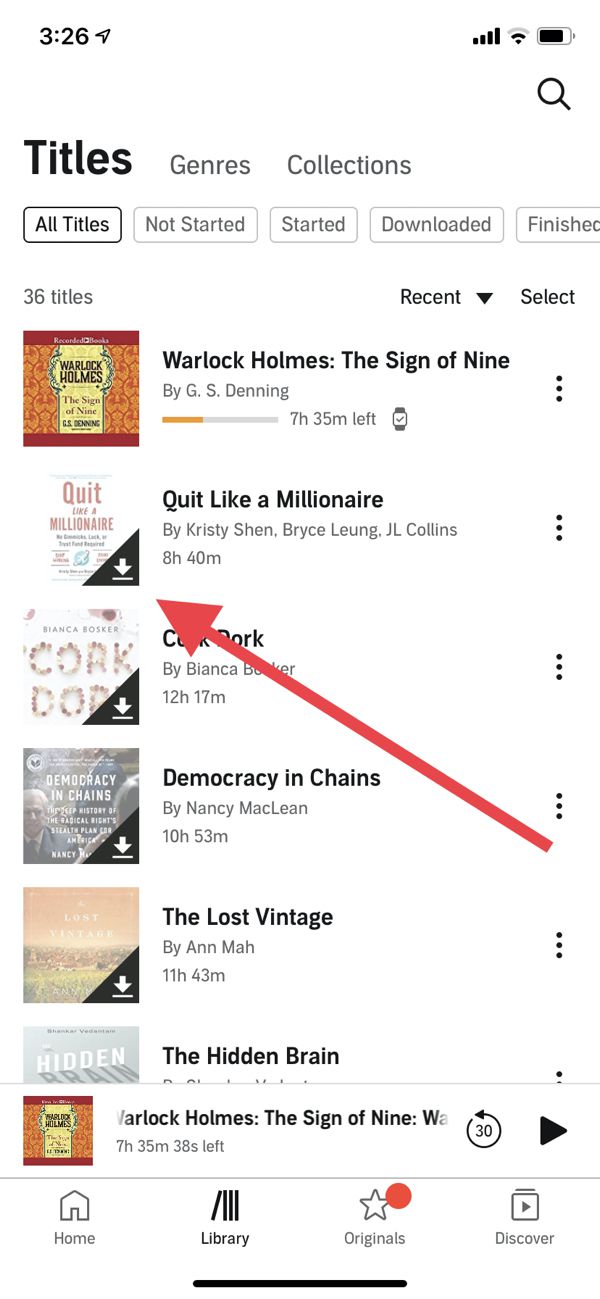
この方法は有効ではあるものの、DRM(デジタル著作権管理)のため、再生はAudibleアプリに限定されてしまう。
パート3。Audibleの書籍をオフラインで聴く Winダウズ/マック
多くのユーザーはコンピューターでAudibleのオーディオブックをオフラインで聴きたいと思っています。しかし、今年の状況は以前とは異なります。Audibleはもはや完全にサポートされたデスクトップアプリを提供していません。 Winダウズ。したがって、Audible のオフライン再生を実現しようとしている場合は、 Winダウズの場合、公式の選択肢は極めて限られています。
Macユーザーにとってこれは非常に便利です。AudibleはApple Booksに深く統合されているからです。「Audible」という別のアプリをダウンロードする必要はありません。ブラウザでAudibleのウェブサイトにアクセスし、書籍タイトルの横にある「ダウンロード」をクリックするだけです。ダウンロードが完了したら、MacのApple Booksで直接開くことができます。
パート4:あらゆるデバイスでAudibleのオーディオブックをオフラインで聴く
Audibleの真のオフライン自由、つまりあらゆるデバイスでどこでも聴く自由を求めるなら、DRM保護を解除する必要があります。 DumpMedia 可聴コンバーター に入っています。
使い方 DumpMedia Audible Converterでは、以下のことが可能です。
- AudibleオーディオブックからDRM*を解除する
- Audibleブックを変換する MP3 またはその他の形式
- 書籍は永久保存してください
- どのデバイスでも聴くことができます: 電話、 MP3 プレーヤー、コンピューター、または自動車システム
使用することにより、 DumpMediaオーディオブックを完全にコントロールし、Audibleアプリの制限を解消できます。これは、コンテンツを真に所有したい人にとって最も信頼できるソリューションです。Audibleオーディオブックをオフラインで再生するためのガイドを見てみましょう。 DumpMedia.
ステップ 1: ダウンロードしてインストール DumpMedia Audible Converter。PC版とMac版が利用可能です。 DumpMedia次に、Audibleタブに移動してください。
ステップ2.Audibleライブラリから変換したい書籍を選択します。
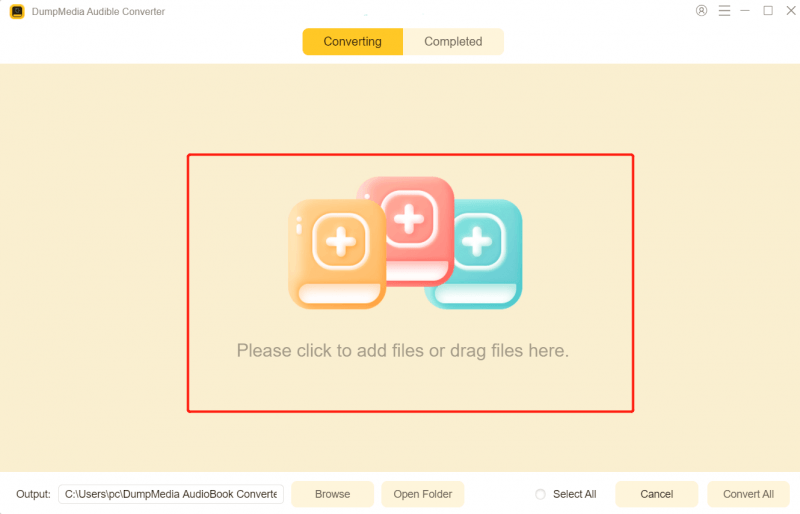
ステップ3.出力設定を選択し、変換を開始します。

ステップ4.変換を完了し、出力ファイルを確認します。

これは、すべてのデバイスで真のAudibleオフラインリスニングを実現するための最も信頼性の高いソリューションです。
パート5。よくある質問
アプリを使わずにAudibleをオフラインで聴くことはできますか?
はい、ただし、次のようなツールでオーディオブックを変換することによってのみ可能です。 DumpMedia 可聴コンバーター。
変換によって音質に影響はありますか?
いいえ。 DumpMedia 変換時に劣化のない品質を維持します。
変換したファイルはどのデバイスでも再生できますか?
Yes. MP3 ファイルは、携帯電話、タブレット、 MP3 プレーヤー、コンピューター、カーオーディオシステム。
Audibleを解約すると、購読している本は失われますか?
購入した書籍はライブラリに残りますが、変換を行わない限り、オフライン再生はAudibleアプリに限定されます。
パート6。 概要
認証されたデバイスではAudibleをオフラインで聴くのは簡単ですが、DRMによって柔軟性と自由度が制限されます。どのデバイスでも永続的にオフラインアクセスするには、 DumpMedia Audible Converterは最適なソリューションです。Audibleの書籍を変換できます。 MP3 オフラインでもあらゆるデバイスで再生できます。DRMにリスニング体験を制限されないでください。今すぐオーディオブックをコントロールして、いつでもどこでもお楽しみください。
*DumpMedia このサービスは、オーディオブックを復号化してDRMフリーのファイルとしてダウンロードすることで、あらゆるデバイスでライブラリのクリーンで制限のないコピーを入手できるようにします。