


iTunes映画からDRMを無料で削除する方法:2026年でも通用する秘訣とは?
AppleはiTunesムービーにDRM保護を採用し、再生権限と著作権へのアクセスを制御しています。そのため、保護されたM4Vムービーファイルには、再生制限、デバイス制限、オフライン視聴の問題などが生じることがよくあります。このガイドでは、iTunesムービーからDRMを無料で解除する現状、ほとんどの無料DRM解除ツールがもはや正常に動作しない理由、そしてAppleユーザーが現在DRM保護されたメディアをどのように管理しているかについて説明します。
目次ガイドパート1. iTunesムービーのDRMとは?パート2. iTunesムービーのDRM解除はまだ可能か?パート3. Apple MusicのDRM解除はまだ可能か? パート4. Apple Musicのオフライン再生のためのより良い解決策パート5. よくある質問パート6. まとめ
パート1:iTunesムービーDRMとは?
iTunes映画からDRMを無料で解除する方法を理解するには、まずAppleのDRMがどのように機能するのかを理解することが重要です。
AppleのDRMがiTunesムービーをどのように保護しているか
Appleは多くのiTunes映画の購入およびレンタルにDRM技術を適用しています。この保護システムはAppleに以下のメリットをもたらします。
- 不正な共有を防止する
- 再生権限を制御する
- サポートされていないデバイスを制限する
- 著作権で保護されたコンテンツを保護する
保護されたM4Vファイルとは何ですか?
iTunesの映画の多くは、保護されたM4Vファイルとして保存されています。標準的なMP4ビデオとは異なり、保護されたM4Vファイルは、Appleが承認したプラットフォームでのみ再生できます。
DRMが再生を制限する理由
DRM保護は多くの場合、以下の点を制限する。
- ファイル転送
- オフライン再生
- デバイスの互換性
- 永久アクセス
- サードパーティ製プレイヤーのサポート
そのため、多くのユーザーがiTunes映画からDRMを無料で解除する方法を探し始めるのです。
パート2:iTunesムービーからDRMを解除することは今でも可能か?
多くのユーザーは、iTunesムービーのDRMを無料で解除する方法が今でも有効なのか疑問に思っています。数年前には、保護されたiTunesムービーファイルのロックを解除できると謳う無料のDRM解除ツールがいくつか存在しました。中にはM4Vファイルを変換しようとするツールもありました。しかし現在では、多くの無料DRM解除ツールはもはや正常に機能しません。AppleはDRMシステムを定期的に更新しているため、古いツールは時代遅れになったり、互換性がなくなったりするのです。
パート3:Apple MusicからDRMを削除することはまだ可能か?
はい、それは確かに可能ですが、その「方法」に関する技術的な定義は変わりました。ストリーミングアプリから直接ダウンロードした暗号化ファイル(.m4p)からFairPlay暗号化レイヤーをファイル自体を変更せずに取り除く、真のDRM解除は、今日では事実上不可能です。最新のデスクトップOSやiTunes/Apple Musicの最新バージョンでは、こうした復号化の仕組みが厳重にロックダウンされています。
実際には、人々がApple MusicからDRMを削除すると言うとき、それはDRMフリーのコピーをダウンロードするか、専用ソフトウェアを使用してストリーミングをキャプチャすることを指している。
パート4:Apple Musicのオフライン再生のためのより良い解決策
オフラインでの音楽鑑賞をより柔軟に行いたいユーザー向けに、 DumpMedia Apple Music 変換 実用的なソリューションを提供します。映画のDRM解除ツールとは異なり、このソフトウェアはApple Musicのオーディオ管理とオフライン再生に特化して設計されています。このプロフェッショナルなコンバーターはユーザーをサポートします。 Apple Music をに変換する MP3 そして、Apple Musicアプリに完全に依存することなく、安定したオフライン再生のためにそれらを保存します。
なぜ使うの? DumpMedia Apple Music Converter?
- 🎶Apple Musicをダウンロードして MP3WAV、FLAC、AAC
- 🎶オリジナルの音質を維持
- 🎶プレイリストとアルバムを一括ダウンロード
- 🎶高速変換速度
- 🎶楽曲のメタデータとID3タグを保持
- 🎶あらゆるデバイスでオフライン再生に対応
ストリーミングの制限に不満を感じているユーザーにとって、ローカルでの音楽再生ははるかに便利な体験となることが多い。Apple Musicアプリがデバイスで動作しない場合でも、別の音楽プレーヤーでApple Musicをオフラインで再生できる。
Apple Musicの楽曲をダウンロードしてオフラインで再生する
ステップ 1: ダウンロードしてインストール DumpMedia Mac/PCにApple Music Converterをインストールしてください。起動するとインターフェースが表示されます。Apple Musicアカウントでログインしてください。
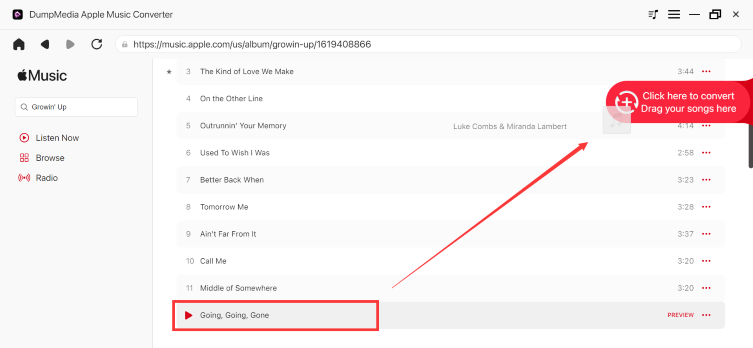
ステップ2:変換したいプレイリスト、アルバム、または特定の曲を探します。画面右側の「+」アイコンに曲をドラッグすることもできます。または、プレイリスト/アルバム全体を開き、「変換に追加」アイコンをクリックして、リスト全体をコンバーターに読み込むこともできます。
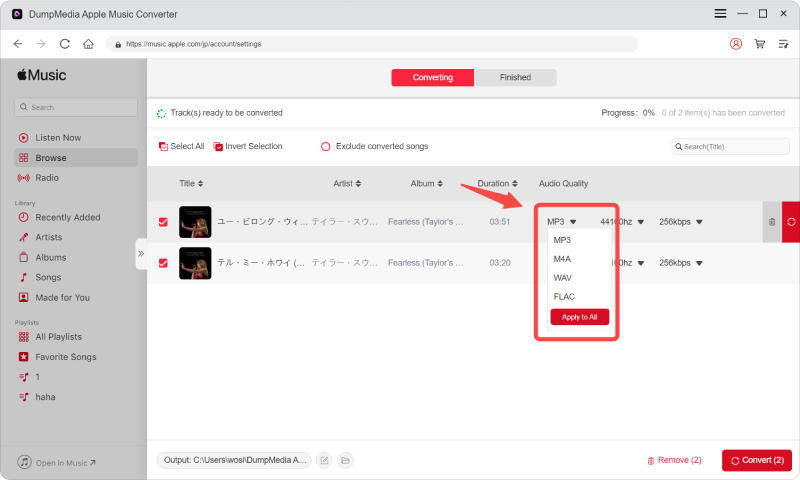
ステップ 3: 選択 MP3 (最も互換性が高い)また、ビットレートまたはサンプリングレートを変更することもできます。最適なバランスを得るには、320kbpsを選択してください。
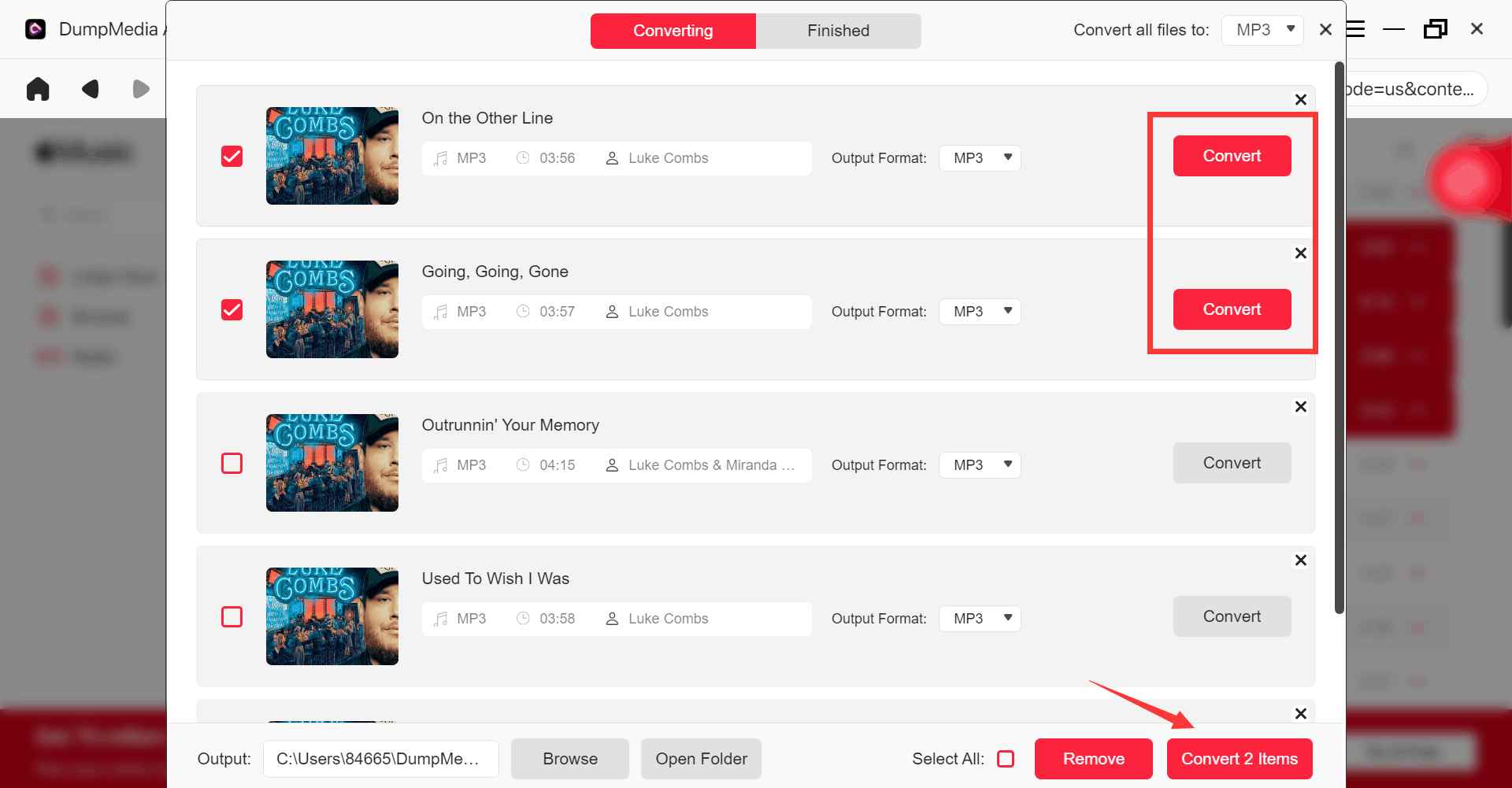
ステップ 4: 設定が完了したら、ユーザーは「変換」アイコンをクリックして変換処理を開始できます。 DumpMedia Apple Musicの曲を変換します MP3 その超高速性により、数秒以内に。
パート5。よくある質問
iTunesの映画からDRM(デジタル著作権管理)を解除することは可能ですか?
以前はiTunesムービーからDRMを解除しようとするツールもあったが、AppleのDRMアップデートにより、多くの無料ソリューションはもはや正常に動作しなくなっている。
無料のDRM解除ツールが動作しなくなるのはなぜですか?
AppleはDRMシステムを頻繁にアップデートするため、古いツールは互換性がなくなります。
保護されたM4Vファイルとは何ですか?
保護されたM4Vファイルは、再生制限がかけられたDRM保護付きのiTunesムービーファイルです。
Apple MusicもDRMを使用していますか?
はい。Apple Musicの楽曲には、DRM(デジタル著作権管理)に関連した再生制限が含まれている場合があります。
Apple Musicはオフラインでも制限なく再生できますか?
多くのユーザーが DumpMedia Apple Music Converterを使えば、より柔軟なオフライン再生が可能になります。
パート6。 概要
iTunesムービーからDRMを無料で解除する方法を探している多くのユーザーは、最終的にはDRMで保護されたメディアによって引き起こされる再生制限、オフライン視聴の問題、およびデバイス互換性の制限を解決しようとしています。iTunesムービー向けの無料のDRM解除ソリューションは信頼性が低下しつつありますが、AppleエコシステムのDRM制限は、今日でも多くのデジタルコンテンツに影響を与えています。
Apple Musicのオフライン再生と柔軟なローカル再生に重点を置くユーザー向けに、 DumpMedia Apple Music Converterは、音楽を標準的なオーディオ形式にダウンロードして、複数のデバイスでオフライン再生するための便利なソリューションを提供します。
*DumpMedia このツールは、Apple Musicの楽曲を復号化してDRMフリーのファイルとしてダウンロードすることで、あらゆるデバイスでライブラリのクリーンで制限のないコピーを入手できるようにします。ただし、ローカルオーディオファイルのDRM解除機能は含まれていません。