


AppleMusicをに転送する方法 Spotify (3つの作業方法)
Apple Musicを転送する方法をお探しですか? Spotifyおそらく、プレイリスト、曲、または音楽ライブラリ全体をコレクションを失うことなく移動しようとしているのでしょう。しかし、多くのユーザーはすぐにイライラする点に気づきます。Apple Music の曲は直接転送されないのです。 Spotifyこのガイドでは、その理由を正確に説明し、さらに重要なことに、3つの有効な方法を用いてどのように解決するかを示します。
コンテンツガイド Apple Musicを転送できますか? Spotify 直接?方法1:Apple Musicを変換してアップロードする Spotify (最良の方法)方法2:Apple Musicを転送する Spotify on Winダウズとマック方法3:Apple Musicを転送する Spotify モバイルでよくあるご質問結論
Apple Musicを転送できますか? Spotify 直接?
簡単に言うと、いいえ、Apple Musicを直接転送することはできません SpotifyApple Musicから曲をダウンロードしたとしても、それらは標準的なオーディオファイルではありません。 Spotify 認識できる。
Apple Musicを転送できない理由 Spotify
主な理由は DRM(デジタル著作権管理) 保護のため、Apple Musicの楽曲は暗号化され、Appleのエコシステムにロックされています。そのため、ダウンロードしたファイルは通常どおりアクセスできません。 MP3 ファイル。 Spotify一方、ローカルオーディオファイルのみをサポートしています(MP3、WAV、AAC)。つまり、Apple Music の曲を単純にエクスポートしてインポートすることはできません。 Spotifyこれは、Apple Musicを転送する方法を学ぶ際の最大の障壁です。 Spotify.
方法1:Apple Musicを変換してアップロードする Spotify (最良の方法)
Apple Musicを転送する方法 Spotify? もしあなたが 100% 動作が安定しているソリューションとして、Apple Music の曲を標準フォーマットに変換してからアップロードする必要があります。 Spotify次のようなツールを使用することで DumpMedia Apple Music 変換DRM制限*を完全に回避するには Apple Musicのプレイリストを高品質に変換する MP3WAV または AAC ファイル。この方法では、トラックをローカルに保存し、直接インポートできます。 Spotify ローカルファイルとして保存することで、ライブラリがプラットフォームを問わず破損することなく正常に機能し、オリジナルのオーディオ品質も維持されます。
より多くの機能
- 音楽を永久に保存する
- プレイリスト全体をまとめてダウンロードする
- ID3タグ(アーティスト、アルバム、タイトル)を保持する
- 高音質のオーディオ出力をお楽しみください
ステップバイステップガイド
Apple Musicを転送する方法 Spotify? これを使用するための簡単なガイドを以下に示します DumpMedia Apple MusicConverter。
ステップ1: ソフトウェアをダウンロードしてコンピューターにインストールしてください。 WinWindowsとMacに対応しています。インターフェースはユーザーフレンドリーで、初心者でも簡単に使えます。
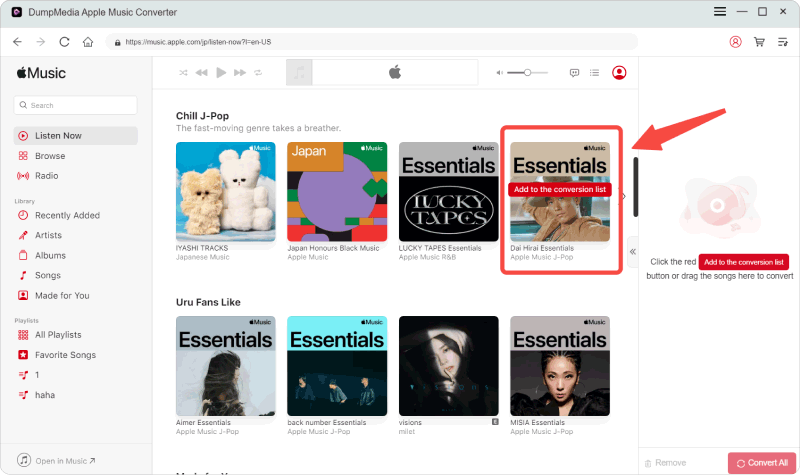
ステップ2: 内蔵のApple Musicウェブプレーヤーを開く DumpMedia Apple Musicアカウントでログインしてください。Apple Musicを閲覧し、ダウンロードしたい曲、アルバム、またはプレイリストをコンバーターにドラッグ&ドロップしてください。
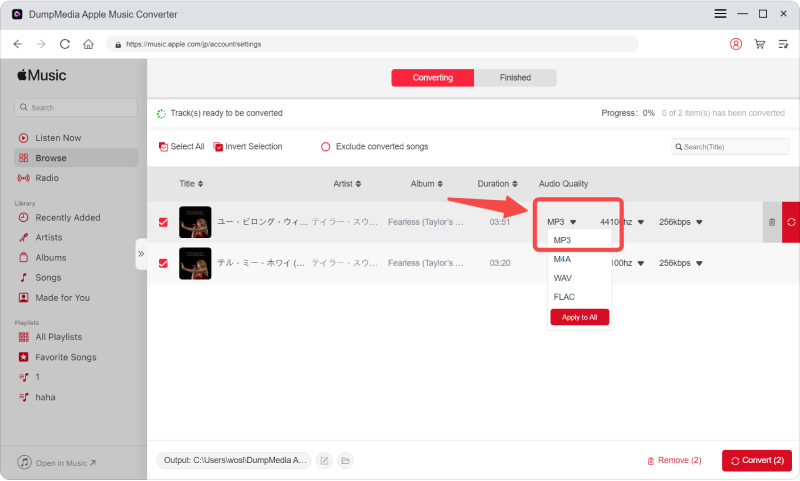
ステップ3: 設定パネルで、 MP3 出力形式として MP3 選択したトラックをダウンロードします。
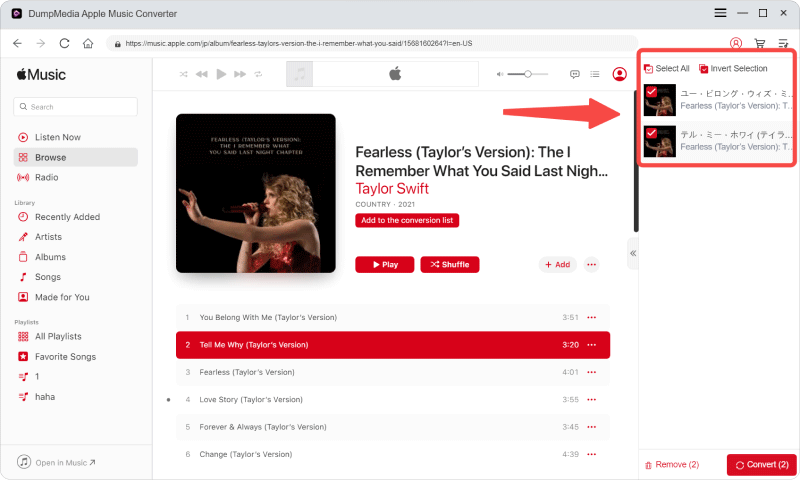
ステップ4: [変換]をクリックし、処理が完了するまで待ちます。
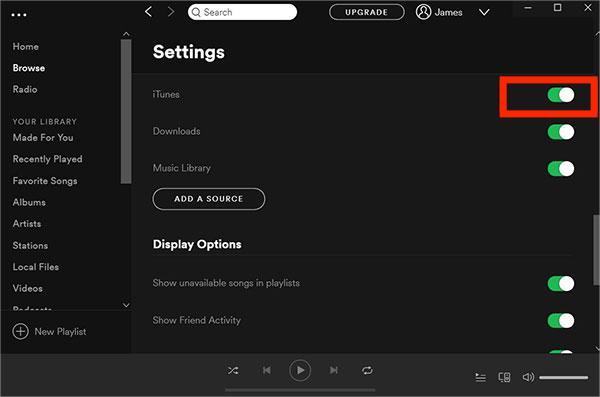
ステップ5: 店は開いています Spotify設定 → ローカルファイルに移動します。「ローカルファイルを表示」を有効にします。変換した音楽フォルダを追加します。
Apple Musicを転送する方法を真剣に考えているなら Spotifyこれが最も信頼できる解決策です。
方法2:Apple Musicを転送する Spotify on Winダウズとマック
Apple Musicを転送する方法を解決する別の方法 Spotify プレイリスト転送ツールを使用しています。Any Music Converterには プレイリスト転送 プラットフォーム間で曲をマッチングできる機能。この方法は、Apple Musicと Spotify アカウントと転送プレイリストは自動的に連携されます。
ステップバイステップガイド
ステップ1: 店は開いています DumpMedia お使いのコンピュータにAny Music Converterをインストールしてください。初心者でも簡単に変換できるよう設計された、シンプルで直感的なインターフェースが表示されます。
ステップ2:ツール>プレイリスト転送を選択します。
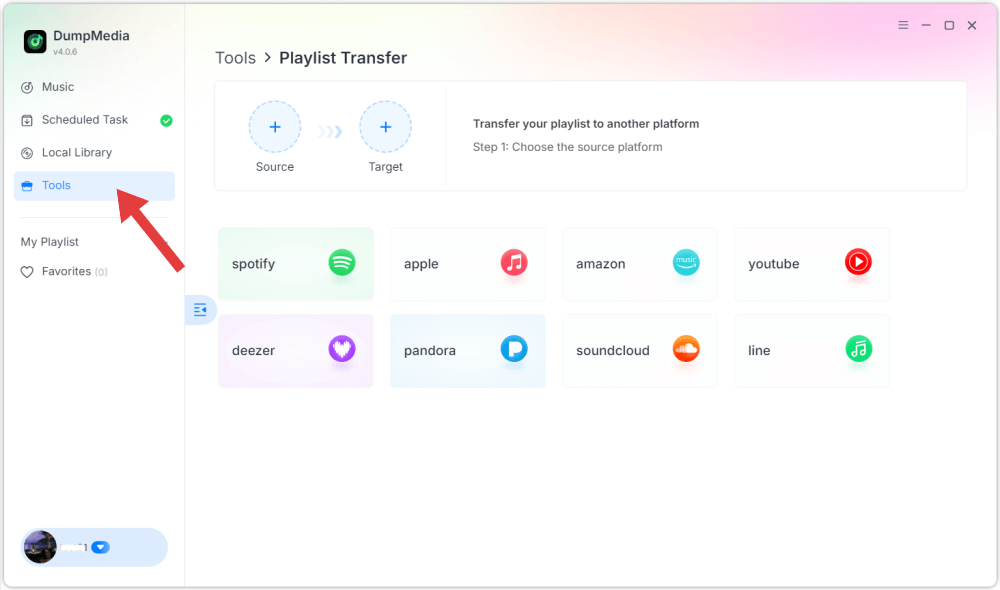
ステップ3:ソースとしてApple Musicを選択します。
ステップ4: 選択 Spotify プレイリストを移動したいプラットフォームとして指定します。
ステップ5: Apple Musicから転送したいプレイリストを見つけます Spotify そして、移動したいプレイリストをすべて選択します。
ステップ6: 移行プロセスを開始します。ツールは曲を自動的に照合して転送します。「移動」をクリックしてください。 Spotifyプレイリストは新しいサービスに移動されました。新しい音楽ストリーミング サービスをお楽しみいただけます。
優位性
- 高速かつ自動化
- ファイル変換は不要です
- 初心者にも簡単
デメリット
- マッチングは必ずしも正確ではない
- 曲がいくつか欠落している可能性があります
- 依存する Spotify 賃貸条件の詳細・契約費用のお見積り等について
方法3:Apple Musicを転送する Spotify モバイルで
Apple Musicを転送する方法 Spotify モバイルデバイスを使用していますか?モバイルファーストのアプローチを好む方にとって、専用アプリを使用することは、スマートフォンからプレイリストを直接転送する便利な方法です。SongShift、FreeYourMusic、Soundiizなどの人気ツールは、両方の音楽サービスに同時に接続することでプロセスを簡素化します。リンクされると、これらのアプリはプラットフォーム間で曲をスキャンして一致させ、ライブラリ全体を自動的に再構築します。 Spotify コンピューターは不要です。
ステップバイステップガイド
ステップ1: iOS App StoreからSongShiftをダウンロードします。iPhoneで、「設定」>「ミュージック」に進み、「ライブラリの同期」がオンになっていることを確認してください。
ステップ2: SongShiftを開き、「音楽サービスを接続」ボタン(または設定アイコン)をタップします。リストからApple Musicを探し、「接続」をタップして、アプリがライブラリにアクセスすることを承認します。
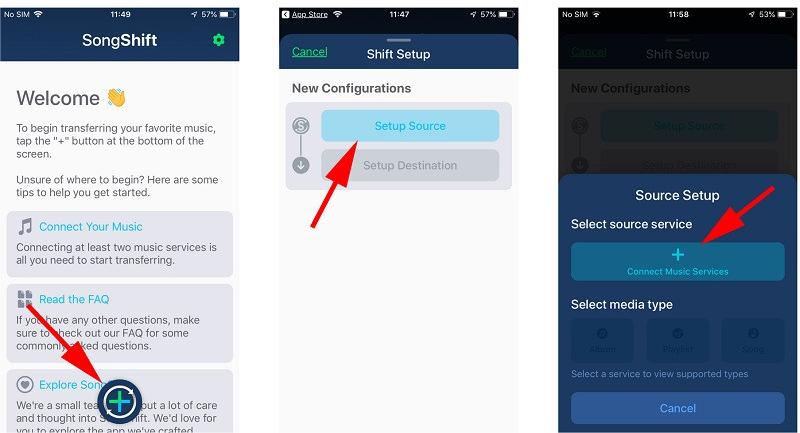
ステップ3: これを繰り返して Spotifyログインして権限に同意する。
ステップ4:メイン画面上部の「+」(プラス)アイコンをタップして、新しい「Shift」を開始します。
ステップ5: [ソースの設定]をタップし、[Apple Music]を選択します。メディアの種類(通常は[プレイリスト])を選択し、移動したい特定のプレイリストを選択します。
ステップ6: 「設定先」をタップして選択 Spotify.
ステップ7:アプリの処理を開始するには、「完了しました」をクリックしてください。
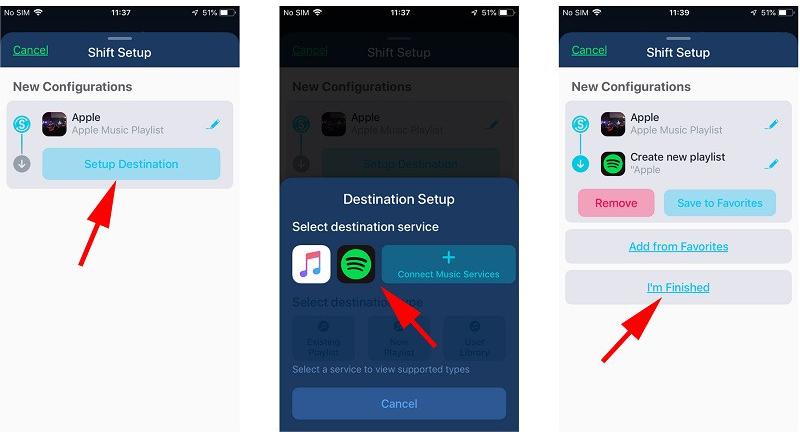
ステップ8: 満足したら、「一致を確認」をタップします。曲はあなたの Spotify としょうかん。
優位性
- コンピューターを使わずに音楽を完全に転送できます
- シンプルで段階的なインターフェース
- 転送を完了する前に、不一致を手動で修正できます。
デメリット
- DRMオーディオを転送できません
- マッチング精度は変動する
- 一部の機能には支払いが必要です
よくあるご質問
1. Apple Musicを転送できますか? Spotify 無料で?
はい、しかし無料ツールには制限がある場合が多く、すべての曲を転送できるとは限りません。
2. なぜ楽曲は異文化間でうまく伝わらないのか?
Apple Musicの楽曲はDRM(デジタル著作権管理)で保護されており、直接アクセスすることはできません。
3.缶 Spotify ローカルファイルをインポートしますか?
はい、 Spotify ローカルのファイルをインポートして再生できます MP3 ファイル。
結論
要約すると、Apple Musicを転送する方法を探している場合は、 Spotifyただし、DRM制限のため直接的な方法はないことを理解しておくことが重要です。プレイリスト転送ツールやモバイルアプリは迅速な解決策を提供しますが、トラックの欠落や不正確なマッチングなどの制限が伴うことがよくあります。最も信頼性が高く完全な方法は、Apple Musicを標準フォーマットに変換してアップロードすることです。 Spotify完全な制御とデータ損失ゼロを保証します。適切な方法を選択することで、音楽ライブラリを正常に移行し、シームレスなリスニング体験を楽しむことができます。 Spotify 制限なし。
*DumpMedia このツールは、Apple Musicの楽曲を復号化してDRMフリーのファイルとしてダウンロードすることで、あらゆるデバイスでライブラリのクリーンで制限のないコピーを入手できるようにします。ただし、ローカルオーディオファイルの変換機能は含まれていません。