


Spotify 沒有響應?預計 2026 年修復。
許多用戶都遇到過令人沮喪的問題,即 Spotify 沒有回應 在嘗試播放音樂、開啟播放清單或使用離線模式時,有時會發生這種情況。 Spotify 應用 播放過程中完全卡死、意外崩潰或停止工作。 Spotify 應用程式問題非常普遍。在本指南中,我們將解釋原因。 Spotify 突然停止工作,如何修復常見問題 Spotify 應用程式問題,以及如何享受更穩定的離線音樂播放。
內容指南 第 1 部分。 為什麼是 Spotify 應用程式無回應?部分2。 怎麼修 Spotify 應用程式無回應?第 3 部分。 避免的最佳方法 Spotify 播放問題第 4 部分。 常見問題解答部分5。 結論
第 1 部分。 為什麼是 Spotify 應用程式無回應?
為什麼有很多原因 Spotify 音樂播放或應用程式使用過程中無回應。
互聯網連接不佳
Spotify 串流媒體播放和帳戶驗證嚴重依賴穩定的網路連線。網路連線不穩定可能會導致 Spotify 凍結或停止反應。
損壞 Spotify 快取
暫存檔案儲存在內部 Spotify 隨著時間的推移,檔案可能會損壞,導致應用程式崩潰和播放問題。
過時的 Spotify 應用
舊 Spotify 版本可能包含觸發“Spotify “未響應”錯誤。
Spotify 伺服器問題
有時 Spotify 伺服器故障會影響全球用戶的播放和應用程式效能。
背景軟體衝突
防毒軟體、防火牆設定或硬體加速衝突也可能導致這種情況 Spotify 停止響應。
設備兼容性問題
較舊的作業系統或不受支援的裝置可能難以運行最新版本 Spotify 應用程式運行流暢。
以下是一些導致“Spotify 出現“無響應”問題。
部分2。 怎麼修 Spotify 應用程式無回應?
If Spotify 如果您的裝置沒有回應,請嘗試以下解決方案。
修復1.重啟 Spotify
完全關閉 Spotify 然後重新開啟應用程式。這個簡單的解決方法通常可以解決暫時的播放問題。
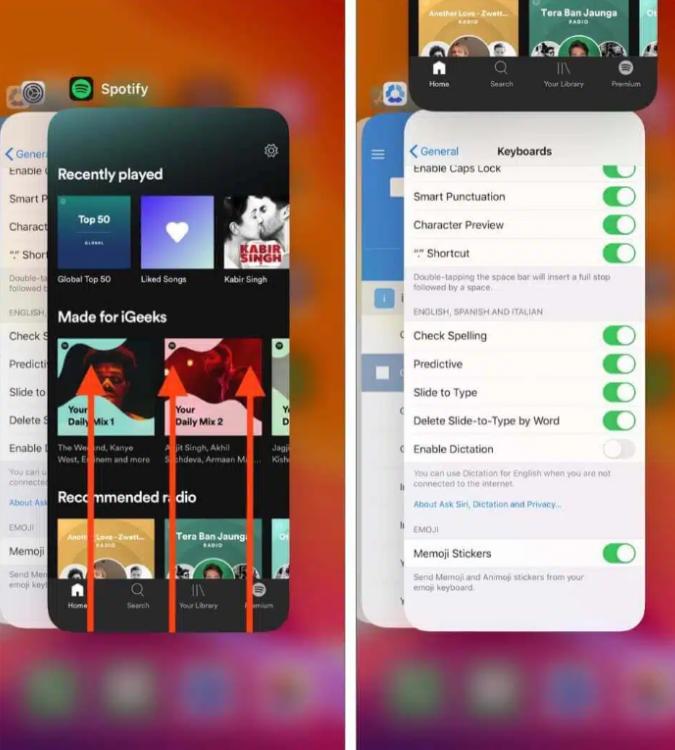
iOS(iPhone/iPad)系統: 從螢幕底部邊緣向上滑動,並在中間位置稍作停留(或在舊裝置上雙擊主螢幕按鈕)。找到 Spotify 預覽卡片並將其完全向上滑動並移出螢幕。
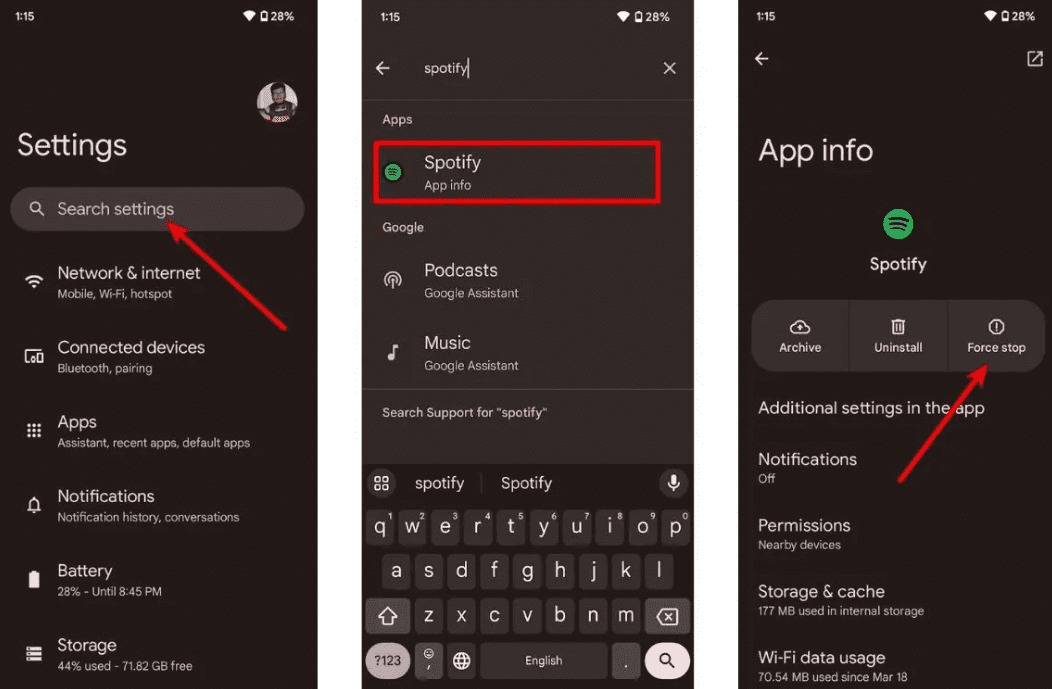
在Android上: 前往「設定」>「應用程式」> Spotify 然後點擊“強制停止”。這將終止所有後台掛起的任務。打開 Spotify 從您的應用程式抽屜中。
在 macOS 上: 點擊 Spotify 在頂部功能表列中選擇“退出”。 Spotify或直接點選窗口,然後按 Command (⌘) + Q。
On Win道瓊指數(10/11): 點擊左上角的“文件” Spotify 視窗並選擇“退出”(按右上角的“X”通常只會將其最小化到系統托盤,而不是關閉它)。
修復 2. 檢查您的網路連接
切換Wi-Fi和行動數據網絡,測試連線穩定性。
修復3.清除 Spotify 快取
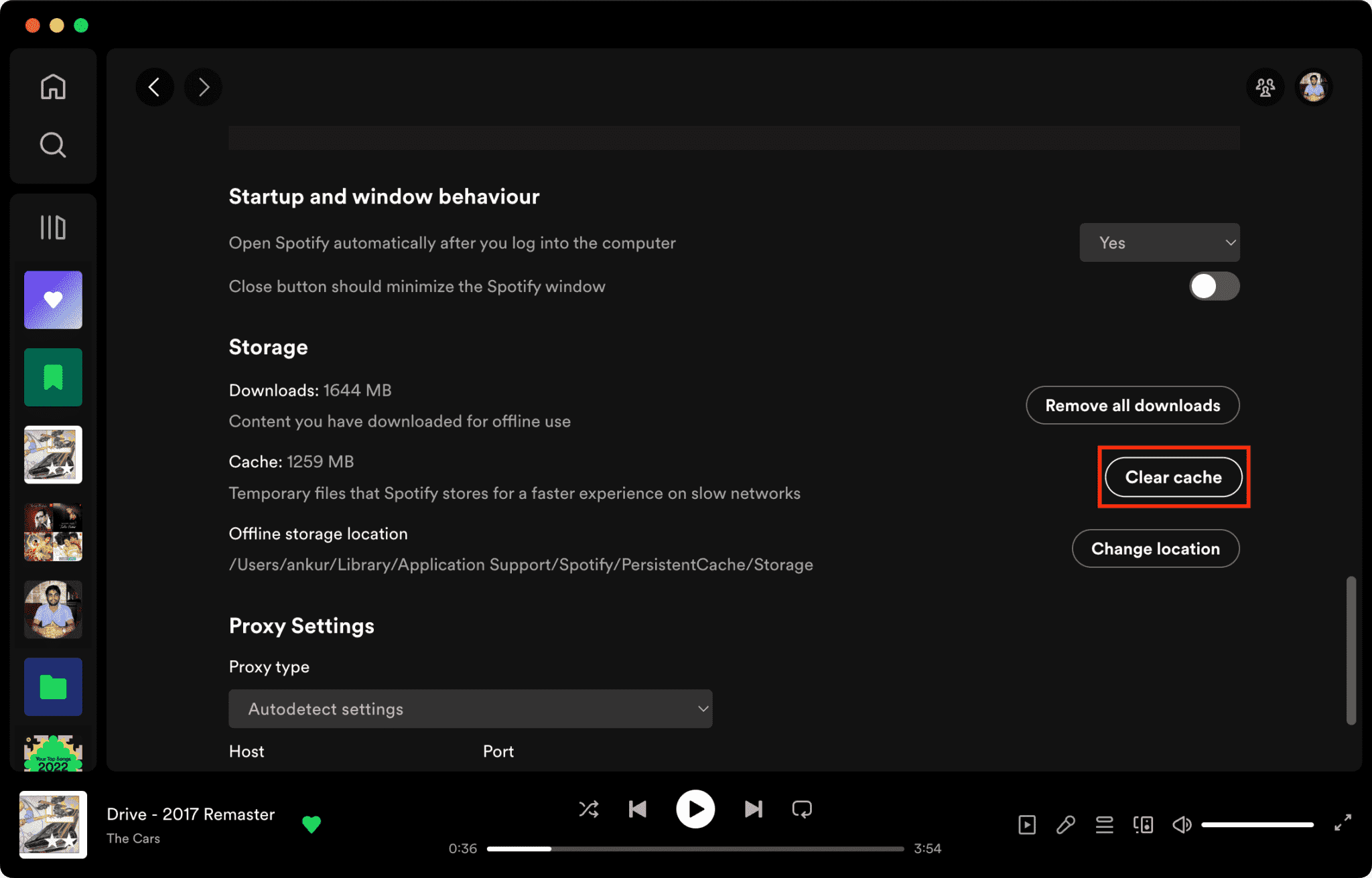
快取檔案損壞是造成這種情況的主要原因之一。 Spotify 沒有響應。
如何清除 Spotify Mac 上的快取/Windows/iPhone/Android >>>>
修復4.更新 Spotify 應用
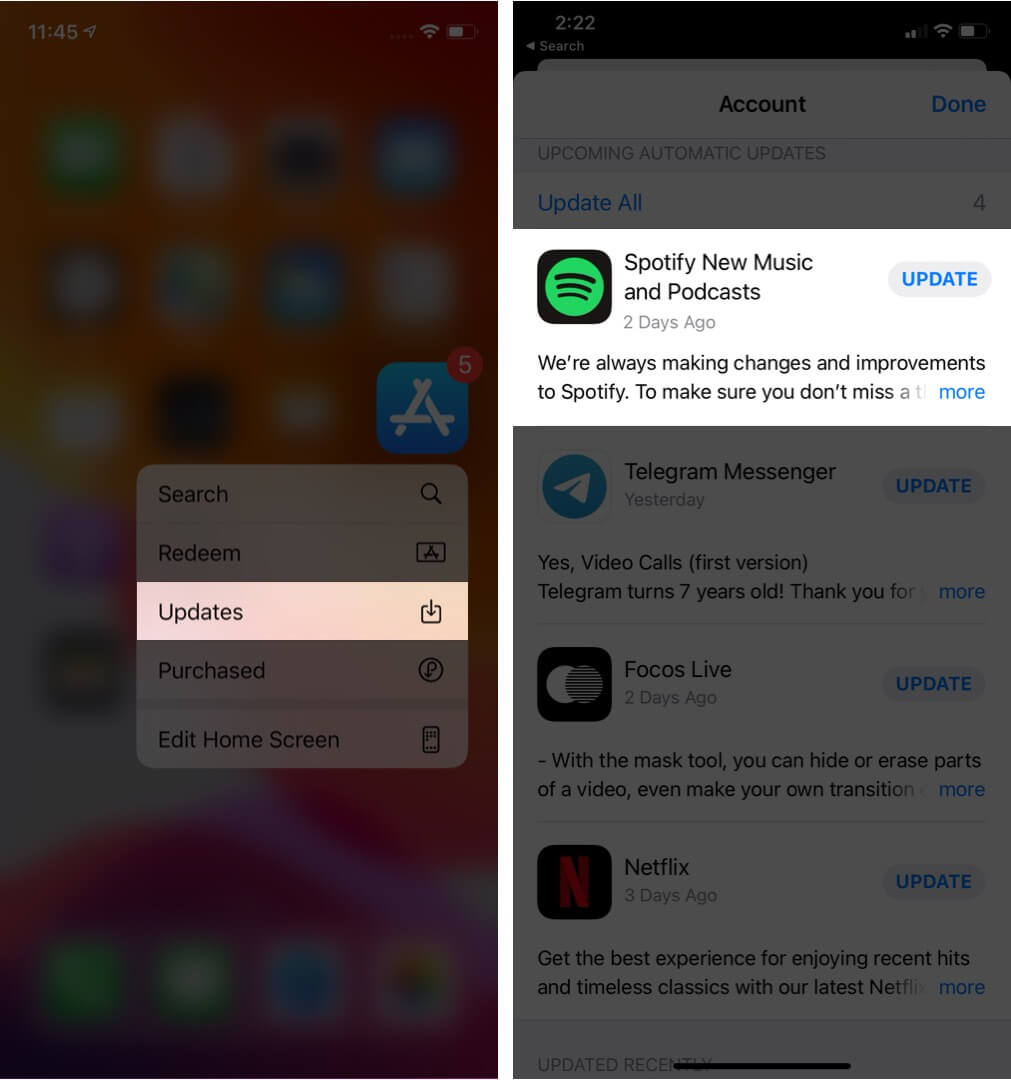
正在安裝最新版本 Spotify 此版本可能會修復已知的軟體漏洞。
修復 5. 重新啟動您的設備
重新啟動電腦或手機可以刷新系統資源。
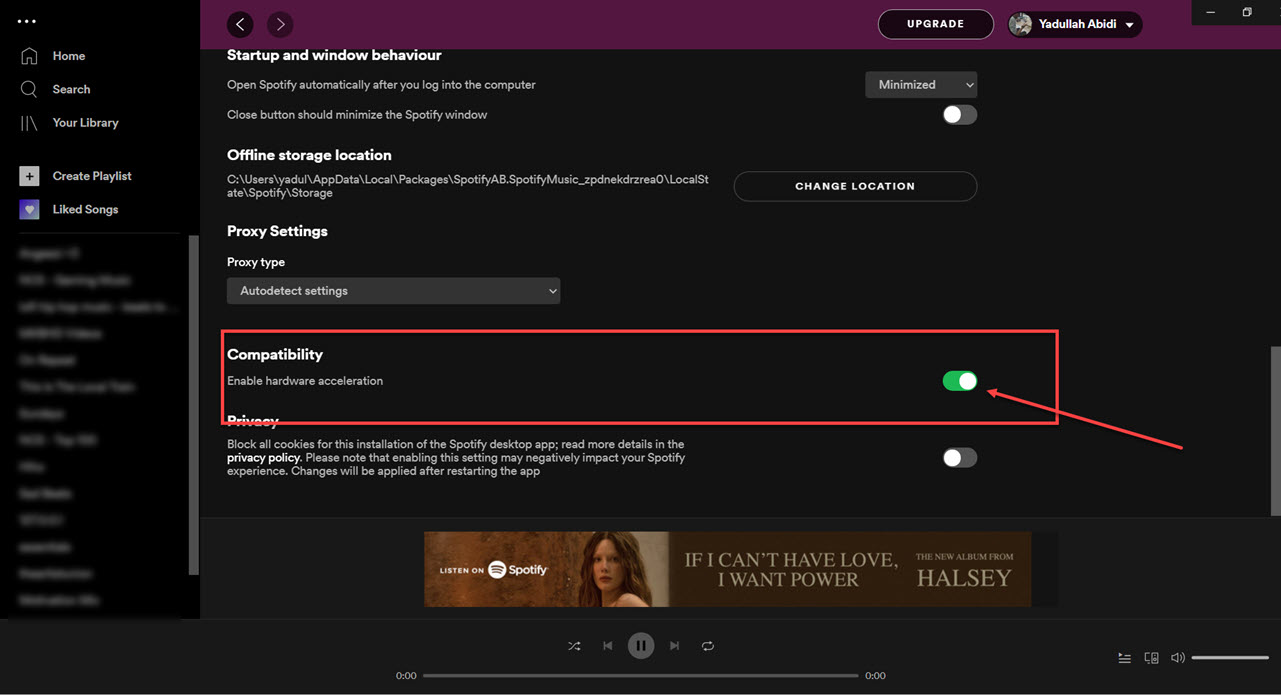
修復 6.禁用硬體加速
您可以停用硬體加速。這有時可以解決卡頓問題。
修復7.檢查 Spotify 服務器狀態
全球 Spotify 服務中斷偶爾會影響播放和登入服務。
第 3 部分。 避免的最佳方法 Spotify 播放問題
許多用戶認為已下載 Spotify 歌曲始終可以離線播放,但下載的歌曲仍受 DRM 保護,這意味著音樂只能在串流媒體應用程式內播放。下載的歌曲無法自由傳輸。如果您經常遇到“Spotify 當出現「無回應」問題時,常用的工具是 DumpMedia Spotify Music Converter該軟體允許用戶轉換 Spotify 將音樂轉換成本地音訊格式,以便更靈活地離線播放。即使 Spotify 您的裝置無法正常運作該應用,您可以 玩 Spotify 離線歌曲 立即切換到另一個音樂播放器。
🏆主要特點 DumpMedia Spotify Music Converter
- 免費下載 Spotify 音樂 MP3WAV、FLAC 和 AAC
- 移除 Spotify 數位版權管理保護*
- 保持原音質
- 批量下載播放清單和專輯
- 轉換速度快
- 保留歌曲元資料和 ID3 標籤
- 支援在任何裝置上離線播放
對於那些感到沮喪的用戶 Spotify 應用程式不穩定,但本地音樂播放通常感覺更可靠。
轉 Spotify 至 MP3 步步
步驟二 下載並安裝 DumpMedia Spotify Music Converter 在您的 Mac/PC 上啟動它,您將看到介面。使用您的 Spotify 用於登入的高級/免費帳戶。
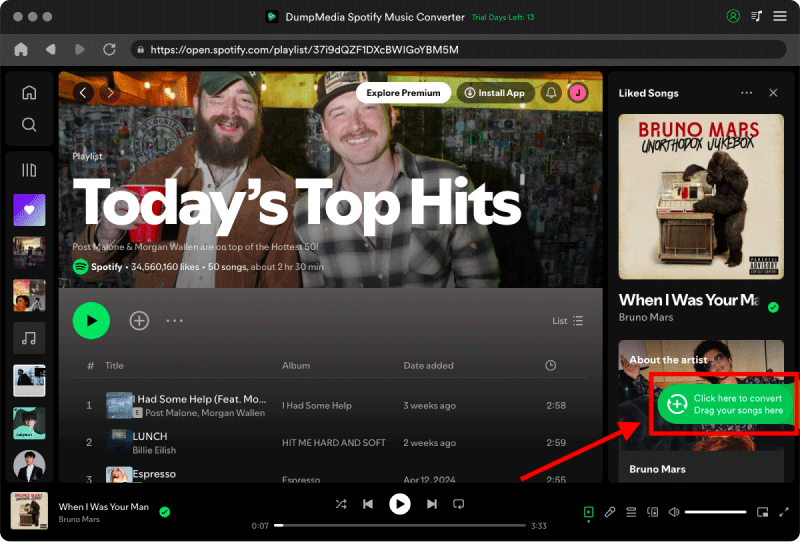
步驟 2:找到要轉換的播放清單、專輯或特定歌曲。您可以將單首歌曲拖曳到螢幕右側的“+”圖示上。或者,打開整個播放清單/專輯,然後點擊「新增到轉換」圖標,將整個清單載入到轉換器中。
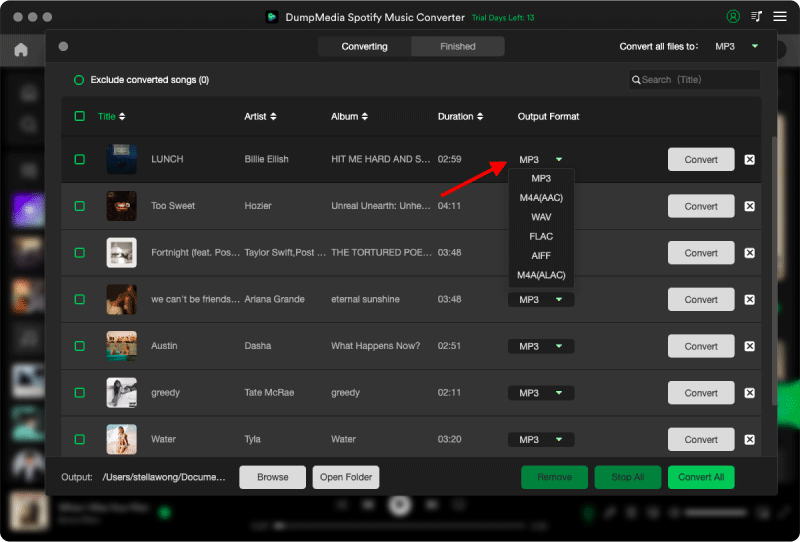
步驟二 選擇 MP3 (相容性最佳)。此外,您還可以變更位元率或取樣率。為了獲得最佳平衡,請選擇 320kbps。
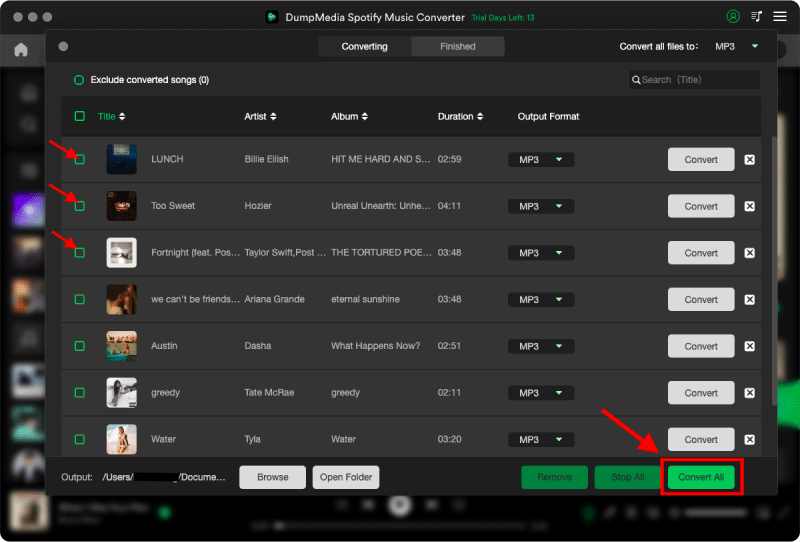
步驟二 設定完成後,使用者即可點選「轉換」圖示轉換。 DumpMedia 將下載 Spotify 歌曲 MP3 憑藉其超快的速度,只需幾秒鐘即可完成。
第 4 部分。 常見問題解答
為什麼 Spotify 沒有回應?
Spotify 可能因網路問題、快取檔案損壞、軟體過時或伺服器問題而停止回應。
為什麼 Spotify 繼續冷凍?
Spotify 卡頓問題通常與快取損壞或硬體加速衝突有關。
為什麼 Spotify 我的手機崩潰了嗎?
電話 Spotify 崩潰可能是由於儲存空間不足、應用程式版本過舊或軟體衝突引起的。
為什麼 Spotify 離線模式無法使用?
離線播放仍然取決於 Spotify 授權和應用穩定性。
Is DumpMedia Spotify Music Converter 安全?
是的。它專為 Spotify 音樂轉換和本地播放管理。
注意:串流媒體平台有自己的規則和監控系統。作為第三方工具, DumpMedia Spotify Music Converter 此外,還需遵守相關限制,這可能會在某些情況下影響使用。 Spotify 如果偵測到違反其服務條款的活動,可能會採取行動;這完全由其自行決定。 Spotify的自由裁量權。
部分5。 結論
“”Spotify 「未回應」問題可能是由網路不穩定、快取檔案損壞、軟體過時或其他原因造成的。 Spotify 應用程式出現問題。雖然許多臨時解決方法可以幫助恢復播放, Spotify 串流媒體播放仍然嚴重依賴應用程式的穩定性和線上驗證。對於想要更穩定的離線收聽的用戶來說, DumpMedia Spotify Music Converter 提供了一種實用的轉換方法 Spotify 歌曲融入當地 MP3 文件可在各種裝置上靈活播放。
*DumpMedia 工作原理是透過解密和下載 Spotify 將歌曲轉換成無 DRM 保護的文件,讓您可以在任何裝置上取得乾淨、無限制的音樂庫副本。此功能不包括移除本機音訊檔案的 DRM 保護。