


如何播放音樂 MP3 玩家來自 Spotify 被回收
如何放音樂 MP3 玩家來自 Spotify 仍然是最常見的問題之一 Spotify 用戶,主要是因為 Spotify 不允許直接下載到任何位置 MP3 由於設備 DRM如果您嘗試傳輸下載的文件 Spotify 曲目,大部分 MP3 玩家將無法認出他們。
為了克服這個限制,你需要一個可以轉換的工具。 Spotify 將音樂轉換成標準音訊格式,例如 MP3. DumpMedia Spotify Music Converter 這是完成這項任務最可靠的解決方案之一。如果您的目標是移動您的 Spotify 將音樂庫轉換到便攜設備以供離線收聽,此轉換器提供了最快捷、最直接的方法。
內容指南 第一部分:為什麼你不能放 Spotify 歌曲上線 MP3 播放器?第 2 部分。 如何放置 Spotify 放音樂 MP3 播放器?第3部分。第4部分。
第一部分:為什麼你不能放 Spotify 歌曲上線 MP3 播放器?
Spotify 不允許使用者直接將歌曲傳輸到 MP3 因為所有玩家 Spotify 曲目受數位版權管理 (DRM) 保護。這種 DRM 加密技術可防止使用者複製、匯出或轉換音樂檔案。 Spotify將音訊檔案轉換為標準格式,例如 MP3即使你使用下載軟體下載歌曲 Spotify 高級 帳戶中,這些文件仍以鎖定的 OGG 格式保留,只有該帳戶才能存取。 Spotify 應用程式可以讀取。因此,傳統 MP3 播放器,尤其是非智慧型設備,無法辨識或播放這些加密檔案。
簡而言之,DRM系統確保 Spotify 音樂只能在…內播放。 Spotify的授權生態系。這就是為什麼只需拖曳 Spotify 歌曲 MP3 播放器永遠不會工作。
如何放音樂 MP3 玩家來自 Spotify要繞過這個限制,你需要一個能夠…的工具。 去除 Spotify的 DRM 保護 並將曲目轉換為通用格式。 DumpMedia Spotify Music Converter 正好實現了這個目的。它可以轉換 Spotify 將歌曲、專輯和播放清單轉換為無 DRM 保護的格式 MP3M4A、WAV 或 FLAC 文件,使其與任何播放器相容 MP3 播放器,讓您真正擁有離線音樂所有權。
第 2 部分。 如何放置 Spotify 放音樂 MP3 播放器?
如何放音樂 MP3 玩家來自 Spotify?在放入之前 Spotify 你的音樂 MP3 玩家,請確保您擁有 DumpMedia Spotify Music Converter 安裝。
DumpMedia Spotify Music Converter 越來越受歡迎 Spotify 聽眾欣賞其精彩的音樂下載服務。無論您是否是用戶 Spotify 免費或 Spotify 高級版用戶可以下載和 轉換 Spotify 歌曲、播放列表和專輯 MP3、AAC、ALAC、FLAC 或其他格式使用 DumpMedia更棒的是,即使您的訂閱到期,這些下載內容仍然可用。
逐步指南:如何放置 Spotify 放音樂 MP3 玩家
步驟二 開啟電腦上的軟體。它適用於兩者。 Win支援Windows和Mac系統。介面友好,即使是新手也能輕鬆上手。
步驟二 造訪 Spotify 選擇要轉換的歌曲、專輯或播放清單。軟體會自動偵測曲目。

步驟二 選擇與您的裝置相容的格式 MP3 玩家。常見選擇有 MP3支援M4A、WAV或FLAC格式。您還可以設定輸出品質和轉換速度。

步驟二 單擊“轉換”按鈕開始轉換過程。 DumpMedia Spotify Music Converter 將移除DRM並將所有選定曲目轉換為您選擇的格式。轉換過程中將保持高音質。

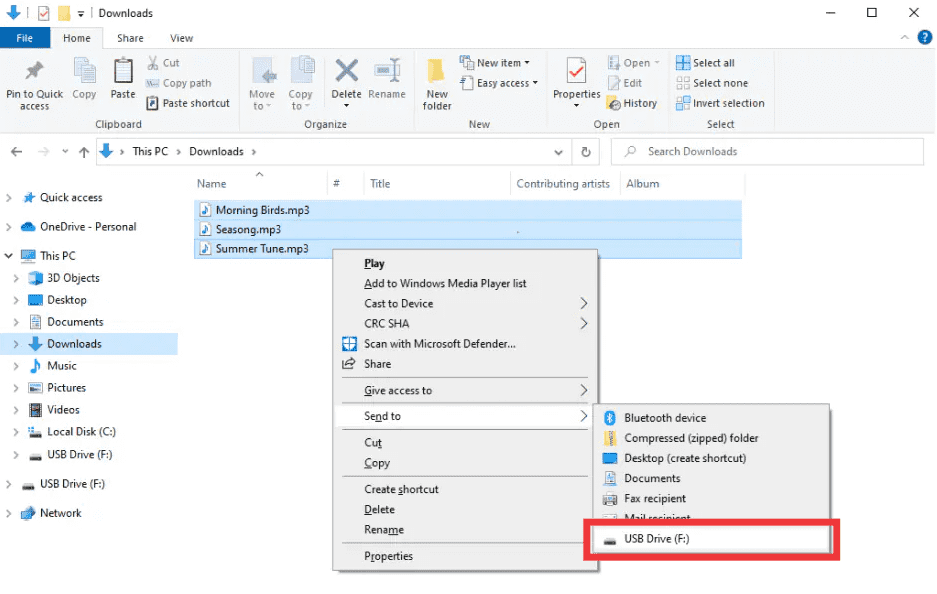
步驟二 如何放音樂 MP3 玩家來自 Spotify轉換完成後,找到輸出資料夾。連接您的 MP3 透過 USB 將播放器連接到電腦,然後複製轉換後的檔案。 Spotify 現在,音樂已準備好在任何裝置上離線播放。 MP3 設備。
第3部分。
1. 我可以放 Spotify 歌曲直接 MP3 球員?
序號 Spotify's 曲目受 DRM 保護,無法直接匯出。您需要一個轉換器,例如 DumpMedia Spotify Music Converter 使它們兼容。
2. 如何轉換 Spotify 播放列表到 MP3?
使用 DumpMedia Spotify Music Converter複製播放清單鏈接,選擇 MP3 將文件輸出並轉換。然後將文件傳輸到您的裝置。 MP3 播放器。
3. 轉換是否合法 Spotify 音樂?
轉換 Spotify 個人離線使用音樂通常是允許的。請勿將轉換後的文件分發給他人,這可能違反版權法。
4. 我可以使用哪些格式? MP3 球員?
MP3 是最常見的。 DumpMedia Spotify Music Converter 同時支援 M4A、WAV 和 FLAC 格式,與大多數設備相容。
5.我可以轉讓嗎 Spotify 音樂可以同時傳輸到多個裝置嗎?
是的。一旦轉換完畢 DumpMedia,你的 Spotify 歌曲不含DRM保護,可在任何裝置上播放。 MP3 播放器、手機或平板電腦。
第4部分。
如果你曾經想知道如何將音樂加入… MP3 玩家來自 Spotify解決方案很明確: Spotify的DRM技術阻止了直接傳輸,但是 DumpMedia Spotify Music Converter 移除這些限制。它將您最喜歡的歌曲、專輯或播放清單轉換為 MP3 或其他通用格式,保持高品質,並允許在任何裝置上離線播放。
嘗試 DumpMedia Spotify Music Converter 今天並享受 Spotify 隨時隨地享受音樂,不再受限,不再受DRM問題困擾。