如何從 Spotify: Download and Burn Spotify 播放列表

羅西(Rosie)撰寫

最後更新時間:2026年02月05日

2最小讀取

如果你想 刻錄 CD 從 Spotify, you will quickly discover that Spotify does not allow direct CD burning, even with a 高級訂閱. Spotify’s downloaded songs are encrypted and limited to playback only within the Spotify app. Because of this DRM protection, users cannot export songs as MP3 files or import them into CD-burning software.

The solution is to first convert Spotify tracks into a CD-compatible audio format using a reliable Spotify converter, and then use a disc-burning application to create your CD. This guide will walk you through the entire process, including recommended formats, detailed burning steps, and essential tips for the best audio results.

內容指南 Can You Burn a CD from Spotify 直接地?步驟1:轉換 Spotify Songs Before Burning (Using DumpMedia)第2步:刻錄 Spotify Songs to CD (Detailed Guide)常見問題結語

Can You Burn a CD from Spotify 直接地?

因為 Spotify's audio files use an encrypted Ogg Vorbis format and are protected by DRM (Digital Rights Management), neither free nor premium users can directly burn songs to a CD using the Spotify application, as traditional burning software cannot recognize this protected cached data.

To burn CD from Spotify, you must first download and convert the Spotify playlist using a third-party conversion tool into standard lossless audio formats such as MP3, WAV, or FLAC, thereby removing the platform restrictions. After the format conversion is complete, you can import these common audio files into Windows Media Player, iTunes, or other professional burning software, and finally burn them permanently onto a physical disc for free listening on car stereos or traditional players.

步驟1:轉換 Spotify Songs Before Burning (Using DumpMedia)

The most important step in learning how to burn CD from Spotify is converting the songs into a burnable format. DumpMedia Spotify Music Converter is commonly used because it supports MP3, WAV, FLAC, and other CD-compatible formats while retaining metadata.

免費下載 免費下載

主要特點

  • 刪除 DRM Spotify 歌曲 安全地建立播放清單。
  • 轉 Spotify 歌曲 MP3M4A、AAC、WAV 等格式。
  • 大量下載播放清單、專輯或整個音樂庫
  • 保持高音訊品質和 ID3 標籤
  • 在任何裝置上享受音樂,無需訂閱限制

如何轉換 Spotify 歌曲與 DumpMedia

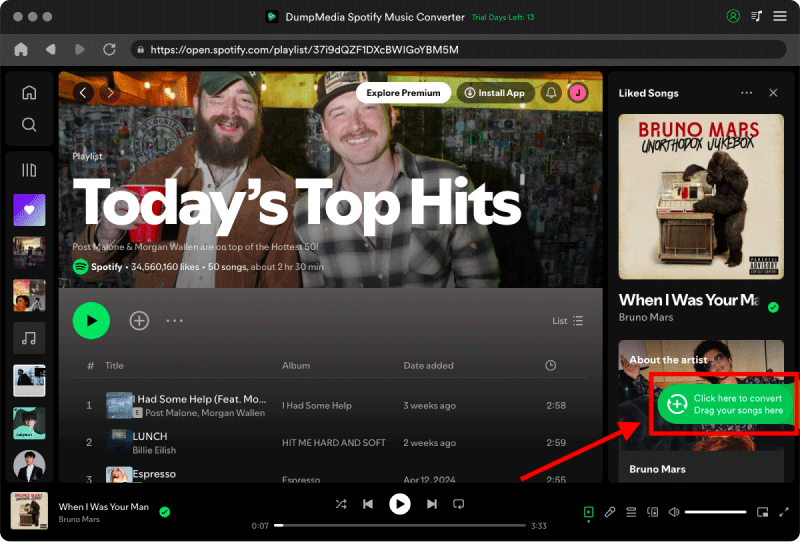
步驟二 安裝並啟動 DumpMedia Spotify Music Converter。 打開 Spotify and choose the song you want to burn to CD.

選擇 Spotify 歌曲

步驟二 Choose an output format: WAV (best for audio CD)/MP3 (最適合 MP3 CD)/FLAC (high-quality archive format)

轉 Spotify 歌曲來 MP3

步驟二 Click "Convert" to download your Spotify 歌曲。

轉 Spotify 歌曲

Once converted, your files are ready to burn to CD.

第2步:刻錄 Spotify Songs to CD (Detailed Guide)

現在你 Spotify tracks are converted, you can choose from three common burning methods:

Method 1: Burn CD from Spotify Using Music App (macOS)

步驟二 Open Apple Music. Go to File > New > Playlist. Drag your converted Spotify songs into the playlist.

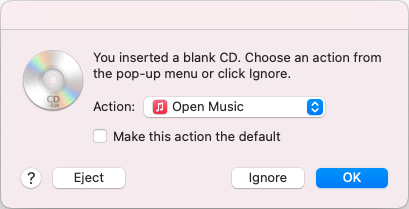
步驟二 Insert a blank CD-R or CD-RW. Right-click the playlist, and choose Burn Playlist to Disc.

Apple Music Insert CD

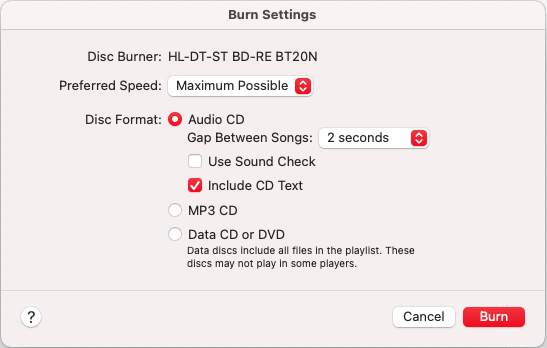
步驟二 Choose burn settings: Audio CD (standard CD for any CD player)/MP3 CD (only for MP3-compatible players)/Select Preferred Speed: 8x for fewer burning errors

Apple Music Audio CD

步驟二 Click Burn.

Method 2: Burn CD from Spotify 運用 Win陶氏媒體播放器

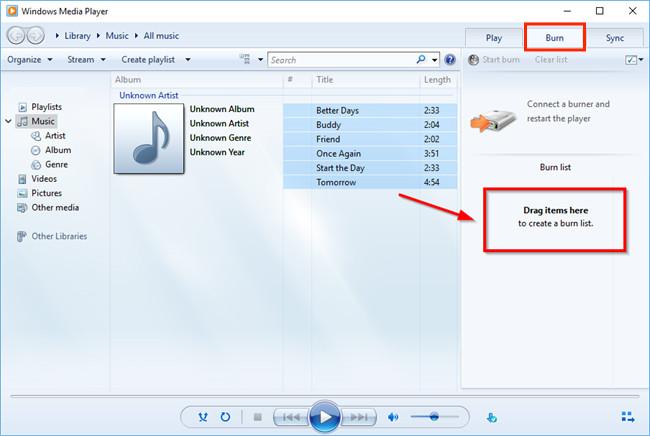
步驟二 未結案工單 Windows Media Player. Click the Burn tab. Insert a blank CD.

步驟二 Drag your converted Spotify files to the burn list.

燃燒 Spotify CD Win陶氏媒體播放器

步驟二 Choose burn type: Audio CD (for car stereos and CD players)/Data CD (MP3 CD for modern players)

步驟二 Click Start Burn.

Windows Media Player is ideal for Windows users because it is built-in and does not require extra software.

Method 3: Burn CD from Spotify Using Mac Finder

Finder supports basic CD burning without iTunes/Music App.

步驟二 Create a folder containing your converted Spotify songs. Insert a blank CD.

步驟二 Right-click the folder, and choose Burn to Disc.

步驟二 Choose burning speed. Confirm Burn.

This method is simple, but it does not create traditional audio CDs, it creates data CDs. For car stereos and older players, use the Apple Music app.

常見問題

Is It Legal to Burn CD from Spotify?

Burning CDs from Spotify music is allowed only for personal, private use. Sharing, selling, or uploading burned CDs is strictly prohibited.

Can I burn CD from Spotify without converting the songs?

No. Conversion is required because Spotify’s files are encrypted and incompatible with CD burners.

What format should I use to burn Spotify songs to CD?

Use WAV for audio CDs, or MP3 對於 MP3 光盤。

Why does iTunes say some songs can't be burned?

Most likely, the files are still DRM-protected or in the wrong format.

華盛頓蘋果 Spotify songs fit on a CD?

  • Audio CD: ~80 minutes (~20 songs).
  • MP3 CD: up to 700MB (~100–200 songs).

結語

Although you cannot directly burn CD from Spotify due to DRM restrictions, the process becomes simple once you convert your Spotify playlists into standard audio formats. DumpMedia Spotify Music Converter enables you to download your songs as MP3 or WAV files, making them fully compatible with CD-burning tools such as iTunes, Windows Media Player, and Finder.

By following the steps above, you can successfully burn CDs from Spotify, create audio discs for your car or home stereo, and preserve your favorite playlists offline without limitations.

免費下載 免費下載

註冊即可享 30% 折扣 註冊獲取
30% 折扣 >>>