如何將 Pandora 歌曲轉換為 MP3 in 2026: Step-by-Step Guide

羅西(Rosie)撰寫

最後更新時間:2026年05月12日

2最小讀取

Pandora is one of the most popular music streaming platforms, but its songs are often protected by subscription restrictions, preventing offline access and flexible playback. Many users ask: how to convert Pandora songs to MP3 so they can listen anywhere without worrying about subscription expiration. In this guide, we’ll explain why you might want to convert Pandora music to MP3, the best tools for the job, and a step-by-step process to get your music offline permanently.

內容指南 Part 1. Can You Directly Download Pandora Songs to MP3?Part 2. Best Tool to Convert Pandora Music to MP3Part 3. How to Convert Pandora Music to MP3 一步步?第4部分。部分5。 結論

Part 1. Can You Directly Download Pandora Songs to MP3?

Pandora allows offline listening for Premium users, but downloaded songs are tied to your account and subscription. Pandora (like Spotify and Apple Music) uses DRM(數字版權管理) to ensure you only listen as long as you have an active subscription. Offline tracks cannot be transferred to other devices or backed up permanently. To get Pandora songs into a physical MP3 format, you have to use unofficial methods.

Part 2. Best Tool to Convert Pandora Music to MP3

How to convert Pandora music to MP3? The most reliable solution is DumpMedia 潘多拉音樂轉換器. This tool helps users convert Pandora songs to MP3, FLAC, M4A, and WAV in one click. So you can save playlists locally and keep music after subscription changes. Instead of depending entirely on streaming access, users can build long-term music collections from their Pandora playlists. Even if the Pandora app is not working on your device, you can 離線播放 Pandora 歌曲 立即切換到另一個音樂播放器。

🏅為什麼選擇 DumpMedia 潘多拉音樂轉換器:

  • ⭐與 Pandora 網路播放器集成
  • ⭐適用於 Pandora Premium 和免費用戶
  • ⭐提供高達 35 倍速度的批次轉換
  • ⭐保留ID3標籤,如藝術家、封面、藝術等。
  • ⭐保留原始音質
  • ⭐100% 乾淨的。使用無風險

免費下載 免費下載

This tool makes it easy to convert Pandora songs to MP3 without complicated setups or technical knowledge.

Part 3. How to Convert Pandora Music to MP3 一步步?

Follow these simple steps to convert Pandora songs to MP3 - DumpMedia 潘多拉音樂轉換器:

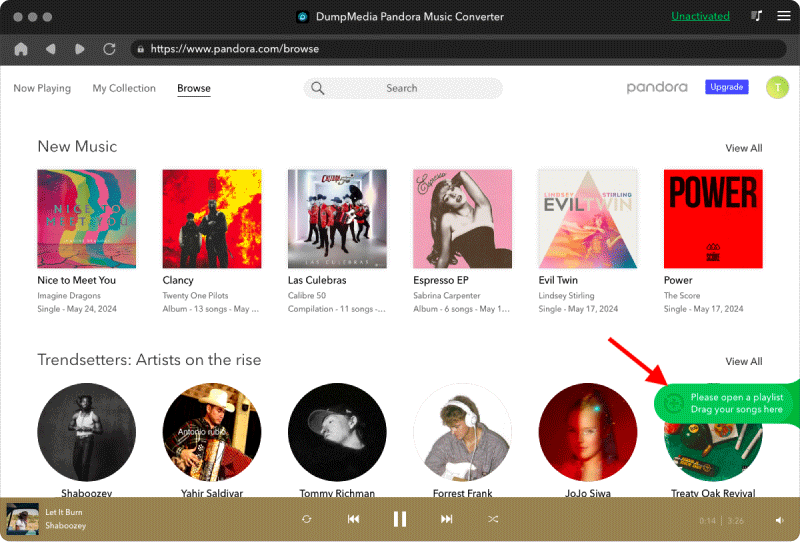
步驟二 下載並安裝 DumpMedia 在您的 Mac/PC 上安裝 Pandora 音樂轉換器。啟動它,您將看到介面。使用您的 Pandora 高級/免費帳號登入。

免費下載 免費下載

步驟二 然後,直接將歌曲或播放清單拖到浮動的「+」圖示上,加入轉換佇列中以準備下載。

免費下載 MP3 潘多拉音樂

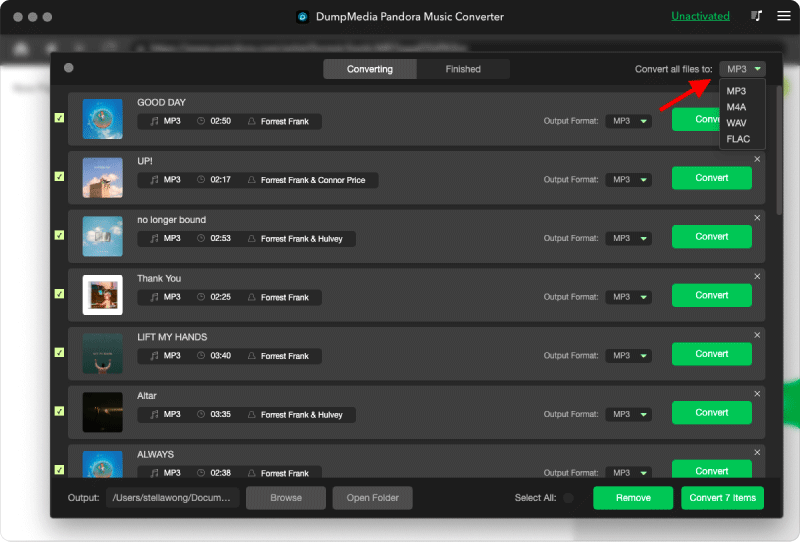
步驟二 選好歌曲後,您可以選擇您喜歡的音訊檔案格式。

將 Pandora 音樂轉換為 MP3

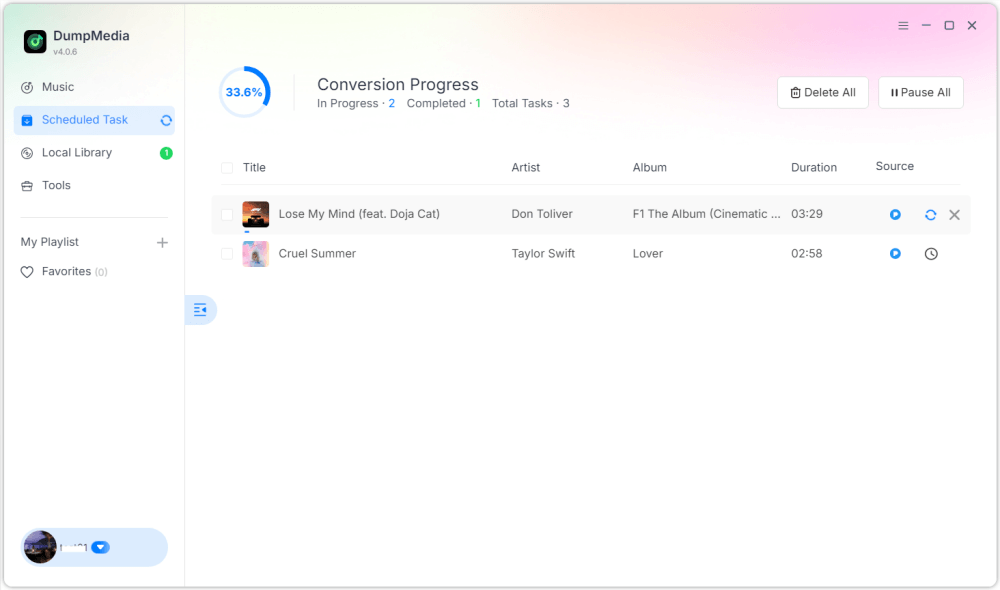
步驟二 設定完成後,使用者即可點選「轉換」圖示轉換。 DumpMedia will perform to convert Pandora songs to MP3 憑藉其超快的速度,只需幾秒鐘即可完成。

下載 Pandora 音樂 MP3

第4部分。

Q1: Can I convert Pandora songs to MP3 免費?

Yes, some tools offer free trials, but premium converters like DumpMedia provide faster speeds and batch conversion.

DumpMedia frequently launches promotional campaigns; you can contact DumpMedia customer support to inquire about additional discounts and offers.

Q2: Is it legal to convert Pandora songs to MP3?

Converting for personal offline use is generally considered acceptable, but distribution or commercial use may violate copyright laws.

Q3: Can I convert entire Pandora playlists to MP3 立刻?

是的。 DumpMedia Pandora Music Converter supports batch conversion for playlists and albums.

Q4: Will the MP3 retain song information?

Yes, the converter preserves metadata including title, artist, album, and artwork.

部分5。 結論

Converting Pandora songs to MP3 is the best way to enjoy your favorite music offline, maintain permanent backups, and have full control over playback across devices. How to convert Pandora songs to MP3? 使用 DumpMedia Pandora Music Converter, you can quickly and easily convert songs, albums, and playlists into MP3 without losing quality or metadata. Start converting today to keep your Pandora music collection forever.

免費下載 免費下載

註冊即可享 30% 折扣 註冊獲取
30% 折扣 >>>