


如何將有聲書 CD 翻錄到 MP3 (免費方法和更佳替代方案)
Ripping an audiobook CD to MP3 is still possible, but it’s no longer the most convenient way to enjoy audiobooks. Many users today find themselves dealing with multiple discs, missing metadata, and outdated hardware just to convert their audiobook collections. In this guide, you’ll learn how to rip audiobook CD to MP3 step by step, along with the common problems you may encounter. More importantly, we’ll show you a better, modern alternative that lets you enjoy audiobooks without relying on CDs at all.
內容指南 Part 1. Can You Rip an Audiobook CD to MP3?Part 2. Rip an Audiobook CD to MP3 Using iTunes/Apple MusicPart 3. Rip an Audiobook CD to MP3 使用 Win陶氏媒體播放器Part 4. Common Problems When Ripping Audiobook CDsPart 5. How to Download Audible Books as MP3 (Best Solution)部分6。 結論
Part 1. Can You Rip an Audiobook CD to MP3?
Yes, you can still rip audiobook CD to MP3 files using standard media software. However, you’ll need a computer with a CD/DVD drive, CD ripping software, and enough time to process multiple discs.
While the process itself hasn't changed much, the technology around it has become outdated. Many modern laptops no longer include disc drives, making CD-based workflows less practical than before.
Part 2. Rip an Audiobook CD to MP3 Using iTunes/Apple Music
How to rip audiobook CD to MP3? Here are the best ways to do it on Win陶氏和麥克。
步驟二 未結案工單 iTunes/Music > Settings (or Preferences) > General > Import Settings. Set Import Using to MP3 Encoder. Check: "Use error correction when reading Audio CDs" (helps with scratched library CDs).
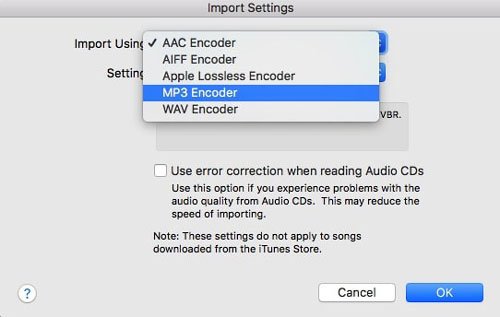
步驟二 Insert the CD. When the list of tracks appears, highlight all tracks (Ctrl+A or Cmd+A).
步驟二 Click the Options (three dots) or the Gear icon and select Join CD Tracks.
步驟二 Click Import CD. Repeat for each disc. The software will convert each track into MP3 格式。
Ripping an audiobook CD to MP3 using iTunes is straightforward, but for audiobooks specifically, you want to pay attention to chapter organization and file concatenation so you don't end up with 100 tiny files for a single book.
Part 3. Rip an Audiobook CD to MP3 使用 Win陶氏媒體播放器
如果你在 Windows 10 or 11, you can use the Windows Media Player Legacy to to rip audiobook CD to MP3.
步驟二 未結案工單 Windows Media Player. Go to Rip settings > Format and select MP3.
步驟二 Go to Rip settings > Audio Quality and choose 192 Kbps.
步驟二 Insert your CD and click Rip CD.
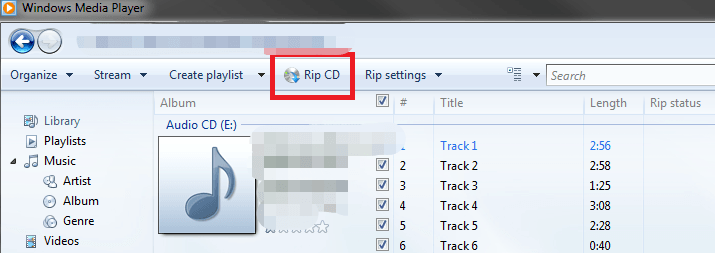
This is one of the simplest free methods available. However, Windows Media Player does not have a "Join Tracks" feature, so you will get multiple files per CD. It requires manual file management.
Part 4. Common Problems When Ripping Audiobook CDs
While ripping CDs is a reliable way to digitize your library, the process often presents several frustrating hurdles:
- High Time Commitment: Audiobooks frequently span 10 or more discs, turning a simple task into a slow, repetitive chore.
- Fragmented Output: Many ripping tools export each track as a separate file, leaving you with hundreds of tiny clips instead of a seamless book.
- Metadata Gaps: Automated databases often fail to recognize older or niche audiobooks, forcing you to manually input titles, authors, and chapter markers.
- Hardware Scarcity: Most modern laptops and desktops no longer include internal optical drives, requiring the additional expense and clutter of an external CD drive.
Part 5. How to Download Audible Books as MP3 (Best Solution)
Because of playing limitations, many users are moving away from CDs and choosing digital audiobook platforms instead. Digital audiobooks offer instant access (no physical discs) and compatibility with multiple devices. However, there’s one challenge: most platforms (like Audible) use DRM protection, which limits how and where you can play your audiobooks.
If you want the flexibility of MP3 without dealing with CDs, the most efficient approach is to convert digital audiobooks into MP3 格式。 這是哪裡 DumpMedia Audible有聲音轉档器 變得有用。
為什麼選擇 DumpMedia 音頻轉換器?
- ✅ 移除DRM保護* 該工具可以移除 DRM,讓您完全掌控自己的檔案。
- ✅ 將聲音轉換為 MP3 容易地: 您可以快速下載 Audible 有聲書 MP3 以及其他格式,例如 M4A 或 FLAC。
- ✅ 高速轉換: 幾分鐘內即可轉換整本有聲書。
- ✅ 無損質量: 轉換過程中無質量損失。
- ✅ 可在多種裝置上使用: 離線播放有聲書 轉換後的任何位置。
Instead of ripping CDs, you can build a fully digital audiobook library that works on any device.
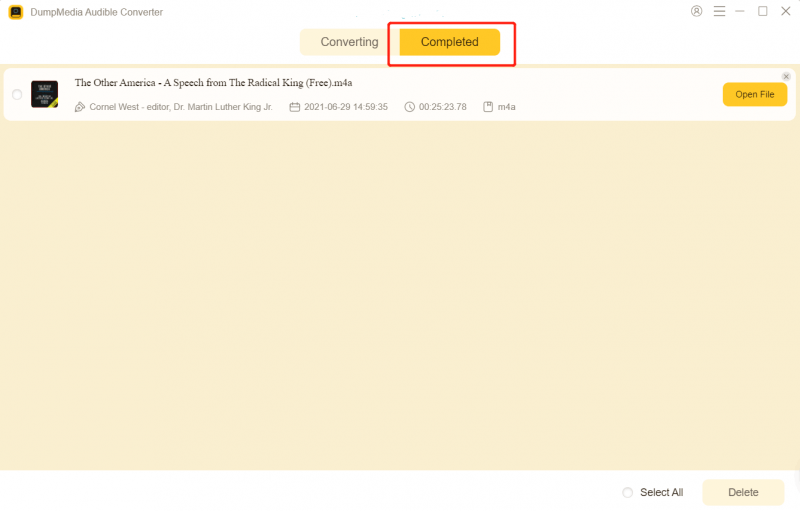
如何使用 DumpMedia Audible Converter(完整指南)>>>
部分6。 結論
將有聲書 CD 翻錄至 MP3 is still possible in 2026, but it’s increasingly outdated and inefficient. While tools like iTunes and Windows Media Player can get the job done, they require time, effort, and hardware that many users no longer have.
If you’re looking for a faster, more flexible solution, switching to digital audiobooks and using DumpMedia Audible Converter is the smarter choice. No need for CD drives, faster processing (no disc swapping), and true offline listening. These make DumpMedia a modern replacement for traditional CD workflows.
*DumpMedia 其工作原理是將您的有聲讀物解密並下載為無 DRM 的文件,使您可以在任何裝置上獲得乾淨、不受限制的庫副本。

30% 折扣 >>>