


2026 年如何移除 Audible 的 DRM 以便離線播放
許多有聲書用戶都在尋找移除 Audible DRM 的方法,因為 Audible 官方檔案有播放限制和裝置限制。儘管 Audible 提供便利的有聲書串流播放和下載服務,但 Audible 有聲書受 DRM 技術保護,限制了用戶播放已購內容的方式和地點。在本指南中,我們將說明 Audible DRM 的原則、Audible 檔案受限的原因,以及將 Audible 有聲書轉換為更靈活的播放格式以便離線收聽的最佳方法。
目錄第一部分:什麼是 Audible DRM?第二部分:可以直接移除 Audible 的 DRM 嗎?第三部分:轉換 Audible 有聲書以便靈活播放的最佳方法第四部分:常見問題解答第五部分:結論
第 1 部分。什麼是 Audible DRM?
在討論如何移除 Audible DRM 之前,了解 Audible 的保護機制非常重要。
Audible 有聲書通常以 AA 或 AAX 格式分發。這些檔案包含DRM(數位版權管理)保護,旨在控制有聲書的播放和帳戶授權。
由於 Audible 採用了數位版權管理 (DRM) 技術,有聲書與 Audible 帳戶綁定,無法像普通有聲書那樣自由轉讓。 MP3 文件。這就是為什麼許多用戶都在尋找移除 Audible DRM 並獲得更靈活的聆聽選項的解決方案。
第二部分:可以直接移除 Audible 的 DRM 嗎?
許多搜尋「移除 Audible DRM」的用戶都希望找到一個簡單的 DRM 移除按鈕,但實際情況要複雜得多。 Audible 的 DRM 保護與 Audible 有聲書授權系統緊密整合。直接移除 DRM 的方法通常不可靠、過時或技術難度較高。
第三部分:轉換有聲書以實現靈活播放的最佳方法
現在,許多用戶不再只專注於如何移除DRM,而是選擇了更實用的解決方案,即將Audible有聲書轉換為更靈活的播放格式。這種方法允許使用者使用標準的音訊格式,例如 MP3 或 M4A 格式。對於搜尋「移除 Audible DRM」的用戶來說,最佳解決方案之一是 DumpMedia Audible有聲音轉档器.
這款工具並非專注於技術性的DRM移除流程,而是幫助使用者將Audible有聲書轉換為更靈活的音訊格式,以便更輕鬆地播放。對於追求有聲書實用性和靈活性的用戶而言,基於格式轉換的播放方式通常比傳統的DRM移除方法更穩定、更便捷。
🏆為什麼要使用 DumpMedia 音頻轉換器?
- 將有聲有聲書轉換為 MP3 以及M4A
- 啟用離線有聲書播放
- 提高設備相容性
- 無需不斷打開 Audible 即可收聽
- 保持有聲書質量
- 支援跨多個裝置播放
如何轉換 Audible 有聲書
步驟二 下載並安裝 DumpMedia 在您的 Mac/PC 上安裝 Audible Converter。啟動它,您將看到介面。使用您的 Audible 帳號登入。
步驟二:找到你想轉換的有聲書。點擊“新增到轉換”圖標,將整個清單載入到轉換器中。
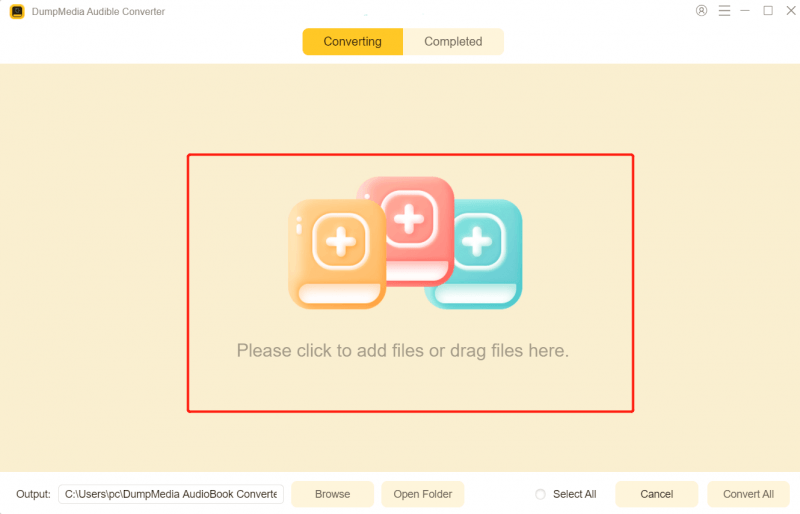
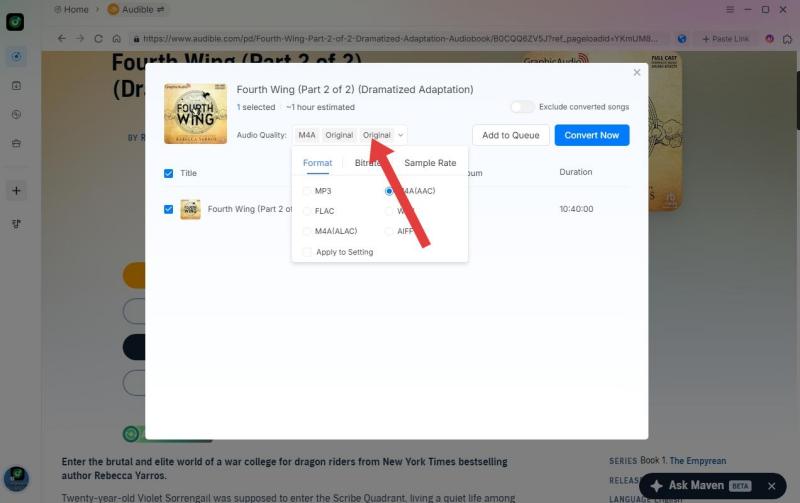
步驟 3:選擇您喜歡的格式。您也可以變更位元率或取樣率。為了獲得最佳平衡,請選擇 320kbps。
步驟二 設定完成後,使用者即可點選「轉換」圖示轉換。 DumpMedia 它速度超快,只需幾秒鐘即可將 Audible 有聲書轉換為無 DRM 保護的格式。
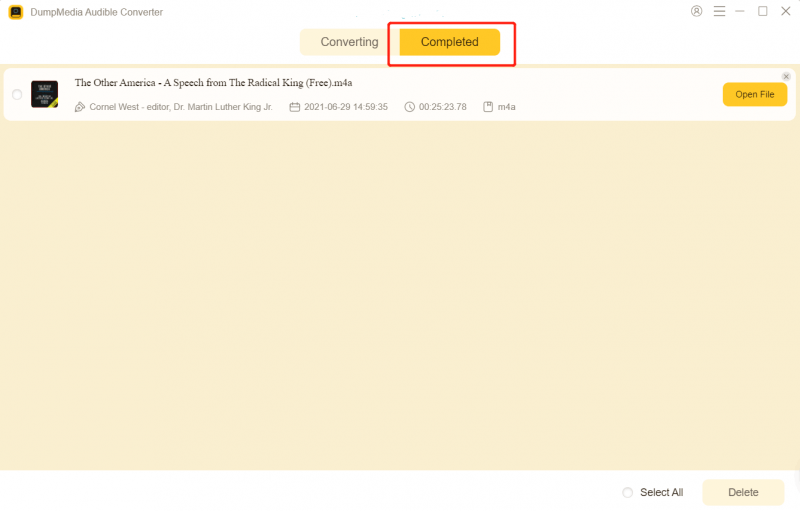
轉換後,您的有聲書可以在不同的裝置和媒體播放器上更靈活地播放。
第 4 部分。 常見問題解答
為什麼 Audible 上的檔案會受到限制?
Audible 有聲書使用 DRM 技術來限製播放,僅限授權設備和帳戶才能播放。
Audible有聲書可以轉換成什麼格式? MP3?
是的。很多用戶都在使用 DumpMedia Audible Converter,用於將 Audible 有聲書轉換為 MP3 格式,播放更靈活。
我可以離線收聽 Audible 有聲書嗎?
是的。 Audible 支援離線收聽,但播放仍僅限於授權環境。
不用 Audible 應用程式可以聽 Audible 有聲書嗎?
轉換後的有聲書檔案可能支援在其他媒體播放器和裝置上播放。
Is DumpMedia Audible Converter 安全嗎?
是的。它是專為有聲讀物轉換和靈活的離線收聽而設計的。
部分5。 結論
許多用戶都在尋找移除 Audible DRM 的方法,因為 Audible 有聲書檔案帶有播放和裝置限制。對於希望在多個裝置上更輕鬆地播放有聲書的用戶來說, DumpMedia Audible Converter 提供了一種便捷的方式,可以將 Audible 有聲書轉換為更靈活的音訊格式,以便離線欣賞。
*DumpMedia 其工作原理是解密並下載 Audible 有聲書到無 DRM 保護的文件,讓您可以在任何裝置上取得乾淨、無限制的音訊庫副本。此功能不包括移除本機音訊檔案的 DRM 保護。