PC 版 Audible 應用程式:如何在電腦上下載 Audible Win陶氏

羅西(Rosie)撰寫

最後更新時間:2026年04月14日

2最小讀取

Looking for a PC Audible app to listen to your audiobooks on a Windows computer? You’re not alone. Many users prefer using a PC for longer listening sessions, better audio control, and multitasking. The good news is that Audible does support PC playback, but not in the way you might expect. While you can use Audible on a computer, some limitations affect flexibility, file access, and offline listening. In this guide, you’ll learn how to download and use the Audible app on PC, along with a smarter way to enjoy your audiobooks without restrictions.

內容指南 Part 1. Is There an Audible App for PC? Part 2. How to Use Audible on PC? Part 3. Limitations of the Audible App on PCPart 4. Best Way to Listen to Audible on PC Without Limits第 5 部分。 常見問題解答部分6。 概要

Part 1. Is There an Audible App for PC?

Yes, but with some important details. Unlike mobile devices, there is no full-featured standalone 聽得見 app for all Windows users. Instead, you have two main options:

1. Audible Web Player

  • Accessible via your browser
  • 無需安裝
  • Works on any PC

2. Audible App (Limited Windows Support)

  • Available only in certain environments (e.g., Windows Store versions)
  • 如今已不那麼常用

For most users, the web player is the primary way to use Audible on PC.

Part 2. How to Use Audible on PC?

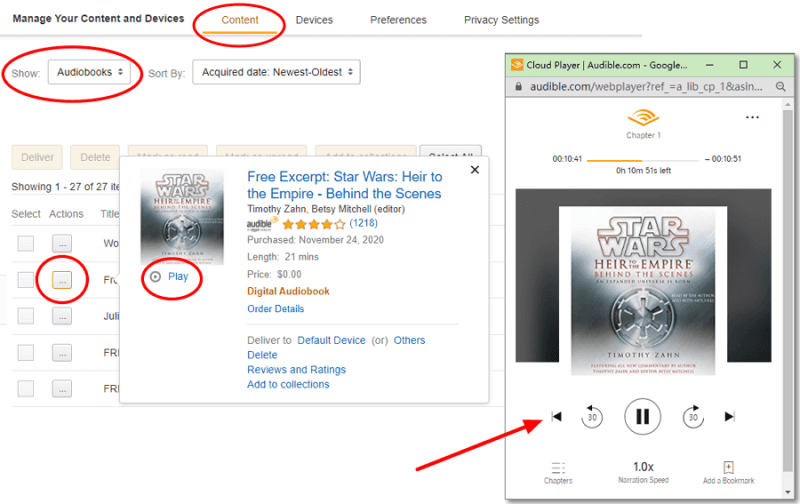
As of now, the dedicated Audible app for Windows has been discontinued. However, using Audible on your PC is still very straightforward, you just use your browser or a small sync tool. Here is the step-by-step guide to listen on your computer.

步驟二 Open Audible.com (or your regional site like .ca or .co.uk) and sign in.

步驟二 Click on Library in the top navigation bar.

步驟二 Find the book you want to hear and click the Listen Now button.

步驟二 A separate "Cloud Player" window will pop up. You can adjust narration speed, skip chapters, and add bookmarks here.

Use Audible on PC

Quick Troubleshooting Tips

  • Pop-up Blocker: If the Cloud Player doesn't open when you click "Listen Now," check your browser's address bar for a "Pop-up blocked" icon and select "Always allow."
  • Audio Quality: In the Cloud Player settings (the gear icon), you can toggle between "Standard" and "High" quality if your internet connection is stable.

Part 3. Limitations of the Audible App on PC

While the PC Audible app (or web player) works, it comes with several restrictions:

1. No True File Access: You don’t actually own the audiobook files, you’re streaming or accessing them within Audible’s system.

2.DRM保護: Audible files are locked in AAX format, meaning:

  • Cannot be played on most media players
  • Cannot be transferred freely
  • Restricted to authorized apps

3. Limited Offline Flexibility: Offline playback is not always straightforward on PC compared to mobile devices.

4. Device Restrictions: You can’t easily move audiobooks to MP3 players, smartwatches, or car systems.

Part 4. Best Way to Listen to Audible on PC Without Limits

If you want full control over your audiobooks, such as playing them on any device, keeping them permanently, or using your preferred media player, you need a different approach. Instead of relying solely on the Audible app, many users choose to convert Audible books into standard formats like MP3. This removes restrictions and gives you complete flexibility. To do this efficiently, you can use DumpMedia Audible有聲音轉档器.

免費下載 免費下載

為什麼選擇 DumpMedia 音頻轉換器?

  • 移除DRM保護* 該工具可以移除 DRM,讓您完全掌控自己的檔案。
  • 將聲音轉換為 MP3 容易地: 你可以快點 下載有聲書到 MP3 以及其他格式,例如 M4A 或 FLAC。
  • 高速轉換: 幾分鐘內即可轉換整本有聲書。
  • 無損質量: 轉換過程中無質量損失。
  • 可在多種裝置上使用: 離線播放有聲書 轉換後的任何位置。

如何使用 DumpMedia Audible有聲音轉档器

步驟二 開啟電腦上的軟體。它適用於兩者。 Win支援Windows和Mac系統。介面友好,即使是新手也能輕鬆上手。

免費下載 免費下載

步驟二 開啟內建的 Audible 網路播放器 DumpMedia 然後使用您的 Audible 帳戶登入。瀏覽 Audible,並將您想要下載的書籍拖入轉換器中。
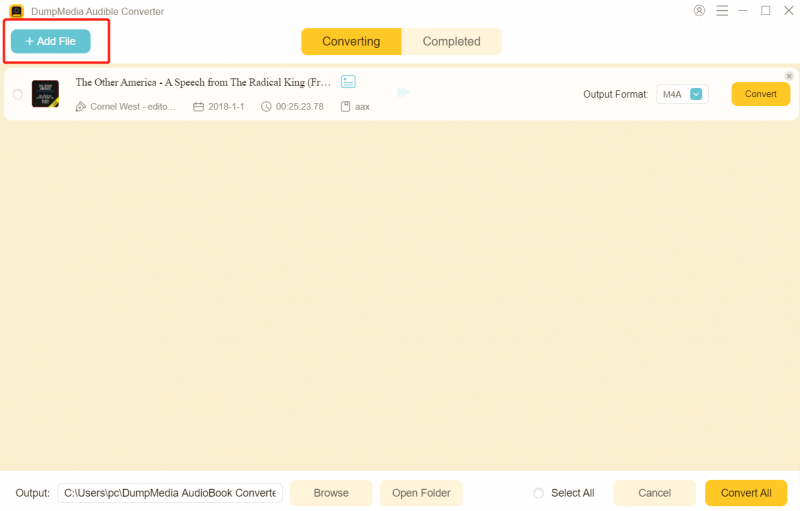
新增有聲讀物

步驟二 在設定面板中,選擇您想要下載的格式。

免費下載 MP3 有聲書

步驟二 最後一步是點擊「轉換」按鈕開始轉換過程。

將 Audible 有聲書轉換為 MP3

第 5 部分。 常見問題解答

1. Can I download the Audible app on PC?

Yes, but not in the same way as on mobile devices. Most users access Audible on PC through the web player instead of a dedicated app. Some Windows versions may support an app, but availability and features are limited.

2. Why can’t I play Audible files on other media players?

Audible files are in AAX format and protected by DRM. This means they can only be played on authorized platforms like the Audible app or web player. Standard media players do not support this format.

3. Can I listen to Audible offline on PC?

Offline listening on PC is limited compared to mobile devices. In most cases, you need to stay within the Audible platform, and offline access may not always be available depending on your setup.

4. How do I transfer Audible books to other devices?

By default, you cannot freely transfer Audible books because of DRM restrictions. They are tied to your account and supported apps only. If you want to move audiobooks to devices like MP3 players, smartwatches, or car systems, you need to convert them into a compatible format such as MP3.

5. Is it legal to convert Audible books to MP3?

This depends on your local copyright laws. In many regions, converting content for personal use is allowed, but sharing or distributing converted files is not. Always check your local regulations before proceeding.

6. Do I still need the Audible app after converting files?

No. Once your Audible books are converted into MP3 or other standard formats, you can play them on any media player without using the Audible app.

部分6。 概要

Using a PC Audible app is a convenient way to access your audiobooks, especially through the web player. However, it comes with limitations that restrict how you use and manage your files. If you’re looking for a more flexible solution, one that lets you play Audible books anywhere, anytime, without restrictions, converting them to MP3 is the best option. Take full control of your audiobook library with DumpMedia Audible Converter and enjoy unrestricted listening on your PC and beyond.

免費下載 免費下載

*DumpMedia 其工作原理是將您的有聲讀物解密並下載為無 DRM 的文件,使您可以在任何裝置上獲得乾淨、不受限制的庫副本。

註冊即可享 30% 折扣 註冊獲取
30% 折扣 >>>