


Kindle Paperwhite 可以聽有聲書嗎?完整指南 (2026)
很多用戶問: 你可以在Kindle Paperwhite上聽有聲讀物嗎 簡而言之,答案是肯定的,但有一些重要的限制。如果您想在 Kindle 上收聽有聲讀物,了解其工作原理、支援的格式以及有聲讀物不相容時的選擇至關重要。在本指南中,我們將解釋您需要了解的關於 Kindle Paperwhite 是否可以收聽有聲讀物以及如何流暢收聽的所有資訊。
內容指南 第一部分:我可以在 Kindle Paperwhite 上聽有聲書嗎?第二部分:如何在 Kindle Paperwhite 上聆聽 Audible 有聲書?第三部分:在 Kindle Paperwhite 上免費收聽有聲書的最佳方式第 4 部分。 常見問題解答部分5。 結論
第一部分:我可以在 Kindle Paperwhite 上聽有聲書嗎?
那麼,Kindle Paperwhite 可以聽有聲書嗎?可以,但需要滿足特定條件。 Kindle Paperwhite 透過以下方式支援有聲書: 聽得見亞馬遜官方有聲書平台。這意味著您可以:
- 從 Audible 購買有聲書
- 直接下載到您的 Kindle 設備
- 使用藍牙耳機或揚聲器收聽
然而,它有一個主要的限制。 Kindle Paperwhite 不支援標準的音訊格式,例如 MP3 或WAV格式。所以,即使理論上你可以在Kindle Paperwhite上聽有聲讀物,但你只能收聽Audible的內容。
第二部分:如何在 Kindle Paperwhite 上聆聽 Audible 有聲書?
如何在 Kindle Paperwhite 上收聽有聲書?如果您使用的是第十代(2018 年)或更新的機型,即可享受流暢的體驗。由於 Kindle Paperwhite 沒有內建揚聲器,因此需要使用藍牙耳機或外接揚聲器。
下面是它的工作原理:
以下是播放有聲書的官方方法:
步驟二 請確保您的 Paperwhite 是 Kindle Paperwhite 第十代(2018 年)或 Kindle Paperwhite 第十一代(2021/2024 年)。
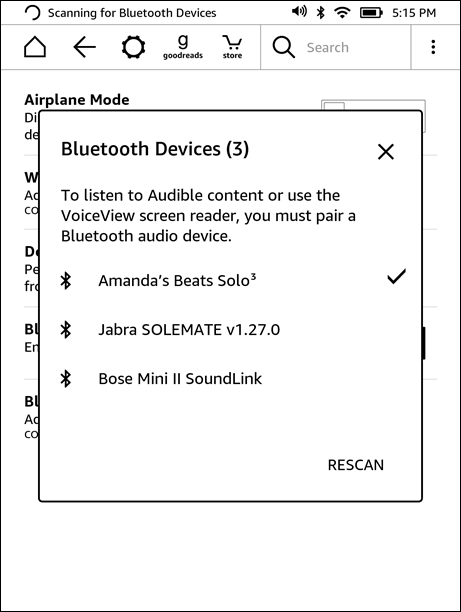
步驟二 在 Kindle 主畫面上,向下滑動以開啟快速設定。點擊藍牙圖示將其開啟。將耳機或揚聲器置於配對模式。在 Kindle 上點擊“藍牙裝置”,然後從清單中選擇您的裝置。
步驟二 前往您的圖書館。點擊篩選圖標,然後選擇 Audible(或 Audible/有聲書)。點擊封面開始下載。 (請確保您已連接到 Wi-Fi,因為有聲書比電子書大得多。)
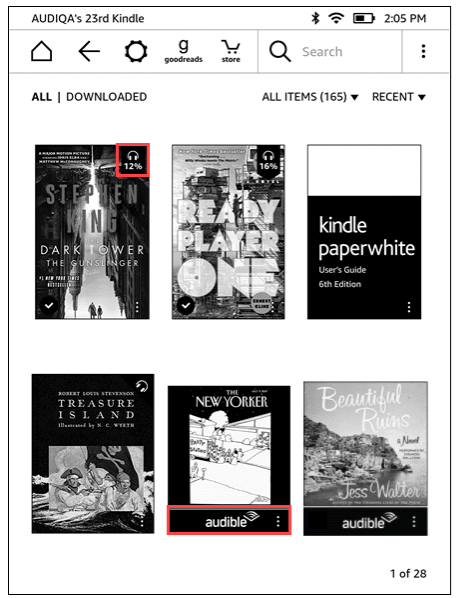
步驟二 打開電子書。點選螢幕中央顯示選單。點擊右下角的耳機圖示。 Kindle 會自動同步您的閱讀進度,讓您可以在閱讀和聆聽之間切換,而不會遺失閱讀位置。
這是在 Kindle Paperwhite 上收聽有聲書的官方方法。
您應該了解的局限性
雖然「可以在 Kindle Paperwhite 上聽有聲書嗎?」的答案是肯定的,但這種體驗有一些限制。
- 僅限 Audible 支援:您無法播放來自其他來源的有聲書。
- 數位版權管理保護:Audible 檔案受保護並與您的帳戶綁定。
- 沒有 MP3 播放:Kindle Paperwhite 不支援常見的格式,例如 MP3.
- 靈活性有限:您無法自由傳輸或管理有聲書檔案。
這意味著,如果你的有聲書不是來自 Audible,你將無法直接在 Kindle Paperwhite 上收聽有聲書。
第三部分:在 Kindle Paperwhite 上免費收聽有聲書的最佳方式
雖然 Kindle 提供原生支持,但它們與 Audible 生態系統緊密綁定。要想在所有裝置上真正實現靈活播放,您需要一種方法來解除這些播放限制。 DumpMedia Audible有聲音轉档器 是理想的解決方案,使您能夠 繞過DRM 完全掌控您的圖書館。
為什麼選擇 DumpMedia 音頻轉換器?
使用專業轉換器,您可以自由地:
- 通用格式轉換: 即刻 將受保護的 Audible 有聲書轉換為 MP3、M4A 或 FLAC。
- 完全移除DRM*: 取消播放限制,確保你的音樂庫真正屬於你。
- 多設備兼容性: 在任何設備上收聽 MP3 無需 Audible 應用,即可在播放器、車上音響或智慧音響上使用。
- 永久所有權: 即使您取消訂閱,您購買的有聲書也將永久保留。
*DumpMedia 其工作原理是將您的有聲讀物解密並下載為無 DRM 的文件,使您可以在任何裝置上獲得乾淨、不受限制的庫副本。
雖然 Kindle Paperwhite 本身不支援直接 MP3 播放和轉換有聲書讓您可以完全掌控收聽方式和地點。對於想要跳脫 Audible 封閉平台的使用者來說,這是最實用、最可靠的解決方案。
如何轉換 Audible 有聲書(逐步指南)
步驟 1.透過內建播放器使用您自己的 Audible 帳戶登入。
步驟 2.瀏覽或搜尋您想要轉換的有聲書。您可以點擊「新增到轉換」按鈕或將其拖曳到轉換面板中來新增。
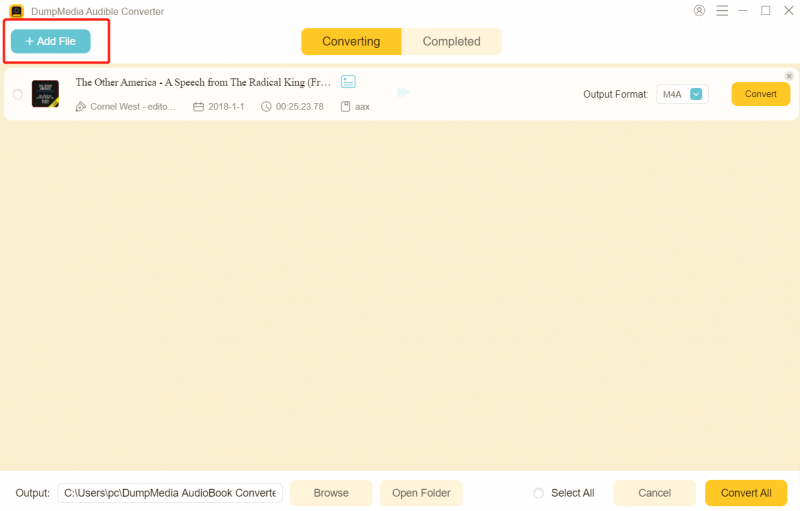
步驟 3.選擇所需的輸出格式和品質設定。

步驟二 點擊“轉換”按鈕開始下載。等待轉換完成。

第 4 部分。 常見問題解答
不用 Audible 也能在 Kindle Paperwhite 聽有聲書嗎?
不,Kindle Paperwhite 官方只支援 Audible 有聲書。
為什麼我不能玩 MP3 Kindle上有有聲書嗎?
因為 Kindle 不支援標準音訊格式。
我需要藍牙才能聽有聲書嗎?
是的,Kindle Paperwhite 需要藍牙音訊裝置。
我可以手動傳輸有聲書嗎?
除非它們採用受支援的格式。
部分5。 結論
那麼,Kindle Paperwhite 可以聽有聲書嗎?可以,但僅限於有限的生態系。如果您想要對有聲書擁有更多控制權,例如在多個裝置上播放或保存永久副本,則需要其他方法,例如… DumpMedia Audible轉換器。透過了解這些限制並使用合適的工具,您可以突破預設限制,打造更靈活的有聲書體驗,滿足您的需求。

30% 折扣 >>>