Removing DRM from iTunes Movies Free: What Still Works in 2026

羅西(Rosie)撰寫

最後更新時間:2026年05月21日

2最小讀取

Apple uses DRM protection on iTunes movies to control playback authorization and copyright access. Because of this, protected M4V movie files often come with playback restrictions, device limitations, and offline viewing problems. In this guide, we will explain the current reality of removing DRM from iTunes movies free, why most free DRM removal tools no longer work reliably, and how Apple users manage DRM-protected media today.

內容指南 Part 1. What Is iTunes Movie DRM?Part 2. Is Removing DRM from iTunes Movies Still Possible?Part 3. Is Removing DRM from Apple Music Still Possible?Part 4. Better Solution for Apple Music Offline Playback第 5 部分。 常見問題解答部分6。 概要

Part 1. What Is iTunes Movie DRM?

To understand removing DRM from iTunes movies free, it is important to first understand how Apple DRM works.

How Apple DRM Protects iTunes Movies

Apple applies DRM technology to many iTunes movie purchases and rentals. This protection system helps Apple:

  • Prevent unauthorized sharing
  • Control playback permissions
  • Restrict unsupported devices
  • Protect copyrighted content

What Are Protected M4V Files?

Many iTunes movies are stored as protected M4V files. Unlike standard MP4 videos, protected M4V files may only play through authorized Apple platforms.

Why DRM Restricts Playback

DRM protection often limits:

  • 文件傳輸
  • 離線播放
  • 設備兼容性
  • 永久訪問
  • Third-party player support

This is why many users begin searching for methods related to removing DRM from iTunes movies free.

Part 2. Is Removing DRM from iTunes Movies Still Possible?

Many users wonder whether removing DRM from iTunes movies free still works. Years ago, several free DRM removal tools claimed to unlock protected iTunes movie files. Some tools attempted to convert M4V files. Today, many free DRM removal solutions no longer function reliably. Apple regularly updates its DRM systems, making older tools outdated or incompatible.

Part 3. Is Removing DRM from Apple Music Still Possible?

Yes, it is entirely possible, but the technical definition of "how" it's done has changed. True DRM removal, meaning taking an encrypted file downloaded directly from the streaming app (.m4p) and stripping out the FairPlay encryption layer without changing the file, is virtually impossible today. Modern desktop operating systems and updated versions of iTunes/Apple Music have tightly locked down those decryption loops.

Instead, when people talk about removing DRM from Apple Music, they are actually referring to downloading DRM-free copies or capturing the stream using specialized software.

Part 4. Better Solution for Apple Music Offline Playback

For users who want more flexible offline music listening, DumpMedia Apple Music 音樂轉檔器 provides a practical solution. Unlike movie DRM removal tools, this software is designed specifically for Apple Music audio management and offline playback. This professional converter helps users 將 Apple Music 轉換為 MP3 並將它們保存下來,以便在離線狀態下穩定播放,而無需完全依賴 Apple Music 應用。

免費下載 免費下載

為何使用 DumpMedia 蘋果音樂轉換器?

  • 🎶下載 Apple Music MP3WAV、FLAC 和 AAC
  • 🎶保持原音質
  • 🎶批量下載播放清單和專輯
  • 🎶快速轉換速度
  • 🎶保留歌曲元資料和 ID3 標籤
  • 🎶支援在任何裝置上離線播放

For users frustrated by streaming restrictions, local music playback often provides a much more convenient experience. Even if the Apple Music app is not working on your device, you can play Apple Music offline on another music player immediately.

Download Apple Music Songs for Offline Playback

步驟二 下載並安裝 DumpMedia 在您的 Mac/PC 上安裝 Apple Music Converter。啟動它,您將看到介面。使用您的 Apple Music 帳戶登入。

免費下載 免費下載

步驟二 找到您想要轉換的播放清單、專輯或特定歌曲。您可以將單首歌曲拖曳到螢幕右側的「+」圖示上。或者,打開整個播放清單/專輯,然後點擊「新增到轉換」圖標,將整個清單載入到轉換器中。
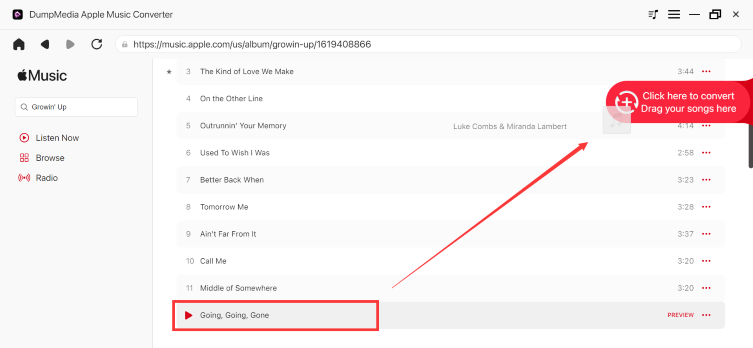
免費下載 MP3 蘋果音樂

步驟二 選擇 MP3 (相容性最佳)。此外,您還可以變更位元率或取樣率。為了獲得最佳平衡,請選擇 320kbps。
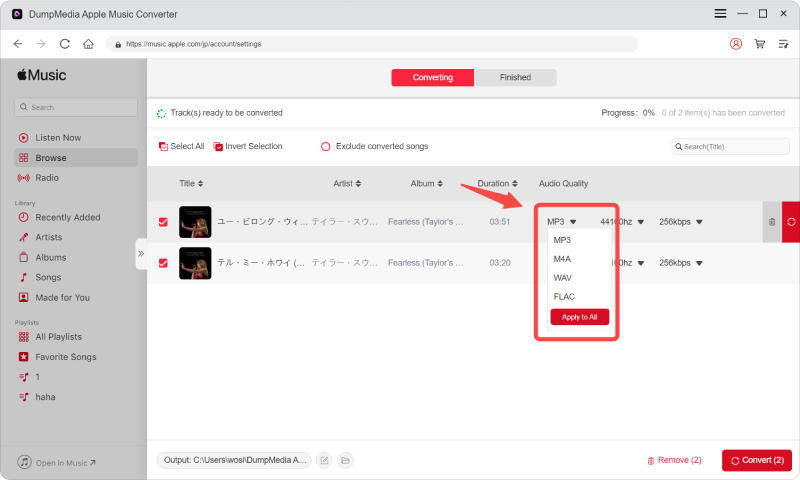
下載Apple Music

步驟二 設定完成後,使用者即可點選「轉換」圖示轉換。 DumpMedia 將 Apple Music 歌曲轉換為 MP3 憑藉其超快的速度,只需幾秒鐘即可完成。
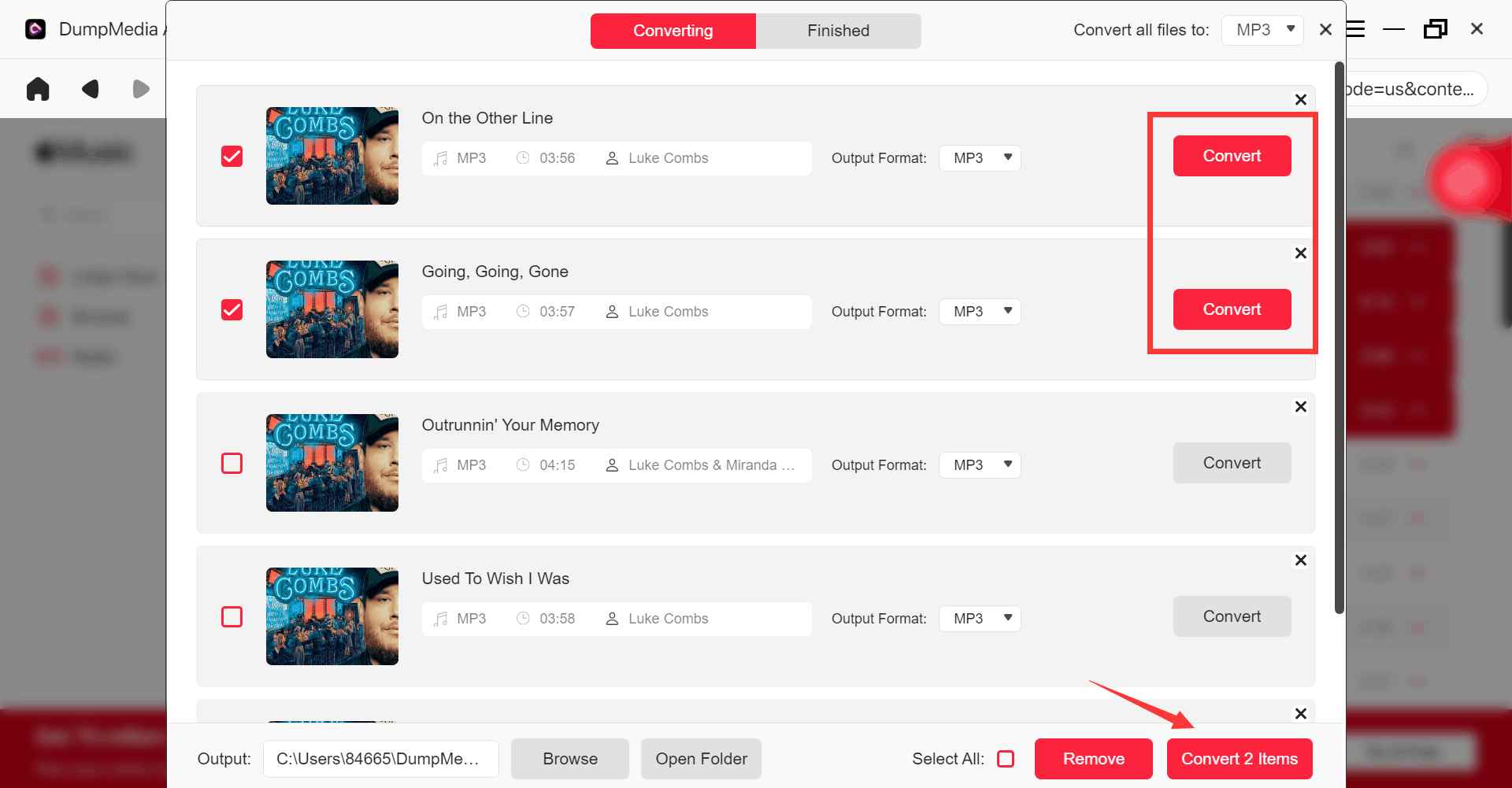
將 Apple Music 轉換為 MP3

第 5 部分。 常見問題解答

Is removing DRM from iTunes movies free possible?

Some older tools attempted to remove DRM from iTunes movies, but many free solutions no longer work reliably because of Apple DRM updates.

Why do free DRM removal tools stop working?

Apple frequently updates its DRM systems, making older tools incompatible.

What are protected M4V files?

Protected M4V files are DRM-protected iTunes movie files with playback restrictions.

Does Apple Music also use DRM?

Yes. Apple Music songs may also include DRM-related playback limitations.

Can I play Apple Music offline without restrictions?

許多用戶使用 DumpMedia Apple Music Converter for more flexible offline playback.

部分6。 概要

Many users searching for removing DRM from iTunes movies free are ultimately trying to solve playback restrictions, offline viewing problems, and device compatibility limitations caused by DRM-protected media. Although free DRM removal solutions for iTunes movies have become increasingly unreliable, Apple ecosystem DRM restrictions still affect many forms of digital content today.

For users focused on Apple Music offline listening and flexible local playback, DumpMedia Apple Music Converter offers a convenient solution for downloading music into standard audio formats for offline playback across multiple devices.

免費下載 免費下載

*DumpMedia 其工作原理是解密 Apple Music 歌曲並將其下載為無 DRM 保護的文件,讓您可以在任何裝置上獲得一份乾淨、無限制的音樂庫副本。此功能不包括移除本機音訊檔案的 DRM 保護。

註冊即可享 30% 折扣 註冊獲取
30% 折扣 >>>