


Apple Music 專輯封面不顯示? 10 個真正有效的解決方法
專輯封面是音樂聆聽體驗的重要組成部分。如果你看到的不是你最喜歡的專輯封面而是空白的音樂圖標,那會讓人非常沮喪,尤其是在瀏覽大型播放清單或音樂庫時。如果你遇到Apple Music 專輯封面無法展現的問題,別擔心。本指南將解釋最常見的原因,提供有效的解決方案,並展示如何防止專輯封面問題再次發生。
目錄第一部分:為什麼 Apple Music 專輯封面不顯示?第二部分:如何解決 Apple Music 專輯封面不顯示的問題?第三部:如何永久保留 Apple Music 專輯封面?第四部分:常見問題第五部分:結論
第一部:為什麼 Apple Music 專輯封面不顯示?
Apple Music專輯封面不顯示可能有以下幾個原因。
網路連線問題: Apple Music 通常會從 Apple 伺服器載入專輯封面。如果您的網路連線不穩定,專輯封面可能無法正確顯示。
iCloud 音樂庫同步錯誤:如果您的音樂庫最近更新過,同步問題可能會導致 Apple Music 專輯封面無法顯示。
元資料損壞:專輯封面與歌曲元資料相關聯。元資料缺失或損壞會導致封面無法正常顯示。
過時的 Apple Music 應用:舊版本的 Apple Music 可能存在影響專輯封面顯示的錯誤。
Apple Music 伺服器問題:有時問題並非出在您的裝置上。 Apple 伺服器的臨時故障可能會影響專輯封面的載入和同步。
第二部分:如何解決 Apple Music 專輯封面不顯示的問題?
Apple Music專輯封面不顯示?請逐一嘗試以下解決方法。
解決方法 1:重新啟動 Apple Music
簡單的重新啟動即可刷新影像資料並解決暫時的顯示故障。
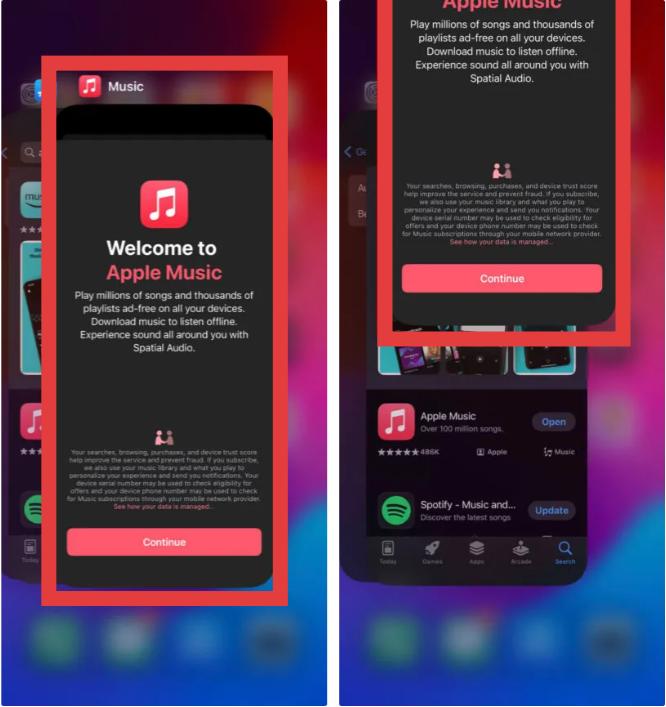
在 iPhone 上:從螢幕底部向上滑動,並在中間位置稍作停留(或雙擊主螢幕按鈕)。向上滑動音樂應用卡將其關閉。點選音樂圖示重新啟動。
在 Mac 上:按 Command + Option + Esc,選擇“音樂”,然後點擊“強制退出”。
On Win陶氏: 點擊「開始」選單,右鍵點擊 Apple Music 圖標,然後選擇「應用程式設定」>「終止」(或「修復」)。
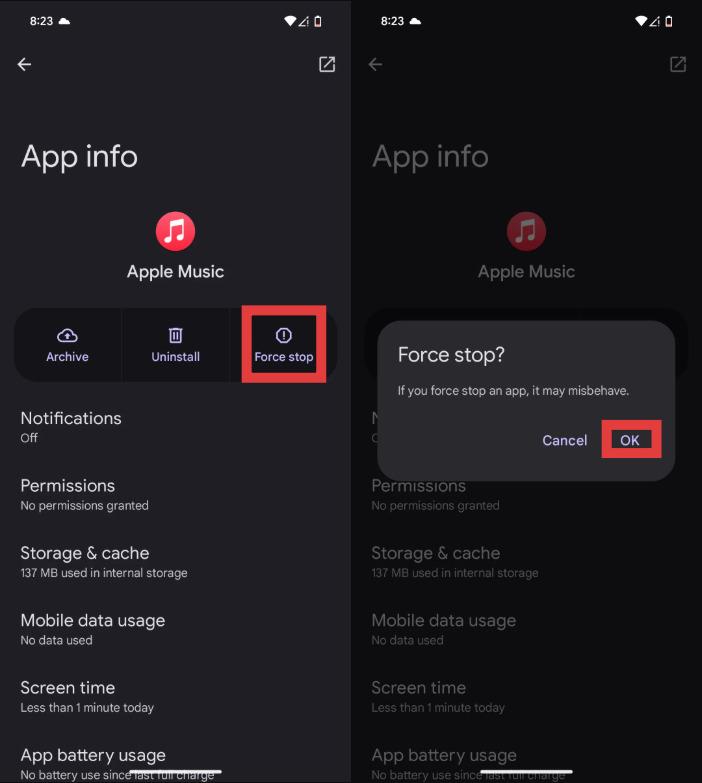
在安卓裝置上:開啟手機的「設定」。前往“應用”(或“應用程式和通知”)。在列表中找到 Apple Music 並點擊它。點擊“強制停止”。從主畫面重新啟動 Apple Music 應用程式。
修復2:檢查您的Internet連接
由於圖片通常需要從蘋果伺服器加載,請確保網路連線穩定。在 Wi-Fi 和行動數據之間切換可能會有所幫助。
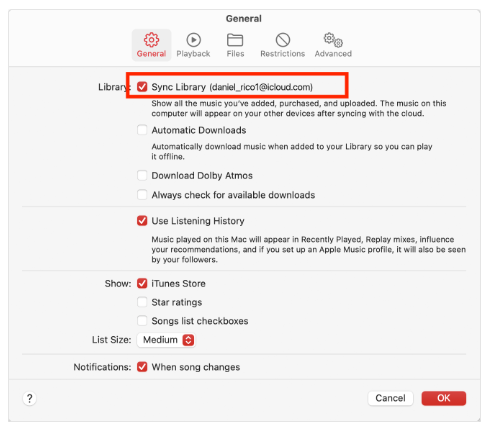
解決方法 3:再次同步您的媒體庫
請刷新您的音樂庫。這通常可以解決音樂庫更新後 Apple Music 專輯封面不顯示的問題。
解決方法 4:更新 iOS 或 Apple Music
軟體更新通常包含與媒體庫和專輯封面同步相關的錯誤修復。如果您的 iPhone 上 Apple Music 專輯封面無法顯示,安裝最新版本或許可以解決此問題。
解決方法 5:登出並重新登入
登出您的 Apple ID 並重新登入後,Apple Music 將重新載入帳戶資訊和資料庫資料。
解決方法 6:重新下載受影響的歌曲
如果只有部分專輯缺少封面,請刪除已下載的專輯並重新下載。許多用戶發現,當 Apple Music 專輯封面不顯示僅影響特定專輯時,此方法非常有效。
修復方法 7:刷新專輯訊息
有時 Apple Music 需要重建專輯封面關聯。移除並重新添加受影響的專輯可以觸發元資料刷新。
解決方法 8:重建您的音樂庫
大型圖書館偶爾會出現索引問題。重建圖書館或許可以恢復多張專輯中缺少的封面圖。
修復方法 9:停用並重新啟用同步庫
這樣就能創造一個全新的同步流程,並能解決長期存在的影像處理問題。
解決方法 10:聯絡 Apple 支持
如果以上方法都無效,則問題可能涉及帳戶特定的同步問題,需要Apple 支援人員的協助。
第三部分:如何永久保存 Apple Music 專輯封面?
許多用戶成功修復了 Apple Music 專輯封面不顯示的問題,但之後又會再次遇到同樣的問題。由於 Apple Music 嚴重依賴雲端同步,即使恢復後,專輯封面也可能偶爾消失。減少對雲端專輯封面載入依賴的一種方法是保存具有嵌入式元資料的本機音樂檔案。
類似的工具 DumpMedia Apple Music 音樂轉檔器 允許用戶將 Apple Music 曲目轉換為常見的音訊格式,同時保留重要的音樂訊息。對於經常遇到 Apple Music 專輯封面無法顯示的用戶,將音樂元數據保存在本地可以提供更穩定的聆聽體驗。
的更多功能 DumpMedia Apple Music 音樂轉檔器
- 🎵將 Apple Music 轉換為 MP3WAV、AAC 等格式
- 🎵與 Apple Music 網路播放器集成
- 🎵提供高達 35 倍速的大量轉換
- 🎵保留 ID3 標籤,例如 artist、cover、art 等。
- 🎵保留原始音訊質量
- ????100% 乾淨的。使用無風險
這些好處有助於降低將來遇到 Apple Music 專輯封面不顯示的機率。
如何將蘋果音樂轉換為MP3
步驟二 下載並安裝軟體到您的電腦。它適用於兩種系統。 Win支援Windows和Mac系統。介面友好,即使是新手也能輕鬆上手。
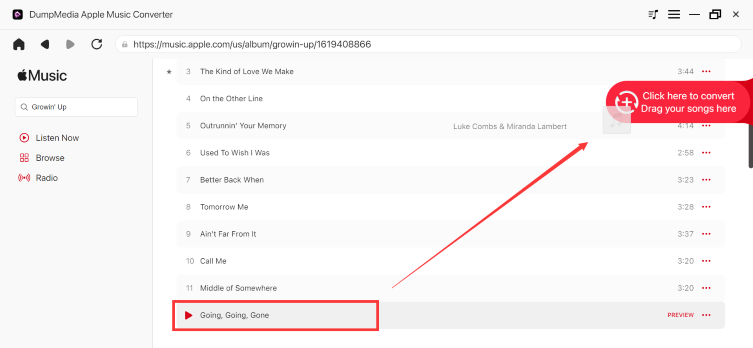
步驟二 開啟內建的 Apple Music 網路播放器 DumpMedia 然後使用您的 Apple Music 帳戶登入。瀏覽 Apple Music,並將您想要下載的歌曲、專輯或播放清單拖入轉換器中。
步驟二 在設定面板中,選擇 MP3 作為輸出格式以啟用 MP3 下載您選擇的曲目。

步驟二 點擊轉換並直接下載歌曲。 MP3 文件。

第 4 部分。 常見問題解答
為什麼我的 iPhone 不顯示 Apple Music 專輯封面?
最常見的原因包括網路問題、iCloud 同步問題、軟體過時和元資料損壞。
我的 Apple Music 封面圖為什麼消失了?
由於同步錯誤、伺服器問題或庫損壞,藝術作品可能會消失。
如何在 Apple Music 中刷新專輯封面?
嘗試重新下載專輯、刷新音樂庫,或停用並重新啟用音樂庫同步功能。
Apple Music 是否會將專輯封面儲存在本地?
部分藝術作品資訊可能會緩存在本地,但大部分藝術作品體驗依賴蘋果公司的雲端服務。
部分5。 結論
遇到 Apple Music 專輯封面不顯示的問題可能會令人沮喪,但大多數情況下,可以透過同步、網路或軟體故障排除來解決。如果 Apple Music 專輯封面不顯示的問題持續存在,保留包含元數據和專輯封面的音樂檔案有助於提供更可靠的聆聽體驗。例如: DumpMedia Apple Music Converter 讓用戶在保留專輯資訊、封面和音樂詳情的同時,更好地控制他們的音樂庫。