


Как включить музыку MP3 Игрок из Spotify в 2026 году
Как включить музыку MP3 игрок из Spotify остается одним из самых распространенных вопросов среди Spotify пользователей, главным образом потому что Spotify не позволяет осуществлять прямую загрузку на какие-либо ресурсы. MP3 устройство из-за DRMЕсли вы попытаетесь передать загруженный файл Spotify треки, большинство MP3 Игроки их не узнают.
Для обхода этого ограничения вам потребуется инструмент, способный выполнять преобразование. Spotify преобразование музыки в стандартный аудиоформат, например MP3. DumpMedia Spotify Music Converter Это одно из самых надежных решений для этой задачи. Если ваша цель — перевезти свой Spotify Для переноса содержимого библиотеки на портативное устройство для прослушивания в автономном режиме этот конвертер предлагает самый быстрый и простой способ.
Содержание Руководство Часть 1. Почему нельзя класть Spotify Песни на MP3 Player?Часть 2. Как поставить Spotify Музыка на MP3 Player?Часть 3. FAQЧасть 4. Подводя итоги
Часть 1. Почему нельзя класть Spotify Песни на MP3 Player?
Spotify не позволяет пользователям напрямую передавать песни на устройство. MP3 игрок, потому что все Spotify Треки защищены системой управления цифровыми правами (DRM). Это шифрование DRM предотвращает копирование, экспорт или конвертацию пользователями. Spotifyаудиофайлы в стандартные форматы, такие как MP3Даже если вы скачиваете песни с помощью Spotify Premium В рамках учетной записи эти файлы остаются в заблокированном формате OGG, доступ к которому имеет только учетная запись. Spotify Приложение может читать. В результате традиционный MP3 Плееры, особенно несмартфоны, не могут распознать или воспроизвести эти зашифрованные файлы.
Короче говоря, система DRM обеспечивает, что Spotify музыку можно воспроизводить только внутри Spotifyавторизованной экосистемы. Именно поэтому достаточно просто перетащить. Spotify песни к MP3 Плеер никогда не заработает.
Как включить музыку MP3 игрок из SpotifyЧтобы обойти это ограничение, вам потребуется инструмент, способный на удаление Spotifyзащита DRM и преобразование треков в универсальные форматы. DumpMedia Spotify Music Converter выполняет именно эту функцию. Оно преобразует Spotify песни, альбомы и плейлисты в формате без DRM MP3файлы форматов M4A, WAV или FLAC, что делает их совместимыми с любыми форматами. MP3 плеер, позволяющий по-настоящему владеть своей музыкой в автономном режиме.
Часть 2. Как поставить Spotify Музыка на MP3 Player?
Как включить музыку MP3 игрок из Spotify? Перед тем, как положить Spotify музыка на твоем MP3 игрок, убедитесь, что у вас есть DumpMedia Spotify Music Converter установлен.
Бесплатная загрузка Бесплатная загрузка
DumpMedia Spotify Music Converter набирает популярность среди Spotify слушателей за замечательный сервис загрузки музыки. Независимо от того, являетесь ли вы пользователем Spotify Свободный или Spotify В премиум-версии вы можете скачать и превращаются Spotify песни, плейлисты и альбомы для MP3, AAC, ALAC, FLAC или другие форматы, использующие DumpMediaБолее того, файлы для скачивания будут доступны всегда, даже если срок вашей подписки истечет.
Пошаговая инструкция: Как это сделать Spotify Музыка на MP3 Игрок
Шаг 1. Откройте программу на своем компьютере. Она работает с обоими устройствами. WinWindows и Mac. Интерфейс удобен для пользователя, что делает его простым в использовании даже для новичков.
Шаг 2. Перейдите на Spotify и выберите песню, альбом или плейлист, который хотите конвертировать. Программа автоматически распознает треки.

Шаг 3. Выберите формат, совместимый с вашим MP3 игрок. Наиболее распространенные варианты: MP3, M4A, WAV или FLAC. Вы также можете установить качество выходного файла и скорость преобразования.

Шаг 4. Нажмите кнопку «Конвертировать», чтобы начать процесс конвертации. DumpMedia Spotify Music Converter Это позволит удалить DRM-защиту и преобразовать все выбранные треки в выбранный вами формат. При преобразовании сохраняется высокое качество звука.

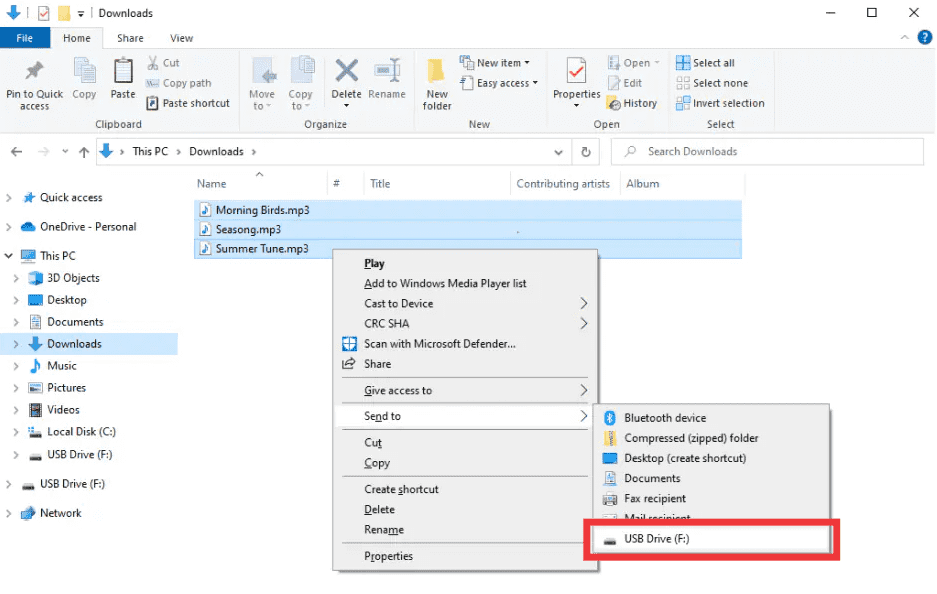
Шаг 5. Как включить музыку MP3 игрок из SpotifyПосле преобразования найдите выходную папку. Подключите ваше устройство. MP3 Подключите плеер к компьютеру через USB и скопируйте преобразованные файлы. Spotify Теперь музыку можно воспроизводить в автономном режиме на любом устройстве. MP3 устройства.
Часть 3. FAQ
1. Могу ли я это сделать? Spotify песни напрямую на MP3 игроки?
№ SpotifyТреки защищены DRM-защитой и не могут быть экспортированы напрямую. Вам понадобится конвертер, например, такой. DumpMedia Spotify Music Converter чтобы сделать их совместимыми.
2. Как мне конвертировать Spotify плейлисты для MP3?
Используйте DumpMedia Spotify Music Converter: скопировать ссылки на плейлисты, выбрать MP3 в качестве выходных данных и преобразуйте. Затем передайте файлы на ваш компьютер. MP3 игрок.
3. Законно ли конвертировать Spotify Музыка?
преобразование Spotify Использование музыки в личных целях, в принципе, разрешено. Следует избегать распространения конвертированных файлов другим лицам, так как это может нарушать законы об авторском праве.
4. Какие форматы я могу использовать для MP3 игроки?
MP3 является наиболее распространенным. DumpMedia Spotify Music Converter Также поддерживаются форматы M4A, WAV и FLAC, совместимые с большинством устройств.
5. Могу ли я перевести Spotify Музыка на нескольких устройствах?
Да. После конвертации с помощью DumpMedia, Ваш Spotify Песни не защищены DRM и могут воспроизводиться на любом устройстве. MP3 плеер, телефон или планшет.
Часть 4. Подводя итоги
Если вы когда-либо задавались вопросом, как загрузить музыку на MP3 игрок из SpotifyРешение очевидно: SpotifyСистема DRM предотвращает прямые переводы, но DumpMedia Spotify Music Converter Снимает эти ограничения. Он преобразует ваши любимые песни, альбомы или плейлисты в... MP3 или других универсальных форматах, обеспечивающих высокое качество и позволяющих воспроизводить контент в автономном режиме на любом устройстве.
Попытка DumpMedia Spotify Music Converter сегодня и наслаждайтесь Spotify Музыка где угодно, когда угодно, без ограничений, без проблем с DRM.

Скидка 30% >>>