


Лучшее MP3 Плеер будет совместим с Apple Music в 2026 году.
Много Apple Music подписчики хотят MP3 Плеер, совместимый с Apple Music. Таким образом, они могут наслаждаться любимыми песнями, не полагаясь на смартфон. Однако найти подходящий вариант может быть непросто. MP3 Совместимость музыкальных плееров с Apple Music не всегда проста, поскольку Apple Music использует потоковую технологию и системы защиты контента, которые не поддерживаются многими традиционными музыкальными плеерами. MP3 плееров. В этом руководстве мы порекомендуем некоторые из лучших устройств, доступных сегодня, и покажем, как наслаждаться Apple Music на более широком спектре устройств. MP3 игроков.
Содержание Руководство Часть 1. Совместима ли Apple Music с... MP3 Игроки?Часть 2. Лучшее MP3 Музыкальные плееры, совместимые с Apple Music.Часть 3. Как можно воспроизводить Apple Music на любом устройстве? MP3 Player?Часть 4. Часто задаваемые вопросыЧасть 5. Вывод
Часть 1. Совместима ли Apple Music с... MP3 Игроки?
Ответ — и да, и нет. Apple Music работает с некоторыми современными устройствами, поддерживающими:
- Подключение к Wi-Fi (устройства с поддержкой Wi-Fi могут подключаться к серверам Apple Music и проверять подписки).
- Операционная система Android (это позволяет пользователям загружать Apple Music из магазина приложений).
- Установка приложения Apple Music (без поддержки приложения прямая потоковая передача, как правило, невозможна).
- Онлайн-подтверждение учетной записи (поскольку Apple Music требует аутентификации учетной записи, совместимые плееры должны поддерживать онлайн-сервисы и функции потоковой передачи).
Однако большинство традиционных MP3 Игроки не соответствуют этим требованиям. В результате не каждый MP3 Плееры, совместимые с Apple Music, могут получить прямой доступ к Apple Music.
Часть 2. Лучшее MP3 Музыкальные плееры, совместимые с Apple Music.
если вы ищете MP3 В числе наиболее популярных вариантов плееров, совместимых с Apple Music, можно выделить следующие устройства.
Sony Walkman NW-A306
Sony Walkman NW-A306 работает на Android и поддерживает приложения для потоковой передачи музыки, включая Apple Music. Поскольку он разработан исключительно для качественного воспроизведения звука, а не для выполнения общих задач, как смартфон, он обеспечивает специализированное качество звучания. Устройство имеет 32 ГБ встроенной памяти, а также слот для карты microSD, что крайне важно, если вы планируете загружать большие музыкальные библиотеки высокого разрешения для прослушивания в автономном режиме.
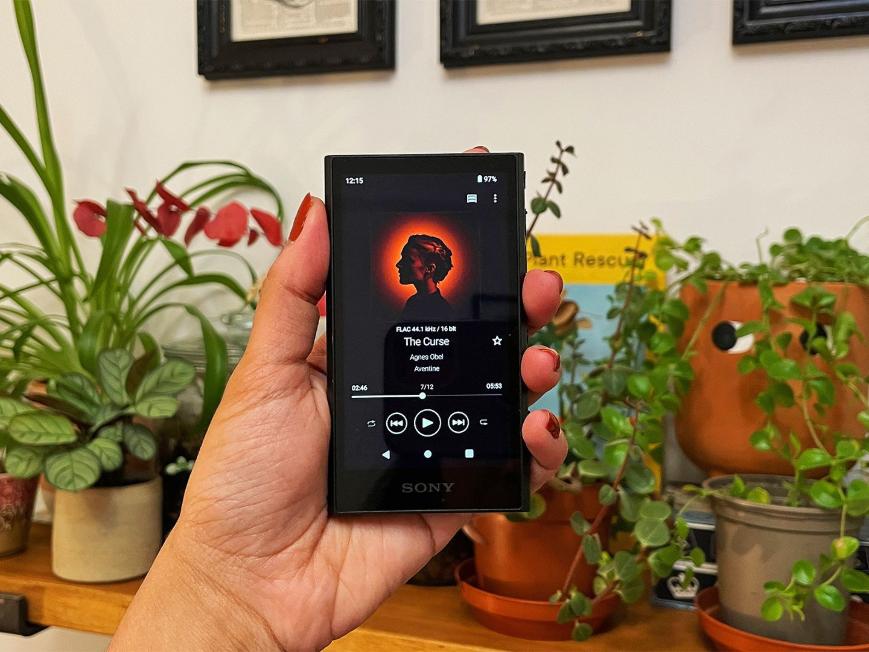
Если вы рассматриваете это устройство для Apple Music, имейте в виду, что, поскольку устройство работает на Android, использование приложения будет очень похоже на использование его на телефоне Android, но с преимуществом использования специализированного аудиооборудования Sony.
Sony Walkman NW-ZX707
Этот высококачественный музыкальный плеер — ещё один превосходный пример MP3 Плеер совместим с Apple Music. Он имеет корпус из фрезерованного алюминия и высококачественные внутренние компоненты, включая высокоемкие твердотельные полимерные конденсаторы, что обеспечивает улучшенную прозрачность звучания, звуковую сцену и контроль басов.
Если для вас приоритетом является качество звука и вы предъявляете высокие требования к наушникам, то NW-ZX707 — лучший выбор, если вы отдаете приоритет портативности и легкому дизайну для прослушивания музыки в дороге.
HiBy R6 III
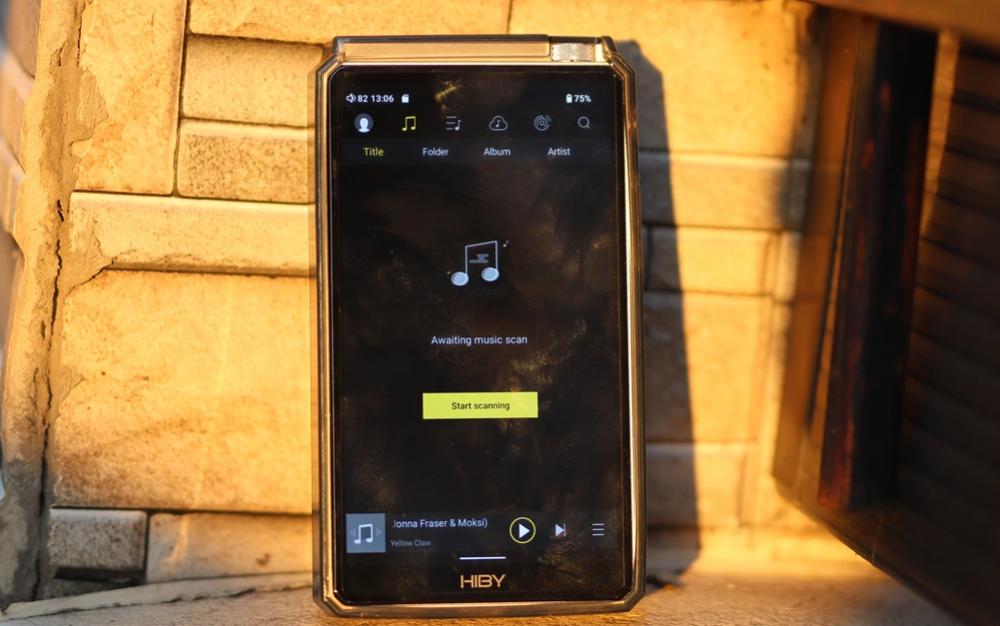
Наушники HiBy R6 III поддерживают приложения Android и обеспечивают высокое качество звука для серьезных ценителей музыки. В них используется массив из четырех ЦАП (четыре чипа CS43198) и выделенные кварцевые генераторы, гарантирующие высококачественное воспроизведение звука и низкий уровень джиттера.
FiiO M11S
FiiO M11S часто рекомендуют пользователям, ищущим MP3 Плеер совместим с Apple Music, поскольку сочетает в себе поддержку потоковой передачи с превосходным качеством звука. FiiO работает на открытой операционной системе Android с предустановленным магазином Google Play, что позволяет легко устанавливать Apple Music, Tidal и другие приложения. Spotifyа также другие потоковые приложения. Кроме того, он предлагает режим «Чистая музыка», который может отключать системные процессы Android, освобождая фоновые процессы и позволяя сосредоточиться исключительно на воспроизведении звука для более аутентичного и свободного от отвлекающих факторов звучания.
Часть 3. Как можно воспроизводить Apple Music на любом устройстве? MP3 Player?
Многие пользователи предполагают, что любой MP3 Плеер может воспроизводить Apple Music. К сожалению, это не так. Треки Apple Music защищены технологиями управления цифровыми правами (DRM). Это предотвращает прямое воспроизведение на неподдерживаемых устройствах. Что делать, если ваше предпочтительное устройство не поддерживает Apple Music? MP3 Совместим ли плеер с Apple Music? К счастью, есть альтернативный подход.
Вместо того чтобы полагаться на прямую поддержку приложения Apple Music, некоторые пользователи предпочитают конвертировать треки Apple Music в распространенные аудиоформаты для воспроизведения на совместимых устройствах. DumpMedia Конвертер Apple Music Это программное обеспечение разработано для пользователей, которым нужна большая гибкость при управлении контентом Apple Music. Оно позволяет пользователям... конвертировать Apple Music в MP3 для более гибкого воспроизведения. Даже если Приложение Apple Music не работает. На вашем устройстве вы можете сразу же воспроизводить песни Apple Music в автономном режиме на другом музыкальном плеере.
Бесплатная загрузка Бесплатная загрузка
🏆Основные особенности DumpMedia Конвертер Apple Music
- 🎵Скачайте Apple Music, чтобы MP3WAV, FLAC и AAC
- 🎵Интеграция с веб-плеером Apple Music
- 🎵Сохраните оригинальное качество звука
- 🎵Пакетная загрузка плейлистов и альбомов
- 🎵Высокая скорость конвертации
- 🎵Сохранение метаданных песни и тегов ID3
- 🎵Поддерживается воспроизведение в автономном режиме на любом устройстве
Благодаря преобразованию песен в широко поддерживаемые форматы, пользователи могут наслаждаться музыкой на устройствах, которые обычно не подходят для этой цели. MP3 Плеер, совместимый с Apple Music.
Как конвертировать Apple Music в MP3
Шаг 1. Загрузите и установите программу на свой компьютер. Она работает с обоими устройствами. WinWindows и Mac. Интерфейс удобен для пользователя, что делает его простым в использовании даже для новичков.
Бесплатная загрузка Бесплатная загрузка
Шаг 2. Откройте встроенный веб-плеер Apple Music. DumpMedia Войдите в свою учетную запись Apple Music. Просмотрите Apple Music и перетащите песни, альбомы или плейлисты, которые хотите загрузить, в конвертер.
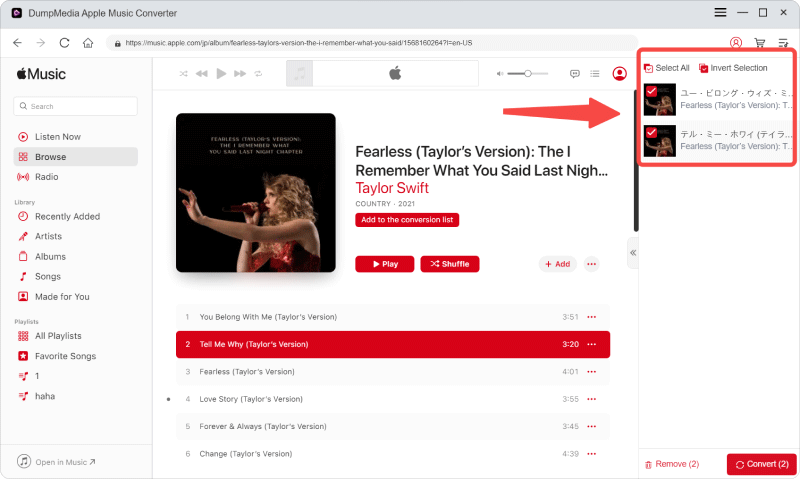
Шаг 3. В панели настроек выберите MP3 в качестве выходного формата для обеспечения MP3 Загрузка выбранных вами треков.

Шаг 4. Нажмите «Конвертировать» и загрузите песни напрямую. MP3 файлы.

Перенести конвертированную музыку из Apple Music в MP3 Игрок (Winдоус)
- Используйте USB-кабель для подключения плеера к компьютеру.
- Если ваш плеер запросит подтверждение (что часто встречается на устройствах Android), выберите режим «Передача файлов» или «MTP» в панели уведомлений или настройках устройства.
- Ваш проигрыватель должен отображаться как диск в разделе «Этот компьютер».
- Откройте устройство, перейдите во внутреннюю память или папку на карте microSD и найдите папку с названием Music.
- Просто перетащите музыкальные файлы из папки на компьютере в папку «Музыка» на вашем плеере.
- После завершения процесса безопасно извлеките накопитель из компьютера, а затем отсоедините USB-кабель.
Перенести конвертированную музыку из Apple Music в MP3 Плеер (Mac)
- Загрузите и установите OpenMTP на свой Mac.
- Подключите плеер к вашему Mac и в настройках уведомлений установите режим USB плеера на «Передача файлов» (MTP).
- Откройте OpenMTP; он автоматически обнаружит ваш плеер.
- Перетащите музыкальные файлы с вашего Mac в папку «Музыка» в приложении плеера.
- На плеере откройте музыкальное приложение и нажмите «Поиск песен», чтобы обновить библиотеку.
Часть 4. Часто задаваемые вопросы
Поддерживает ли Sony Walkman Apple Music?
Многие новые модели Sony Walkman используют Android и поддерживают установку Apple Music.
Можно ли перенести Apple Music на традиционный компьютер? MP3 игрок?
Традиционном MP3 Как правило, плееры не поддерживают Apple Music напрямую из-за защиты DRM и требований к приложениям.
Почему Apple Music не воспроизводится на моем устройстве? MP3 игрок?
Ваше устройство может не поддерживать аутентификацию Apple Music, потоковые сервисы или само приложение Apple Music.
Можно ли преобразовать Apple Music в... MP3?
Некоторые пользователи выбирают специализированное программное обеспечение для конвертации, чтобы создавать аудиофайлы, совместимые с более широким спектром устройств.
Часть 5. Вывод
Нахождение MP3 Совместимость плеера с Apple Music может быть сложной задачей, поскольку Apple Music использует потоковую передачу, проверку подписки и поддержку приложений. Если вам нужна большая гибкость, более широкая совместимость с устройствами и более простое воспроизведение в автономном режиме, важно понимать доступные варианты, такие как... DumpMedia Программа Apple Music Converter поможет вам выбрать оптимальное решение для ваших потребностей в прослушивании музыки.