


Бесплатный AAX для MP3 Конвертер: 3 способа работы (включая аудиофайлы)
AAX — это проприетарный аудиоформат, разработанный компанией ЗвуковойИ он поставляется со встроенной защитой DRM. Это означает, что вы не можете просто воспроизводить или конвертировать файлы AAX без использования соответствующих инструментов. Хотя существуют некоторые способы использования бесплатного AAX-редактора для MP3 Большинство бесплатных конвертеров имеют ограничения, такие как низкая вероятность успеха, медленная скорость или плохое качество звука. В этом руководстве мы покажем вам рабочие методы и лучшее решение для эффективного конвертирования файлов AAX.
Содержание Руководство Часть 1: Что такое AAX и зачем вам нужен конвертерЧасть 2: Бесплатные AAX-файлы для MP3 Конвертер (онлайн и бесплатные инструменты)Часть 3: Лучший способ конвертировать AAX в MP3 (Рекомендуется)Часть 4: Бесплатный AAX-конвертер против DumpMediaЧасть 5: часто задаваемые вопросыЧасть 6: чтобы все обернуть
Часть 1: Что такое AAX и зачем вам нужен конвертер
AAX — это формат аудиокниг, используемый Audible для защиты контента, защищенного авторским правом. Из-за ограничений DRM:
- Вы не можете напрямую преобразовать AAX в MP3
- Многие медиаплееры не поддерживают файлы AAX.
- Стандартные конвертеры не смогут обрабатывать файлы AAX.
Именно поэтому пользователи ищут бесплатный AAX-файл. MP3 конвертер, позволяющий снять эти ограничения и сделать аудиокниги воспроизводимыми на любом устройстве.
Часть 2: Бесплатные AAX-файлы для MP3 Конвертер (онлайн и бесплатные инструменты)
Если вам нужен бесплатный AAX-файл, MP3 Вот два наиболее часто используемых варианта конвертера.
Метод 1: AAX-конвертер аудио (инструмент с открытым исходным кодом)
AAX Audio Converter — это настольная программа, которая может конвертировать файлы Audible в незащищенные форматы, такие как... MP3M4A или M4B. Этот формат высоко ценится в сообществе любителей аудиокниг за способность обходить DRM, используя индивидуальные активационные байты пользователя.
Шаги:
- Во-первых, убедитесь, что на вашем компьютере установлен и авторизован Audible Manager или приложение Audible. Конвертеру необходимы ваши «активационные байты» (цифровой ключ) из вашей системы для законного расшифрования принадлежащих вам файлов.
- Запустите программу и нажмите кнопку «Добавить...» (или просто перетащите файлы .aax в главное окно).
- В раскрывающемся меню «Формат» выберите желаемый тип.
- Затем выберите «Один файл» или «Разделить по главам».
- В поле «Каталог сохранения» выберите место сохранения преобразованных файлов.
- Нажмите кнопку «Конвертировать» внизу. Откроется консольное окно, отображающее ход выполнения.
Метод 2: Онлайн-конвертеры аудио
Некоторые веб-сайты утверждают, что предоставляют бесплатный AAX-адаптер. MP3 Онлайн-конвертеры, такие как WaveSpeed Online, AhaConvert, CloudConvert и другие.
Однако вам придётся загрузить оригинал и скачать результат; медленный интернет делает это утомительным для файлов WAV/FLAC высокого разрешения. Кроме того, конвертация всей музыкальной библиотеки (например, 500 песен) онлайн намного медленнее, чем с помощью настольной программы.
Часть 3: Лучший способ конвертировать AAX в MP3 (Рекомендуется)
Если вам нужно стабильное и эффективное решение, выходящее за рамки базового бесплатного AAX-приложения, MP3 конвертер, лучший вариант — DumpMedia Звуковой конвертер.
Бесплатная загрузка Бесплатная загрузка
Почему именно DumpMedia Звуковой конвертер?
- ✅ Полное удаление DRM* из AAX-файлов
- ✅ Высокое качество MP3 выходной
- ✅ Пакетное преобразование аудиокниг
- ✅ Высокая скорость конвертации
- ✅ Сохраняет главы и метаданные
Как конвертировать AAX в MP3?
Шаг 1. Скачайте и установите DumpMedia Audible Converter. Доступны версии для ПК и Mac. Открыть DumpMediaЗатем перейдите на вкладку Audible.
Бесплатная загрузка Бесплатная загрузка
Шаг 2. Выберите книги из вашей библиотеки Audible, которые вы хотите оцифровать.
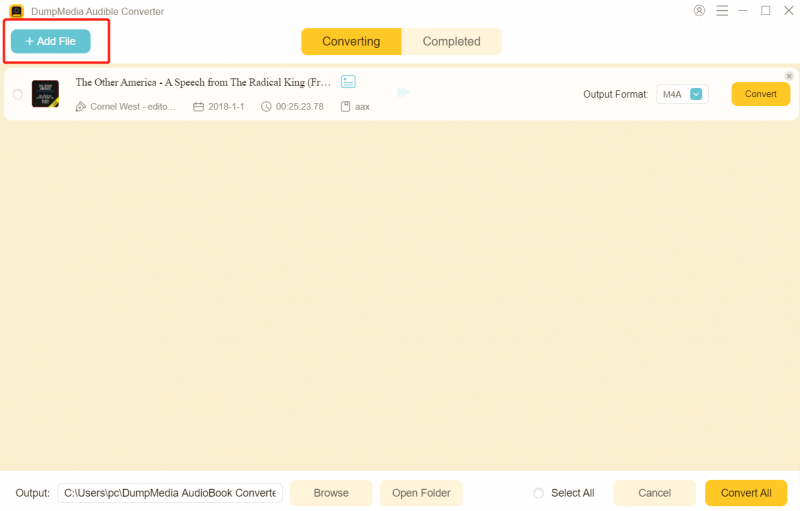
Шаг 3. Выберите параметры вывода и начните преобразование.

Шаг 4. Завершите преобразование и просмотрите выходные файлы.

Вместо того чтобы полагаться на ограниченный бесплатный AAX, MP3 Этот метод, используемый в конвертере, гарантирует надежные результаты каждый раз.
Часть 4: Бесплатный AAX-конвертер против DumpMedia
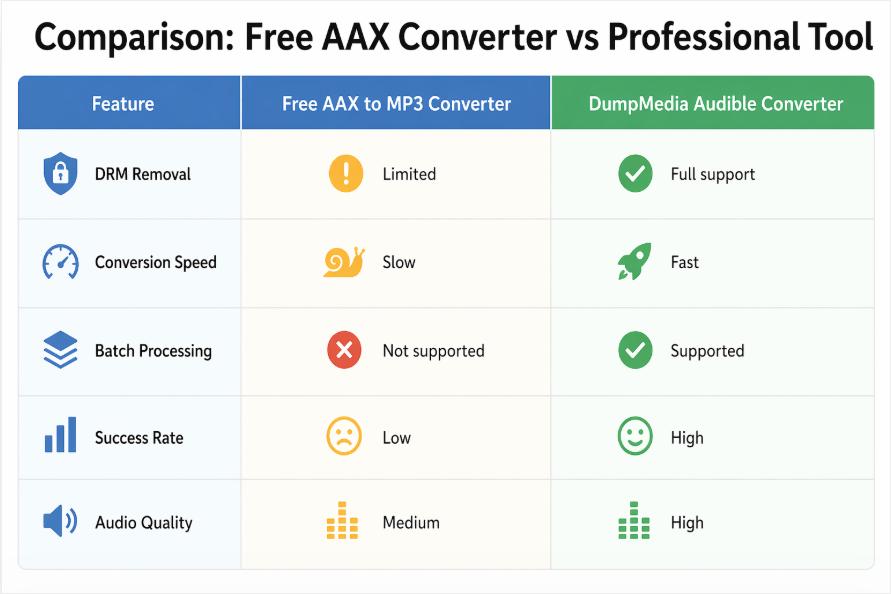
В то время как бесплатный AAX MP3 Конвертер может подойти для базовых задач, но профессиональные инструменты обеспечивают гораздо лучшую производительность.
Часть 5: часто задаваемые вопросы
Существует ли полностью бесплатный AAX-адаптер? MP3 преобразователь?
Да, некоторые инструменты заявляют, что являются бесплатными AAX-редакторами. MP3 конвертер, но большинство из них имеют ограничения по функциональности и вероятности успеха.
Можно ли конвертировать файлы Audible в формат AAX? MP3 на законных основаниях?
Использование материалов в личных целях, как правило, допустимо, но распространение запрещено.
Почему онлайн-конвертеры AAX не работают?
Большинство онлайн-инструментов не поддерживают DRM, что делает их неэффективными в качестве бесплатных AAX-адаптеров. MP3 конвертер.
Какая лучшая альтернатива бесплатному AAX-файлу? MP3 преобразователь?
Специализированное решение, например DumpMedia Программа Audible Converter обеспечивает наиболее надежные результаты.
Часть 6: чтобы все обернуть
Использование бесплатного AAX для MP3 Конвертер может работать в ограниченных случаях, но большинство бесплатных инструментов испытывают проблемы с защитой DRM, скоростью и надежностью. Если вы хотите получить плавную и качественную работу, перейдите на профессиональное решение, например, на [название инструмента]. DumpMedia Audible Converter — лучший выбор. Вместо того чтобы тратить время на нестабильные инструменты, вы можете быстро и эффективно конвертировать файлы Audible с помощью специализированного конвертера.
Бесплатная загрузка Бесплатная загрузка
*DumpMedia Эта программа расшифровывает и загружает ваши аудиокниги в файлы без DRM-защиты, позволяя получить чистую, неограниченную копию вашей библиотеки для любого устройства.

Скидка 30% >>>