


Jak przenieść Apple Music do Spotify: Kompletny przewodnik
Cyfrowa lojalność jest płynna. Ponieważ entuzjaści muzyki poszukują lepszej kompatybilności międzyplatformowej i nowych algorytmów wyszukiwania, wielu z nich decyduje się na przejście z Apple Music do SpotifyJednak największą barierą w przejściu na muzykę nie jest opłata abonamentowa, lecz strach przed utratą dekady historii muzyki. Na szczęście istnieje obecnie kilka narzędzi, które to umożliwiają. przenieś Apple Music do Spotify automatycznie. W tym przewodniku przedstawimy najskuteczniejsze metody przenoszenia utworów z Apple Music do Spotify na różnych urządzeniach.
Przewodnik po zawartości Część 1. Przenieś playlistę Apple Music do Spotify on Windows/MacCzęść 2. Przenieś playlistę Apple Music do Spotify OnlineCzęść 3. Przenieś playlistę Apple Music do Spotify na iOS/AndroidCzęść 4. Często zadawane pytaniaCzęść 5. Podsumowując
Część 1. Przenieś playlistę Apple Music do Spotify on Windows/Mac
Jednym z najpewniejszych sposobów na przeniesienie Apple Music do Spotify Można to zrobić za pomocą dedykowanego narzędzia desktopowego, które oferuje zaawansowane funkcje migracji playlist. Zdecydowanie zalecaną opcją jest DumpMedia Dowolny konwerter muzyki, który obejmuje zaawansowaną funkcję przesyłania list odtwarzania.
Bezpłatne pobieranie Bezpłatne pobieranie
DumpMedia Any Music Converter to profesjonalna aplikacja desktopowa przeznaczona do zarządzania muzyką i konwersji między platformami. Działa na obu platformach. WinDows i macOS. Dzięki wbudowanej funkcji przesyłania playlist użytkownicy mogą sprawnie przesyłać muzykę z Apple Music do Spotify przy jednoczesnym zachowaniu struktury listy odtwarzania i metadanych utworów.
Kluczowe funkcje
- Funkcja przenoszenia playlisty: DumpMedia Umożliwia przenoszenie całych playlist zamiast przenoszenia pojedynczych utworów. To znacznie oszczędza czas w przypadku dużych kolekcji muzycznych.
- Migracja list odtwarzania wsadowo: Możesz wybrać wiele list odtwarzania i przenieść je jednocześnie, co ułatwia zarządzanie dużymi bibliotekami.
- Stabilna wydajność komputera stacjonarnego: Ponieważ DumpMedia działa lokalnie na Twoim komputerze i zapewnia bardziej stabilny proces transferu niż wiele narzędzi opartych na przeglądarce.
- Inteligentne dopasowywanie utworów: Oprogramowanie automatycznie identyfikuje pasujące utwory Spotifykatalogu, upewniając się, że przeniesiona lista odtwarzania zawiera właściwe utwory.
- Zachowywanie metadanych: Tytuły utworów, nazwy wykonawców, albumy i kolejność playlisty pozostają nienaruszone podczas procesu transferu.
Przewodnik krok po kroku
Krok 1. Najpierw pobierz DumpMedia Any Music Converter z oficjalnej strony. Zainstaluj program na swoim WinDows lub komputer Mac i uruchom go. Otwórz aplikację i wybierz Narzędzia > Przesyłanie list odtwarzania.
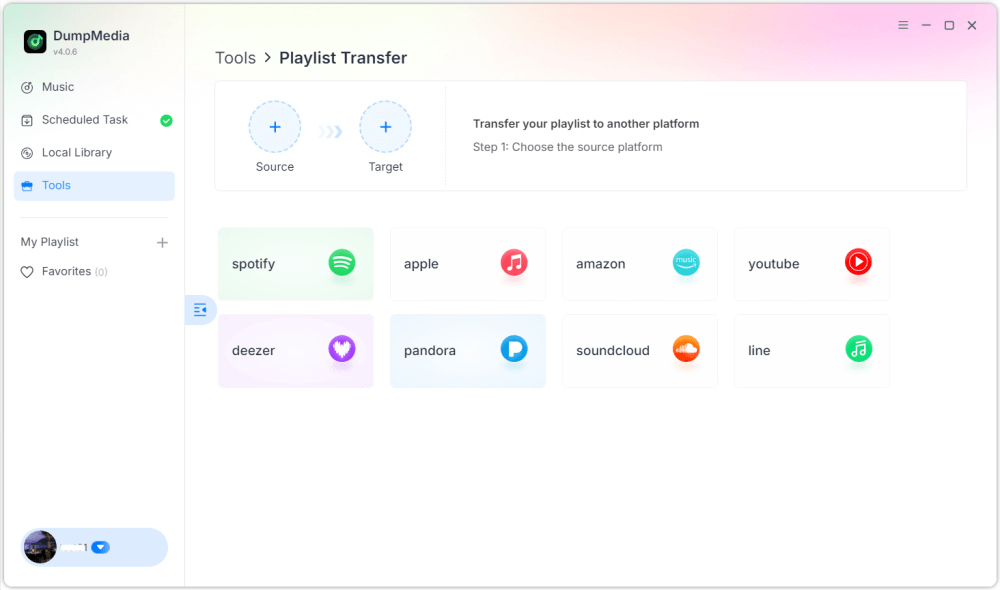
Krok 2. Wybierz Apple Music jako źródło. Następnie wybierz Spotify jako platforma docelowa.
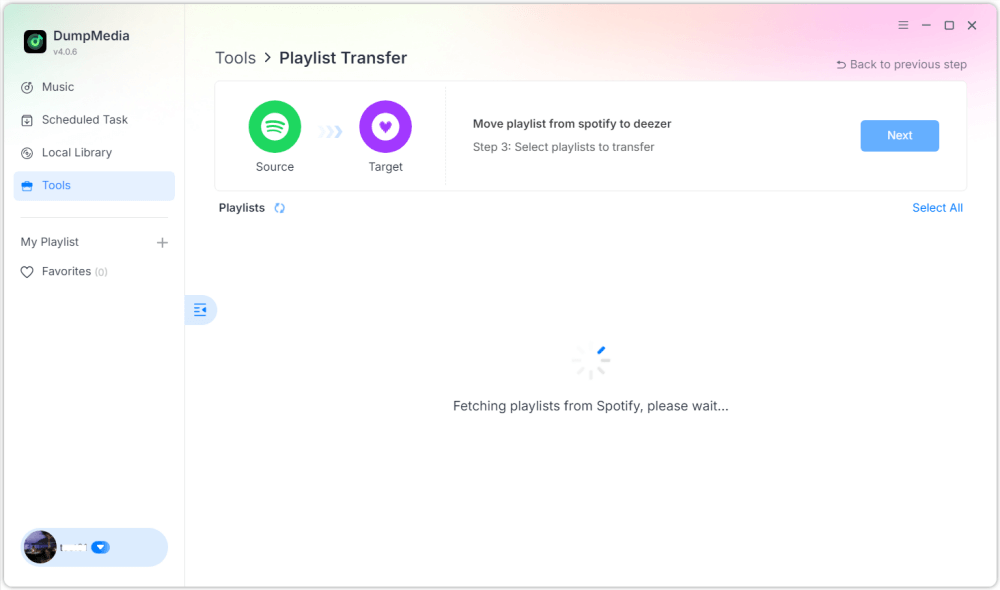
Krok 3. Znajdź listy odtwarzania, które chcesz przenieść z Apple Music do Spotifyi wybierz wszystkie listy odtwarzania, które chcesz przenieść.

Krok 4. Kliknij przycisk Konwertuj, aby rozpocząć migrację listy odtwarzania. DumpMedia automatycznie odtworzy listę odtwarzania Spotify.
Krok 5. Transfer zakończony. Kliknij „Przejdź do” SpotifyTwoje playlisty zostały przeniesione do nowej usługi i możesz zacząć korzystać z nowej usługi strumieniowego przesyłania muzyki.
Korzystanie z tej metody na komputerze stacjonarnym to jeden z najskuteczniejszych sposobów na przeniesienie Apple Music do Spotifyzwłaszcza jeśli masz wiele playlist lub dużą bibliotekę muzyczną.
Część 2. Przenieś playlistę Apple Music do Spotify Online
Jeśli nie chcesz instalować dodatkowego oprogramowania, możesz skorzystać z narzędzia do przesyłania list odtwarzania online, które pomoże Ci przenieść Apple Music do Spotify Szybko. Jedną z popularnych opcji jest Soundiiz. Soundiiz to oparta na chmurze platforma do zarządzania playlistami, która umożliwia użytkownikom przesyłanie playlist między wieloma serwisami streamingowymi. Ponieważ działa w całości w przeglądarce, działa na niemal każdym urządzeniu.
Kluczowe funkcje
- Interfejs internetowy, który nie wymaga instalacji
- Obsługuje wiele platform do strumieniowego przesyłania muzyki
- Narzędzia do konwersji list odtwarzania
- Zarządzanie listami odtwarzania wsadowego
Kroki przenoszenia Apple Music do Spotify z Soundiizem
Krok 1. Odwiedź stronę Soundiiz i załóż konto. Zaloguj się na swoje konto Apple Music i zezwól Soundiiz na dostęp do swoich playlist.
Krok 2. Następnie podłącz swój Spotify konta.
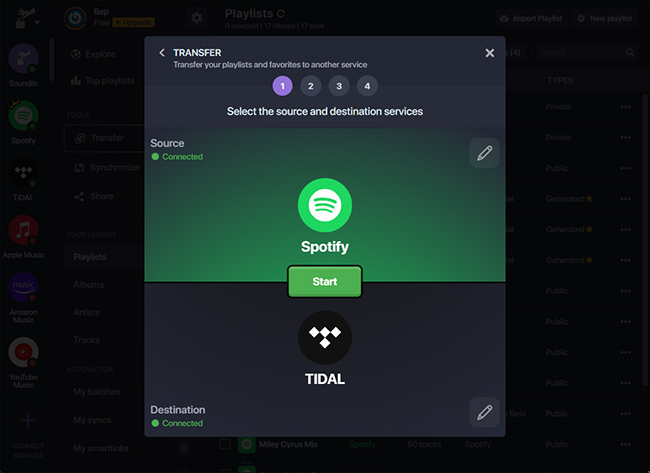
Krok 3. Przeglądaj playlisty Apple Music i wybierz tę, którą chcesz przenieść. Kliknij Konwertuj i wybierz Spotify jako platforma docelowa.
Krok 4. Soundiiz zacznie dopasowywać utwory i odtwarzać playlistę w Spotify.
Narzędzia online, takie jak Soundiiz, są wygodną opcją dla użytkowników, którzy chcą przenieść utwory z Apple Music do Spotify bez instalowania oprogramowania na komputerze. Mogą jednak mieć ograniczenia, takie jak limity transferu lub wolniejsze przetwarzanie dużych list odtwarzania.
Część 3. Przenieś playlistę Apple Music do Spotify na iOS/Android
Jeśli wolisz zarządzać swoimi listami odtwarzania bezpośrednio ze smartfona, możesz skorzystać z kilku aplikacji mobilnych, które pomogą Ci przenieść Apple Music do Spotify łatwo. Dwiema najpopularniejszymi aplikacjami są FreeYourMusic i SongShift.
Korzystanie z FreeYourMusic (iOS i Android)
FreeYourMusic to wieloplatformowe narzędzie do przesyłania muzyki, dostępne zarówno na urządzeniach z systemem iOS, jak i Android. Umożliwia użytkownikom przenoszenie playlist między różnymi serwisami streamingowymi bezpośrednio z telefonu.
- Zainstaluj aplikację FreeYourMusic ze sklepu App Store lub Google Play.
- Otwórz aplikację i wybierz Apple Music jako platformę źródłową.
- Zaloguj się na swoje konto Apple Music.
- Dodaj Spotify jako platforma docelowa.
- Wybierz listę odtwarzania, którą chcesz przenieść.
- Kliknij Transfer, aby rozpocząć proces.
W ciągu kilku minut Twoja lista odtwarzania powinna się pojawić Spotify.
Korzystanie z SongShift (tylko iOS)
SongShift to kolejna popularna aplikacja mobilna zaprojektowana specjalnie dla użytkowników iOS. Umożliwia ona szybkie przesyłanie playlist między wieloma serwisami muzycznymi.
- Pobierz SongShift ze sklepu App Store.
- Połącz Apple Music i Spotify Konta.
- Kliknij Utwórz zmianę.
- Wybierz Apple Music jako źródło i Spotify jako miejsce docelowe.
- Wybierz playlistę, którą chcesz przenieść.
- Rozpocznij proces transferu.
Korzystanie z aplikacji mobilnych to doskonała opcja, jeśli chcesz przenieść Apple Music do Spotify bezpośrednio z telefonu, bez użycia komputera.
Część 4. Często zadawane pytania
1. Czy mogę przenieść Apple Music do Spotify za darmo?
Niektóre narzędzia oferują darmowe przesyłanie playlist z ograniczeniami, takimi jak maksymalna liczba utworów. Wersje płatne zazwyczaj umożliwiają nielimitowane przesyłanie i szybsze przetwarzanie.
2. Czy każda piosenka zostanie pomyślnie przeniesiona?
Większość utworów zostanie przeniesiona prawidłowo, ale czasami niektóre utwory mogą się nie pojawić, jeżeli są niedostępne na platformie docelowej.
3. Jak długo trwa przelew?
Czas potrzebny na przesłanie playlisty zależy od jej rozmiaru. Przesyłanie mniejszych playlist może zająć kilka minut, a większych – dłużej.
4. Czy korzystanie z narzędzi do przesyłania playlist jest bezpieczne?
Renomowane narzędzia korzystają z bezpiecznych metod uwierzytelniania, aby łączyć się z Twoimi kontami muzycznymi. Zawsze wybieraj zaufane oprogramowanie, przenosząc Apple Music do Spotify.
Część 5. Podsumowując
Zmiana platformy streamingowej nie oznacza już utraty starannie dobranych playlist. Dzięki nowoczesnym narzędziom do migracji playlist przeniesienie Apple Music na inną platformę jest teraz łatwiejsze niż kiedykolwiek. Spotify Bez ręcznego przebudowywania biblioteki muzycznej. Wybierając metodę, która najlepiej pasuje do Twojego urządzenia i rozmiaru playlisty, możesz z powodzeniem przenieść utwory z Apple Music do Spotify i nadal możesz cieszyć się ulubionymi utworami na nowej platformie streamingowej.