


Jak przenieść Spotify do Deezer łatwo: kompletny przewodnik
Wielu słuchaczy, którzy pierwotnie korzystali z Spotify mogą później zdecydować się na przeniesienie swoich bibliotek muzycznych do Deezer ze względu na unikalne funkcje, takie jak wysoka jakość dźwięku, spersonalizowane rekomendacje i kompatybilność z wieloma urządzeniami inteligentnymi. Jednak największym problemem przy zmianie platformy jest to, jak przenosić playlisty bez ich ręcznego tworzenia. Tworzenie playlist utwór po utworze może zająć godziny, szczególnie jeśli masz ich setki.
Na szczęście obecnie istnieje kilka narzędzi umożliwiających użytkownikom automatyczne przenoszenie list odtwarzania z Spotify do Deezera, oszczędzając czas i zapewniając porządek w ulubionej muzyce. W tym przewodniku omówimy najskuteczniejsze sposoby migracji. Spotify playlisty do Deezera i odpowiemy na najczęściej zadawane pytania, aby pomóc Ci sprawnie ukończyć ten proces.
Przewodnik po zawartości Część 1. Przelew Spotify Listy odtwarzania do Deezer OnlineCzęść 2. Przelew Spotify Playlisty do Deezer na Windows/MacCzęść 3. Często zadawane pytaniaCzęść 4. Wniosek
Część 1. Przelew Spotify Listy odtwarzania do Deezer Online
Jeden z najłatwiejszych sposobów przenoszenia list odtwarzania Spotify Do Deezera można przenieść playlisty online, korzystając z usługi przesyłania playlist online. Narzędzia te działają bezpośrednio w przeglądarce i nie wymagają instalacji. Łączą się z kontami muzycznymi i automatycznie odtwarzają playlisty na nowej platformie.
Szeroko stosowanym narzędziem online do tego zadania jest TuneMyMusic. TuneMyMusic to oparte na przeglądarce narzędzie do migracji muzyki, zaprojektowane, aby pomóc użytkownikom w przenoszeniu playlist między różnymi serwisami streamingowymi. Obsługuje wiele popularnych platform i zapewnia prosty proces przenoszenia. Spotify playlisty do Deezer.
Kluczowe funkcje
- Działa bezpośrednio w przeglądarce internetowej
- Obsługuje wiele serwisów streamingowych muzyki
- Prosty interfejs krok po kroku
- Nie wymaga instalacji oprogramowania
- Umożliwia łączenie list odtwarzania i importowanie kont
Ze względu na swoją prostotę TuneMyMusic jest często polecany użytkownikom, którzy chcą przenieść listy odtwarzania z Spotify szybko przejść do Deezer bez konieczności instalowania dodatkowych aplikacji.
Przewodnik krok po kroku
Krok 1. Wejdź na stronę TuneMyMusic i kliknij przycisk „Rozpocznij”, aby rozpocząć proces przenoszenia playlisty.
Krok 2. Wybierz Spotify jako platforma źródłowa. Zostaniesz poproszony o zalogowanie się do swojego Spotify Załóż konto i udziel narzędziu uprawnień dostępu do Twoich playlist. Po autoryzacji usługa wyświetli dostępne playlisty.
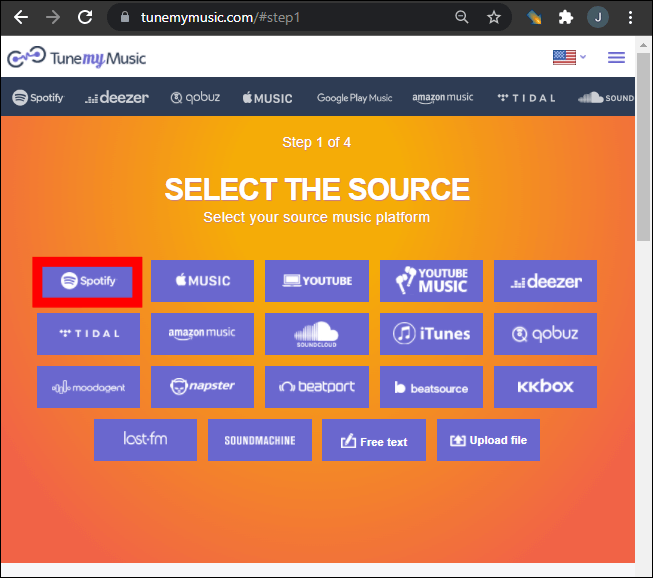
Krok 3. Możesz wybrać konkretną playlistę ze swojej biblioteki lub wkleić link do playlisty. TuneMyMusic automatycznie załaduje wszystkie utwory z tej playlisty.
Krok 4. Następnie wybierz Deezer jako platformę docelową. Zaloguj się na swoje konto Deezer i zezwól narzędziu na tworzenie playlist w Twojej bibliotece.
Krok 5. Kliknij „Rozpocznij przenoszenie mojej muzyki”. System rozpocznie dopasowywanie utworów pomiędzy Spotify i Deezer.
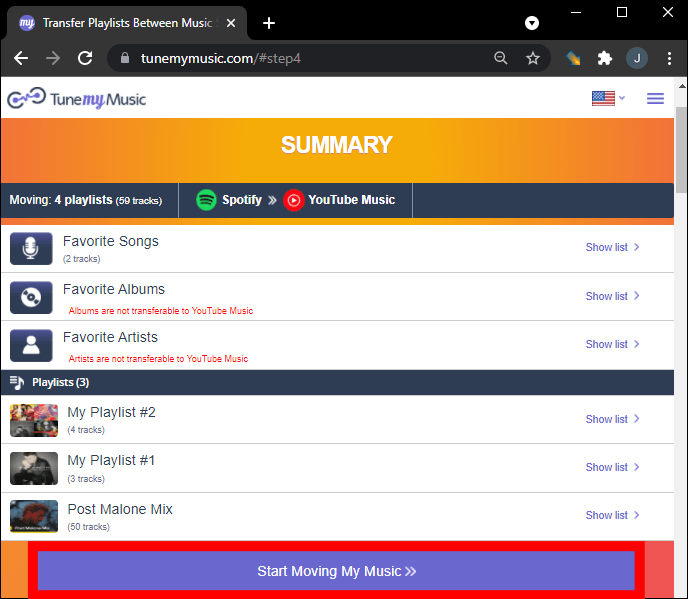
Krok 6. Po zakończeniu przesyłania otwórz bibliotekę Deezer, aby sprawdzić, czy playlista została pomyślnie utworzona ponownie.
Korzystając z tej metody, wielu użytkowników może szybko przenosić listy odtwarzania z Spotify do Deezer w ciągu kilku minut.
Ograniczenia narzędzi online
Mimo że narzędzia online są wygodne, mogą mieć pewne ograniczenia:
- Wersje bezpłatne mogą ograniczać liczbę przesyłanych utworów
- Przetwarzanie dużych list odtwarzania może zająć więcej czasu
- Dokładność dopasowania utworów może się różnić
- Łączność internetowa wpływa na prędkość transferu
Ze względu na te ograniczenia użytkownicy posiadający duże biblioteki muzyczne często wolą rozwiązanie stacjonarne do przesyłania list odtwarzania z Spotify do Deezer w sposób bardziej niezawodny.
Część 2. Przelew Spotify Playlisty do Deezer na Windows/Mac
Dla użytkowników, którzy oczekują większej stabilności i lepszego zarządzania listami odtwarzania, oprogramowanie desktopowe jest często najpewniejszą opcją. Jednym z najbardziej polecanych rozwiązań jest DumpMedia Dowolny konwerter muzyki, który obejmuje dedykowany Przenoszenie playlisty cecha.
Bezpłatne pobieranie Bezpłatne pobieranie
DumpMedia Any Music Converter to potężna aplikacja desktopowa, która pomaga użytkownikom zarządzać muzyką i konwertować ją na różnych platformach. Obsługuje zarówno WinDows i macOS, a także oferuje zaawansowane narzędzia do migracji playlist. Oprogramowanie pozwala użytkownikom na przenoszenie playlist z Spotify do Deezer, zachowując przy tym strukturę playlisty i informacje o utworze.
Kluczowe funkcje
- Program zawiera wbudowaną funkcję przesyłania playlist, która umożliwia przenoszenie całych playlist pomiędzy platformami streamingowymi.
- Użytkownicy mogą migrować wiele list odtwarzania jednocześnie, zamiast przenosić je pojedynczo.
- Tytuły utworów, artyści, informacje o albumie i kolejność listy odtwarzania pozostają niezmienione w trakcie procesu migracji.
- Ponieważ oprogramowanie działa lokalnie na Twoim komputerze, jest mniej podatne na zakłócenia w działaniu sieci niż narzędzia oparte na przeglądarce.
Przewodnik krok po kroku dotyczący transferu Spotify Listy
Krok 1. Pobierz i zainstaluj DumpMedia Dowolny konwerter muzyki na Twoim komputerze Windows lub komputer Mac. Uruchom program po instalacji.
Bezpłatne pobieranie Bezpłatne pobieranie
Krok 2. Wybierz Narzędzia > Przenoszenie playlist. Wybierz Spotify jako źródło.
Krok 3. Wybierz Deezer jako miejsce docelowe.
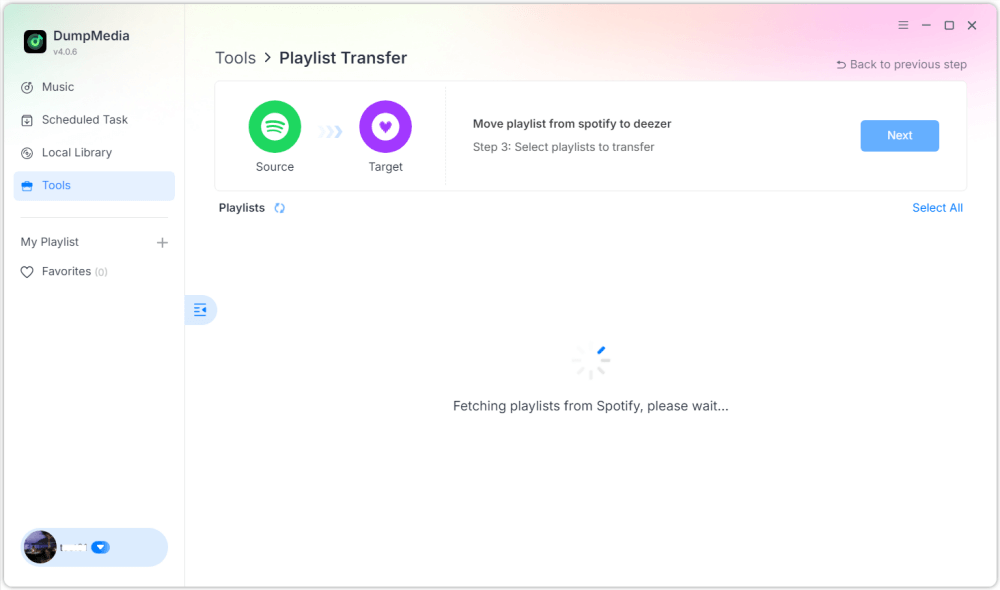
Krok 4. Wybierz, co chcesz przenieść. Obsługujemy Twoje ulubione utwory, artystów, albumy i starannie wybrane playlisty.

Krok 5. Kliknij Konwertuj, aby rozpocząć transfer.
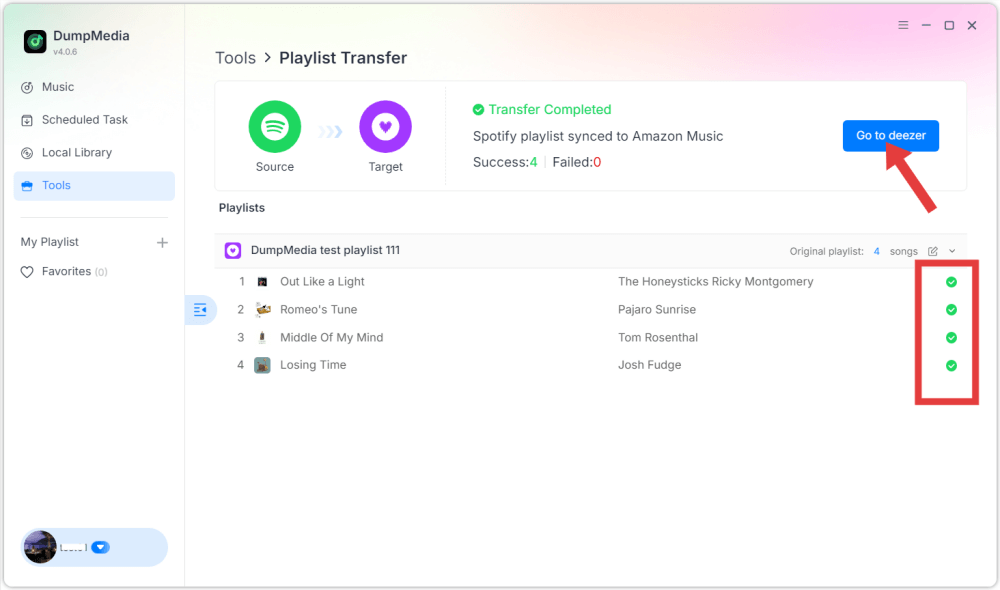
Krok 6. Transfer zakończony. Kliknij „Przejdź do Deezera”. Twoja playlista powinna teraz pojawić się z dopasowanymi utworami.
Część 3. Często zadawane pytania
1. Czy mogę przenieść Spotify playlisty do Deezer za darmo?
Niektóre narzędzia online oferują darmowe przesyłanie playlist z ograniczonymi funkcjami. Jednak te darmowe wersje mogą ograniczać liczbę utworów, które można przesłać jednocześnie. Narzędzia premium zazwyczaj usuwają te ograniczenia i zapewniają szybsze przesyłanie.
2. Czy wszystkie utwory zostaną pomyślnie przeniesione?
Większość utworów zostanie przeniesiona pomyślnie, ponieważ obie platformy mają obszerne katalogi muzyczne. Czasami jednak niektóre utwory mogą nie pojawić się na liście odtwarzania docelowej, jeśli są niedostępne w Deezerze.
3. Jak długo trwa przesyłanie playlist?
Czas przesyłania zależy od rozmiaru playlisty. Małe playlisty mogą zająć tylko kilka minut, podczas gdy większe, zawierające setki utworów, mogą wymagać więcej czasu.
4. Czy korzystanie z narzędzi do przesyłania playlist jest bezpieczne?
Renomowane narzędzia korzystają z bezpiecznych systemów uwierzytelniania, aby łączyć się z Twoimi kontami streamingowymi. Zawsze wybieraj zaufane aplikacje i unikaj nieznanych usług podczas migracji playlist z… Spotify do Deezera.
Część 4. Wniosek
Zmiana serwisu streamingowego nie oznacza już utraty starannie uporządkowanych playlist. Dzięki nowoczesnym narzędziom do migracji playlist możesz łatwo przenieść swoją bibliotekę muzyczną z Spotify do Deezera bez ręcznego tworzenia playlist. Jeśli masz dużą kolekcję muzyki lub zależy Ci na większej niezawodności, oprogramowanie na komputer, takie jak DumpMedia Any Music Converter oferuje bardziej stabilne i wydajne rozwiązanie.