


Spotify Nie odpowiada? Napraw to w 2026 roku
Wielu użytkowników spotyka się z frustrującym problemem, gdzie Spotify nie odpowiada podczas próby odtwarzania muzyki, otwierania list odtwarzania lub korzystania z trybu offline. Czasami Spotify Aplikacja zawiesza się całkowicie, niespodziewanie ulega awarii lub przestaje działać w trakcie odtwarzania. Spotify Problemy z aplikacjami są niezwykle częste. W tym przewodniku wyjaśnimy, dlaczego Spotify nagle przestaje działać, jak naprawić to powszechne Spotify problemów z aplikacją i jak cieszyć się bardziej stabilnym odtwarzaniem muzyki w trybie offline.
Przewodnik po zawartości Część 1. Dlaczego jest Spotify Aplikacja nie odpowiada?Część 2. Jak naprawić Spotify Aplikacja nie odpowiada?Część 3. Najlepszy sposób na uniknięcie Spotify Problemy z odtwarzaniemCzęść 4. Często zadawane pytaniaCzęść 5. Wniosek
Część 1. Dlaczego jest Spotify Aplikacja nie odpowiada?
Istnieje wiele powodów Spotify nie reaguje podczas odtwarzania muzyki lub korzystania z aplikacji.
Słabe połączenie internetowe
Spotify W dużej mierze opiera się na stabilnym dostępie do internetu do streamingu i weryfikacji konta. Słabe połączenia sieciowe mogą powodować Spotify zamrozić lub przestać odpowiadać.
Zepsuty Spotify Cache
Pliki tymczasowe przechowywane w Spotify z czasem mogą ulec uszkodzeniu, powodując awarie aplikacji i problemy z odtwarzaniem.
Przestarzały Spotify aplikacji
Older Spotify wersje mogą zawierać błędy, które powodują „Spotify błąd „nie odpowiada”.
Spotify Problemy z serwerem
czasami Spotify Awarie serwerów mają globalny wpływ na odtwarzanie treści przez użytkowników oraz wydajność aplikacji.
Konflikty oprogramowania w tle
Konflikty mogą być również spowodowane przez oprogramowanie antywirusowe, ustawienia zapory sieciowej lub akcelerację sprzętową. Spotify aby przestać odpowiadać.
Problemy ze zgodnością urządzenia
Starsze systemy operacyjne lub nieobsługiwane urządzenia mogą mieć problemy z uruchomieniem najnowszej wersji Spotify aplikacja działa płynnie.
Oto niektóre z najczęstszych przyczyn występowania "Spotify nie odpowiada".
Część 2. Jak naprawić Spotify Aplikacja nie odpowiada?
If Spotify nie odpowiada na Twoim urządzeniu, wypróbuj poniższe rozwiązania.
Poprawka 1. Uruchom ponownie Spotify
Całkowicie blisko Spotify i ponownie otwórz aplikację. To proste rozwiązanie często rozwiązuje tymczasowe problemy z odtwarzaniem.
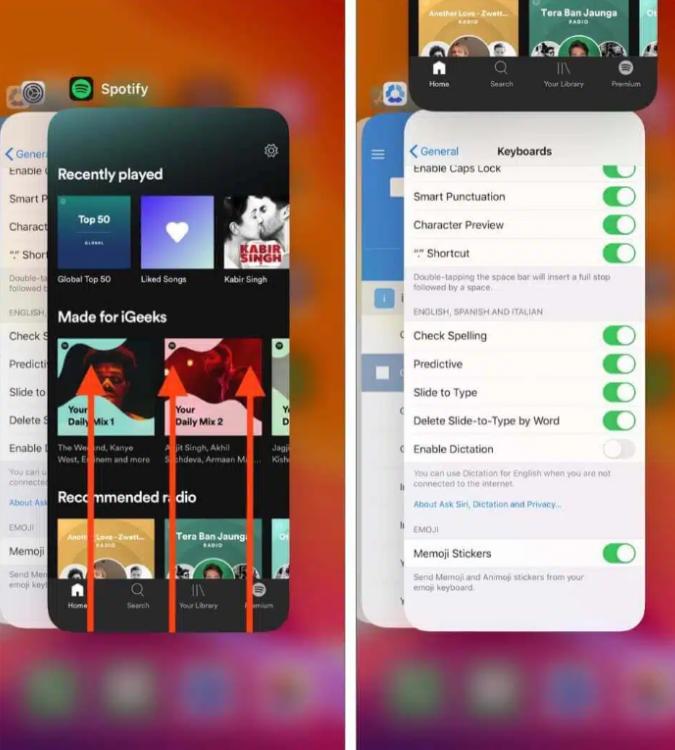
Na iOS (iPhone / iPad): Przesuń palcem w górę od dolnej krawędzi ekranu i zatrzymaj się na środku (lub kliknij dwukrotnie przycisk Home na starszych urządzeniach). Znajdź Spotify podgląd karty i przesuń ją całkowicie w górę i poza ekran.
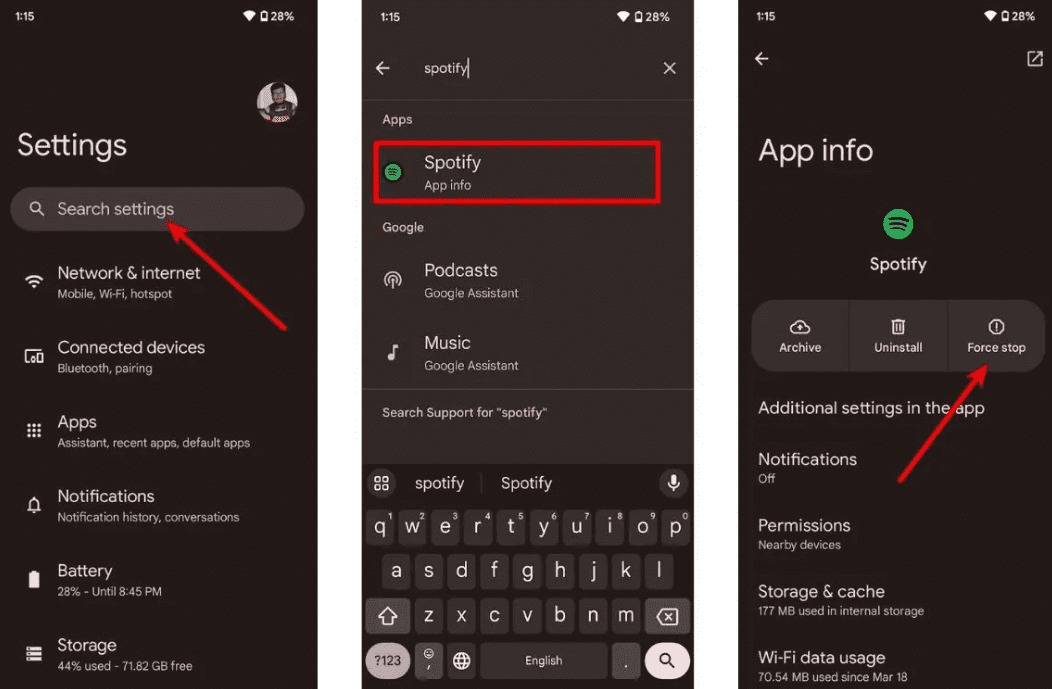
W systemie Android: Przejdź do Ustawień > Aplikacje > Spotify i dotknij opcji Wymuś zatrzymanie. Spowoduje to zamknięcie wszystkich zawieszonych zadań w tle. Otwórz Spotify ze szuflady aplikacji.
W systemie macOS: Kliknij Spotify na górnym pasku menu i wybierz Zakończ Spotifylub po prostu kliknij okno i naciśnij Command (⌘) + Q.
On Windows (10/11): Kliknij Plik w lewym górnym rogu Spotify okno i wybierz Wyjdź (naciśnięcie „X” w prawym górnym rogu często powoduje zminimalizowanie okna do zasobnika systemowego, zamiast jego zamknięcia).
Rozwiązanie 2. Sprawdź połączenie internetowe
Przełączaj się między siecią Wi-Fi a transmisją danych mobilnych, aby sprawdzić stabilność połączenia.
Napraw 3. Wyczyść Spotify Cache
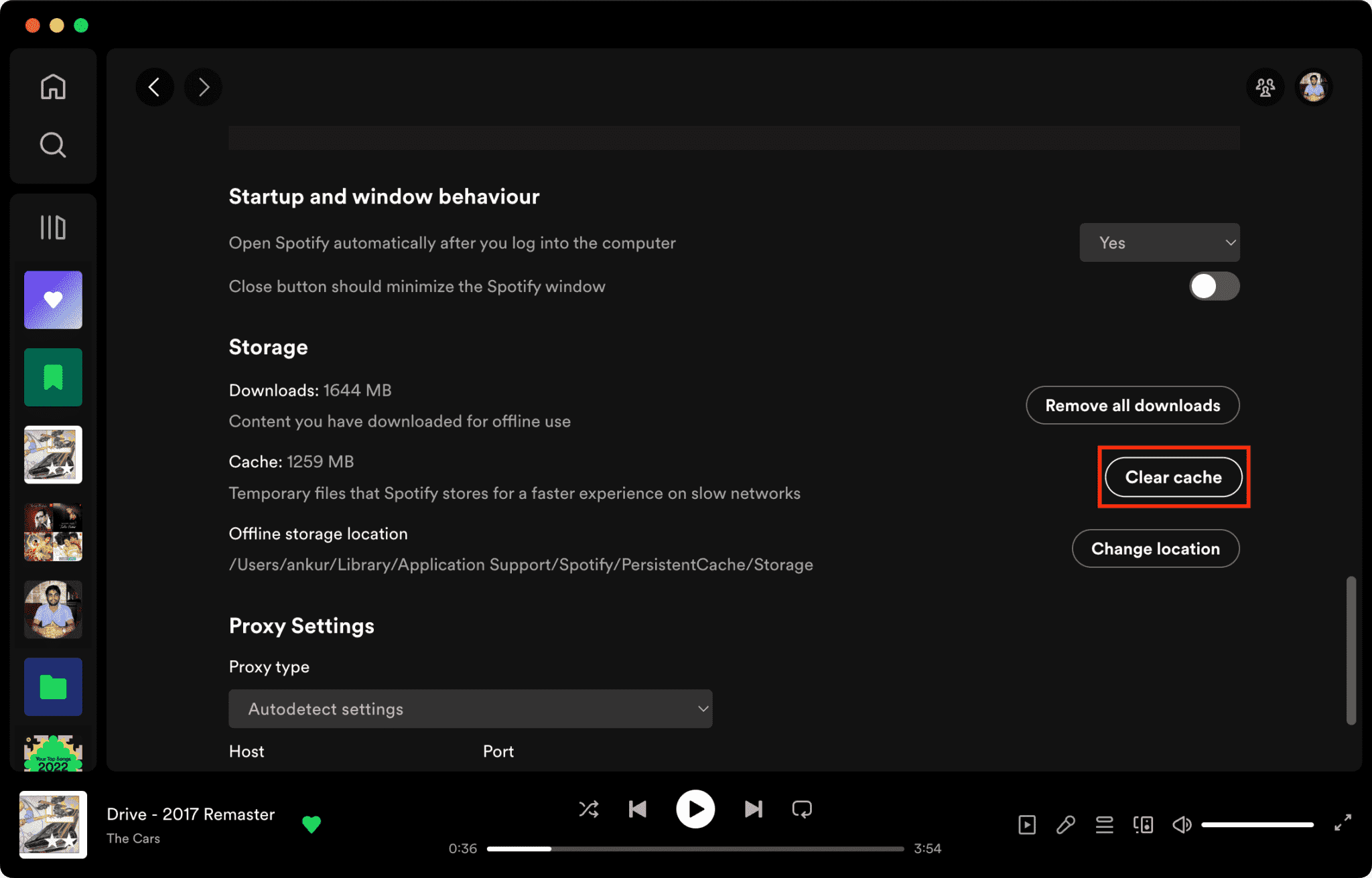
Uszkodzone pliki pamięci podręcznej to jeden z głównych powodów Spotify nie odpowiada.
Jak wyczyścić Spotify Pamięć podręczna na komputerze Mac/Windows/iPhone/Android >>>>
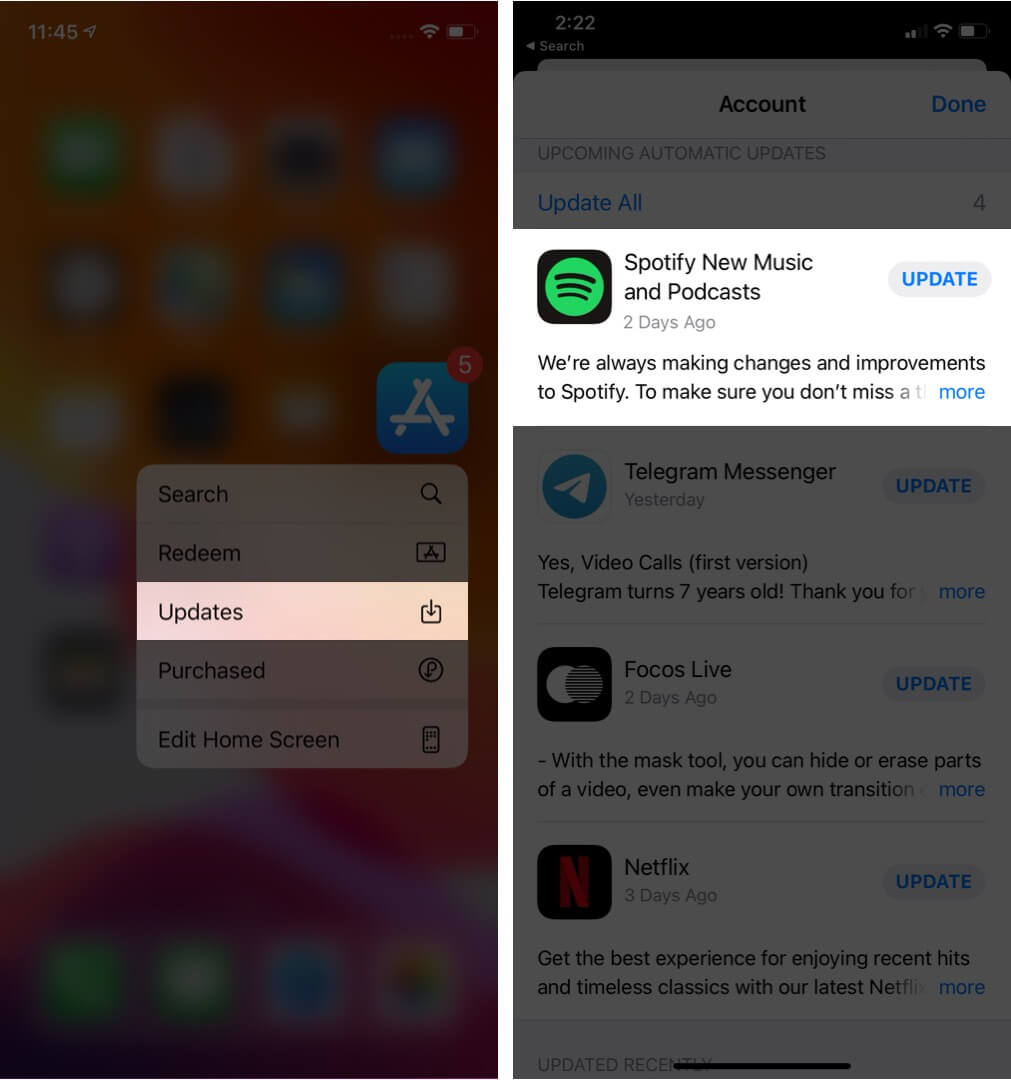
Poprawka 4. Aktualizacja Spotify aplikacji
Instalowanie najnowszej wersji Spotify Wersja może naprawić znane błędy oprogramowania.
Poprawka 5. Uruchom ponownie urządzenie
Ponowne uruchomienie komputera lub telefonu może odświeżyć zasoby systemowe.
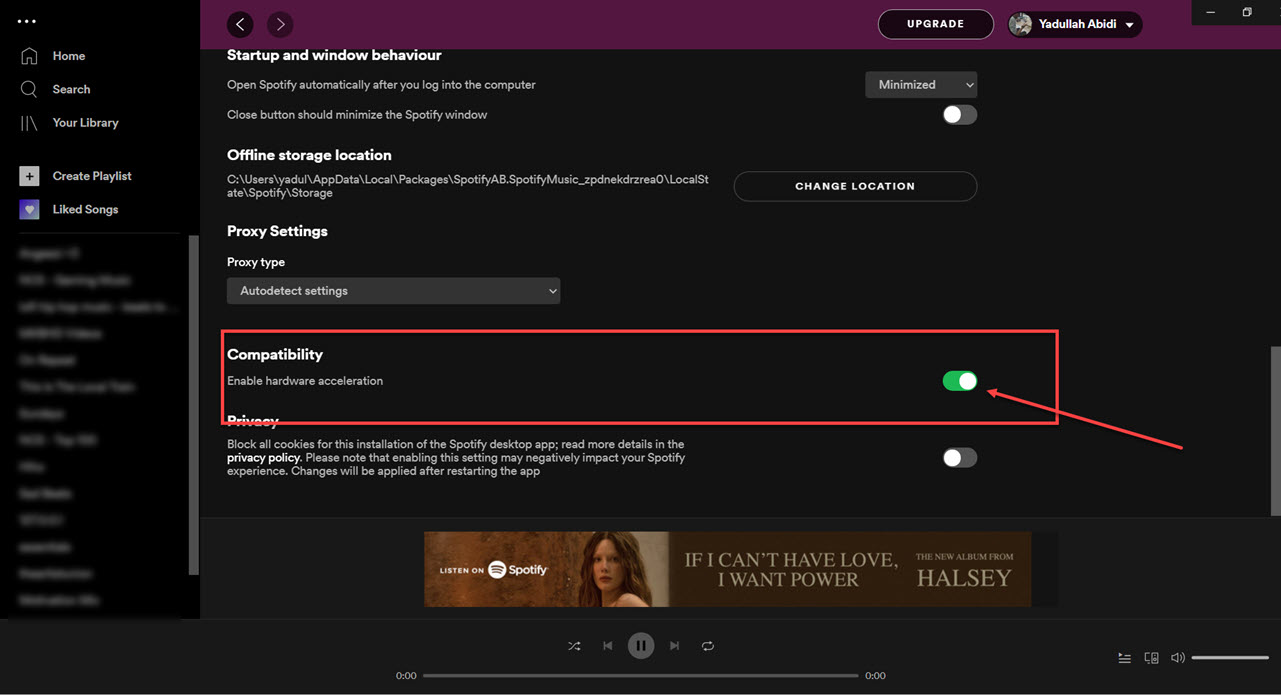
Poprawka 6. Wyłącz przyspieszanie sprzętowe
Możesz wyłączyć przyspieszenie sprzętowe. Czasami rozwiązuje to problem zawieszania się systemu.
Napraw 7. Sprawdź Spotify Status serwera
Globalny Spotify przerwy w działaniu usług mogą czasami mieć wpływ na odtwarzanie i logowanie.
Część 3. Najlepszy sposób na uniknięcie Spotify Problemy z odtwarzaniem
Wielu użytkowników zakłada, że pobrano Spotify Utwory zawsze będą działać offline, ale pobrane utwory pozostają chronione systemem DRM, co oznacza, że muzyka działa tylko w aplikacji streamingowej. Pobranych plików nie można swobodnie przesyłać. Jeśli często napotykasz komunikat „Spotify „nie odpowiada”, jednym z popularnych narzędzi jest DumpMedia Spotify Music ConverterTo oprogramowanie pozwala użytkownikom na konwersję Spotify muzykę do lokalnych formatów audio, co zapewnia większą elastyczność odtwarzania offline. Nawet jeśli Spotify aplikacja nie działa na Twoim urządzeniu, możesz grać Spotify piosenki offline natychmiast na innym odtwarzaczu muzyki.
Bezpłatne pobieranie Bezpłatne pobieranie
🏆Główne cechy DumpMedia Spotify Music Converter
- Pobierz Spotify muzyka do MP3, WAV, FLAC i AAC
- Usunąć Spotify Ochrona DRM*
- Zachowaj oryginalną jakość dźwięku
- Pobieranie zbiorcze list odtwarzania i albumów
- Szybka prędkość konwersji
- Zachowaj metadane utworu i znaczniki ID3
- Obsługa odtwarzania offline na dowolnym urządzeniu
Dla użytkowników sfrustrowanych Spotify niestabilność aplikacji, lokalne odtwarzanie muzyki często wydaje się o wiele bardziej niezawodne.
konwertować Spotify do MP3 Krok po kroku
Krok 1. Pobierz i zainstaluj DumpMedia Spotify Music Converter na komputerze Mac/PC. Uruchom go, a zobaczysz interfejs. Użyj Spotify Konto Premium/bezpłatne do logowania.
Bezpłatne pobieranie Bezpłatne pobieranie
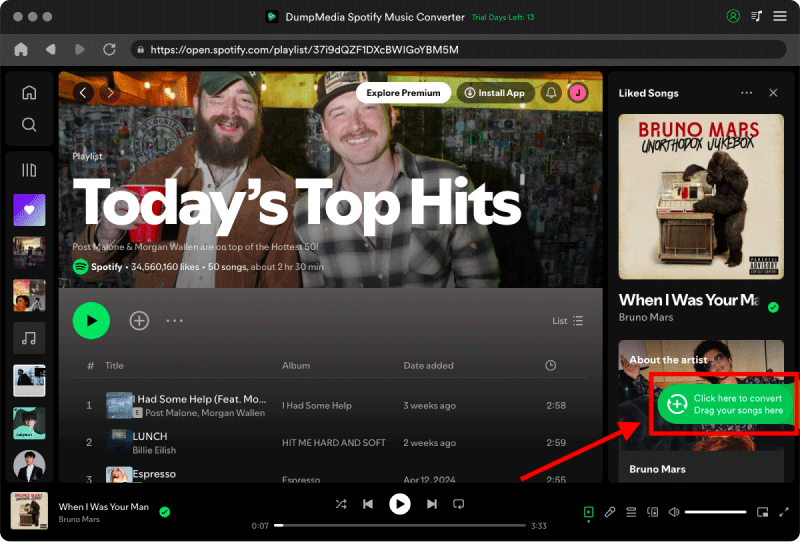
Krok 2. Znajdź playlistę, album lub konkretny utwór, który chcesz przekonwertować. Możesz przeciągnąć pojedynczy utwór na ikonę „+” po prawej stronie ekranu. Możesz również otworzyć całą playlistę/album i kliknąć ikonę „Dodaj do konwersji”, aby załadować całą listę do konwertera.
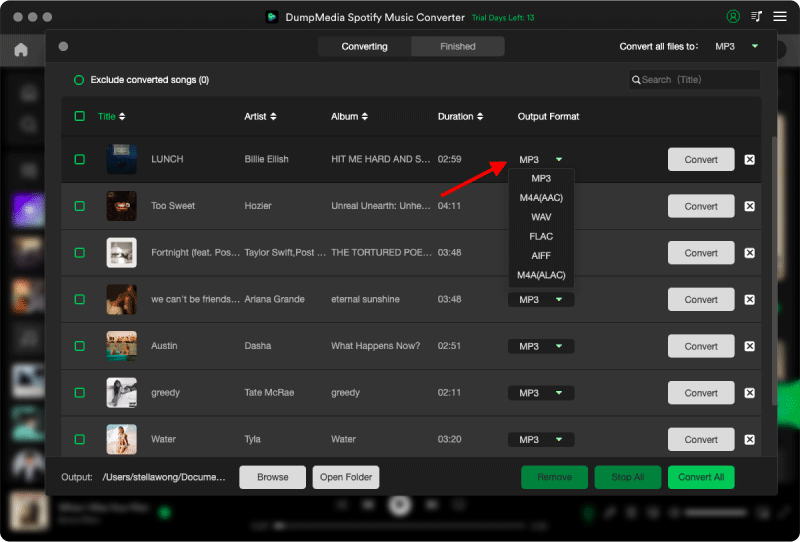
Krok 3. Wybierz MP3 (najbardziej kompatybilny). Możesz również zmienić szybkość transmisji lub częstotliwość próbkowania. Dla uzyskania najlepszego balansu wybierz 320 kbps.
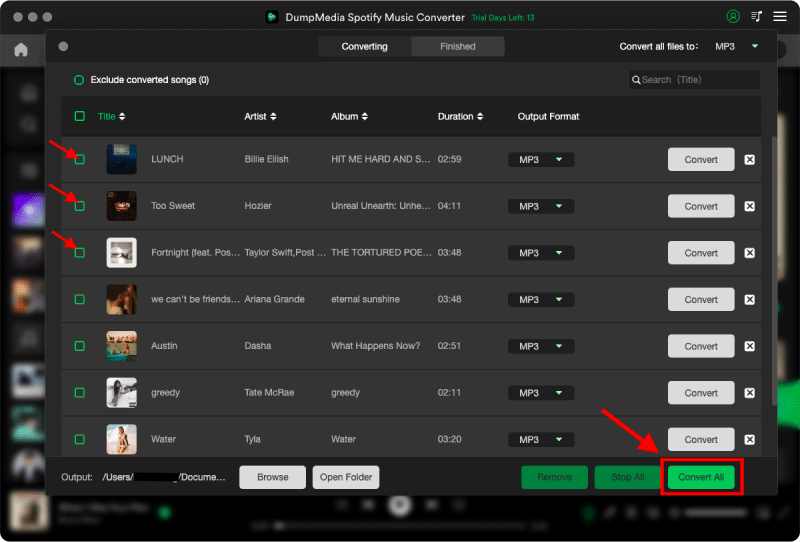
Krok 4. Po zakończeniu ustawień użytkownicy mogą dokonać konwersji, klikając ikonę „Konwertuj”. Następnie DumpMedia pobierze Spotify piosenki do MP3 w ciągu kilku sekund dzięki swojej superszybkiej prędkości.
Część 4. Często zadawane pytania
Dlaczego Spotify nie odpowiadasz?
Spotify może przestać odpowiadać z powodu problemów z Internetem, uszkodzonych plików pamięci podręcznej, nieaktualnego oprogramowania lub problemów z serwerem.
Dlaczego Spotify nadal zamarzać?
Spotify Problemy z zawieszaniem się systemu są często związane z uszkodzeniem pamięci podręcznej lub konfliktami związanymi ze sprzętowym przyspieszaniem.
Dlaczego Spotify zawiesza się na moim telefonie?
Mobile Spotify Przyczyną awarii może być mała ilość miejsca na dysku, nieaktualna wersja aplikacji lub konflikty oprogramowania.
Dlaczego Spotify tryb offline nie działa?
Odtwarzanie offline nadal zależy od Spotify autoryzacja i stabilność aplikacji.
Is DumpMedia Spotify Music Converter bezpieczny?
Tak. Jest przeznaczony do Spotify konwersja muzyki i zarządzanie odtwarzaniem lokalnym.
Uwaga: Platformy streamingowe mają własne zasady i systemy monitorowania. Jako narzędzie zewnętrzne, DumpMedia Spotify Music Converter podlega również ograniczeniom, które mogą mieć wpływ na użytkowanie w pewnych przypadkach. Spotify może podjąć działania, jeśli wykryje aktywność naruszającą Warunki korzystania z usługi; jest to całkowicie dozwolone Spotifywedług uznania.
Część 5. Wniosek
"Spotify problem „nie odpowiada” może być spowodowany niestabilnością połączenia internetowego, uszkodzonymi plikami pamięci podręcznej, nieaktualnym oprogramowaniem lub Spotify problemy z aplikacją. Chociaż wiele tymczasowych rozwiązań może pomóc przywrócić odtwarzanie, Spotify Streaming nadal w dużym stopniu zależy od stabilności aplikacji i weryfikacji online. Użytkownicy, którzy oczekują bardziej stabilnego słuchania offline, DumpMedia Spotify Music Converter zapewnia praktyczny sposób konwersji Spotify piosenki do lokalnego MP3 pliki umożliwiające elastyczne odtwarzanie na różnych urządzeniach.
Bezpłatne pobieranie Bezpłatne pobieranie
*DumpMedia działa poprzez odszyfrowanie i pobranie Spotify Konwertuje utwory do plików bez DRM, umożliwiając uzyskanie czystej, nieograniczonej kopii biblioteki na dowolne urządzenie. Funkcjonalność ta nie obejmuje usuwania DRM z lokalnych plików audio.