


Dlaczego jest Spotify Tak wolno? Sprawdzone rozwiązania w 2026 roku
Jeśli zastanawiasz się dlaczego Spotify jest tak wolny, że nie jesteś sam. Wielu użytkowników doświadcza buforowania, opóźnionego odtwarzania lub opóźnionego ładowania podczas korzystania z Spotify, nawet przy stabilnym połączeniu internetowym. W tym przewodniku wyjaśnimy szczegółowo, dlaczego Spotify tak powolny, co go powoduje i jak można go trwale naprawić. Co ważniejsze, pokażemy Ci również długoterminowe rozwiązanie, które poprawi Twój Spotify doświadczenie słuchowe bez przerw.
Przewodnik po zawartości Część 1. Dlaczego jest Spotify Nagle zwolniłeś? Wyjaśnienie głównych przyczynCzęść 2. Jak naprawić Spotify Bycie stale powolnymCzęść 3. Najlepszy sposób na poprawę Spotify Doświadczenie słuchoweCzęść 4. Często zadawane pytaniaCzęść 5. Wniosek
Część 1. Dlaczego jest Spotify Nagle zwolniłeś? Wyjaśnienie głównych przyczyn
Istnieje kilka powodów, dla których Spotify tak powolne, a większość z nich jest związana z wydajnością aplikacji, warunkami sieciowymi lub ograniczeniami urządzenia.
1. Słabe połączenie internetowe
Jeden z najczęstszych powodów Spotify Prędkość internetu jest tak niska, że jest niestabilna. Nawet niewielkie wahania mogą powodować buforowanie lub opóźnione odtwarzanie.
2. Spotify Przeciążenie pamięci podręcznej
Z biegiem czasu, Spotify Przechowuje pliki pamięci podręcznej, aby poprawić wydajność. Jednak zbyt duża ilość danych w pamięci podręcznej może faktycznie spowolnić działanie aplikacji i jest głównym powodem Spotify tak powolny na wielu urządzeniach.
3. Nieaktualna wersja aplikacji
Korzystanie ze przestarzałego Spotify Wersja może prowadzić do problemów z wydajnością. Błędy i problemy ze zgodnością często wyjaśniają, dlaczego Spotify aplikacja jest bardzo powolna po aktualizacjach.
4. Ograniczenia wydajności urządzenia
Urządzenia z małą ilością pamięci lub starsze urządzenia mogą mieć problemy z obsługą Spotify płynnie, co jest kolejnym częstym powodem, dla którego Spotify aplikacja jest bardzo wolna.
5. Aplikacje działające w tle, zużywające zasoby
Jeśli w tle działa wiele aplikacji, Spotify może występować opóźnienie z powodu ograniczonych zasobów systemowych, co przyczynia się do tego, dlaczego Spotify bardzo powolne podczas odtwarzania.
6. Spotify Ustawienia
Wielu użytkowników zgłasza to Spotify Staje się wolniejszy tylko podczas strumieniowego przesyłania utworów. Zwykle jest to związane z regulacją przepływności transmisji strumieniowej lub adaptacyjnym przełączaniem jakości. Te czynniki wyjaśniają, dlaczego Spotify bardzo powolny, szczególnie podczas odtwarzania muzyki, ale nie podczas korzystania z innych aplikacji.
Część 2. Jak naprawić Spotify Bycie stale powolnym
Czy Twój Spotify Opóźnienia, zacięcia lub długie ładowanie? Oto kilka skutecznych sposobów na poprawę wydajności:
1. Wyczyść plik Spotify Cache
Z biegiem czasu, Spotify Przechowuje duże ilości danych tymczasowych i utworów w pamięci podręcznej, aby przyspieszyć odtwarzanie. Jednak przeładowana lub uszkodzona pamięć podręczna może mieć odwrotny skutek, prowadząc do znacznych opóźnień. Wyczyszczenie tej pamięci w ustawieniach aplikacji wymusza na oprogramowaniu odświeżenie struktury danych.
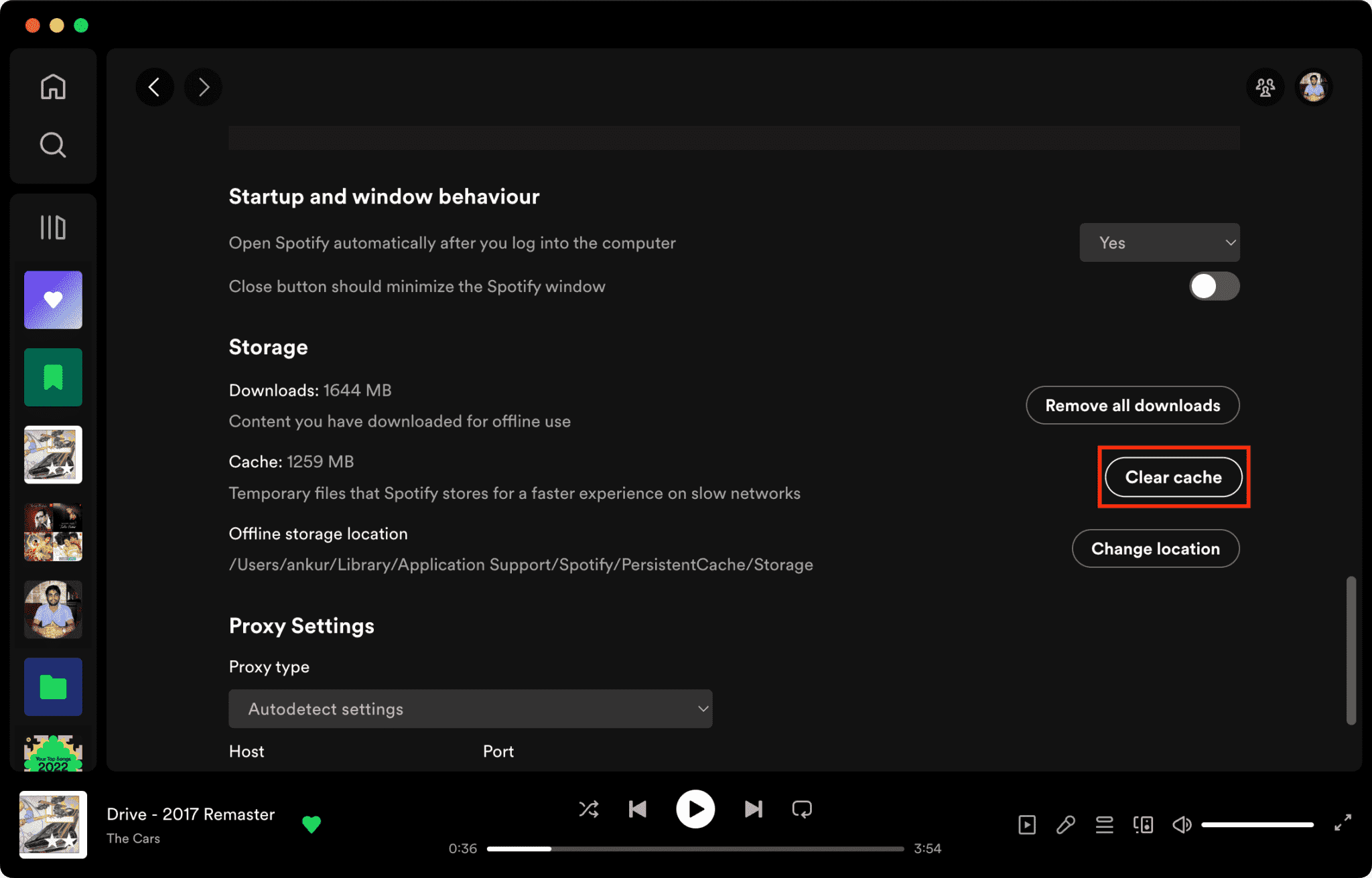
Powiązany artykuł: Jak wyczyścić Spotify Pamięć podręczna na komputerze/urządzeniu mobilnym >>>>>>
2. Uruchom ponownie aplikację
Wykonanie ręcznego ponownego uruchomienia to podstawowy krok rozwiązywania problemów, który skutecznie rozwiązuje wiele podstawowych przyczyn problemów. Spotify Bardzo wolno. Ten proces opróżnia pamięć tymczasową (RAM) aplikacji i wymusza zakończenie wszelkich „wątków zombie” lub zbędnych procesów działających w tle, które mogą zużywać zasoby systemowe. Usuwając te wąskie gardła, umożliwiasz oprogramowaniu zainicjowanie czystej sesji, co często rozwiązuje problem uporczywych zawieszeń i opóźnień interfejsu, które zakłócają strumieniowanie.
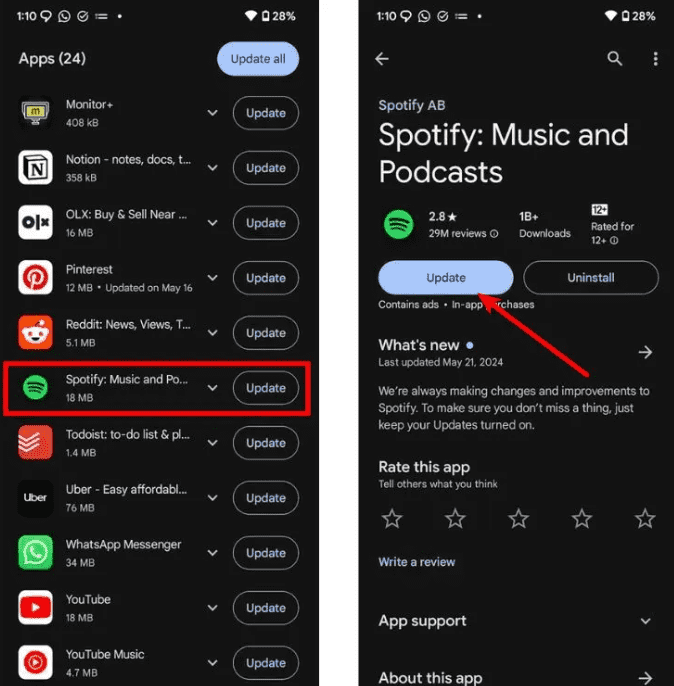
3. Zaktualizuj do najnowszej wersji
Programiści często publikują poprawki naprawiające wycieki pamięci i błędy zgodności. Korzystanie z przestarzałej wersji Spotify oznacza, że nie korzystasz z tych krytycznych optymalizacji wydajności.
4. Wykonaj czystą ponowną instalację
Jeśli problemy z wydajnością nadal występują, często konieczna jest czysta reinstalacja. Usuwa ona wszystkie powiązane pliki bibliotek i wpisy rejestru, które mogły być uszkodzone, zapewniając „fabrycznie nowe” środowisko dla oprogramowania.
5. Przełączaj się między Wi-Fi a danymi mobilnymi
Przeciążenie sieci lub „zawieszenie DNS” często mogą być przyczyną długiego czasu ładowania. Zmiana typu połączenia może ominąć lokalne zakłócenia sieciowe i pomóc w ustaleniu, czy problem leży po stronie dostawcy usług internetowych (ISP), a nie samej aplikacji.
Te kroki mogą tymczasowo zmniejszyć problemy związane z tym, dlaczego Spotify choć są bardzo powolne, nie rozwiązują na stałe problemu niestabilności przesyłania strumieniowego.
Część 3. Najlepszy sposób na poprawę Spotify Doświadczenie słuchowe
Jeśli chcesz całkowicie uniknąć buforowania, opóźnień i opóźnień w strumieniowaniu, najskuteczniejszym rozwiązaniem jest słuchanie muzyki offline, bez polegania na niestabilnym strumieniowaniu. W tym miejscu polecamy DumpMedia Spotify Music Converter.
Bezpłatne pobieranie Bezpłatne pobieranie
Za pomocą tego narzędzia możesz:
- konwertować Spotify Muzyka do MP3, WAV, FLAC
- Słuchaj offline bez buforowania
- Całkowicie unikaj opóźnień w przesyłaniu strumieniowym
- Odtwarzaj muzykę na dowolnym urządzeniu
- Zachowaj utwory na stałe
Zamiast ciągle pytać dlaczego Spotify Tak powolne, to podejście eliminuje problem u źródła: zależność od transmisji strumieniowej na żywo. Wykorzystując narzędzia do konwersji, które przekształcają zaszyfrowane strumienie w zasoby lokalne, użytkownicy mogą ominąć nieodłączne ograniczenia platform online, takie jak buforowanie, zależność od sieci, opóźnienie odtwarzania i inne.
Jak pobrać Spotify Piosenki do MP3
Krok 1. Pobierz i zainstaluj DumpMedia Spotify Music Converter do Twojego Maca/Windows. Uruchom go, a zobaczysz interfejs. Użyj swojego Spotify Konto Premium/bezpłatne do logowania.
Bezpłatne pobieranie Bezpłatne pobieranie
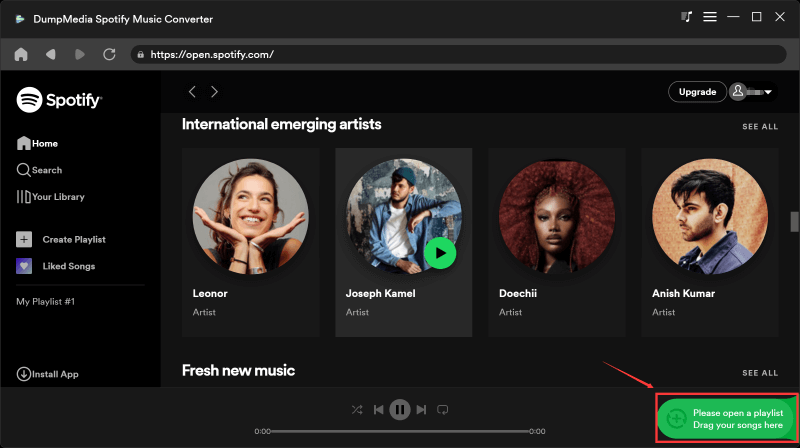
Krok 2. Teraz możesz przejść do utworów, które chcesz pobrać. Możesz je bezpośrednio przeciągnąć na listę konwersji.
Krok 3. W interfejsie konwersji możesz wybrać format wyjściowy jako MP3i ustaw częstotliwość próbkowania lub szybkość transmisji w Preferencjach. Wybierz również folder, w którym będą zapisywane pliki.

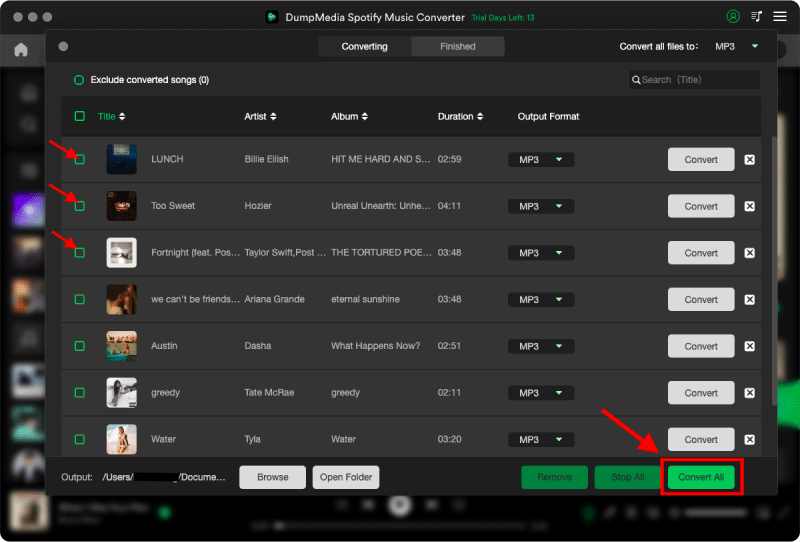
Krok 4. Na koniec kliknij przycisk „Konwertuj” u dołu strony, a oprogramowanie rozpocznie proces konwersji.
Dla zaawansowanych użytkowników, którym zależy na płynnym działaniu w wysokiej rozdzielczości, DumpMedia Spotify Music Converter stanowi trwałe rozwiązanie problemu niestabilności przesyłania strumieniowego, wykraczające poza tymczasowe poprawki aplikacji i zapewniające prawdziwą autonomię w trybie offline.
Część 4. Często zadawane pytania
Dlaczego Spotify aplikacja jest taka wolna na urządzeniach mobilnych?
Zwykle jest to spowodowane słabym sygnałem, aplikacjami działającymi w tle lub przeciążeniem pamięci podręcznej.
Dlaczego Spotify tak wolno na WiFi?
Może to być spowodowane niestabilnością routera lub problemami z trasowaniem DNS.
Dlaczego Spotify tak wolno, ale internet szybki?
Często jest to spowodowane problemami z pamięcią podręczną aplikacji lub wydajnością urządzenia.
Jak to trwale naprawić Spotify opóźnienie?
Najbardziej niezawodnym rozwiązaniem jest ograniczenie uzależnienia od przesyłania strumieniowego poprzez wykorzystanie narzędzi do konwersji muzyki offline.
Część 5. Wniosek
Jeśli często pytasz dlaczego Spotify Tak wolno, że problem zazwyczaj nie jest spowodowany jedną przyczyną, ale kombinacją problemów związanych z siecią, urządzeniem i aplikacją. Chociaż podstawowe poprawki mogą tymczasowo poprawić wydajność, najbardziej stabilne wrażenia ze słuchania uzyskuje się po całkowitym wyeliminowaniu zależności od strumieniowania za pomocą narzędzi takich jak DumpMedia Spotify Music Converter.