


Spotify Tryb DJ: Jak go używać (Kompletny przewodnik na rok 2026)
Jeśli ostatnio słyszałeś o Spotify Tryb DJ – pewnie zastanawiasz się, co on właściwie robi i jak go używać. Spotify Tryb AI DJ jest jednym z SpotifyNajbardziej ekscytujące funkcje, oferujące spersonalizowane wrażenia muzyczne oparte na sztucznej inteligencji. Choć jest to potężne urządzenie, ma też ograniczenia, których wielu użytkowników nie dostrzega. W tym przewodniku dowiesz się, Spotify Czym jest AI DJ i jak włączyć AI DJ Spotify.
Przewodnik po zawartości Część 1. Co jest Spotify AI DJ?Część 2. Jak włączyć Spotify AI DJ?Część 3. Ograniczenia Spotify AI DJCzęść 4. Jak oszczędzać Spotify Muzyka DJ-ska do użytku offline?Część 5. Często zadawane pytaniaCzęść 6. Wniosek
Część 1. Co jest Spotify AI DJ?
Spotify Tryb DJ to spersonalizowany przewodnik muzyczny, który działa jak wirtualny prezenter radiowy, łącząc zaawansowane uczenie maszynowe z niezwykle realistycznym głosem AI. Dostępny dla subskrybentów Premium, nie tylko losowo odtwarza utwory, ale także tworzy ciągły strumień muzyki w oparciu o Twoją historię słuchania, aktualne trendy, a nawet nostalgiczne hity, których nie słuchałeś od lat.
Kluczowe funkcje Spotify AI DJ
- Spersonalizowane rekomendacje piosenek
- Ciągłe odtwarzanie bez ręcznego wprowadzania danych
- Komentarz głosowy generowany przez sztuczną inteligencję
- Inteligentne przejścia między nastrojami i gatunkami
Dlatego właśnie Spotify Tryb DJ staje się coraz bardziej popularny wśród użytkowników, którzy preferują słuchanie bez wysiłku.
Część 2. Jak włączyć Spotify AI DJ?
Jak uzyskać dostęp Spotify Tryb DJ-a? Jeśli subskrybujesz Spotify Premium, wykonaj następujące kroki:
Krok 1. Upewnij się, że Twoja aplikacja jest zaktualizowana do najnowszej wersji. Przejdź do sekcji Strona główna.
Krok 2. Poszukaj funkcji DJ w swoim kanale. Zacznij słuchać od razu.
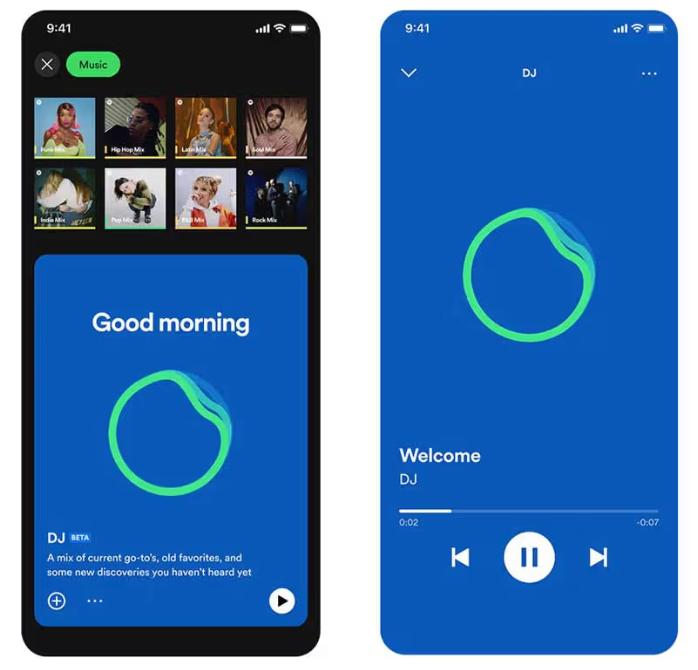
SpotifyAI DJ obsługuje teraz funkcję „Żądania”. Tak jak rozmawiałbyś z DJ-em, możesz używać komend głosowych lub wiadomości tekstowych, mówiąc na przykład „Przełącz na łagodniejszy gatunek” lub „Odtwórz więcej utworów Jaya Justina Biebera”, a sztuczna inteligencja natychmiast dostosuje playlistę.
Część 3. Ograniczenia Spotify AI DJ
Spotify Tryb DJ wyróżnia się tym, że eliminuje konieczność ręcznego wyszukiwania muzyki. Idealnie nadaje się do słuchania w tle, odkrywania nowych utworów i tworzenia wrażeń przypominających słuchanie radia. SpotifyAI DJ firmy jest imponujący, ale wiąże się z kilkoma istotnymi ograniczeniami.
1. Brak stałych pobrań
Nawet w wersji Premium utworów nie da się pobrać. Pliki są zablokowane w aplikacji i nie można ich przenieść.
2. Brak wolności offline
Możesz pobrać i słuchać offline, ale dostęp zależy od subskrypcji. Muzyka zniknie, jeśli ją anulujesz.
3. Brak eksportu i udostępniania
Nie można eksportować playlist DJ-skich i zapisywać miksów zewnętrznie.
4. Ograniczona kontrola
Spotify Sztuczna inteligencja kontroluje wybór i kolejność utworów. Nie masz pełnej personalizacji.
Ograniczenia te stają się istotne, jeśli chcesz mieć większą kontrolę nad swoją muzyką.
Część 4. Jak oszczędzać Spotify Muzyka DJ-ska do użytku offline?
Jeśli lubisz Spotify Tryb DJ, ale chcesz większej elastyczności, potrzebujesz możliwości trwałego zapisywania utworów. Zamiast polegać na SpotifyDzięki wbudowanym ograniczeniom możesz wybrać utwory z rekomendacji DJ-ów i przekonwertować je do plików lokalnych. Daje to pełną kontrolę nad muzyką. Najpewniejszym sposobem na to jest skorzystanie z profesjonalnego narzędzia, takiego jak DumpMedia Spotify Music Converter.
Darmowe pobieranie Darmowe pobieranie
🏅Dlaczego warto wybrać DumpMedia Spotify Music Converter:
- ⭐Integracja z Spotify odtwarzacz internetowy
- ⭐Praca dla obu stron Spotify Premium i Spotify Darmowe użytkownicy
- ⭐Zapewnia konwersję wsadową z prędkością do 35x
- ⭐konwertować Spotify piosenki do MP3, WAV lub FLAC
- ⭐Zachowaj tagi ID3, takie jak artysta, okładka, grafika itp.
- ⭐Zachowaj oryginalną jakość dźwięku
- ⭐100% czyste. Nie ma ryzyka w użyciu
Krok po kroku: Konwersja Spotify Muzyka DJ-ska
Krok 1. Pobierz i zainstaluj oprogramowanie na swoim komputerze. Działa ono z obydwoma systemami. WinDows i Mac. Interfejs jest przyjazny dla użytkownika, co ułatwia pracę początkującym.
Darmowe pobieranie Darmowe pobieranie
Krok 2. Otwórz wbudowany Spotify odtwarzacz internetowy w środku DumpMedia i zaloguj się za pomocą Spotify konto. Przeglądaj Spotify i przeciągnij piosenki, albumy lub playlisty, które chcesz pobrać, do konwertera.

Krok 3. W panelu ustawień wybierz MP3 jako format wyjściowy umożliwiający MP3 pobieranie wybranych utworów.

Krok 4. Kliknij przycisk „Konwertuj wszystko” i rozpocznij konwersję. DumpMedia Spotify Music Converter obsługuje 35-krotnie szybszą prędkość pobierania, dzięki czemu możesz po prostu poczekać na zakończenie procesu konwersji.

Część 5. Często zadawane pytania
1. Co jest Spotify Tryb DJ-a?
Jest to funkcja oparta na sztucznej inteligencji, która odtwarza muzykę dostosowaną do Twojego gustu.
2. Jest SpotifyCzy AI DJ jest darmowy?
Nie, zazwyczaj wymagana jest subskrypcja Premium.
3. Czy mogę pobrać Spotify Piosenki DJ-skie?
Tylko w aplikacji, nie jako pliki lokalne.
4. Czy mogę stworzyć własną playlistę DJ-ską?
Tak, zwłaszcza jeśli posiadasz lokalne kopie swojej muzyki.
Część 6. Wniosek
Spotify Tryb DJ to potężna funkcja, która ułatwia i uprzyjemnia odkrywanie muzyki. Wiąże się ona jednak z ograniczeniami, takimi jak brak możliwości stałego pobierania i ograniczony dostęp offline. Jeśli chcesz w pełni korzystać z zalet… SpotifyAI DJ bez tych ograniczeń, korzystanie z niezawodnego narzędzia do zapisywania muzyki to najlepsze rozwiązanie. Pozwala to zachować ulubione utwory, tworzyć własne playlisty i cieszyć się pełną swobodą słuchania.
Darmowe pobieranie Darmowe pobieranie
*DumpMedia działa poprzez odszyfrowanie i pobranie Spotify Konwertuje utwory do plików bez DRM, umożliwiając uzyskanie czystej, nieograniczonej kopii biblioteki na dowolne urządzenie. Funkcjonalność ta nie obejmuje konwersji lokalnych plików audio.

30% zniżki >>>