


UwagaBurner Spotify Music Converter Recenzja: Czy nadal warto?
Z SpotifyZ powodu zabezpieczeń DRM, wielu użytkowników korzysta z zewnętrznych konwerterów, aby pobierać i przechowywać muzykę offline. NoteBurner to jedno z najpopularniejszych narzędzi w tej dziedzinie, ale czy nadal działa dobrze? W tym NoteBurnerze Spotify Music Converter W tej recenzji omówimy szczegółowo jego funkcje, rzeczywistą wydajność, zalety i wady, a następnie porównamy go z bardziej wydajną alternatywą, abyś mógł podjąć właściwą decyzję.
Przewodnik po zawartości Część 1: Czym jest NoteBurner Spotify Music Converter?Część 2: Prawdziwy test NoteBurnera Spotify Music ConverterCzęść 3: NoteBurner kontra inne Spotify Przetwornice Część 4: Najlepsza alternatywa (jeśli potrzebujesz lepszej wydajności)Część 5: FAQCzęść 6: Ostateczny werdykt: czy NoteBurner jest wart swojej ceny?
Część 1: Czym jest NoteBurner Spotify Music Converter?
Zanim zagłębisz się bardziej w ten NoteBurner Spotify Music Converter W tym przeglądzie pokrótce wyjaśnimy, co on robi. NoteBurner Spotify Music Converter jest narzędziem komputerowym zaprojektowanym, aby pomóc użytkownikom w pobieraniu i konwertowaniu Spotify piosenek do popularnych formatów, takich jak MP3, AAC, WAV i FLAC. Działa poprzez przetwarzanie Spotify utworów za pośrednictwem aplikacji lub odtwarzacza internetowego i zapisuje je lokalnie.
Część 2: Prawdziwy test NoteBurnera Spotify Music Converter
Aby utworzyć ten NoteBurner Spotify Music Converter Aby zapewnić większą niezawodność, przetestowaliśmy oprogramowanie w rzeczywistych sytuacjach, w tym podczas pobierania playlist, konwertowania wielu utworów i sprawdzania jakości wyjściowej. Oto, co odkryliśmy po testach praktycznych.
Konfiguracja testowa
Dla tego NoteBurnera Spotify Music Converter przegląd, użyliśmy następującej konfiguracji:
- Windows 11 PC
- Spotify Konto premium
- Playlista 100 utworów (mieszane gatunki)
- Format wyjściowy: MP3 (320 kb/s)
Skupiliśmy się na trzech kluczowych wskaźnikach: szybkości, stabilności i jakości wyników.
Szybkość konwersji
NoteBurner twierdzi, że konwersja jest szybka, ale rzeczywiste testy wykazały niestabilną wydajność.
- Małe partie (5–10 piosenek): stosunkowo szybko
- Duże playlisty (ponad 50 utworów): zauważalne spowolnienie
- Użycie procesora znacznie wzrosło podczas konwersji
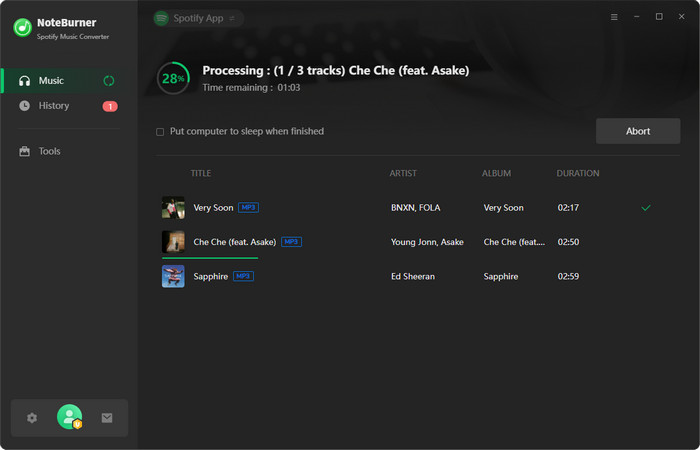
W naszym teście konwersja playlisty składającej się ze 100 utworów zajęła więcej czasu niż oczekiwaliśmy, zwłaszcza w porównaniu z nowszymi narzędziami. Szybkość jest akceptowalna dla okazjonalnego użytkowania, ale nie jest idealna dla użytkowników intensywnie korzystających z urządzenia.
Jakość wyjściowa
W tym NoteBurnerze Spotify Music Converter W ramach przeglądu sprawdziliśmy również, czy przekonwertowane pliki zachowały swoją oryginalną jakość.
Wyniki:
- Większość utworów zachowała przyzwoitą jakość dźwięku
- Nie wykryto żadnych większych zniekształceń
- Jednak w niektórych utworach można było zauważyć niewielkie różnice w kompresji
Wydajność metadanych:
- Tagi ID3 (artysta, album, tytuł) były w większości dokładne
- W większości przypadków zachowano okładkę albumu
Dobra jakość ogólna, ale nie w każdym scenariuszu zapewnia całkowitą bezstratność.
Stabilność i wskaźnik sukcesu
Stabilność to jedna z wad NoteBurnera, która wykazuje pewne słabości.
Podczas testów:
- Kilka utworów nie udało się przekonwertować za pierwszym razem
- Sporadyczne zawieszanie się podczas przetwarzania dużych list odtwarzania
- W niektórych przypadkach wymagane jest ponowne uruchomienie procesu konwersji
Niezawodny w przypadku małych zadań, ale mniej stabilny przy pobieraniu dużej ilości danych.
Wnioski: Z tego NoteBurnera Spotify Music Converter Po przejrzeniu recenzji widać wyraźnie, że chociaż narzędzie jest funkcjonalne, nie zawsze jest najbardziej wydajną i stabilną opcją, zwłaszcza dla intensywnych użytkowników.
Część 3: NoteBurner kontra inne Spotify Przetwornice
Jeśli czytasz ten NoteBurner Spotify Music Converter Przeglądając, prawdopodobnie porównujesz opcje. Oto, jak wypada na tle bardziej zoptymalizowanego rozwiązania.
| Cecha | UwagaBurner | DumpMedia |
| Szybkość konwersji | Średni | Szybciej |
| Stabilność | Średni | Wysoki |
| Formaty wyjściowe | MP3, AAC, WAV, FLAC | bardziej elastyczne |
| Łatwość użycia | Umiarkowany | Przyjazny dla początkujących |
| Konwersja wsadowa | Ograniczona wydajność | Płynnie i wydajnie |
Część 4: Najlepsza alternatywa (jeśli potrzebujesz lepszej wydajności)
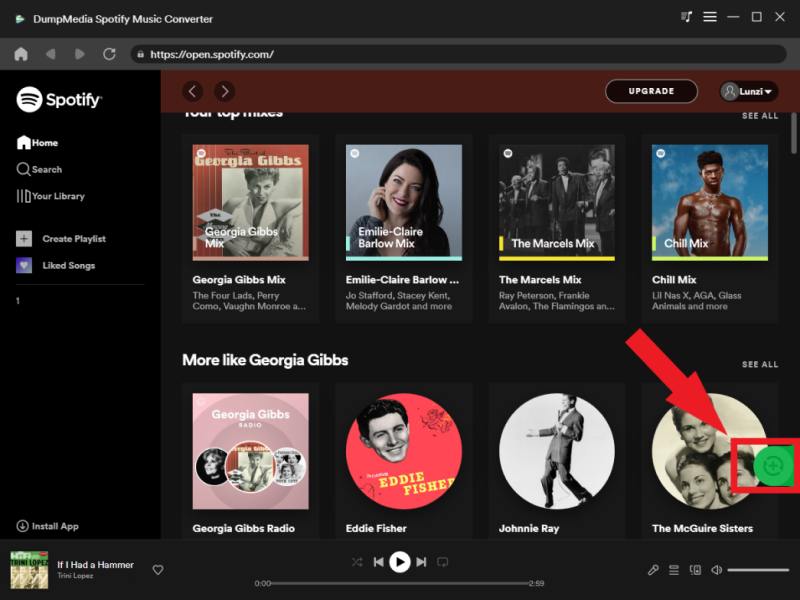
Po przejrzeniu tego NoteBurnera Spotify Music Converter Po zapoznaniu się z recenzją możesz się zastanawiać, czy istnieje lepsza opcja. Jeśli doświadczyłeś powolnej konwersji, niestabilności lub ograniczeń, zmiana narzędzia może przynieść zauważalną różnicę. DumpMedia Spotify Music Converter jest przeznaczony dla użytkowników, którzy oczekują większej szybkości konwersji, stabilnego przetwarzania wsadowego i wysokiej jakości wyników bez strat.
🏅Więcej niesamowitych funkcji
- konwertować Spotify Muzyka do MP3, WAV, FLAC
- Usuń ochronę DRM*
- Pobieranie zbiorcze list odtwarzania
- Zachowaj oryginalną jakość
W przeciwieństwie do NoteBurnera, program ten kładzie nacisk na spójność działania i płynniejszy przepływ pracy, co jest szczególnie ważne, jeśli regularnie pobierasz muzykę.
Darmowe pobieranie Darmowe pobieranie
Jak korzystać DumpMedia Spotify Music Converter (Kompletny przewodnik) >>>
Część 5: FAQ
1. Czy NoteBurner Spotify Music Converter bezpieczny w użyciu?
Tak, korzystanie z NoteBurnera jest generalnie bezpieczne, jeśli zostanie pobrane z oficjalnej strony internetowej. Wydajność i niezawodność mogą się jednak różnić.
2. Czy NoteBurner obsługuje Spotify darmowe konta?
Niektóre funkcje mogą działać na kontach bezpłatnych, ale pełna funkcjonalność zwykle wymaga Spotify Konto premium.
3. Jaka jest najlepsza alternatywa dla NoteBurnera?
Narzędzia takie jak DumpMedia Spotify Music Converter oferują lepszą prędkość, stabilność i ogólną wydajność.
4. Dlaczego NoteBurner czasami działa wolno?
Może to być spowodowane wydajnością systemu, dużymi listami odtwarzania lub ograniczeniami w sposobie przetwarzania danych przez oprogramowanie. Spotify utworów.
Część 6: Ostateczny werdykt: czy NoteBurner jest wart swojej ceny?
Więc po tym pełnym NoteBurnerze Spotify Music Converter recenzja, oto szczera odpowiedź:
- 👉 Tak — ale tylko dla użytkowników o ograniczonym użytkowaniu.
- 👉 Nie — jeśli zależy Ci na szybkości, stabilności i wydajności.
Chociaż NoteBurner nadal działa, nie dorównuje wydajnością nowszym narzędziom. Dla użytkowników, którzy oczekują płynniejszego i bardziej niezawodnego działania, lepszym wyborem będzie przejście na bardziej zoptymalizowany konwerter.
Darmowe pobieranie Darmowe pobieranie
*DumpMedia działa poprzez odszyfrowanie i pobranie Spotify Konwertuje utwory do plików bez DRM, umożliwiając uzyskanie czystej, nieograniczonej kopii biblioteki na dowolne urządzenie. Funkcjonalność ta nie obejmuje konwersji lokalnych plików audio.

30% zniżki >>>