


Jak włączyć muzykę MP3 Gracz z Spotify w 2026
Jak włączyć muzykę MP3 gracz z Spotify pozostaje jednym z najczęściej zadawanych pytań Spotify użytkowników, głównie dlatego, że Spotify nie pozwala na bezpośrednie pobieranie do żadnego MP3 urządzenie z powodu DRM. Jeśli spróbujesz przenieść pobrane Spotify utwory, większość MP3 gracze nie będą w stanie ich rozpoznać.
Aby obejść to ograniczenie, potrzebne jest narzędzie, które może konwertować Spotify muzykę do standardowego formatu audio, takiego jak MP3. DumpMedia Spotify Music Converter jest jednym z najpewniejszych rozwiązań tego zadania. Jeśli Twoim celem jest przeniesienie Spotify Ten konwerter umożliwia zapisanie biblioteki na urządzeniu przenośnym w celu słuchania offline. Jest to najszybsza i najłatwiejsza metoda.
Przewodnik po zawartości Część 1. Dlaczego nie możesz umieścić Spotify Piosenki włączone MP3 Gracz?Część 2. Jak umieścić Spotify Muzyka włączona MP3 Gracz?Część 3. FAQCzęść 4. Podsumowując
Część 1. Dlaczego nie możesz umieścić Spotify Piosenki włączone MP3 Gracz?
Spotify nie pozwala użytkownikom na bezpośrednie przesyłanie utworów do MP3 gracz, ponieważ wszyscy Spotify Utwory są chronione systemem zarządzania prawami cyfrowymi (DRM). To szyfrowanie DRM uniemożliwia użytkownikom kopiowanie, eksportowanie lub konwertowanie. SpotifyPliki audio do standardowych formatów, takich jak MP3. Nawet jeśli pobierasz utwory za pomocą Spotify Premium konto, te pliki pozostają w zablokowanym formacie OGG, który jest dostępny tylko Spotify aplikacja może czytać. W rezultacie tradycyjne MP3 Odtwarzacze, zwłaszcza urządzenia pozbawione funkcji inteligentnych, nie potrafią rozpoznać ani odtworzyć tych zaszyfrowanych plików.
Krótko mówiąc, system DRM zapewnia, że Spotify muzykę można odtwarzać tylko w Spotifyautoryzowanego ekosystemu. Dlatego po prostu przeciągnij Spotify piosenki do MP3 Odtwarzacz nigdy nie będzie działał.
Jak włączyć muzykę MP3 gracz z SpotifyAby ominąć to ograniczenie, potrzebne jest narzędzie, które potrafi usuwanie SpotifyOchrona DRM i konwertowanie utworów do uniwersalnych formatów. DumpMedia Spotify Music Converter spełnia dokładnie ten cel. Konwertuje Spotify piosenki, albumy i playlisty do formatu wolnego od DRM MP3Pliki M4A, WAV lub FLAC, dzięki czemu są kompatybilne z dowolnymi MP3 odtwarzacz i umożliwia prawdziwe posiadanie muzyki w trybie offline.
Część 2. Jak umieścić Spotify Muzyka włączona MP3 Gracz?
Jak włączyć muzykę MP3 gracz z Spotify? Przed włożeniem Spotify muzyka na Twoim MP3 graczu, upewnij się, że masz DumpMedia Spotify Music Converter zainstalowany.
Darmowe pobieranie Darmowe pobieranie
DumpMedia Spotify Music Converter zyskuje popularność wśród Spotify słuchaczy za wspaniałą usługę pobierania muzyki. Nieważne, czy jesteś użytkownikiem Spotify Darmowe lub Spotify Premium, możesz pobrać i konwertować Spotify utwory, listy odtwarzania i albumy MP3, AAC, ALAC, FLAC lub innych formatach DumpMediaCo więcej, pliki do pobrania będą zawsze dostępne, nawet jeśli Twoja subskrypcja wygaśnie.
Przewodnik krok po kroku: Jak umieścić Spotify Muzyka włączona MP3 Twórca
Krok 1. Otwórz oprogramowanie na swoim komputerze. Działa ono z obydwoma WinDows i Mac. Interfejs jest przyjazny dla użytkownika, co ułatwia pracę początkującym.
Krok 2. Iść do Spotify i wybierz utwór, album lub playlistę, którą chcesz przekonwertować. Oprogramowanie automatycznie wykryje utwory.

Krok 3. Wybierz format zgodny z Twoim MP3 Gracz. Typowe wybory to MP3, M4A, WAV lub FLAC. Możesz również ustawić jakość wyjściową i prędkość konwersji.

Krok 4. Kliknij przycisk „Konwertuj”, aby rozpocząć proces konwersji. DumpMedia Spotify Music Converter Usunie DRM i przekonwertuje wszystkie wybrane utwory do wybranego formatu. Konwersja zachowuje wysoką jakość dźwięku.

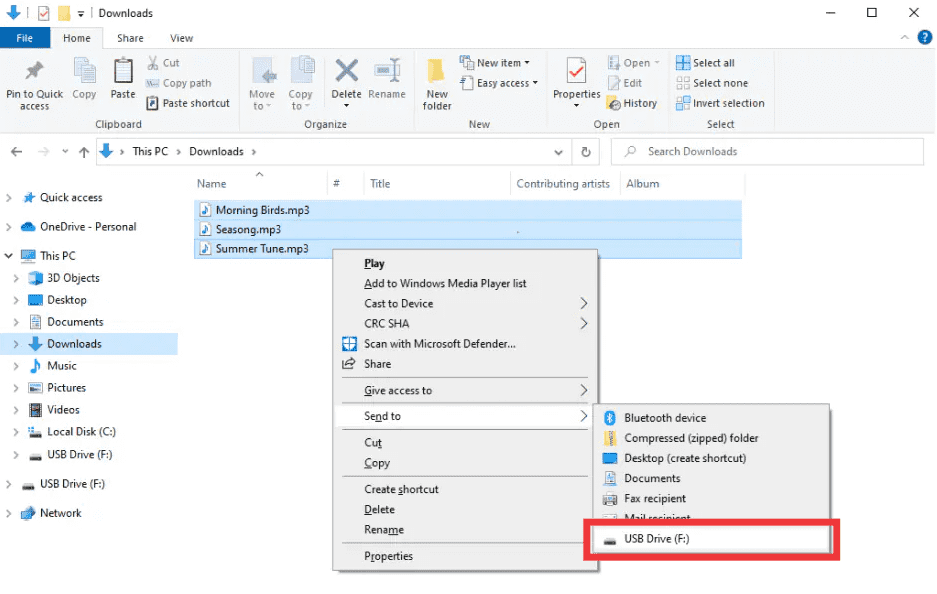
Krok 5. Jak włączyć muzykę MP3 gracz z Spotify? Po konwersji zlokalizuj folder wyjściowy. Podłącz MP3 Podłącz odtwarzacz do komputera przez USB i skopiuj przekonwertowane pliki. Twój Spotify muzyka jest teraz gotowa do odtwarzania offline na dowolnym urządzeniu MP3 urządzeń.
Część 3. FAQ
1. Czy mogę umieścić Spotify piosenki bezpośrednio na MP3 gracze?
Nie. SpotifyUtwory są chronione DRM i nie można ich eksportować bezpośrednio. Potrzebujesz konwertera, takiego jak DumpMedia Spotify Music Converter aby były kompatybilne.
2. Jak dokonać konwersji Spotify listy odtwarzania do MP3?
Zastosowanie DumpMedia Spotify Music Converter: skopiuj linki do playlist, wybierz MP3 jako dane wyjściowe i przekonwertuj. Następnie przenieś pliki do swojego MP3 gracz.
3. Czy konwersja jest legalna? Spotify muzyka?
Konwersja Spotify Muzyka do użytku osobistego offline jest generalnie dozwolona. Unikaj udostępniania przekonwertowanych plików innym osobom, ponieważ może to naruszać prawa autorskie.
4. Jakich formatów mogę używać MP3 gracze?
MP3 jest najczęstszy. DumpMedia Spotify Music Converter obsługuje również formaty M4A, WAV i FLAC, wszystkie kompatybilne z większością urządzeń.
5. Czy mogę przenieść Spotify muzyki na wielu urządzeniach?
Tak. Po konwersji DumpMedia, Twój Spotify utwory są wolne od DRM i można je odtwarzać na dowolnym urządzeniu MP3 odtwarzacz, telefon lub tablet.
Część 4. Podsumowując
Jeśli kiedykolwiek zastanawiałeś się, jak umieścić muzykę na MP3 gracz z SpotifyRozwiązanie jest jasne: SpotifyDRM uniemożliwia bezpośrednie transfery, ale DumpMedia Spotify Music Converter usuwa te ograniczenia. Konwertuje Twoje ulubione utwory, albumy lub playlisty do MP3 lub innych uniwersalnych formatach, zachowujących wysoką jakość i umożliwiających odtwarzanie offline na dowolnym urządzeniu.
Próbować DumpMedia Spotify Music Converter dzisiaj i ciesz się Spotify muzyka gdziekolwiek i kiedykolwiek, bez ograniczeń, bez problemów z DRM.

30% zniżki >>>