


Jak pobrać Spotify Piosenki do MP3 na Macu w 2026 r
Spotify jest jedną z najpopularniejszych platform do strumieniowego przesyłania muzyki na świecie, ale wielu użytkowników komputerów Mac nadal chce mieć możliwość pobierania Spotify piosenki do MP3 na komputerze Mac, aby móc stale odtwarzać w trybie offline. Chociaż Spotify Premium umożliwia słuchanie offline, pobrane utwory są szyfrowane i nie można ich eksportować standardowo MP3 Pliki. W tym przewodniku wyjaśnimy, czy możliwa jest konwersja Spotify muzyka w MP3 na Macu i przedstawiamy najlepsze Spotify do MP3 konwerter dla użytkowników macOS.
Przewodnik po zawartości Część 1. Czy możesz pobrać? Spotify Muzyka do MP3 na Macu?Część 2. Najlepsze Spotify Piosenki do MP3 Konwerter dla MacaCzęść 3. Często zadawane pytaniaCzęść 4. streszczenie
Część 1. Czy możesz pobrać? Spotify Muzyka do MP3 na Macu?
Wielu użytkowników zastanawia się, czy Spotify oficjalnie pozwala użytkownikom na pobieranie Spotify piosenki do MP3 na komputerze Mac. Odpowiedź brzmi nie.
Spotify nie zapewnia bezpośredniego MP3 pobieranie, nawet dla subskrybentów Premium. Oficjalny Spotify Pobieranie jest chronione technologią DRM (Digital Rights Management), co oznacza, że:
- Utwory można odtwarzać tylko w Spotify Aplikacja
- Po anulowaniu subskrypcji pliki do pobrania znikają
- Pliki muzyczne nie mogą być swobodnie przesyłane
- Spotify utworów nie można eksportować jako MP3
Nawet jeśli użytkownicy włączą słuchanie offline, pobrane pliki pozostaną zaszyfrowane i niedostępne poza siecią. SpotifyZ powodu tych ograniczeń użytkownicy chcący pobrać Spotify piosenki do MP3 na komputerze Mac zwykle potrzebny jest program innej firmy Spotify przetwornik.
Część 2. Najlepsze Spotify Piosenki do MP3 Konwerter dla Maca
Jeśli chcesz najłatwiejszego sposobu pobrania Spotify piosenki do MP3 na Macu, DumpMedia Spotify Music Converter jest jednym z najlepszych dostępnych rozwiązań. Ten profesjonalista Spotify Konwerter został zaprojektowany specjalnie dla użytkowników, którzy chcą mieć możliwość odtwarzania muzyki w trybie offline i elastycznego zarządzania nią w systemie macOS.
Bezpłatne pobieranie Bezpłatne pobieranie
🏆Główne cechy DumpMedia Spotify Music Converter
- konwertować Spotify piosenki do MP3, WAV, FLAC i AAC
- Usunąć Spotify DRM dla muzyki ochrona*
- Zachowaj oryginalną jakość dźwięku
- Zachowaj tagi ID3 i metadane
- Konwersja zbiorcza list odtwarzania i albumów
- Szybka prędkość konwersji
- Pełna kompatybilność z urządzeniami Mac
- Obsługa odtwarzania offline na dowolnym urządzeniu
w odróżnieniu Spotify oficjalne pliki do pobrania, przekonwertowane MP3 Pliki można trwale przechowywać i swobodnie przenosić. Wielu użytkowników komputerów Mac wybiera DumpMedia Spotify Music Converter ponieważ zapewnia stabilny i prosty sposób pobierania Spotify piosenki do MP3 na Macu bez komplikacji technicznych.
Pobierz Spotify do MP3 na komputerze Mac za pomocą DumpMedia Spotify Music Converter
Krok 1. Pobierz i zainstaluj DumpMedia Spotify Music Converter na komputerze Mac/PC. Uruchom go, a zobaczysz interfejs. Użyj Spotify Konto Premium/bezpłatne do logowania.
Bezpłatne pobieranie Bezpłatne pobieranie
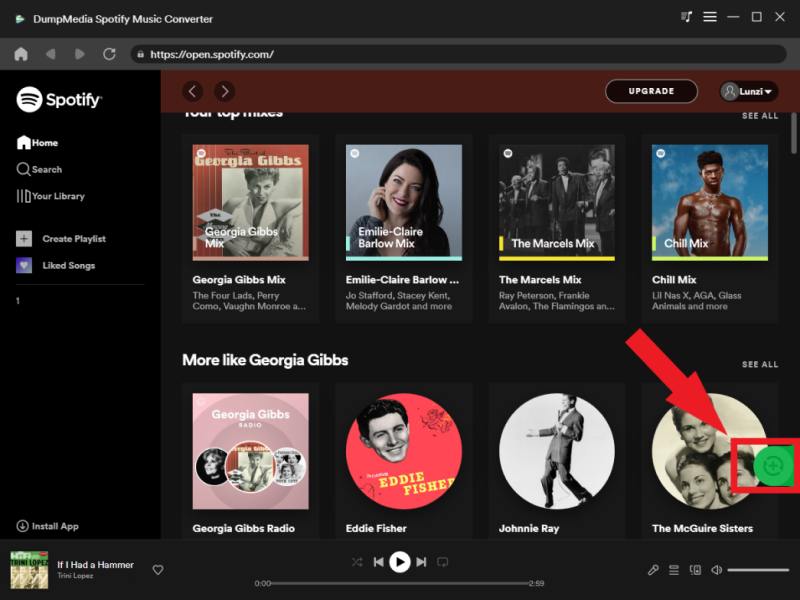
Krok 2. Znajdź playlistę, album lub konkretny utwór, który chcesz przekonwertować. Możesz przeciągnąć pojedynczy utwór na ikonę „+” po prawej stronie ekranu. Możesz również otworzyć całą playlistę/album i kliknąć ikonę „Dodaj do konwersji”, aby załadować całą listę do konwertera.
Krok 3. Wybierz MP3 (najbardziej kompatybilny). Możesz również zmienić szybkość transmisji lub częstotliwość próbkowania. Dla uzyskania najlepszego balansu wybierz 320 kbps.

Krok 4. Po zakończeniu ustawień użytkownicy mogą dokonać konwersji, klikając ikonę „Konwertuj”. Następnie DumpMedia nawróci się Spotify piosenki do MP3 w ciągu kilku sekund dzięki swojej superszybkiej prędkości.
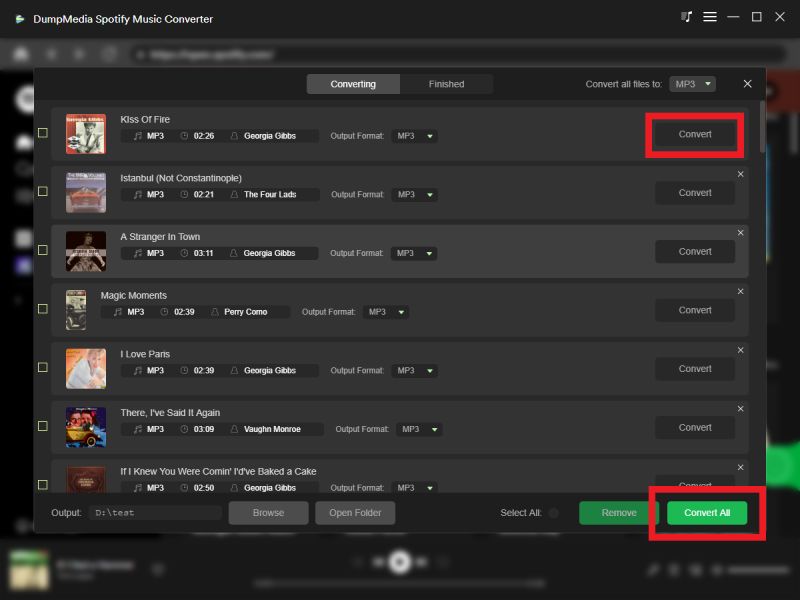
Po konwersji Twoje Spotify tory staną się standardem lokalnym MP3 pliki, które można swobodnie odtwarzać w trybie offline.
Dodatkowe wskazówki
Jeśli chcesz pobrać Spotify piosenki do MP3 na komputerze Mac bez instalowania żadnego programu możesz wypróbować DumpMedia narzędzie online. DumpMedia opracował a Spotify do MP3 przetwornikNarzędzie online działa na zasadzie prostego procesu „Kopiuj-Wklej-Pobierz”.
Kluczowe funkcje DumpMedia Spotify do MP3 Przetwornik
- konwertować Spotify piosenki do MP3
- W pełni kompatybilny z komputerami Mac i Winłajdaki
- Obsługa odtwarzania offline na dowolnym urządzeniu
Pobierz Spotify do MP3 na komputerze Mac za pomocą DumpMedia Spotify do MP3 Przetwornik
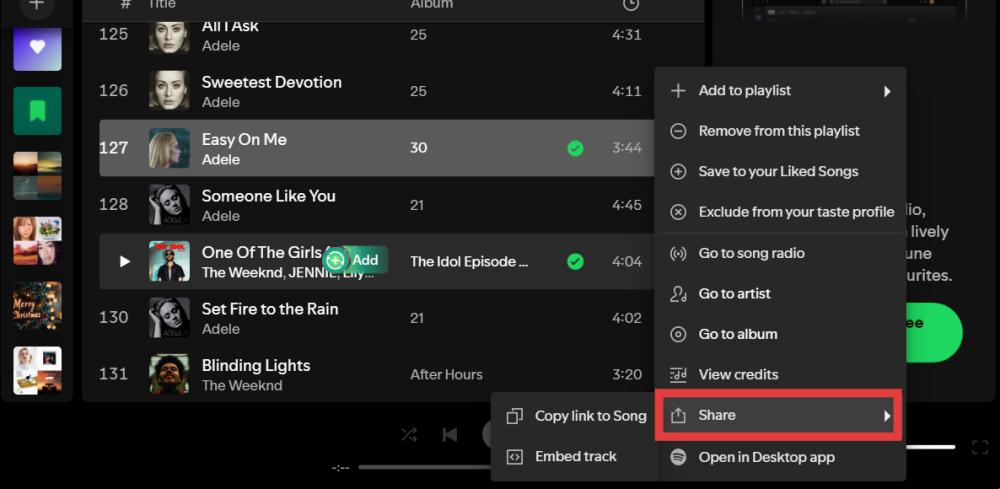
Krok 1. Otwarte Spotify Na swoim urządzeniu (aplikacja stacjonarna lub wersja internetowa). Znajdź utwór, który chcesz pobrać. Kliknij ikonę trzech kropek (⋯) obok nazwy utworu. Wybierz „Udostępnij”, a następnie „Kopiuj link do utworu”.
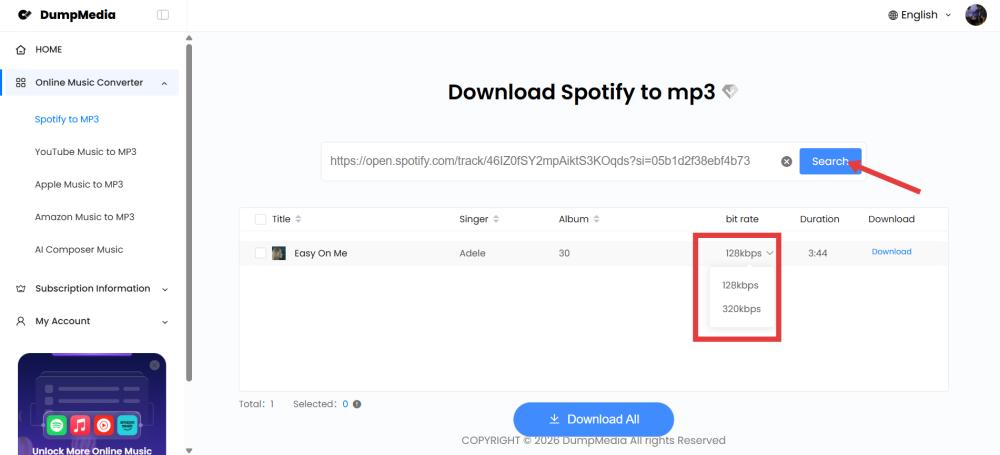
Krok 2. Wklej link w polu wejściowym na „Spotify do MP3Kliknij „Szukaj” i poczekaj na przetworzenie linku.
Krok 3. Kliknij przycisk „Pobierz” obok wybranego utworu. Plik zostanie zapisany w MP3 Format.
Część 3. Często zadawane pytania
Czy mogę pobrać Spotify piosenki do MP3 na Macu?
Spotify oficjalnie nie wspiera MP3 pobrań, ale użytkownicy mogą konwertować Spotify muzyka w MP3 sformatuj używając DumpMedia Spotify Music Converter.
Czy Spotify dopuszczać MP3 pobrań?
Nie. Spotify pliki do pobrania są szyfrowane i można je odtwarzać wyłącznie w Spotify app.
Czy mogę przenieść? Spotify utwory na USB na komputerze Mac?
Oficjalnych plików do pobrania nie można przenieść bezpośrednio, ale można je przekonwertować MP3 Pliki można kopiować swobodnie.
Is DumpMedia Spotify Music Converter bezpieczny?
Tak. Jest przeznaczony do Spotify konwersja muzyki i zarządzanie odtwarzaniem offline.
Uwaga: Platformy streamingowe mają własne zasady i systemy monitorowania. Jako narzędzie zewnętrzne, również podlegamy ich ograniczeniom, które w niektórych przypadkach mogą mieć wpływ na użytkowanie. Spotify może podjąć działania w przypadku wykrycia aktywności naruszającej Warunki korzystania z usługi; jest to w pełni zgodne z Spotifywedług uznania.
Część 4. streszczenie
Chociaż Spotify oficjalnie nie pozwala użytkownikom na pobieranie Spotify piosenki do MP3 Na komputerach Mac nadal istnieją skuteczne rozwiązania umożliwiające stałe odtwarzanie offline. Użytkownicy komputerów Mac, którzy oczekują większej elastyczności, DumpMedia Spotify Music Converter zapewnia prosty i niezawodny sposób konwersji Spotify piosenki do MP3 format, zachowując jakość dźwięku i metadane.
Wybierając opcję pobierania Spotify piosenki do MP3 na komputerach Mac użytkownicy mogą cieszyć się nieograniczonym odtwarzaniem offline, swobodą przenoszenia danych z urządzenia na urządzenie i stałym dostępem do ulubionych utworów Spotify muzyka.
Bezpłatne pobieranie Bezpłatne pobieranie
*DumpMedia działa poprzez odszyfrowanie i pobranie Spotify Konwertuje utwory do plików bez DRM, umożliwiając uzyskanie czystej, nieograniczonej kopii biblioteki na dowolne urządzenie. Funkcjonalność ta nie obejmuje usuwania DRM z lokalnych plików audio.