


Deezer Offline: Jak słuchać muzyki z Deezer offline bez ograniczeń
Wielu miłośników muzyki korzysta z trybu offline Deezera, aby słuchać utworów bez użycia danych komórkowych ani połączenia internetowego. Niezależnie od tego, czy podróżujesz, dojeżdżasz do pracy, czy oszczędzasz transfer danych, Deezer offline Odtwarzanie to jedna z najprzydatniejszych funkcji platformy. Jednak wielu użytkowników szybko odkrywa, że standardowe pobieranie z Deezer wiąże się z ograniczeniami. W tym przewodniku dowiesz się, jak działa tryb offline Deezer, jakie ma ograniczenia i jak na stałe wyłączyć muzykę z Deezer.
Przewodnik po zawartości Część 1. Czym jest tryb offline w serwisie Deezer Music?Część 2. Jak korzystać z Deezer Music w trybie offline?Część 3. Najlepszy sposób na stałe utrzymanie muzyki Deezer w trybie offlineCzęść 4. Często zadawane pytaniaCzęść 5. Wniosek
Część 1. Czym jest tryb offline w serwisie Deezer Music?
Tryb offline serwisu Deezer umożliwia Premium Umożliwia subskrybentom pobieranie utworów, albumów i playlist do słuchania bez połączenia z internetem. W trybie offline użytkownicy mogą słuchać muzyki bez Wi-Fi.
Jednak wielu użytkowników nie rozumie, jak działa Deezer offline. Pobieranie z Deezer nie jest tradycyjne. MP3 Pliki są trwale przechowywane na Twoim urządzeniu. Pozostają zaszyfrowane i powiązane z Twoim kontem Deezer.
Część 2. Jak korzystać z Deezer Music w trybie offline?
Korzystanie z serwisu Deezer w trybie offline jest stosunkowo proste.
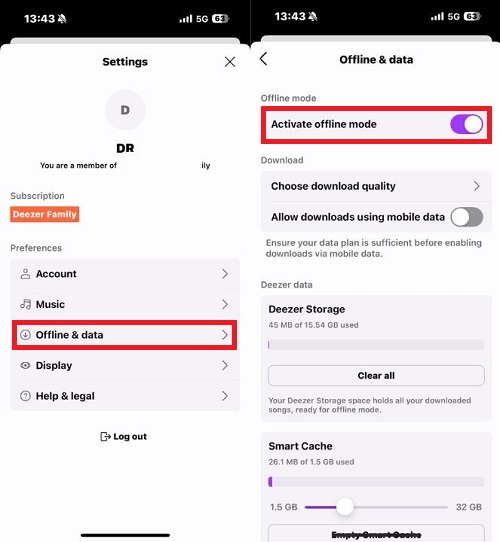
Na komórce
- Otwórz aplikację Deezer
- Zaloguj się na swoje konto Deezer Premium
- Wybierz listę odtwarzania lub album
- Stuknij przycisk Pobierz
- Włącz tryb offline w ustawieniach
Po pobraniu Twoja muzyka będzie dostępna bez dostępu do Internetu.
Część 3. Najlepszy sposób na stałe utrzymanie muzyki Deezer w trybie offline
Choć wygodne, odtwarzanie offline w Deezer wiąże się z kilkoma ograniczeniami, które frustrują wielu użytkowników. Po pierwsze, pobrana muzyka pozostaje powiązana z kontem Deezer Premium. Po wygaśnięciu subskrypcji utwory offline mogą natychmiast przestać działać. Kolejnym istotnym ograniczeniem trybu offline w Deezer jest to, że pobrane utwory nie są przechowywane w normalny sposób. MP3 Pliki. Użytkownicy nie mogą swobodnie korzystać z pobranych plików poza Deezer.
Dla użytkowników, którzy chcą większej elastyczności, dostępne są narzędzia takie jak DumpMedia DeezPlus zapewnić alternatywne podejście do standardowych ograniczeń offline Deezera. Zamiast polegać wyłącznie na szyfrowanych pobieraniu z Deezera, DumpMedia DeezPlus umożliwia użytkownikom konwertowanie muzyki z serwisu Deezer do popularnych formatów audio w celu umożliwienia stałego odtwarzania w trybie offline.
Darmowe pobieranie Darmowe pobieranie
🏆Dlaczego warto używać DumpMedia DeezPlus
- Konwertuj Deezer na MP3, WAV, FLAC i AAC
- Integracja z odtwarzaczem internetowym Deezer
- Usuń ochronę DRM serwisu Deezer*
- Zachowaj oryginalną jakość dźwięku
- Pobieranie zbiorcze list odtwarzania i albumów
- Szybka prędkość konwersji
- Zachowaj metadane utworu i znaczniki ID3
- Obsługa odtwarzania offline na dowolnym urządzeniu
Dzięki temu użytkownicy mają znacznie większą kontrolę w porównaniu z tradycyjnym odtwarzaniem offline w serwisie Deezer.
Pobierz muzykę z serwisu Deezer do stałego odtwarzania w trybie offline
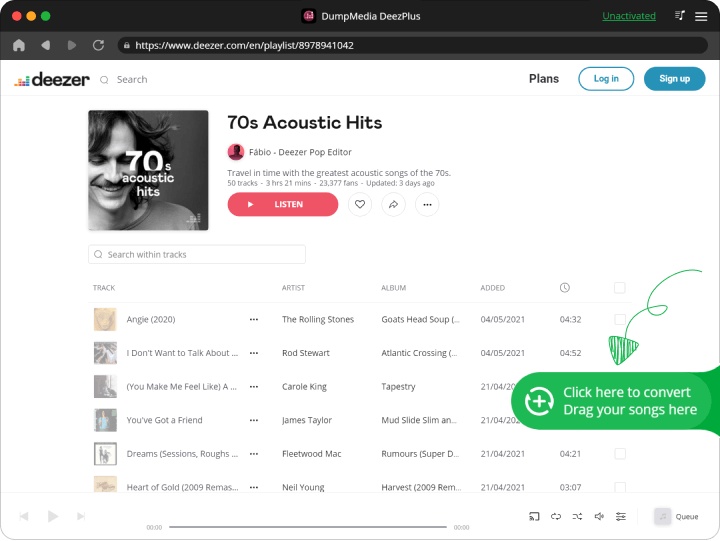
Krok 1. Pobierz i zainstaluj DumpMedia DeezPlus na komputerze Mac/PC. Uruchom DumpMedia Deezer Converter, a zobaczysz interfejs. Zaloguj się na swoje konto Deezer.
Darmowe pobieranie Darmowe pobieranie
Krok 2. Znajdź playlistę, album lub konkretny utwór, który chcesz przekonwertować. Możesz przeciągnąć pojedynczy utwór na ikonę „+” po prawej stronie ekranu. Możesz też otworzyć całą playlistę/album i kliknąć ikonę „Dodaj do konwersji”, aby załadować całą listę do konwertera.
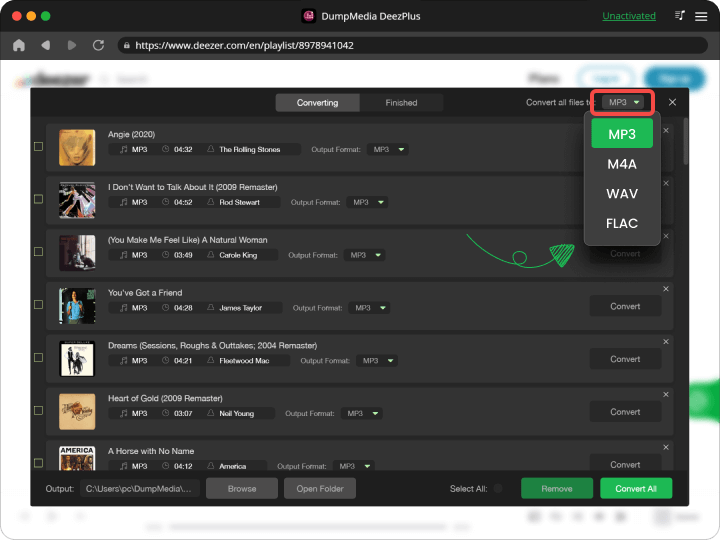
Krok 3. Wybierz MP3 (najbardziej kompatybilne). Możesz również zmienić szybkość transmisji lub częstotliwość próbkowania.
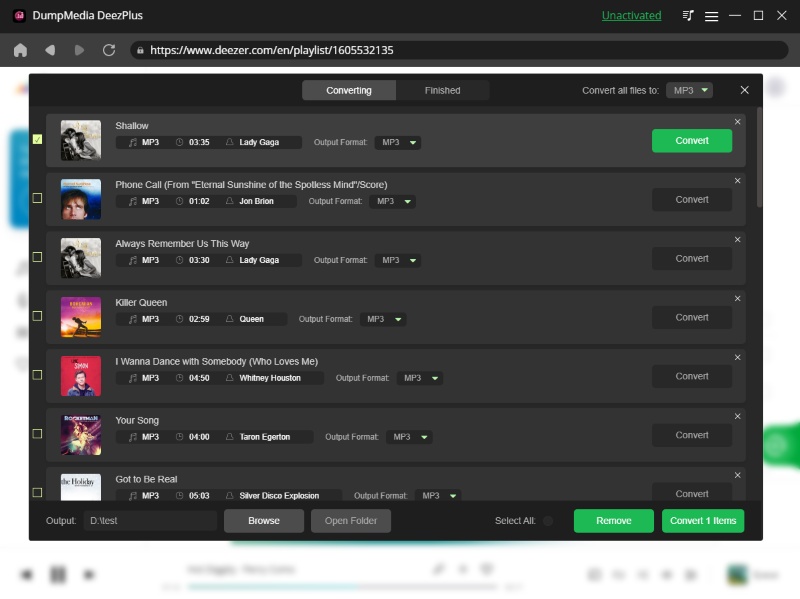
Krok 4. Po zakończeniu ustawień użytkownicy mogą dokonać konwersji, klikając ikonę „Konwertuj”. Następnie DumpMedia przekonwertuje utwory z Deezer na MP3 w ciągu kilku sekund dzięki swojej superszybkiej prędkości.
Część 4. Często zadawane pytania
Czy Deezer offline działa bez dostępu do internetu?
Tak, ale pobranie muzyki nadal zależy od weryfikacji konta i statusu subskrypcji.
Czy mogę zachować utwory z serwisu Deezer na zawsze?
Standardowe pliki do pobrania offline z Deezera są tymczasowe. Przekonwertowane pliki lokalne zapewniają trwalszy dostęp.
Dlaczego moje pliki pobrane z serwisu Deezer zniknęły?
Zwykle dzieje się tak, gdy subskrypcja wygasła lub gdy aplikacja wymaga weryfikacji online.
Czy Deezer offline jest dostępny dla użytkowników bezpłatnych?
Nie. Tryb offline jest zasadniczo ograniczony do subskrybentów Deezer Premium.
Czy mogę przekonwertować muzykę z Deezer na MP3?
Tak. Narzędzia takie jak DumpMedia DeezPlus może konwertować muzykę z serwisu Deezer do popularnych formatów audio.
Część 5. Wniosek
Tryb offline Deezer jest przydatny do tymczasowego słuchania offline, ale wiąże się z kilkoma ograniczeniami związanymi z subskrypcjami, kompatybilnością urządzeń i dostępem do plików. Dla użytkowników, którzy chcą mieć większą elastyczność stałego odtwarzania offline, DumpMedia DeezPlus to praktyczne rozwiązanie umożliwiające konwersję muzyki z serwisu Deezer do dostępnych formatów audio, które można przechowywać i odtwarzać na wielu urządzeniach.
Darmowe pobieranie Darmowe pobieranie
*DumpMedia Działa poprzez odszyfrowanie i pobranie utworów z Deezer do plików bez DRM, umożliwiając uzyskanie czystej, nieograniczonej kopii Twojej biblioteki na dowolnym urządzeniu. Funkcjonalność nie obejmuje usuwania DRM z lokalnych plików audio.

30% zniżki >>>