


Deezer ARL: Jak z niego korzystać i bezpieczniejsza alternatywa
Jeśli szukasz Deezer ARL, prawdopodobnie próbujesz uzyskać dostęp do muzyki lub pobrać ją za pomocą narzędzi innych firm. Chociaż Deezer ARL może być przydatny w niektórych sytuacjach, nie jest tak prosty ani bezpieczny, jak wielu użytkowników myśli. W tym poradniku wyjaśnimy, czym jest Deezer ARL i jak go uruchomić. Przedstawiamy również bezpieczniejszą i bardziej niezawodną alternatywę. Zaczynajmy!
Przewodnik po zawartości Część 1. Co to jest Deezer ARL? Część 2. Jak zdobyć Deezer ARL?Część 3. Czy Deezer ARL jest bezpieczny?Część 4. Najlepsza alternatywa dla Deezer ARL Część 5. Deezer ARL kontra DumpMediaCzęść 6. Często zadawane pytania Część 7. Wniosek
Część 1. Co to jest Deezer ARL?
W obszarze pobierania i streamingu muzyki cyfrowej, ARL (Access Rights Language) to w istocie token uwierzytelniający przechowywany w plikach cookie przeglądarki przez internetową wersję serwisu Deezer . Mówiąc prościej, pełni on funkcję „cyfrowego identyfikatora” do Twojego konta.
Dlaczego Deezer ARL jest ważny?
Token Deezer ARL jest często używany w zewnętrznych narzędziach muzycznych, skryptach automatyzacji i programach do pobierania. Narzędzia te wykorzystują ARL do uzyskiwania dostępu do biblioteki muzycznej, wyszukiwania playlist i pobierania utworów. Właśnie dlatego użytkownicy poszukujący zaawansowanego dostępu lub pobierania często szukają hasła „Deezer ARL”.
Część 2. Jak uzyskać dostęp do Deezer ARL?
Na chwilę obecną proces uzyskiwania tokenu ARL w Deezer pozostaje taki sam, ponieważ jest to standardowy token uwierzytelniający oparty na plikach cookie. Należy to zrobić za pomocą przeglądarki internetowej na komputerze (Chrome, Firefox lub Edge), ponieważ dostęp do tych wewnętrznych tokenów nie jest możliwy za pośrednictwem aplikacji mobilnej.
Jak odzyskać ARL (krok po kroku)
Dla Chrome i Microsoft Edge
- Wejdź na deezer.com i zaloguj się na swoje konto.
- Naciśnij klawisz F12 (lub Ctrl + Shift + I na Windows; Cmd + Option + I na Macu).
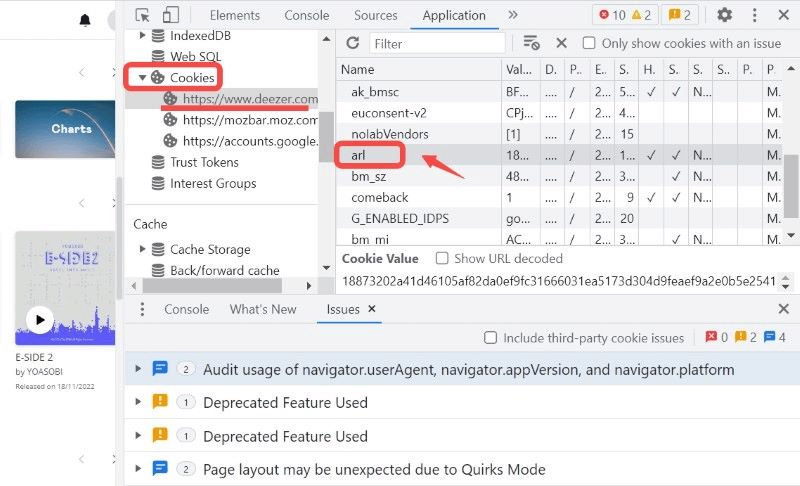
- Kliknij kartę „Aplikacja” u góry (jeśli jej nie widzisz, kliknij strzałki >>). Na pasku bocznym po lewej stronie rozwiń sekcję „Pliki cookie” i wybierz https://www.deezer.com.
- Wyszukaj arl w kolumnie „Nazwa”. Kliknij dwukrotnie długi ciąg znaków w kolumnie Wartość i skopiuj go.
Dla przeglądarki Mozilla Firefox
- Zaloguj się na swoje konto na deezer.com.
- Naciśnij klawisz F12 (lub Ctrl + Shift + I na Windows; Cmd + Option + I na Macu).
- Kliknij kartę „Pamięć” u góry. Na pasku bocznym po lewej stronie rozwiń „Pliki cookie” i wybierz https://www.deezer.com.
- Wyszukaj arl na liście. Skopiuj ciąg alfanumeryczny z kolumny Wartość.
Dzięki Deezer ARL użytkownicy mogą logować się do narzędzi innych firm i omijać pewne ograniczenia. Prawdziwym celem Deezer ARL nie jest samo logowanie, ale odblokowanie dostępu do muzyki.
Ważna uwaga:
- W sklepie dodatków przeglądarki Microsoft Edge dostępne jest teraz rozszerzenie „Deezer ARL Retriever”, które umożliwia wyodrębnienie tokenu jednym kliknięciem, dzięki czemu nie musisz ręcznie przechodzić przez Narzędzia programistyczne.
- Pamiętaj, że Twój ARL jest powiązany z Twoją bieżącą sesją. Jeśli wylogujesz się ze strony Deezer, skopiowany ARL natychmiast straci ważność.
- Twój ARL to w zasadzie Twój „bezhasłowy” login. Nigdy nie udostępniaj tego kodu na forach publicznych ani kanałach Discord, ponieważ daje on pełny dostęp do Twojego konta i subskrypcji.
Część 3. Czy Deezer ARL jest bezpieczny?
Tutaj robi się naprawdę gorąco. Chociaż Deezer ARL działa, wiąże się z nim kilka zagrożeń, które wielu użytkowników ignoruje.
1. Zagrożenia bezpieczeństwa konta
Twój token ARL w Deezer działa jak „klucz” do Twojego konta, omijając standardowe hasła i zapewniając bezpośredni dostęp. Ponieważ jest to wrażliwy token uwierzytelniający, jego ujawnienie umożliwia innym osobom dostęp do Twojego konta, korzystanie z Twojej subskrypcji premium bez zezwolenia i potencjalne naruszenie Twoich danych osobowych.
2. Problemy z wygaśnięciem tokena
Co więcej, tokeny ARL Deezer są podatne na wygaśnięcie i mogą nagle przestać działać, co prowadzi do niestabilnego działania. Te tokeny sesyjne często tracą ważność po wylogowaniu się z oficjalnej strony internetowej lub gdy platforma odświeża swoje protokoły bezpieczeństwa, co wymaga ręcznego pobrania nowego kodu w celu utrzymania dostępu do narzędzi innych firm.
3. Ryzyko ograniczeń konta
Ponadto korzystanie z tokenów ARL przy użyciu nieoficjalnych narzędzi niesie ze sobą ryzyko ograniczeń konta, ponieważ działania te często naruszają zasady platformy i mogą skutkować automatycznymi ograniczeniami lub trwałymi banami.
4. Złożoność techniczna
Bądźmy szczerzy: większość użytkowników nie chce zajmować się uciążliwym otwieraniem narzędzi programistycznych w przeglądarce, ręcznym wyodrębnianiem plików cookie ani nawigowaniem po skomplikowanych konfiguracjach, aby móc słuchać muzyki. Ten ręczny proces jest często zbyt żmudny i onieśmielający dla przeciętnego użytkownika, który po prostu oczekuje płynnego działania „plug and play”.
Część 4. Najlepsza alternatywa dla Deezer ARL
Zamiast radzić sobie z ryzykiem ARL istnieje znacznie prostsze i bezpieczniejsze rozwiązanie: skorzystaj z profesjonalnego konwertera muzyki, takiego jak DumpMedia Konwerter muzyki DeezerTo narzędzie zostało zaprojektowane specjalnie do pobierania muzyki z serwisu Deezer i konwertować piosenki na MP3, WAV i FLAC.
Bezpłatne pobieranie Bezpłatne pobieranie
Więcej funkcji
- Zachowaj bezstratną jakość dźwięku
- Konwersja wsadowa dla list odtwarzania i albumów
- Szybka prędkość konwersji
Krok po kroku: pobieranie muzyki z Deezer
Krok 1. Pobierz i zainstaluj oprogramowanie na swoim komputerze. Działa ono z obydwoma systemami. WinDows i Mac. Interfejs jest przyjazny dla użytkownika, co ułatwia pracę początkującym.
Bezpłatne pobieranie Bezpłatne pobieranie
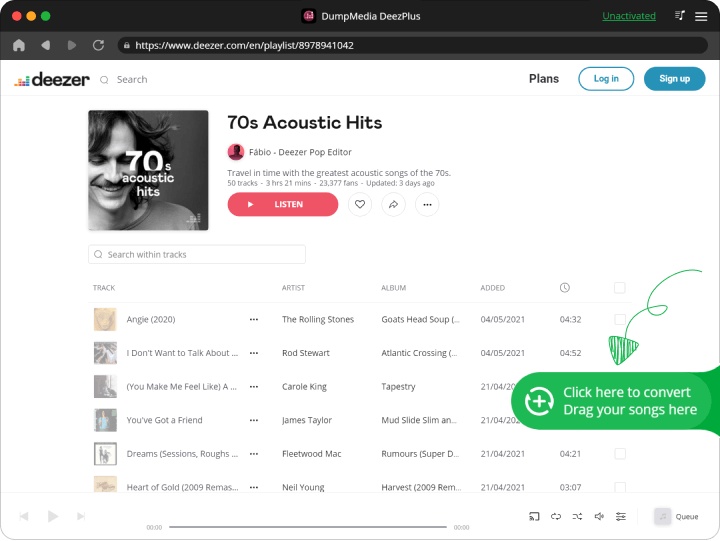
Krok 2. Otwórz wbudowany odtwarzacz internetowy Deezer DumpMedia i zaloguj się na swoje konto Deezer. Przeglądaj Deezer i przeciągnij utwory, albumy lub playlisty, które chcesz pobrać, do konwertera.
Krok 3. W panelu ustawień wybierz MP3 jako format wyjściowy umożliwiający MP3 pobieranie wybranych utworów.
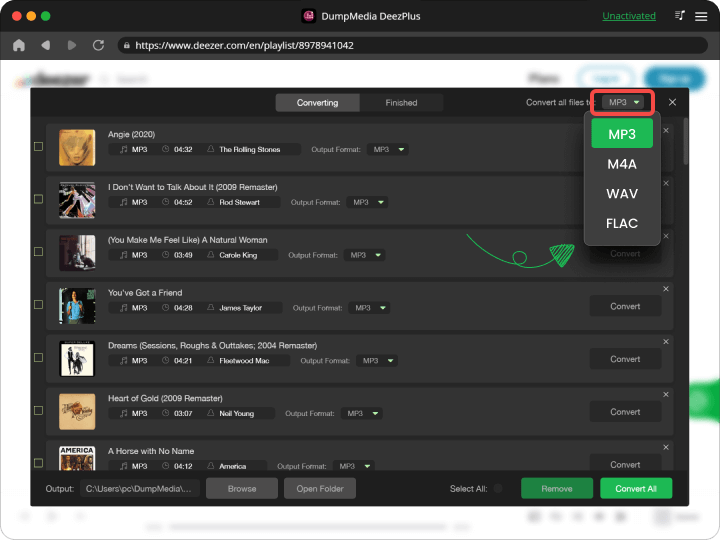
Krok 4. Kliknij przycisk „Konwertuj wszystko” i rozpocznij konwersję. DumpMedia Deezer Music Converter obsługuje 35-krotnie szybszą prędkość pobierania, wystarczy zaczekać na zakończenie procesu konwersji.
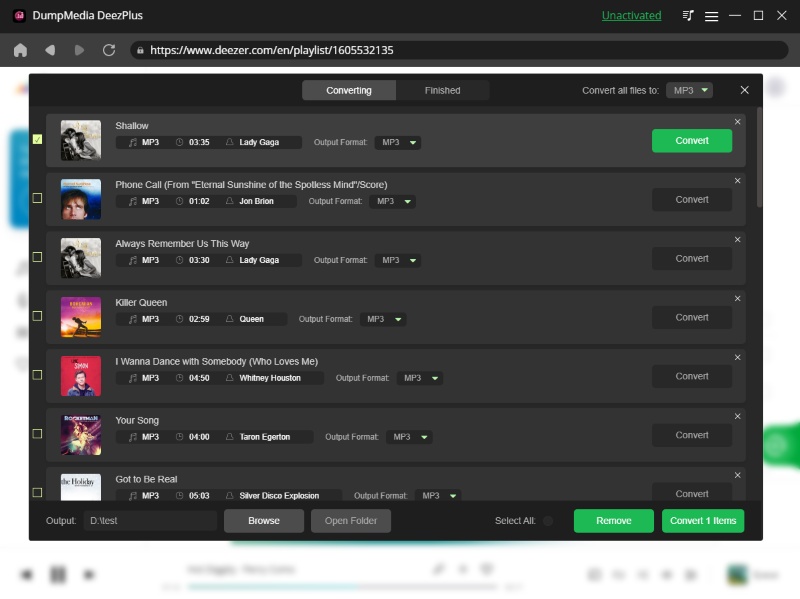
Kolejną świetną funkcją tego konwertera jest możliwość dostosowania kilku parametrów. Możesz zmieniać szybkość transmisji i częstotliwość próbkowania, a nawet tagi ID3 w swoich utworach.
Część 5. Deezer ARL kontra DumpMedia
| Cecha | Deezer ARL | DumpMedia |
| Łatwość użycia | ❌ Kompleks | ✅ Proste |
| Bezpieczeństwo | ❌ Ryzykowne | ✅ Bezpieczne |
| Stabilność | ❌ Niestabilny | ✅ Niezawodny |
| Możliwość pobrania | ✅ Tak | ✅ Tak |
| Pliki trwałe | ❌ Ograniczona | ✅ Tak |
Różnica jest oczywista: DumpMedia zapewnia kompletne rozwiązanie, natomiast Deezer ARL jest tylko obejściem problemu.
Część 6. Często zadawane pytania
1. Czy korzystanie z Deezer ARL jest bezpieczne?
Udostępnianie lub niewłaściwe używanie tych danych może być ryzykowne, ponieważ umożliwiają one dostęp do Twojego konta.
2. Czy mogę pobierać muzykę za pomocą Deezer ARL?
Tak, ale zależy to od narzędzi innych firm i może być niestabilne.
3. Jaka jest najlepsza alternatywa dla Deezer ARL?
Bezpieczniejszą opcją jest użycie narzędzia takiego jak DumpMedia Konwerter muzyki Deezer.
4. Czy potrzebuję umiejętności technicznych, aby korzystać z DumpMedia?
Nie, jest on przeznaczony dla początkujących i nie wymaga żadnej konfiguracji technicznej.
Część 7. Wniosek
Czy warto korzystać z Deezer ARL? Tak, jeśli masz doświadczenie techniczne i rozumiesz ryzyko. Jednak dla większości użytkowników nie jest to najlepszy wybór. Jeśli chcesz pobierać muzykę bez ryzyka, skorzystaj z dedykowanego narzędzia, takiego jak DumpMedia DeezPlus to mądrzejsza opcja.