


Jak dodać muzykę do Final Cut Pro z Apple Music
Jeśli szukasz sposobu na dodanie muzyki z Apple Music do Final Cut Pro, prawdopodobnie napotkałeś frustrujący problem: utwory z Apple Music po prostu nie importują się do Final Cut Pro. Nie jesteś sam. Wielu montażystów wideo napotyka ten sam problem, próbując użyć swoich ulubionych utworów z Apple Music w projektach wideo. Przyczyną nie jest błąd ani błąd użytkownika, ale ograniczenie wbudowane w samą aplikację Apple Music. W tym poradniku poznasz jedyny niezawodny sposób rozwiązania tego problemu oraz krok po kroku dowiesz się, jak konwertować i importować muzykę.
Przewodnik po zawartości Część 1. Czy można dodać Apple Music bezpośrednio do Final Cut Pro?Część 2. Rozwiązanie: Konwersja Apple Music do formatu obsługiwanego przez Final Cut ProCzęść 3. Jak zaimportować Apple Music do Final Cut Pro?Część 4. Często zadawane pytaniaCzęść 5. Wniosek
Część 1. Czy można dodać Apple Music bezpośrednio do Final Cut Pro?
Krótka odpowiedź brzmi: nie. Nie możesz bezpośrednio dodawać utworów z Apple Music do Final Cut Pro. Nawet jeśli pobrałeś utwory do słuchania offline, nadal nie możesz ich używać w oprogramowaniu do edycji wideo.
Pliki Apple Music są chronione przez DRM (Cyfrowe zarządzanie prawami) i ograniczone do odtwarzania w aplikacji Apple Music. Pliki nie są przechowywane w standardowych formatach audio, takich jak MP3 lub WAV. Final Cut Pro z kolei obsługuje tylko lokalne, niezabezpieczone pliki audio. To główny powód, dla którego użytkownicy szukający sposobu na dodanie muzyki do Final Cut Pro z Apple Music napotykają problemy.
Część 2. Rozwiązanie: Konwersja Apple Music do formatu obsługiwanego przez Final Cut Pro
Jak dodać muzykę do Final Cut Pro z Apple Music? Aby skutecznie korzystać z Apple Music w Final Cut Pro, musisz usuń DRM* i konwertuj utwory do standardowych formatów audio. Dzięki temu możesz importować muzykę do Final Cut Pro, swobodnie edytować ją bez ograniczeń i wykorzystywać w profesjonalnych projektach wideo. Najpewniejszym sposobem na to jest skorzystanie z profesjonalnego narzędzia, takiego jak DumpMedia Apple Music Converter.
Darmowe pobieranie Darmowe pobieranie
Kluczowe funkcje
- Konwertuj muzykę Apple na MP3, WAV, AAC i inne
- Zachowaj bezstratną jakość dźwięku
- Konwersja wsadowa dla list odtwarzania i albumów
- Szybka prędkość konwersji
Krok po kroku: Konwersja Apple Music do Final Cut Pro
Krok 1. Pobierz i zainstaluj oprogramowanie na swoim komputerze. Działa ono z obydwoma systemami. WinDows i Mac. Interfejs jest przyjazny dla użytkownika, co ułatwia pracę początkującym.
Darmowe pobieranie Darmowe pobieranie
Krok 2. Otwórz wbudowany odtwarzacz internetowy Apple Music DumpMedia i zaloguj się na swoje konto Apple Music. Przeglądaj Apple Music i przeciągnij utwory, albumy lub playlisty, które chcesz pobrać, do konwertera.
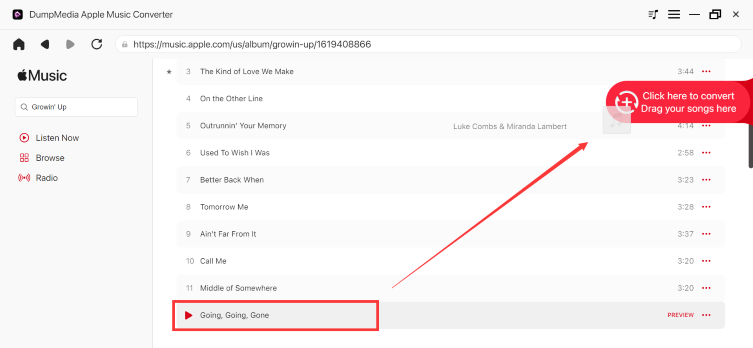
Krok 3. W panelu ustawień wybierz MP3 jako format wyjściowy umożliwiający MP3 pobieranie wybranych utworów.

Krok 4. Kliknij Konwertuj i pobierz utwory bezpośrednio jako MP3 akta.

Po konwersji Twoja muzyka zostanie zapisana lokalnie na Twoim urządzeniu.
Część 3. Jak zaimportować Apple Music do Final Cut Pro?
Jak dodać muzykę do Final Cut Pro z Apple Music? Dodawanie lokalnej muzyki do Final Cut Pro to prosty proces, ale wymaga upewnienia się, że pliki są w formacie obsługiwanym przez oprogramowanie (takim jak WAV, AIFF, MP3lub AAC). Gdy pliki będą gotowe, wykonaj następujące kroki:
Krok 1. Kliknij ikonę Zdjęcia i dźwięk w lewym górnym rogu interfejsu Final Cut Pro (wygląda jak aparat i nuta).
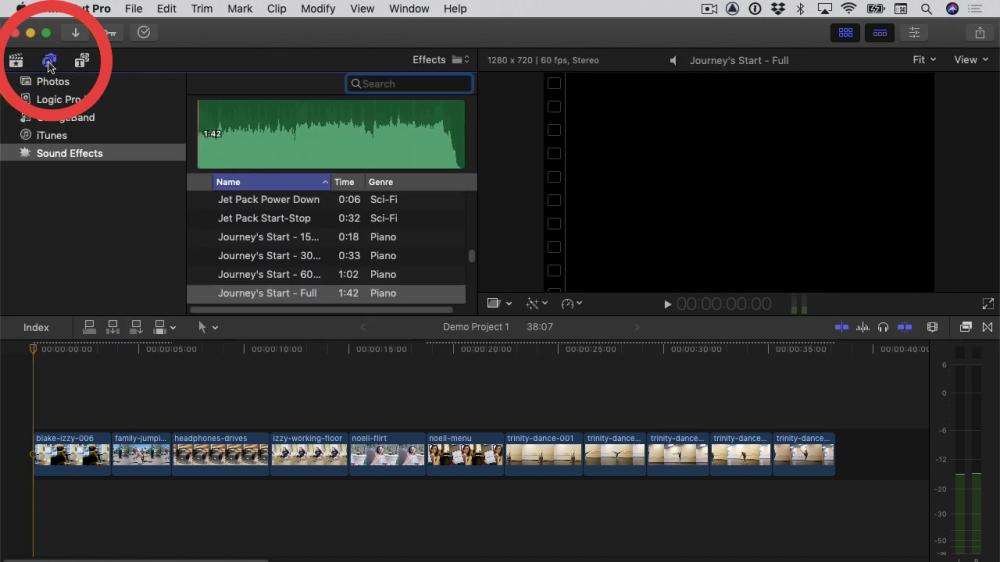
Krok 2. Wybierz Muzykę. Użyj paska wyszukiwania, aby znaleźć utwór.
Krok 3. Przeciągnij piosenkę z przeglądarki bezpośrednio na oś czasu.
Teraz Twoje utwory z Apple Music możesz w pełni wykorzystać w projekcie wideo.
Część 4. Często zadawane pytania
1. Czy mogę używać utworów z Apple Music w Final Cut Pro?
Nie, nie bezpośrednio. Utwory z Apple Music są chronione mechanizmem DRM i nie można ich importować do Final Cut Pro.
2. Dlaczego nie mogę zaimportować Apple Music do Final Cut Pro?
Ponieważ pliki są szyfrowane i nie mają kompatybilnego formatu.
3. Jaki format obsługuje Final Cut Pro?
Final Cut Pro obsługuje MP3Formaty audio WAV, AAC i AIFF.
4. Czy konwersja Apple Music jest legalna?
Konwersja na użytek osobisty jest generalnie dopuszczalna, ale redystrybucja nie jest dozwolona.
Część 5. Wniosek
Jeśli chcesz dowiedzieć się, jak dodać muzykę do Final Cut Pro z Apple Music, musisz przekonwertować ją na obsługiwane formaty. Najskuteczniejszym rozwiązaniem jest użycie DumpMedia Konwerter Apple Music gwarantuje kompatybilność, jakość i długotrwałą użyteczność. Konwertuj swoje utwory z Apple Music już dziś i zacznij edytować bez ograniczeń!
Darmowe pobieranie Darmowe pobieranie
*DumpMedia Działa poprzez odszyfrowanie i pobranie utworów z Apple Music do plików bez DRM, umożliwiając uzyskanie czystej, nieograniczonej kopii biblioteki na dowolnym urządzeniu. Funkcjonalność ta nie obejmuje konwersji lokalnych plików audio.

30% zniżki >>>