


Apple Music niedostępne w Twoim regionie? Napraw to w 2026 roku
Wielu użytkowników Apple Music napotyka frustrujący komunikat: „ Apple Music niedostępne w Twoim regionie ”. Ograniczenia regionalne, umowy licencyjne, zabezpieczenia DRM i problemy z weryfikacją konta często uniemożliwiają normalne odtwarzanie utworów z Apple Music. W tym poradniku wyjaśnimy, dlaczego Apple Music wyświetla komunikat „niedostępne w Twoim kraju”, jak rozwiązać ten problem na iPhonie, komputerze Mac i PC oraz jak najlepiej zachować możliwość odtwarzania utworów z Apple Music offline bez ograniczeń regionalnych.
Spis treści Część 1. Dlaczego Apple Music wyświetla komunikat „Niedostępne w Twoim regionie”? Część 2. Jak naprawić problem z niedostępnością Apple Music w Twoim kraju? Część 3. Najlepszy sposób na zapewnienie możliwości odtwarzania Apple Music wszędzie Część 4. Często zadawane pytania Część 5. Podsumowanie
Część 1. Dlaczego w Apple Music pojawia się komunikat „Niedostępne w Twoim regionie”?
Użytkownicy często wyszukują frazę „Apple Music niedostępne w Twoim regionie” w następujących sytuacjach.
- Utwory Apple Music są wyszarzone
- Utwory pojawiają się na listach odtwarzania, ale nie można ich odtwarzać.
- Pobrane utwory nagle stają się niedostępne
- Trasy offline przestają działać po wykupieniu subskrypcji lub zweryfikowaniu regionu.
- Problemy z Apple Music podczas podróży
- Problemy ze zmianą kraju w Apple ID
- Apple Music nie działa na iPhonie ani Macu
Istnieje kilka powodów, dla których użytkownicy widzą błąd „Usługa Apple Music nie jest dostępna w Twoim regionie”.
Ograniczenia licencyjne
Apple Music licencjonuje utwory w różny sposób w zależności od kraju i regionu. Niektóre utwory mogą być dostępne w jednym kraju, ale ograniczone w innym z powodu umów o prawach autorskich. Jest to jedna z najczęstszych przyczyn problemu „Apple Music niedostępne w Twoim kraju”.
Ustawienia regionu Apple ID
Jeśli region Twojego Apple ID ulegnie zmianie, niektóre utwory mogą zniknąć. Wielu użytkowników napotyka komunikat „Apple Music niedostępne w Twoim kraju” po przeprowadzce za granicę lub zmianie ustawień płatności.
Ochrona DRM
Utwory z Apple Music są chronione systemem DRM (Digital Rights Management) , który wymaga weryfikacji konta i autoryzacji regionalnej. Ze względu na ograniczenia DRM odtwarzanie w trybie offline może się nie powieść.
Problemy z weryfikacją subskrypcji
Apple Music okresowo sprawdza status subskrypcji online. Jeśli weryfikacja się nie powiedzie, użytkownicy mogą nagle utracić dostęp do pobranych utworów.
Utwory usunięte z lokalnego katalogu
Czasami wytwórnie muzyczne usuwają utwory z określonych katalogów regionalnych, przez co utwory stają się niedostępne, nawet jeśli wcześniej można je było odtwarzać.
Część 2. Jak naprawić problem braku dostępności Apple Music w Twoim kraju?
Jeśli nadal widzisz komunikat „Usługa Apple Music nie jest dostępna w Twoim regionie”, poniższe metody mogą pomóc w rozwiązaniu problemu.
Sprawdź region swojego Apple ID
Nieprawidłowe ustawienia regionu to jeden z głównych powodów, dla których Apple Music nie jest dostępne w Twoim regionie. Otwórz ustawienia Apple ID i sprawdź, czy Twój kraj lub region jest zgodny z Twoją obecną lokalizacją i metodą płatności.
Zaktualizuj informacje o płatności
Wygasłe lub nieobsługiwane metody płatności mogą mieć wpływ na weryfikację konta i dostęp regionalny.
Ponowna synchronizacja biblioteki Apple Music
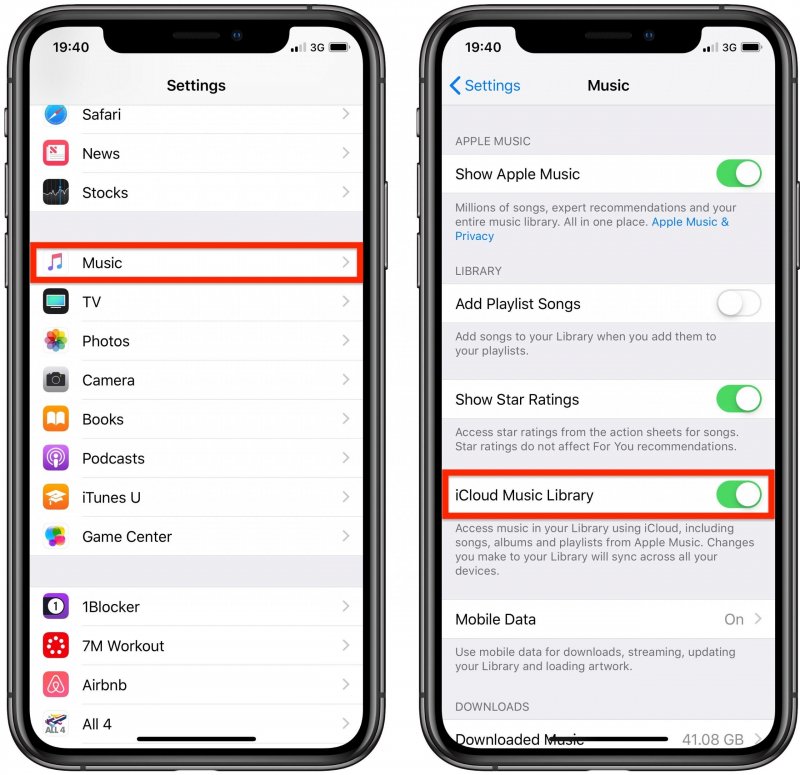
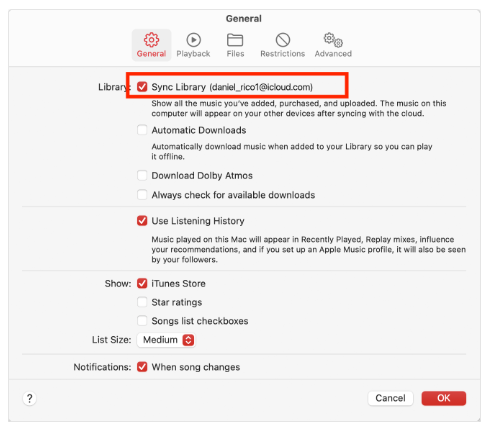
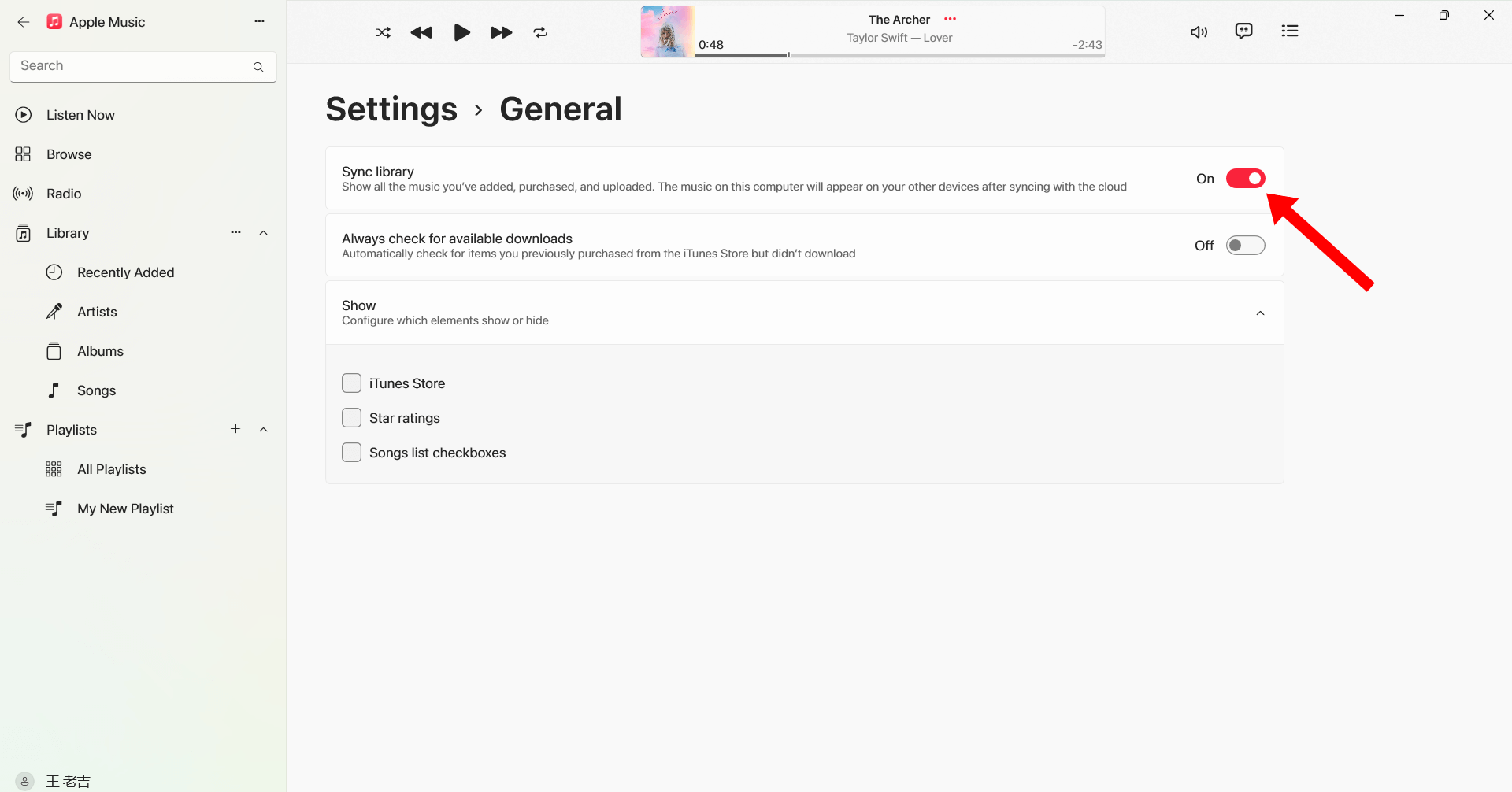
Wyłącz i ponownie włącz opcję Synchronizuj bibliotekę, aby odświeżyć informacje o dostępności utworów.
W systemie iOS (iPhone): Otwórz Ustawienia > Aplikacje > Muzyka. Wyłącz opcję Synchronizuj bibliotekę. Odczekaj 30 sekund, a następnie ponownie włącz opcję Synchronizuj bibliotekę. Otwórz aplikację Muzyka; u góry powinien pojawić się pasek postępu z napisem „Ładowanie biblioteki muzycznej”.
W systemie Android: Otwórz aplikację Apple Music. Dotknij menu z trzema kropkami (⋮) w prawym górnym rogu i wybierz Ustawienia. Znajdź opcję Synchronizuj bibliotekę i wyłącz ją, a następnie ponownie włącz.
W przypadku systemu macOS (Tahoe / 2026): Przejdź do Muzyka > Ustawienia > Ogólne i odznacz opcję Synchronizuj bibliotekę, kliknij OK, a następnie wróć i zaznacz ją ponownie.
Dla litu szacuje się Windows (10/11): Otwórz aplikację Apple Music. Kliknij swoją nazwę/ikonę profilu u dołu paska bocznego. Przejdź do Ustawień > Ogólne. Wyłącz i włącz ponownie opcję Synchronizuj bibliotekę.
Wyloguj się i zaloguj ponownie
Ponowne zalogowanie się do Apple ID może odświeżyć autoryzację Apple Music i rozwiązać problemy z odtwarzaniem związane z regionem.
Ponowne pobieranie piosenek
Niektóre pobrane utwory mogą ulec uszkodzeniu lub utracić autoryzację. Ponowne pobranie utworów może przywrócić odtwarzanie.
Zaktualizuj iOS lub macOS
Starsze wersje systemu mogą powodować problemy ze zgodnością z Apple Music.

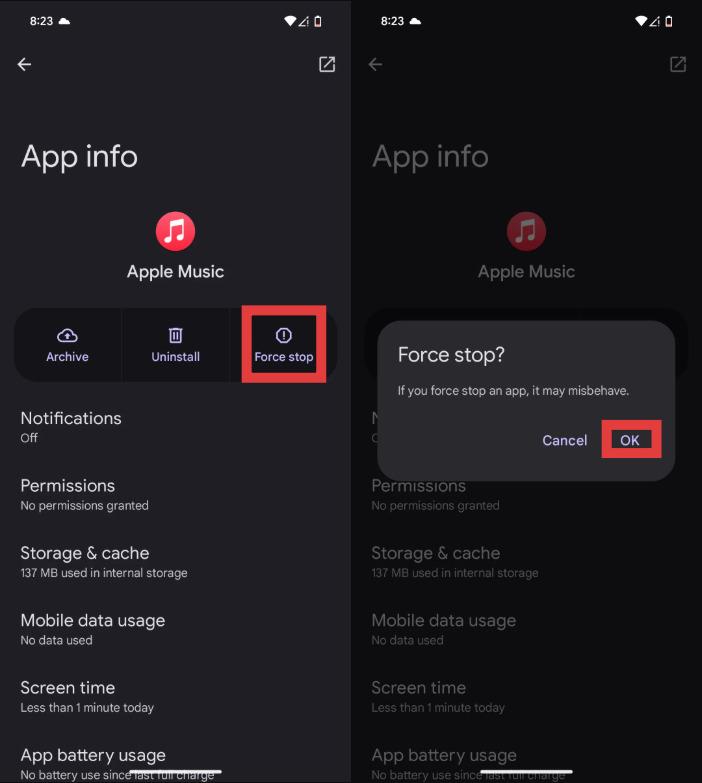
Uruchom ponownie aplikację Apple Music
Komunikat „Apple Music nie jest dostępny w Twoim regionie” może być również spowodowany tymczasowymi błędami.
Jeśli te rozwiązania nie pomogą, problem może być związany z ograniczeniami DRM i regionalnymi ograniczeniami licencyjnymi, na które nie masz wpływu.
Część 3. Najlepszy sposób na zapewnienie możliwości odtwarzania Apple Music wszędzie
Aby uniknąć powtarzających się problemów z komunikatem „Usługa Apple Music nie jest dostępna w Twoim regionie”, wielu użytkowników konwertuj utwory Apple Music na lokalne MP3 plikiJednym z najlepszych narzędzi do tego jest DumpMedia Apple Music ConverterTen profesjonalny konwerter Apple Music umożliwia użytkownikom zapisywanie utworów lokalnie w celu stabilnego odtwarzania w trybie offline, bez konieczności uzyskiwania autoryzacji regionalnej.
Bezpłatne pobieranie Bezpłatne pobieranie
🏆Dlaczego warto wybrać DumpMedia Apple Music Converter
- Usuń ochronę DRM Apple Music*
- Zachowaj oryginalną jakość dźwięku
- Pobieranie zbiorcze list odtwarzania i albumów
- Szybka prędkość konwersji
- Zachowaj metadane utworu i znaczniki ID3
- Obsługa odtwarzania offline na dowolnym urządzeniu
W przypadku użytkowników, którzy wielokrotnie napotykają komunikat „Usługa Apple Music nie jest dostępna w Twoim regionie”, lokalne MP3 odtwarzanie zapewnia bardziej niezawodne rozwiązanie długoterminowe.
Jak przekonwertować muzykę Apple na MP3 do odtwarzania offline
Krok 1. Pobierz i zainstaluj DumpMedia Apple Music Converter na komputerze Mac/PC. Uruchom go, a zobaczysz interfejs. Zaloguj się za pomocą konta Apple Music.
Bezpłatne pobieranie Bezpłatne pobieranie
Krok 2. Znajdź playlistę, album lub konkretny utwór, który chcesz przekonwertować. Możesz przeciągnąć pojedynczy utwór na ikonę „+” po prawej stronie ekranu. Możesz również otworzyć całą playlistę/album i kliknąć ikonę „Dodaj do konwersji”, aby załadować całą listę do konwertera.
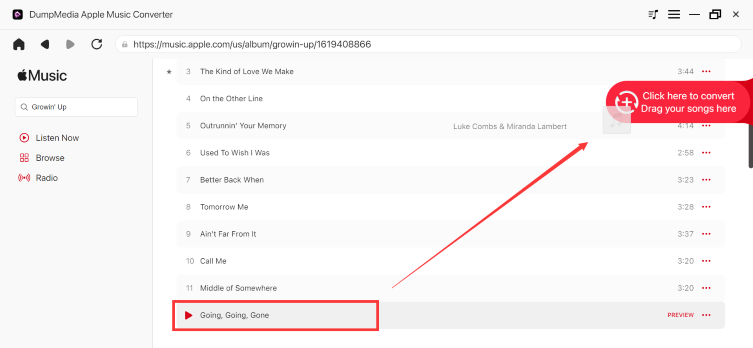
Krok 3. Wybierz MP3 (najbardziej kompatybilny). Możesz również zmienić szybkość transmisji lub częstotliwość próbkowania. Dla uzyskania najlepszego balansu wybierz 320 kbps.
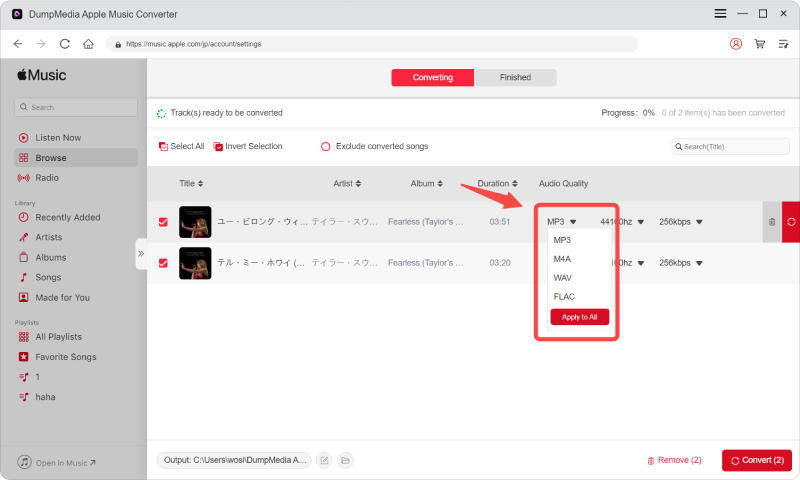
Krok 4. Po zakończeniu ustawień użytkownicy mogą dokonać konwersji, klikając ikonę „Konwertuj”. Następnie DumpMedia przekonwertuje utwory Apple Music na MP3 w ciągu kilku sekund dzięki swojej superszybkiej prędkości.

Po konwersji Twoje utwory będzie można odtwarzać w trybie offline bez konieczności weryfikacji regionu w Apple Music.
Część 4. Często zadawane pytania
Dlaczego w Apple Music wyświetla się informacja, że usługa nie jest dostępna w Twoim regionie?
Zwykle dzieje się tak ze względu na ograniczenia licencyjne, ustawienia regionalne Apple ID lub problemy z autoryzacją DRM.
Jak naprawić problem z niedostępnością usługi Apple Music w Twoim regionie?
Możesz spróbować zaktualizować ustawienia regionu Apple ID, ponownie zsynchronizować bibliotekę, ponownie pobrać utwory lub ponownie uruchomić aplikację.
Dlaczego moje utwory w Apple Music są wyszarzone?
Utwory oznaczone na szaro często wskazują na problemy z licencją regionalną lub synchronizacją.
Czy mogę korzystać z Apple Music podczas podróży za granicą?
Tak, ale niektóre utwory mogą być niedostępne ze względu na regionalne ograniczenia praw autorskich.
Jak mogę na stałe zachować utwory z Apple Music?
Wielu użytkowników używa DumpMedia Konwerter Apple Music do konwersji utworów do formatu lokalnego MP3 pliki do stałego odtwarzania offline.
Is DumpMedia Czy Apple Music Converter jest bezpieczny?
Tak. Jest przeznaczony do konwersji Apple Music i zarządzania odtwarzaniem offline.
Część 5. streszczenie
Błąd „Apple Music niedostępne w Twoim regionie” jest zazwyczaj spowodowany ograniczeniami licencyjnymi, zabezpieczeniami DRM, ustawieniami regionalnymi Apple ID lub problemami z weryfikacją subskrypcji. Użytkownicy, którzy chcą słuchać muzyki offline bez ograniczeń regionalnych, powinni: DumpMedia Konwerter Apple Music zapewnia praktyczny sposób konwersji Apple Music na stałe pliki lokalne MP3 Pliki. Dzięki usunięciu zależności od aplikacji i ograniczeń przesyłania strumieniowego użytkownicy mogą swobodniej korzystać z Apple Music na różnych urządzeniach i w różnych lokalizacjach.
Bezpłatne pobieranie Bezpłatne pobieranie
*DumpMedia Działa poprzez odszyfrowanie i pobranie utworów z Apple Music do plików bez DRM, umożliwiając uzyskanie czystej, nieograniczonej kopii biblioteki na dowolnym urządzeniu. Funkcjonalność nie obejmuje usuwania DRM z lokalnych plików audio.