


Spotify DJ 모드: 사용법 (2026년 완벽 가이드)
최근에 들어보셨다면 Spotify DJ 모드, 이게 실제로 무슨 기능을 하고 어떻게 사용하는지 궁금하실 수도 있겠네요. Spotify AI DJ 모드는 그중 하나입니다. Spotify가장 흥미로운 기능은 인공지능 기반의 개인 맞춤형 음악 경험을 제공하는 것입니다. 하지만 강력한 기능에는 많은 사용자가 인지하지 못하는 한계점도 존재합니다. 이 가이드에서는 이러한 한계점들을 알아보겠습니다. Spotify AI DJ란 무엇이며, AI DJ를 활성화하는 방법은 무엇인가요? Spotify.
컨텐츠 가이드 1부. 무엇인가 Spotify AI DJ?2부. 활성화 방법 Spotify AI DJ?제3부. 한계점 Spotify AI DJ4부. 저장 방법 Spotify 오프라인에서 사용할 DJ 음악?파트 5. FAQ6 부. 결론
1부. 무엇인가 Spotify AI DJ?
Spotify DJ 모드는 가상 라디오 진행자처럼 작동하는 개인 맞춤형 음악 가이드로, 고급 머신 러닝 기술과 놀랍도록 사실적인 AI 음성을 결합했습니다. 프리미엄 구독자에게 제공되는 이 기능은 단순히 노래를 섞어 재생하는 것이 아니라, 사용자의 청취 기록, 최신 트렌드, 심지어 오랫동안 듣지 않았던 추억의 히트곡까지 고려하여 끊임없이 음악을 선별해 줍니다.
주요 특징 Spotify AI DJ
- 개인 맞춤형 노래 추천
- 수동 입력 없이 연속 재생
- AI가 생성한 음성 해설
- 세련된 분위기 및 장르 전환
이 이유 Spotify DJ 모드는 간편한 청취를 선호하는 사용자들 사이에서 점점 더 인기를 얻고 있습니다.
2부. 활성화 방법 Spotify AI DJ?
이용 방법 Spotify DJ 모드? 구독하셨다면 Spotify 프리미엄, 다음과 같이하세요:
1단계. 앱이 최신 버전으로 업데이트되었는지 확인하세요. 홈 섹션으로 이동합니다.
2단계. 피드에서 DJ 기능을 찾아보세요. 바로 음악을 감상할 수 있습니다.
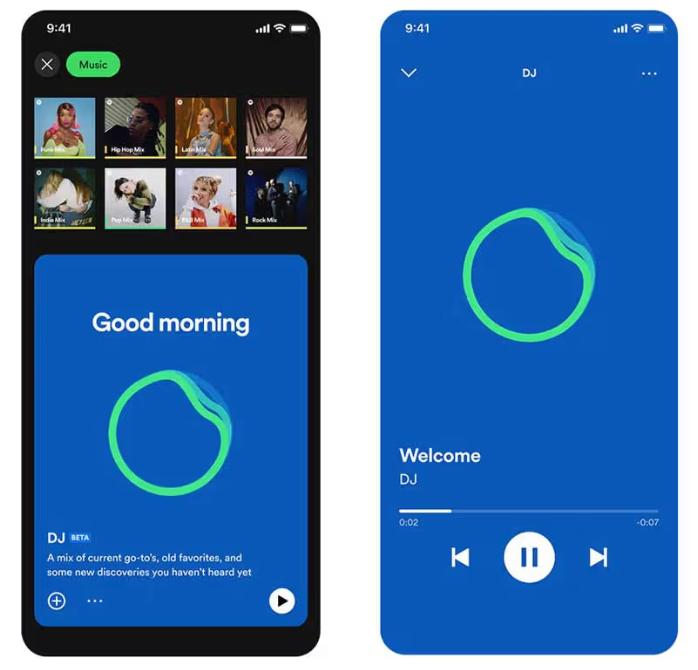
Spotify이제 AI DJ가 "요청" 기능을 지원합니다. 마치 사람 DJ에게 말하는 것처럼 음성 명령이나 문자 메시지를 사용하여 "좀 더 부드러운 장르로 바꿔줘" 또는 "제이 저스틴 비버 노래를 더 틀어줘"와 같이 말하면 AI가 즉시 재생 목록을 조정합니다.
제3부. 한계점 Spotify AI DJ
Spotify DJ 모드는 수동으로 음악을 검색할 필요가 없다는 점에서 돋보입니다. 배경 음악 감상, 새로운 노래 발견, 라디오와 같은 경험을 만들기에 이상적입니다. Spotify'의 AI DJ는 인상적이지만, 몇 가지 중요한 한계점이 있습니다.
1. 영구 다운로드 없음
프리미엄 버전을 사용하더라도 노래를 실제로 다운로드할 수는 없습니다. 파일은 앱 내에 잠겨 있으며, 전송할 수 없습니다.
2. 오프라인 자유 없음
오프라인 감상을 위해 다운로드할 수 있지만, 이용하려면 구독이 필요합니다. 구독을 취소하면 음악이 사라집니다.
3. 수출 또는 공유 금지
DJ 플레이리스트를 내보내거나 믹스를 외부 저장소에 저장할 수 없습니다.
4. 제한된 제어
Spotify AI가 곡 선택 및 순서를 제어합니다. 완전한 사용자 지정 기능은 제공되지 않습니다.
음악을 더 효과적으로 제어하고 싶다면 이러한 제약 사항들이 중요해집니다.
4부. 저장 방법 Spotify 오프라인에서 사용할 DJ 음악?
당신이 즐길 수있다면 Spotify DJ 모드도 좋지만 더 많은 유연성을 원한다면, 곡을 영구적으로 저장할 수 있는 방법이 필요합니다. 기존 방식 대신... Spotify내장된 제한 사항을 극복하기 위해 DJ 추천에서 노래를 선택하고 로컬 파일로 변환할 수 있습니다. 이렇게 하면 음악을 완벽하게 제어할 수 있습니다. 가장 확실한 방법은 전문 도구를 사용하는 것입니다. DumpMedia Spotify Music Converter.
🏅선택해야 하는 이유 DumpMedia Spotify Music Converter:
- ⭐통합 Spotify 웹 플레이어
- ⭐두 가지 모두에 적용 가능 Spotify 프리미엄과 Spotify 무료 사용자
- ⭐최대 35배 속도로 일괄 변환 제공
- ⭐개 심자 Spotify 노래 MP3WAV 또는 FLAC
- ⭐ 아티스트, 커버, 아트 등의 ID3 태그를 유지하세요.
- ⭐원래 오디오 품질 유지
- ⭐100% 깨끗합니다. 사용에 위험이 없습니다
단계별 변환 Spotify DJ 음악
1 단계 소프트웨어를 다운로드하여 컴퓨터에 설치하세요. 이 소프트웨어는 두 가지 모두에서 작동합니다. Win다우즈와 맥에서 사용 가능합니다. 사용자 친화적인 인터페이스 덕분에 초보자도 쉽게 사용할 수 있습니다.
2 단계 내장된 앱을 엽니다. Spotify 웹 플레이어 내부 DumpMedia 귀하의 Spotify 계정. 찾아보기 Spotify 다운로드하고 싶은 노래, 앨범 또는 재생 목록을 변환기 안으로 드래그하세요.

3 단계 설정 패널에서 선택하세요 MP3 출력 형식으로 활성화하려면 MP3 선택한 트랙을 다운로드하세요.

4 단계 "모두 변환" 버튼을 누르고 변환을 시작하세요. DumpMedia Spotify Music Converter 최대 35배 빠른 다운로드 속도를 지원하므로 변환 과정이 완료될 때까지 기다리기만 하면 됩니다.

파트 5. FAQ
1. 무엇입니까 Spotify DJ 모드?
이는 사용자의 취향에 따라 맞춤형 음악을 재생하는 AI 기반 기능입니다.
2. ~이다. SpotifyAI DJ 무료인가요?
아니요, 일반적으로 프리미엄 구독이 필요합니다.
3. 다운로드할 수 있나요? Spotify DJ 노래?
앱 내에서만 사용 가능하며, 로컬 파일로는 저장되지 않습니다.
4. 나만의 DJ 플레이리스트를 만들 수 있나요?
네, 특히 음악 파일을 로컬에 저장해 둔 경우라면 더욱 그렇습니다.
6 부. 결론
Spotify DJ 모드는 음악 검색을 더욱 쉽고 즐겁게 만들어주는 강력한 기능입니다. 하지만 영구 다운로드가 불가능하고 오프라인 접속이 제한되는 등의 제약이 있습니다. DJ 모드의 모든 장점을 누리려면 이러한 제약을 극복해야 합니다. Spotify이러한 제약 없이 AI DJ를 사용하려면 음악을 저장할 수 있는 신뢰할 수 있는 도구를 사용하는 것이 최선의 해결책입니다. 이를 통해 좋아하는 트랙을 저장하고, 나만의 플레이리스트를 만들고, 음악 감상 경험을 완벽하게 자유롭게 즐길 수 있습니다.
*DumpMedia 암호 해독 및 다운로드를 통해 작동합니다. Spotify 이 프로그램은 DRM이 없는 파일로 노래를 변환하여 모든 기기에서 제약 없이 깨끗한 음원 라이브러리 사본을 얻을 수 있도록 합니다. 단, 로컬 오디오 파일 변환 기능은 제공하지 않습니다.