


Apple Music에서 특정 지역에서 노래를 이용할 수 없나요? 5가지 간단한 방법으로 해결해 보세요.
"Apple Music에서 해당 지역의 노래를 이용할 수 없습니다"라는 오류 메시지가 뜨면 특히 좋아하는 노래를 재생하려고 할 때 매우 답답할 수 있습니다. 이 문제는 일반적으로 라이선스 제한, 계정 설정 또는 지역 제한으로 인해 발생합니다. 다행히 Apple Music에서 해당 지역의 노래를 이용할 수 없다는 문제를 해결할 수 있는 여러 가지 방법이 있습니다. 이 가이드에서는 이 오류가 발생하는 이유와 실제로 효과가 있는 해결 방법을 설명합니다.
목차 1부: Apple Music에서 "해당 지역에서는 이용할 수 없습니다"라는 메시지가 표시되는 이유 2부: "Apple Music 노래를 해당 지역에서 이용할 수 없습니다" 문제 해결 방법 3부: 노래를 여전히 이용할 수 없는 경우 4부: 지역 제한 없이 Apple Music 노래를 이용하는 가장 좋은 방법 5부: 자주 묻는 질문(FAQ) 6부: 요약
파트 1: Apple Music에서 "해당 지역에서는 이용할 수 없습니다"라고 표시되는 이유
Apple Music에서 '해당 지역에서 노래를 이용할 수 없습니다'라는 오류 메시지가 나타나는 경우, 일반적으로 다음과 같은 이유 중 하나가 원인입니다.
1. 라이선스 제한
음악 이용 가능 여부는 저작권 협약으로 인해 국가별로 다릅니다. 한 지역에서 이용 가능한 노래가 다른 지역에서는 차단될 수 있습니다.
2. Apple ID 지역 설정
Apple ID는 이용 가능한 콘텐츠를 결정합니다. 계정 지역이 실제 위치와 일치하지 않으면 'Apple Music에서 해당 지역의 노래를 이용할 수 없습니다'라는 메시지가 표시될 수 있습니다.
3. 구독 또는 동기화 문제
구독 만료 또는 동기화 문제로 인해 이 오류가 발생할 수도 있습니다.
4. 아티스트 또는 레이블에 의해 삭제된 콘텐츠
간혹 노래가 삭제되거나 다른 노래로 대체되는 경우가 있는데, 이로 인해 Apple Music에서 해당 노래를 해당 지역에서 이용할 수 없다는 문제가 발생할 수 있습니다.
파트 2: "Apple Music에서 해당 지역의 노래를 이용할 수 없습니다" 오류 해결 방법
다음은 Apple Music에서 '해당 지역에서 노래를 이용할 수 없습니다'라는 오류를 해결하는 검증된 방법입니다.
해결 방법 1: Apple ID 지역 변경
Apple ID의 지역 설정을 업데이트하면 이러한 지역 제한이 해결되는 경우가 많습니다.
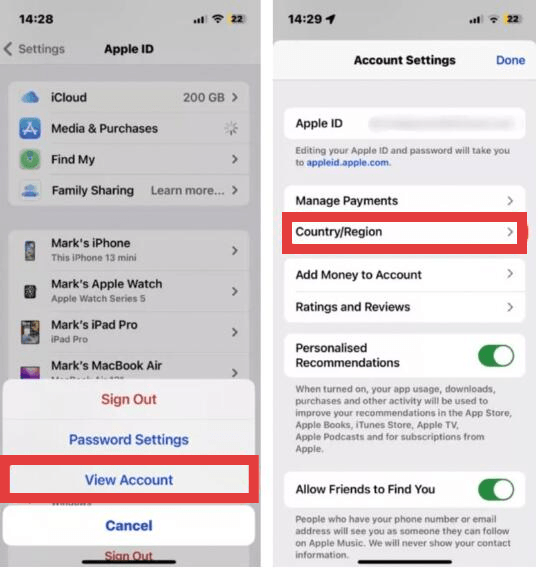
- iPhone/iPad에서: 설정 앱을 열고 상단의 이름을 탭한 다음 미디어 및 구입 항목을 선택합니다. 계정 보기를 탭합니다(인증이 필요할 수 있습니다). 얼굴 인식 (또는 암호). Mac에서는 Apple Music 앱을 열고 메뉴 막대에서 계정을 선택한 다음 계정 설정을 선택하세요.
- 국가/지역을 선택한 다음 '국가 또는 지역 변경'을 탭하세요.
- 목록에서 새 위치를 선택하세요. 이용 약관을 검토하고 '동의'를 탭한 후, 해당 지역에 맞는 유효한 결제 수단과 청구지 주소를 입력하세요.
수정 2 : VPN 사용
Apple Music에서 특정 지역의 노래를 이용할 수 없는 문제를 해결하는 방법은 무엇일까요? 지역 라이선스로 인해 특정 곡을 스트리밍할 수 없는 경우, 가상 사설 네트워크(VPN)를 사용하면 이러한 지역적 제한을 우회할 수 있습니다. VPN은 인터넷 연결을 다른 국가에 있는 서버를 통해 라우팅하여 실제 IP 주소를 숨기고, 마치 해당 콘텐츠를 합법적으로 이용할 수 있는 지역에서 Apple Music에 접속하는 것처럼 보이게 합니다.
이 방법은 효과적이긴 하지만 완벽한 해결책은 아닙니다. 스트리밍 속도가 느려지거나, 지연 시간이 길어지거나, 재생 중 버퍼링이 자주 발생하여 청취 경험이 저하될 수 있습니다. 또한 Apple Music은 IP 주소뿐 아니라 Apple ID의 지역 설정과도 밀접하게 연관되어 있습니다. 따라서 계정 설정도 위장하려는 위치와 일치하지 않으면 VPN만으로는 제대로 작동하지 않을 수 있습니다.
해결 방법 3: 다른 버전 검색
같은 노래가 다른 버전이나 앨범에 수록되어 있는 경우가 있습니다.
해결 방법 4: 라이브러리를 다시 동기화하세요
Apple Music 보관함에서 노래가 누락되거나 트랙이 회색으로 표시되는 경우, 계정을 다시 동기화하면 Apple 서버와의 연결이 새로 고쳐지고 보관함 불일치가 해결될 수 있습니다. 이 과정은 앱이 인덱스를 다시 구축하고 구독 상태를 다시 확인하는 작업입니다.
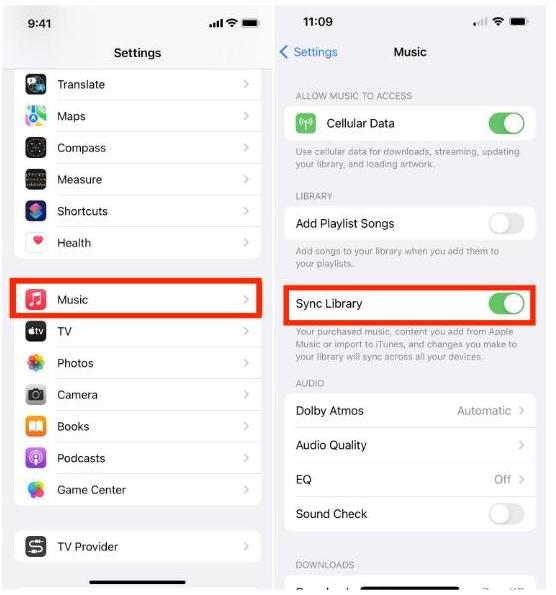
- 모바일: We Buy Orders 신청서를 클릭하세요. 설정 > 음악 보장하다 동기화 라이브러리 토글됨 ON. 이미 켜져 있는 경우, 전원을 끄고 몇 초 기다린 후 다시 켜서 새 검사를 시작해 보세요..
- 데스크탑에서 : 음악 앱을 열고 다음으로 이동하세요. 설정 (또는 환경설정) > 일반 , 그리고 확인 동기화 라이브러리 확인 됨. 수동으로 업데이트를 시작하려면 다음 경로로 이동하세요. 입양 부모로서의 귀하의 적합성을 결정하기 위해 미국 이민국에 > 도서관 > 클라우드 라이브러리 업데이트.
해결 방법 5: 구독 상태 확인
또 다른 해결책은 Apple Music 구독이 여전히 활성화되어 있는지 확인하는 것입니다. 결제가 실패하거나 구독이 만료되면 Apple Music은 스트리밍 카탈로그 및 오프라인 사용을 위해 다운로드한 모든 트랙에 대한 접근을 즉시 제한합니다.
이러한 방법은 Apple Music에서 특정 지역에서 노래를 이용할 수 없는 많은 문제를 해결할 수 있지만, 모든 문제를 해결할 수 있는 것은 아닙니다.
파트 3: 만약 노래를 여전히 구할 수 없다면 어떻게 해야 할까요?
모든 해결 방법을 시도해 봤지만 여전히 Apple Music에서 해당 지역의 노래를 이용할 수 없다는 오류가 발생할 수 있습니다. 이는 일부 노래가 특정 지역에서 영구적으로 제한되어 있고, 라이선스 제한을 쉽게 우회할 수 없기 때문입니다. 이때 많은 사용자들이 "이 문제를 완전히 해결할 방법이 있을까요?"라고 묻습니다.
파트 4: 지역 제한 없이 Apple Music 노래를 이용하는 가장 좋은 방법
애플 뮤직에서 특정 지역에서 노래를 이용할 수 없다는 오류를 반복적으로 겪는 대신, 장기적으로 더 나은 해결책은 음악을 DRM이 없는 형식으로 저장하는 것입니다. MP3 파일. 계정 위치에 따른 디지털 제한을 해제하면 지역 라이선스 변경이나 여행과 관계없이 음악 라이브러리에 계속 액세스할 수 있습니다.
이 목적을 위해, DumpMedia 애플 뮤직 변환기 이 솔루션은 강력히 추천합니다. 특히 Apple의 FairPlay DRM*의 기술적 제한을 우회하도록 설계되어 음악 파일을 로컬에 영구적으로 저장할 수 있습니다.
주요 기능 및 이점
- 영구 오프라인 접속: 일단 노래는 다음과 같이 변환됩니다. MP3이제 더 이상 Apple Music 구독이나 지역 서버 가용성에 의존하지 않습니다. 개인 기기에 영구적으로 보관할 수 있습니다.
- 무손실 품질 변환 : 이 도구는 원본 오디오의 충실도를 유지하도록 설계되어 있어 사용자의 오디오 품질을 보장합니다. MP3M4A 또는 FLAC 형식으로 내보낸 파일도 원본 스트림만큼 깨끗한 음질을 제공합니다.
- 고속 일괄 처리: 표준 녹음 방식보다 최대 10배 빠른 속도로 전체 재생 목록이나 앨범을 한 번에 변환할 수 있어 시간을 크게 절약할 수 있습니다.
- 메타데이터 보존: 이 기능은 곡 제목, 아티스트 이름, 앨범 아트, 장르 등 필수 ID3 태그를 자동으로 유지하여 로컬 라이브러리를 완벽하게 정리해 줍니다.
- 보편적 인 호환성 : 출력값이 표준이므로 MP3음악을 어떤 기기로든 전송할 수 있습니다. MP3 Apple Music 앱 없이도 플레이어, 차량용 스테레오 및 Apple 제품이 아닌 스마트 스피커에서 사용할 수 있습니다.
이용 방법 DumpMedia 애플 뮤직 변환기
1 단계 소프트웨어를 다운로드하여 컴퓨터에 설치하세요. 이 소프트웨어는 두 가지 모두에서 작동합니다. Win다우즈와 맥에서 사용 가능합니다. 사용자 친화적인 인터페이스 덕분에 초보자도 쉽게 사용할 수 있습니다.
2 단계 내장된 Apple Music 웹 플레이어를 엽니다. DumpMedia Apple Music 계정으로 로그인하세요. Apple Music에서 다운로드하려는 노래, 앨범 또는 재생 목록을 변환기로 드래그하세요.

3 단계 설정 패널에서 선택하세요 MP3 출력 형식으로 활성화하려면 MP3 선택한 트랙을 다운로드하세요.

4 단계 변환 버튼을 클릭하고 노래를 바로 다운로드하세요. MP3 파일.

제 5 부 : FAQ
Apple Music에서 해당 지역에서 노래를 이용할 수 없다고 표시되는 이유는 무엇인가요?
이는 대개 라이선스 제한이나 계정 설정 때문입니다.
애플 뮤직에서 특정 지역에서 노래를 이용할 수 없다는 문제를 영구적으로 해결할 수 있을까요?
일부 문제는 해결할 수 있지만, 모든 문제를 해결할 수는 없습니다. 일부 노래는 지역 제한이 걸려 있습니다.
앞으로 이런 문제를 피할 수 있는 방법이 있을까요?
네. 노래를 변환하는 것입니다. MP3 지역 제한에 다시 직면하지 않도록 보장합니다.
최선의 해결책은 무엇일까요?
사용 DumpMedia Apple Music Converter는 음악에 항상 접근할 수 있도록 유지하는 가장 믿을 수 있는 방법입니다.
6 부. 개요
Apple Music에서 "해당 지역에서 노래를 이용할 수 없습니다"라는 오류 메시지가 뜨는 것은 짜증스러울 수 있지만, 대부분 간단한 설정 변경으로 해결할 수 있습니다. 하지만 장기적인 편의성을 위해서는 스트리밍 플랫폼에만 의존하는 것은 충분하지 않을 수 있습니다. 음악을 완벽하게 제어하고 지역 제한을 완전히 피하고 싶다면, 노래를 다른 형식으로 변환하는 것이 좋습니다. MP3 이것이 최선의 해결책입니다. 시도해 보세요. DumpMedia 지금 바로 Apple Music Converter를 사용하여 제한 없이 음악을 즐겨보세요.
*DumpMedia 이 프로그램은 Apple Music의 노래를 암호 해독하고 DRM이 없는 파일로 다운로드하여 모든 기기에서 제약 없이 깨끗한 음원 라이브러리 사본을 얻을 수 있도록 해줍니다. 로컬 오디오 파일 변환 기능은 포함되어 있지 않습니다.