


転送方法 Spotify プレイリストからYouTube Musicへの変換(実証済みの2つの方法)
転送方法をお探しの場合 Spotify YouTube Music にプレイリストを移行する場合、曲、構成、リスニング体験を損なうことなく、丁寧に作成したプレイリストを移行しようとしているでしょう。残念ながら、 Spotify YouTube Musicには直接転送できるネイティブ機能がないため、ユーザーはサードパーティ製のツールや回避策に頼る必要があります。このガイドでは、信頼できる2つの解決策を解説します。どちらの方法も実用的ですが、速度、操作性、音質など、ユーザーのニーズに応じて使い分ける必要があります。
コンテンツガイド 直接送金できない理由 Spotify YouTubeミュージックへ 方法1:変換 Spotify プレイリストへ MP3 (オフライン制御に最適)方法2:転送 Spotify プレイリストからYouTube Musicへ(直接移行)よくあるご質問 製品概要
直接送金できない理由 Spotify YouTubeミュージックへ
潜在的な解決策を検討する前に、それに伴う技術的な制約を理解することが不可欠です。
なぜなら Spotify YouTube MusicとYouTube Musicは全く異なるライセンスシステムで運営されているため、プレイリストを両プラットフォーム間で直接移行することはできません。さらに、ライブラリ構造とメタデータは大部分が互換性がなく、個々のトラックは厳格なDRM制限によって保護されています。そのため、YouTube MusicとYouTube Musicを移行する方法を探している人は、 Spotify YouTube Musicにプレイリストをアップロードするには、サードパーティ製のソリューションに頼る必要があります。
方法1:変換 Spotify プレイリストへ MP3 (オフライン制御に最適)
転送方法 Spotify プレイリストをYouTube Musicに変換するには?最も信頼できる解決策の1つは、次のようなプロのコンバーターを使用することです。 DumpMedia Spotify Music Converterこの方法は、音楽ファイルを完全にコントロールしたい場合、またはYouTube Musicに手動で曲をアップロードしたい場合に最適です。
🏅なぜ選ぶのか DumpMedia Spotify Music Converter:
- ⭐統合 Spotify ウェブプレイヤー
- ⭐両方に対応 Spotify プレミアムと Spotify 無料ユーザー
- ⭐最大35倍の速度でバッチ変換を実現
- ⭐変換 Spotify に歌 MP3WAV、またはFLAC
- ⭐アーティスト、カバー、アートなどのID3タグを保持します。
- ⭐オリジナルのオーディオ品質を維持
- ⭐100% クリーン。使用してもリスクはありません
ステップバイステップガイド
ステップ 1: ソフトウェアをダウンロードしてコンピューターにインストールしてください。 WinWindowsとMacに対応しています。インターフェースはユーザーフレンドリーで、初心者でも簡単に使えます。
ステップ 2: 内蔵の Spotify ウェブプレーヤー内蔵 DumpMedia そしてあなたのログイン Spotify アカウント。閲覧 Spotify ダウンロードしたい曲、アルバム、またはプレイリストをコンバーターにドラッグします。
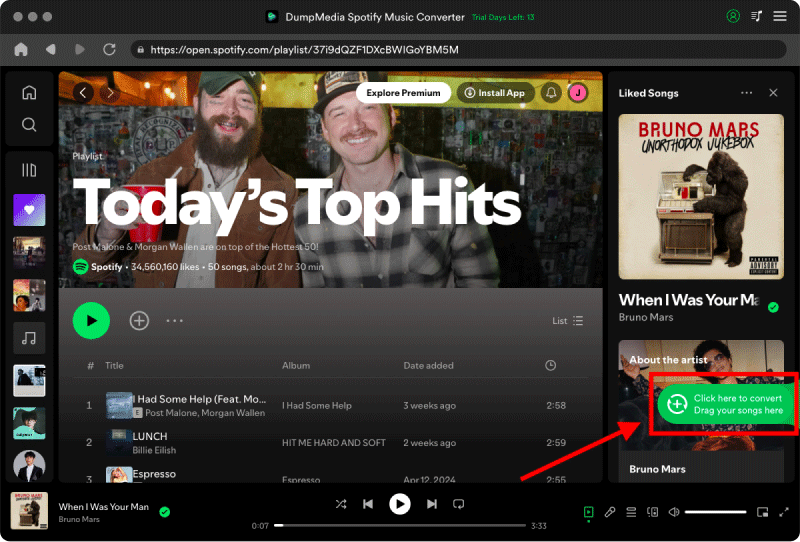
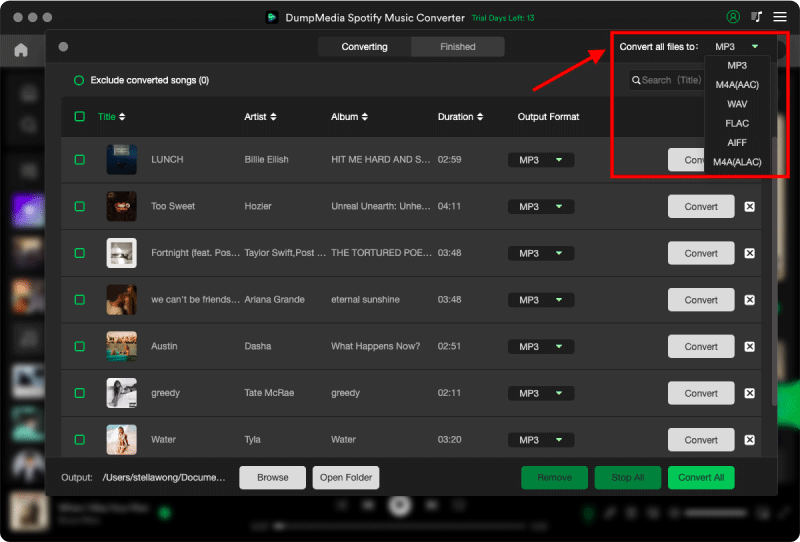
ステップ 3: 設定パネルで、 MP3 出力形式として MP3 選択したトラックをダウンロードします。
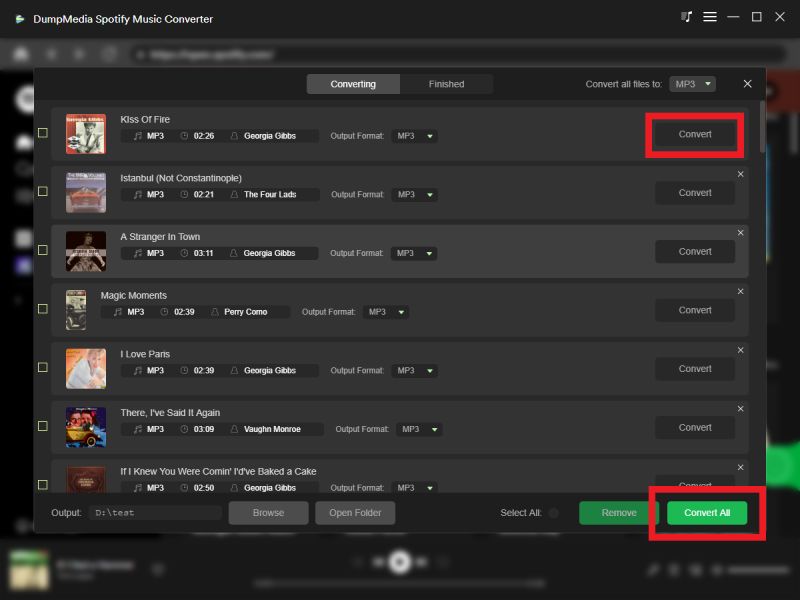
ステップ 4: 「変換」をクリックして曲を直接ダウンロードします MP3 ファイル。
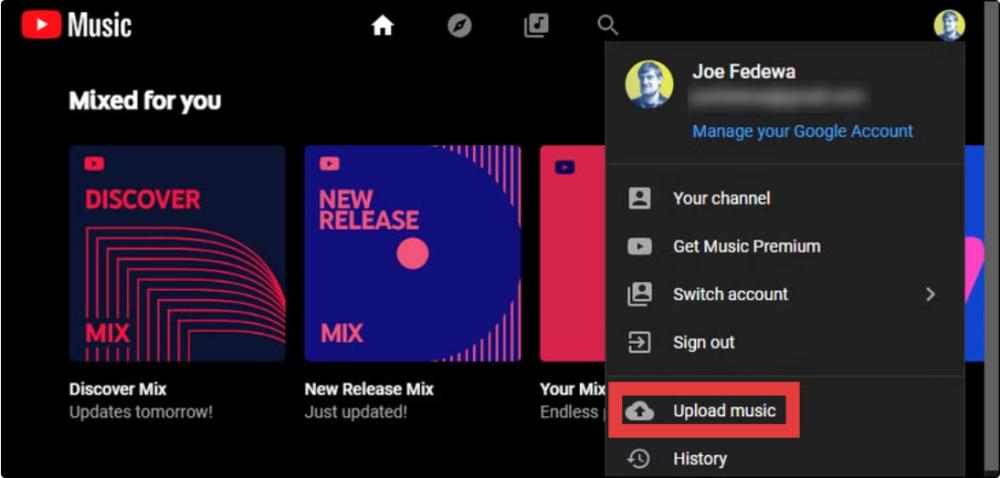
ステップ 5: 転送方法 Spotify プレイリストをYouTube Musicにアップロードするには?ウェブブラウザでmusic.youtube.comを開きます。サイトの右上にあるプロフィール画像をクリックし、「音楽をアップロード」を選択します。
優位性
- 高品質オーディオ変換
- ファイルを完全に制御
- プラットフォームAPIへの依存なし
デメリット
- 手動アップロードが必要です
- 少し長いプロセス
方法2:転送 Spotify プレイリストからYouTube Musicへ(直接移行)
転送方法 Spotify YouTube Music にプレイリストをアップロードしますか? スピードと利便性を重視するなら、次のような自動化ツールが便利です。 あらゆる音楽変換ソフトのプレイリスト転送 機能の方が良い選択肢です。この方法は直接接続します。 Spotify YouTube Musicアカウントとプレイリストを自動的に転送します。
ステップバイステップガイド
ステップ 1: 店は開いています DumpMedia お使いのコンピュータにAny Music Converterをインストールしてください。初心者でも簡単に変換できるよう設計された、シンプルで直感的なインターフェースが表示されます。
ステップ2.ツール > プレイリスト転送を選択します。
ステップ 3: 選択する Spotify 情報源として。
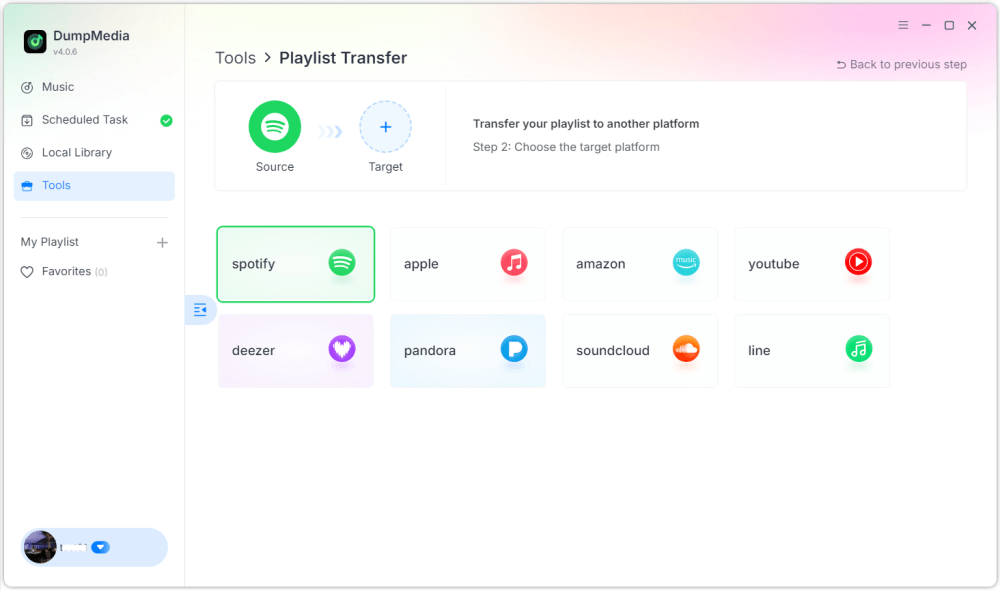
ステップ4.プレイリストを移動したいプラットフォームとして、YouTube Musicを選択します。
ステップ 5: 転送したいプレイリストを見つけます Spotify YouTube Musicに移動し、移動したいプレイリストをすべて選択します。
ステップ6.移行プロセスを開始します。ツールが自動的に楽曲を照合して転送します。「YouTube Musicへ移動」をクリックしてください。プレイリストが新しいサービスに移行されたので、新しい音楽ストリーミングサービスをお楽しみいただけます。
優位性
- ワンクリック転送
- 手動ダウンロードは不要です。
- 高速で初心者にも優しい
デメリット
- 曲のマッチングは 100% 正確な
- 安定したAPI接続が必要です
- 一部のトラックが欠落または置き換えられている場合があります
よくあるご質問
1. 直接送金できますか? Spotify プレイリストを YouTube Music に追加しますか?
いいえ。 Spotify そしてYouTube Music。
2. 最も簡単な送金方法は? Spotify YouTube Music のプレイリスト?
最も簡単な方法は、両方のアカウントを同期する自動プレイリスト転送ツールを使用することです。
注意: DumpMedia Any Music Converterの定期購読者は、プレイリスト転送機能を無料で利用できます。まだ定期購読者でない方は、まずAny Music Converterをご購入ください。スムーズで超高速な転送と、完全なコントロール機能をご利用いただけます。
3.です DumpMedia Spotify Music Converter 安全に使用できますか?
はい、これは個人用の音楽変換用に設計されており、楽曲をオフラインで保存できます。
4. すべての楽曲は正常に転送されますか?
必ずしもそうとは限りません。ライセンスの違いにより、自動ツールが一部の楽曲を正しく照合できない場合があります。
5. 必要か Spotify プレミアム会員になるとプレイリストを転送できますか?
いいえ。ほとんどのサードパーティツールは無料で動作します。 Spotify アカウント。
製品概要
転送方法を調べているなら Spotify YouTube Music にプレイリストを追加するには、主に 2 つの方法があります。 Spotify Music Converter または、任意の音楽変換ソフトのプレイリスト転送機能を使用することもできます。どちらの方法も、優先順位に応じて効果的です。