


プレイ方法 Spotify 2026年にiPod Classicで発売
その iPod Classic は、これまで発売されたポータブル音楽プレーヤーの中でも最も愛されているものの1つです。大容量のストレージ、長いバッテリー寿命、シンプルな操作性のおかげで、多くの音楽愛好家が今でも使用しています。しかし、よくある疑問が1つ残っています。再生できますか? Spotify iPod Classic で?このガイドではその理由を説明します Spotify iPod Classic ではネイティブに動作せず、再生する最良の方法は Spotify iPod Classicで制限なく楽曲を楽しめます。
コンテンツガイド パート1。プレイできますか Spotify Apple iPod Classicで?パート2。ダウンロードする方法 Spotify iPod Classicへの曲?パート3。転送する方法 Spotify iPod Classicへの曲?パート4。よくある質問パート5:結論
パート1。プレイできますか Spotify Apple iPod Classicで?
多くのユーザーが遊び方を探しています Spotify iPod Classic では、 Spotify アプリに直接アクセスすることはできません。残念ながら、それは不可能です。
iPod Classicは、現代の音楽ストリーミングサービスが主流になる前に設計されました。スマートフォンや最新のデバイスとは異なり、音楽をインストールすることはできません。 Spotify または接続する Spotifyのストリーミングインフラストラクチャ。
しかし、それはあなたがプレイできないという意味ではありません Spotify iPod Classic の曲。 Spotify 曲は、次のような互換性のあるオーディオ形式に変換されます。 MP3それらは他の音楽ファイルと同様にデバイスに転送できます。
パート2。ダウンロードする方法 Spotify iPod Classicへの曲?
Spotify トラックはデジタル著作権管理(DRM)技術によって保護されています。そのため、ダウンロードは Spotify アカウント。これは、プレイしたいユーザーにとって最大の障害の1つです。 Spotify iPod Classic で。最も効果的な解決策は、 DumpMedia Spotify Music Converterこのソフトウェアを使用すると、ユーザーは変換できます。 Spotify 曲をiPod Classicと互換性のある形式に変換することで、再生がはるかに簡単になります。 Spotify ストリーミングに頼らずにiPod Classicで曲を楽しむ。
🏆主な特徴 DumpMedia Spotify Music Converter
- ダウンロード Spotify に音楽 MP3WAV、FLAC、AAC
- オリジナルの音質を維持
- プレイリストとアルバムを一括ダウンロードする
- 高速変換速度
- 楽曲のメタデータとID3タグを保持する
- あらゆるデバイスでオフライン再生に対応
これらの機能により、プレイしたいユーザーにとって理想的なソリューションとなります。 Spotify iPodClassicで。
ダウンロード Spotify iPod Classic用の曲
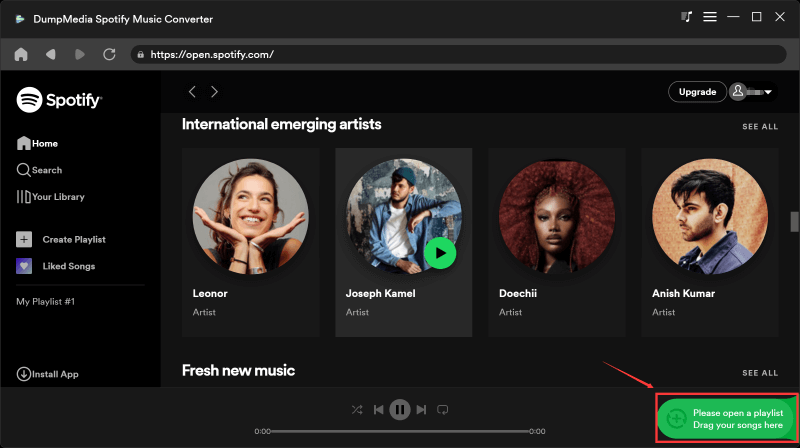
ステップ 1: ダウンロードしてインストール DumpMedia Spotify Music Converter Mac/PC 上で起動すると、インターフェースが表示されます。 Spotify ログインするにはプレミアム/無料アカウントが必要です。
ステップ2:変換したいプレイリスト、アルバム、または特定の曲を探します。画面右側の「+」アイコンに曲をドラッグすることもできます。または、プレイリスト/アルバム全体を開き、「変換に追加」アイコンをクリックして、リスト全体をコンバーターに読み込むこともできます。
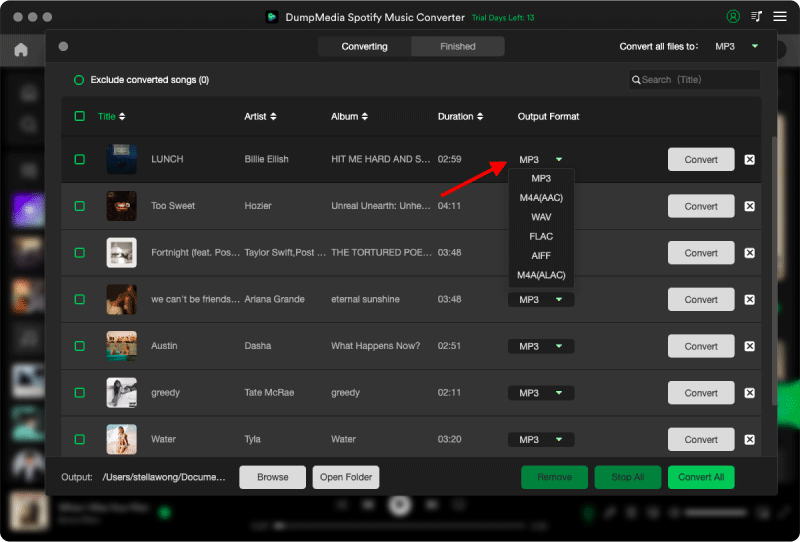
ステップ 3: 選択 MP3 (最も互換性が高い)また、ビットレートまたはサンプリングレートを変更することもできます。最適なバランスを得るには、320kbpsを選択してください。
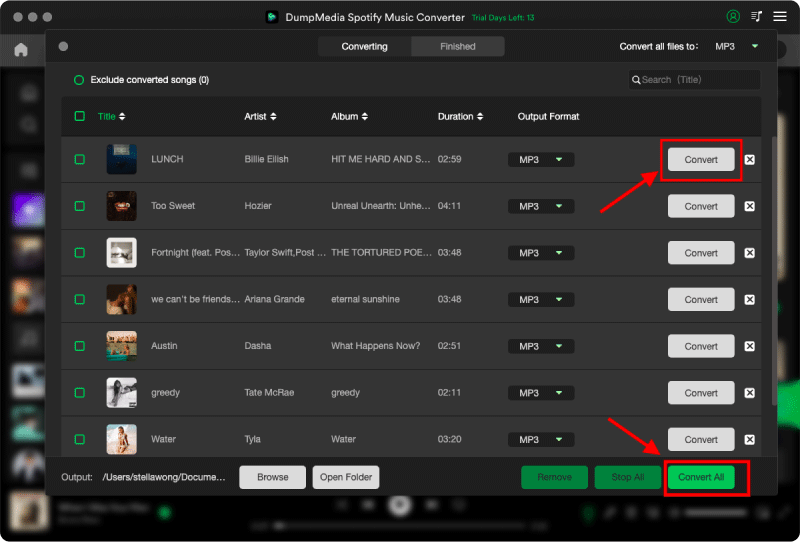
ステップ 4: 設定が完了したら、ユーザーは「変換」アイコンをクリックして変換処理を開始できます。 DumpMedia ダウンロードします Spotify に歌 MP3 その超高速性により、数秒以内に。
パート3。転送する方法 Spotify iPod Classicへの曲?
曲を変換したら、次のステップはそれらをiPod Classicに同期することです。
『Brooklyn Galaxy』のために、倪氏はブルックリン美術館のコレクションからXNUMX点の名品を選び、そのイメージを極めて詳細に描き込みました。これらの作品は、彼の作品とともに中国ギャラリーに展示されています。彼はXNUMX年にこの作品の制作を開始しましたが、最初の硬貨には、当館が所蔵する Winまたは古いMac(macOS Mojave以前):
- iTunesを開き、30ピンUSBケーブルを使ってiPod Classicを接続してください。
- ウィンドウの左上隅に表示されるiPodアイコンをクリックしてください。
- 「音楽」タブを開いてください。
- 「音楽の同期」にチェックを入れてください。「音楽ライブラリ全体」または「選択したプレイリスト、アーティスト、アルバム、ジャンル」のいずれかを同期できます。
- 右下隅の「適用」または「同期」をクリックしてください。
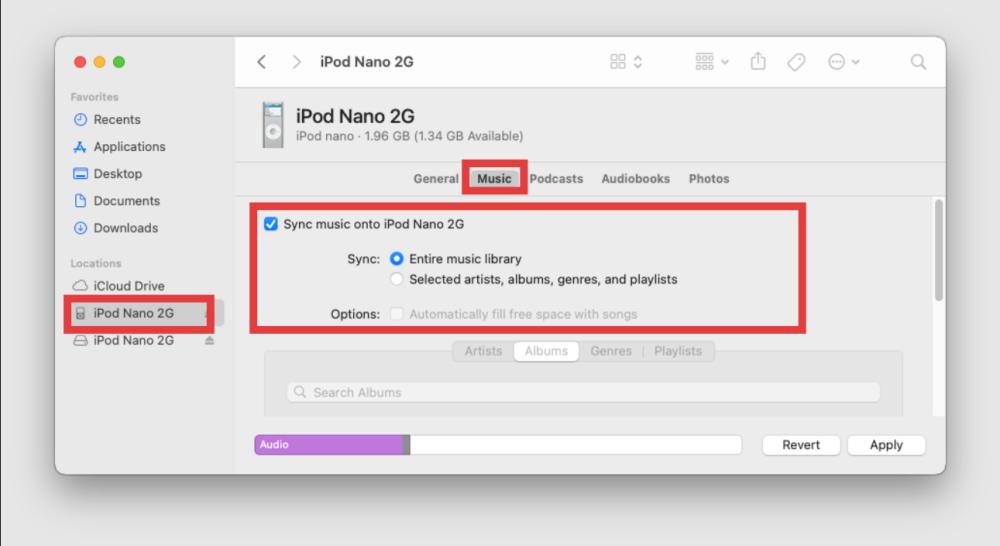
最新のMac(macOS Catalina以降)の場合:
- iPod ClassicをUSBケーブルで接続してください。
- Finderウィンドウを開いてください。iPodはサイドバーの「場所」の下に表示されるはずです。
- iPodをクリックし、次に「ミュージック」タブをクリックします。
- 「[iPod名]に音楽を同期」を選択し、お好みのアルバムまたはプレイリストを選択してください。
- 転送を開始するには、「適用」をクリックしてください。
パート4。よくある質問
できる Spotify iPod Classicで直接動作しますか?
いいえ。 Spotify iPod Classic用の公式アプリケーションは提供されていません。
ダウンロードできますか Spotify 曲をiPod Classicに直接転送できますか?
いいえ。 Spotify 楽曲は転送前に、まず互換性のあるオーディオ形式に変換する必要があります。
iPod Classicに最適なオーディオフォーマットは何ですか?
MP3 一般的に、プレイしたいユーザーにとって最も互換性の高いフォーマットです Spotify iPodClassicで。
か Spotify iPod Nanoで動作しますか?
Spotify iPod Nano上で直接動作することはありませんが、変換した楽曲はオフライン再生用に転送できます。
使ってもいいですか Spotify プレミアムのみでプレイ Spotify iPod クラシックで?
いいえ。 Spotify プレミアムダウンロードは暗号化されたままであり、iPod Classicに直接転送することはできません。
パート5:結論
しかし Spotify 公式にはiPod Classicをサポートしていませんが、それでも実用的な再生方法があります。 Spotify iPod Classic 上で変換することで。 Spotify 曲を互換性のある形式に変換し、iTunes を介して同期することで、ユーザーは Apple の最も象徴的な音楽プレーヤーの 1 つでお気に入りのプレイリストを楽しむことができます。信頼性の高いソリューションをお探しのユーザーにとって、 DumpMedia Spotify Music Converter 変換が簡単になります Spotify 音楽をiPod Classicに転送して、ストリーミング再生のみの制限なしにオフライン再生を楽しむことができます。