


ノートバーナー Spotify Music Converter レビュー:今でも買う価値はあるのか?
自律的AI SpotifyNoteBurnerのDRM保護のため、多くのユーザーは音楽をダウンロードしてオフラインで保存するためにサードパーティのコンバーターを利用しています。NoteBurnerはこの分野で最もよく知られたツールの1つですが、今でも十分に機能するのでしょうか?このNoteBurnerは Spotify Music Converter レビューでは、その機能、実際の性能、長所と短所を詳しく解説し、より効率的な代替製品と比較することで、適切な判断ができるようにお手伝いします。
コンテンツガイド パート1:NoteBurnerとは何か Spotify Music Converter?パート2:NoteBurnerの実地テスト Spotify Music Converterパート3:NoteBurnerとその他の製品の比較 Spotify 変換装置 パート4:最適な代替案(より優れたパフォーマンスが必要な場合)パート5:FAQパート6:最終結論:NoteBurnerは買う価値があるのか?
パート1:NoteBurnerとは何か Spotify Music Converter?
NoteBurnerについてさらに詳しく調べる前に Spotify Music Converter レビューでは、まずその機能について簡単に理解しましょう。NoteBurner Spotify Music Converter は、ユーザーがダウンロードや変換を行う際に役立つように設計されたデスクトップツールです。 Spotify 曲を一般的な形式に変換する MP3AAC、WAV、FLACなど。 Spotify アプリやウェブプレーヤーを通してトラックを再生し、ローカルに保存します。
パート2:NoteBurnerの実地テスト Spotify Music Converter
このNoteBurnerを作成するには Spotify Music Converter より信頼性の高いレビューを行うため、プレイリストのダウンロード、複数トラックの変換、出力品質の確認など、実際の使用環境でソフトウェアをテストしました。実地テストの結果は以下のとおりです。
テストのセットアップ
このNoteBurnerの場合 Spotify Music Converter レビューでは、以下の設定を使用しました。
- Winダウズ11 PC
- Spotify プレミアムアカウント
- 100曲入りプレイリスト(ジャンルミックス)
- 出力フォーマット: MP3 (320kbps)
私たちは、速度、安定性、出力品質という3つの重要な指標に焦点を当てました。
変換速度
NoteBurnerは高速な変換速度を謳っているが、実際のテストではパフォーマンスにばらつきが見られた。
- 少量のバッチ(5~10曲):比較的速い
- 大規模なプレイリスト(50曲以上):顕著な動作の遅延
- 変換中にCPU使用率が大幅に増加した。
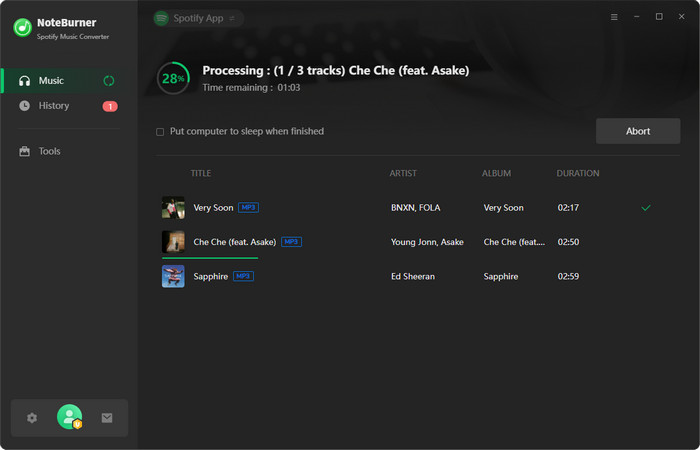
私たちのテストでは、100曲のプレイリストを変換するのに予想以上に時間がかかりました。特に最新のツールと比較すると顕著です。速度は一般的な使用には許容範囲内ですが、ヘビーユーザーには最適とは言えません。
出力品質
このNoteBurnerでは Spotify Music Converter レビューの際には、変換されたファイルが元の品質を保持しているかどうかも確認しました。
結果について
- ほとんどのトラックは良好な音質を維持していた。
- 大きな歪みは検出されませんでした。
- しかし、一部の楽曲ではわずかな圧縮の違いが認められた。
メタデータのパフォーマンス:
- ID3タグ(アーティスト、アルバム、タイトル)はほぼ正確だった
- ほとんどの場合、アルバムのアートワークは保存されていた。
全体的に音質は良好だが、あらゆる状況において完全にロスレスというわけではない。
安定性と成功率
NoteBurnerは安定性においていくつかの弱点が見られる。
テスト中:
- 最初の試行で変換に失敗したトラックがいくつかありました
- 大規模なプレイリストを処理する際に、時折フリーズが発生する。
- 場合によっては変換プロセスを再開する必要がある
小規模な作業には信頼性が高いが、大規模なダウンロードには安定性に欠ける。
まとめ: このNoteBurnerから Spotify Music Converter レビューの結果、このツールは機能的ではあるものの、特にヘビーユーザーにとっては、必ずしも最も効率的または安定した選択肢ではないことが明らかになった。
パート3:NoteBurnerとその他の製品の比較 Spotify 変換装置
もしあなたがこれを読んでいるなら、NoteBurner Spotify Music Converter レビューをご覧になっているということは、おそらく複数の選択肢を比較検討されているのでしょう。より最適化されたソリューションと比較した場合、どのような違いがあるのかをご紹介します。
| 機能 | ノートバーナー | DumpMedia |
| 変換速度 | 技法 | 速く |
| 安定性 | 平均 | ハイ |
| 出力フォーマット | MP3、AAC、WAV、FLAC | より柔軟な |
| 使いやすさ | 穏健派 | 初心者に優しい |
| ロット変換 | 限られたパフォーマンス | スムーズで効率的 |
パート4:最適な代替案(より優れたパフォーマンスが必要な場合)
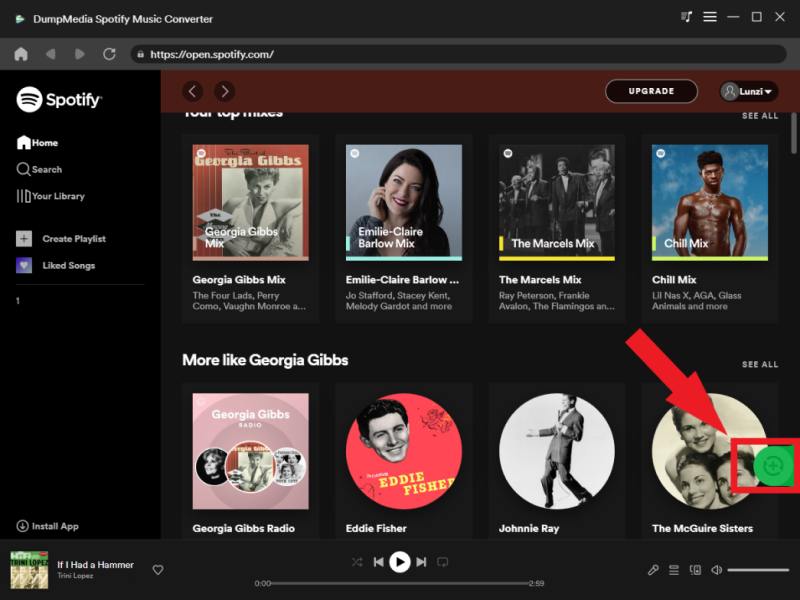
このNoteBurnerを読んだ後 Spotify Music Converter レビューを書いているうちに、もっと良い選択肢はないかと疑問に思うかもしれません。変換速度が遅い、不安定、または制限があるといった問題に直面している場合は、ツールを切り替えることで顕著な違いを感じられるでしょう。 DumpMedia Spotify Music Converter より高速な変換速度、安定したバッチ処理、そして損失のない高品質な出力を求めるユーザー向けに設計されています。
🏅さらに素晴らしい機能
- 変換 Spotify 音楽に合わせて MP3、WAV、FLAC
- DRM保護を解除*
- プレイリストの一括ダウンロード
- オリジナルの品質を維持
NoteBurnerとは異なり、パフォーマンスの安定性とスムーズなワークフローに重点を置いており、これは音楽を定期的にダウンロードするユーザーにとって非常に重要です。
使い方 DumpMedia Spotify Music Converter (完全ガイド)>>>
パート5:FAQ
1. NoteBurnerは Spotify Music Converter 安全に使用できますか?
はい、NoteBurnerは公式サイトからダウンロードすれば概ね安全に使用できます。ただし、パフォーマンスや信頼性は異なる場合があります。
2. NoteBurnerはサポートしていますか? Spotify 無料アカウントですか?
一部の機能は無料アカウントでも動作するかもしれませんが、フル機能を利用するには通常、 Spotify プレミアムアカウント。
3. NoteBurnerの最適な代替ソフトは何ですか?
のようなツール DumpMedia Spotify Music Converter より優れた速度、安定性、そして全体的なパフォーマンスを提供します。
4. NoteBurnerの動作が時々遅くなるのはなぜですか?
これは、システムのパフォーマンス、大規模なプレイリスト、またはソフトウェアの処理方法の制限が原因である可能性があります。 Spotify トラック。
パート6:最終結論:NoteBurnerは買う価値があるのか?
だから、この完全なNoteBurnerの後 Spotify Music Converter レビュー、正直な答えはこうです。
- 👉 はい、ただしライトユーザー向けです。
- 👉 いいえ — スピード、安定性、効率性を重視するなら。
NoteBurnerはまだ動作しますが、パフォーマンスの面では最新のツールに追いついていません。よりスムーズで信頼性の高い使用感を求めるユーザーは、より最適化された変換ソフトに切り替える方が良いでしょう。
*DumpMedia 復号化してダウンロードすることで機能します Spotify 楽曲をDRMフリーのファイルに変換することで、あらゆるデバイスでライブラリのクリーンで制限のないコピーを入手できます。ただし、ローカルオーディオファイルの変換機能は含まれていません。