


ポッドキャストをダウンロード MP3:ベスト Spotify 解決策
ポッドキャストをダウンロードする方法を探しています MP3 オフラインでいつでも聴けるようにしたいですか? Spotify または他のプラットフォームで、ポッドキャストをダウンロードする MP3 ファイルを完全に制御でき、どのデバイスでも再生でき、永久に保存でき、アプリの制限を回避できます。このガイドでは、ダウンロードするための無料およびプロフェッショナルな方法の両方を紹介します。 Spotify ポッドキャスト MP3.
コンテンツガイド パート1: ダウンロードできますか Spotify ポッドキャストへ MP3? パート2:無料でオンラインでダウンロードする方法 Spotify ポッドキャストへ MP3 パート3:ダウンロードするための最良の方法 Spotify ポッドキャストへ MP3パート4:無料/オンライン方式 vs DumpMediaパート5:よくある質問パート6:結論
パート1: ダウンロードできますか Spotify ポッドキャストへ MP3?
一方、 Spotify 技術的にはオフライン再生用にポッドキャストをダウンロードできますが、直接 MP3 ファイルはDRMで暗号化され、アプリ内にのみ保存されるため、エクスポートできません。したがって、ポッドキャストを実際にダウンロードすることはできません。 MP3 from Spotify プラットフォームが生の音声ファイルへのアクセスを制限しているため、内蔵のプレミアム機能を使用することはできません。
パート2:無料でオンラインでダウンロードする方法 Spotify ポッドキャストへ MP3
ポッドキャストをダウンロードしたい場合は MP3 無料で利用できる回避策はいくつかありますが、それらには制限があります。
方法1:オンラインポッドキャストダウンローダー
一部のウェブサイトでは、ポッドキャストのリンクを貼り付けて変換することができます。オンラインのポッドキャストダウンローダーは、デスクトップソフトウェアをインストールする手間をかけずに単一のエピソードをダウンロードしたいユーザーにとって、依然として人気の「手軽な解決策」です。PodcastToなどのウェブベースのユーティリティMP3、 Spotify-downloader および pastedownload.com は、 Spotify 指定されたURLから、独自のサーバーまたは代替データベースから音声を取得します。
メリット:
- インストール不要
- 簡単に使える
デメリット:
- ほとんどの人は支持していません Spotify リンク
- 成功率は限られている
- 品質低下の可能性
方法2:録音ツール
オンラインダウンローダーが回避に失敗した場合 Spotify専用の録音ソフトウェアを使用する方法は、暗号化を回避する最も信頼性の高い「汎用的な」方法です。この方法では、コンピューターでポッドキャストのエピソードを再生しながら、プログラムがシステムの音声出力を直接キャプチャし、音声を新しいDRMフリーのファイルに「再デジタル化」します。
メリット:
- 音量レベルをリアルタイムで監視する
デメリット:
- リアルタイム録画(低速)
- 音質が低い
- 手動プロセス
パート3:ダウンロードするための最良の方法 Spotify ポッドキャストへ MP3
ポッドキャストをダウンロードする信頼できる方法をお探しなら MP3 from Spotify最善の解決策は、専用ツールを使用することです。 DumpMedia Spotify Music Converter DRM保護*を削除して変換プロセスを簡素化し、 100% オリジナルのオーディオ品質。単一のトラック、ポッドキャスト、または大規模なプレイリストをバックアップしたい場合でも、 DumpMedia 数回クリックするだけで、ほとんどのメディアデバイスで音楽を再生できる状態にできます。
🏅さらに素晴らしい機能
- ⭐変換 Spotify 音楽に合わせて MP3、WAV、FLAC
- ⭐統合 Spotify ウェブプレイヤー
- ⭐両方に対応 Spotify プレミアムと Spotify 無料ユーザー
- ⭐最大35倍の速度でバッチ変換を実現
- ⭐アーティスト、カバー、アートなどのID3タグを保持します。
- ⭐オリジナルのオーディオ品質を維持
- ⭐100% クリーン。使用してもリスクはありません
どのように変換する方法 Spotify ポッドキャストへ MP3
ステップ 1: ダウンロードしてインストール DumpMedia Spotify Music Converter Macに/Win起動するとインターフェースが表示されます。 Spotify ログインするにはプレミアム/無料アカウントが必要です。
ステップ2:次に、ダウンロードしたいポッドキャストに移動します。それを変換リストに直接ドラッグできます。

ステップ 3: 変換インターフェースでは、出力形式を次のように選択できます。 MP3環境設定でサンプルレートまたはビットレートを設定してください。また、ファイルの保存先となるフォルダを選択してください。

ステップ4.最後に、ページ下部の「変換」ボタンをタップすると、ソフトウェアが変換処理を開始します。

これはポッドキャストをダウンロードする最も効率的な方法です MP3 制限なし。
パート4:無料/オンライン方式 vs DumpMedia
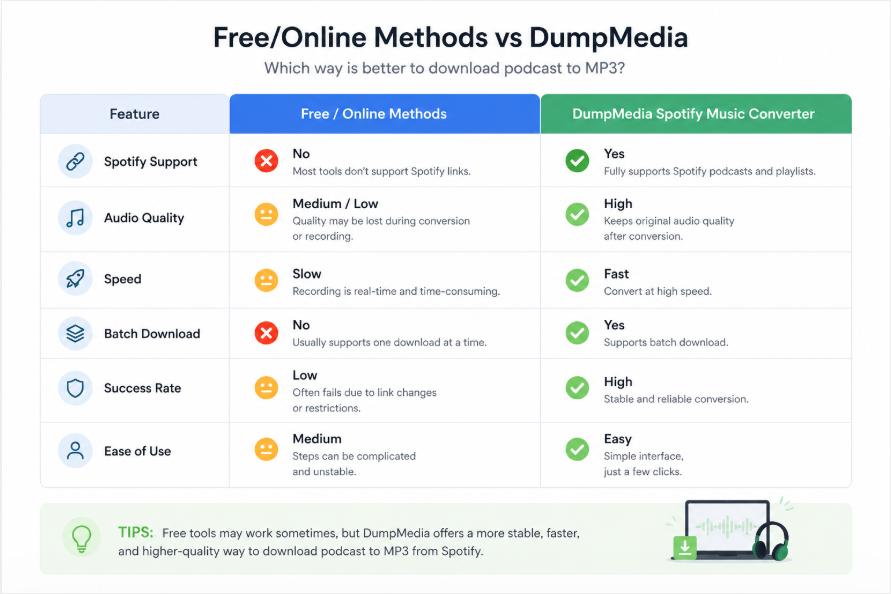
無料ツールはポッドキャストのダウンロードに役立つ場合もありますが、 MP3それらは、専用ソリューションの信頼性と品質には到底及ばない。
パート5:よくある質問
ポッドキャストをダウンロードできますか MP3 from Spotify 直接?
いいえ。 Spotify 直接許可しない MP3 DRM保護のためダウンロードが制限される。
ポッドキャストを無料でダウンロードする方法はありますか? MP3?
はい、しかし無料の方法には制限があり、多くの場合サポートされていません Spotify.
ダウンロードする最良の方法は何ですか Spotify ポッドキャスト MP3?
専用ツール DumpMedia Spotify Music Converter 最も信頼性の高いソリューションを提供します。
ポッドキャスト変換ソフトを使うのは安全ですか?
はい、信頼できるソフトウェアを使用し、個人利用目的でコンテンツをダウンロードする限りは問題ありません。
パート6:結論
ポッドキャストをダウンロードする MP3 ファイルを使用すると完全な柔軟性が得られますが、すべての方法が同じように効果的というわけではありません。ポッドキャストを高速、安定、高品質でダウンロードする方法をお探しの場合は、 MP3プロフェッショナルなソリューションを使用する DumpMedia Spotify Music Converter が最良の選択です。今日からお気に入りのポッドキャストを変換して、制限なくお楽しみください。
*DumpMedia 復号化してダウンロードすることで機能します Spotify 楽曲をDRMフリーのファイルに変換することで、あらゆるデバイスでライブラリのクリーンで制限のないコピーを入手できます。ただし、ローカルオーディオファイルの変換機能は含まれていません。