


Pandoraの曲を変換する方法 MP3 2026 年: ステップバイステップ ガイド
Pandoraは最も人気のある音楽ストリーミングプラットフォームの1つですが、楽曲はサブスクリプション制限によって保護されていることが多く、オフラインアクセスや柔軟な再生ができません。多くのユーザーが、Pandoraの楽曲を変換する方法を尋ねています。 MP3 サブスクリプションの有効期限を気にせずにどこでも聴けるようにするためです。このガイドでは、Pandoraの音楽を変換したい理由を説明します。 MP3最適なツールと、音楽を永久にオフラインにするための段階的な手順をご紹介します。
コンテンツガイド パート1. Pandoraの曲を直接ダウンロードできますか? MP3?パート2。Pandoraの音楽を変換する最適なツール MP3パート3. Pandoraの音楽を変換する方法 MP3 ステップバイステップ?パート4. FAQパート5:結論
パート1. Pandoraの曲を直接ダウンロードできますか? MP3?
Pandoraではプレミアムユーザー向けにオフライン再生が可能ですが、ダウンロードした曲はアカウントとサブスクリプションに紐付けられます。Pandora( Spotify (Apple Music)は DRM(デジタル著作権管理) 有効なサブスクリプションがある間だけ聴くことができるようにします。オフラインのトラックは他のデバイスに転送したり、永久にバックアップしたりすることはできません。Pandoraの曲を物理的なデバイスに取り込むには MP3 フォーマットによっては、非公式な方法を使う必要があります。
パート2。Pandoraの音楽を変換する最適なツール MP3
Pandoraの音楽を変換する方法 MP3最も信頼できる解決策は DumpMedia パンドラ音楽コンバータこのツールは、ユーザーが Pandora の曲を変換するのに役立ちます。 MP3FLAC、M4A、WAV をワンクリックで保存できます。そのため、プレイリストをローカルに保存して、サブスクリプションの変更後も音楽を保持できます。ストリーミングアクセスに完全に依存するのではなく、ユーザーは Pandora プレイリストから長期的な音楽コレクションを構築できます。デバイスで Pandora アプリが動作しない場合でも、 Pandoraの曲をオフラインで再生する すぐに別の音楽プレーヤーで再生してください。
🏅なぜ選ぶのか DumpMedia パンドラ音楽コンバータ:
- ⭐Pandoraウェブプレーヤーとの連携
- ⭐Pandoraプレミアムユーザーと無料ユーザーの両方で利用できます
- ⭐最大35倍の速度でバッチ変換を実現
- ⭐アーティスト、カバー、アートなどのID3タグを保持します。
- ⭐オリジナルのオーディオ品質を維持
- ⭐100% クリーン。使用してもリスクはありません
このツールを使えば、Pandoraの曲を簡単に変換できます。 MP3 複雑な設定や専門知識は不要です。
パート3. Pandoraの音楽を変換する方法 MP3 ステップバイステップ?
Pandoraの曲を変換するには、以下の簡単な手順に従ってください。 MP3 DumpMedia パンドラ音楽コンバータ:
ステップ 1: ダウンロードしてインストール DumpMedia Mac/PCでPandora Music Converterを起動してください。起動するとインターフェースが表示されます。Pandoraプレミアム/無料アカウントを使用してログインしてください。
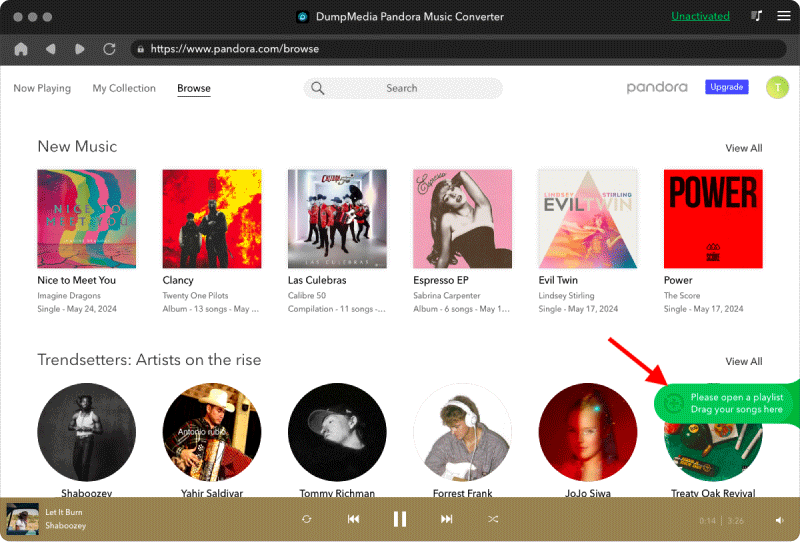
ステップ2.次に、曲またはプレイリストをフローティングの「+」アイコンに直接ドラッグして変換キューに追加し、ダウンロードの準備をします。
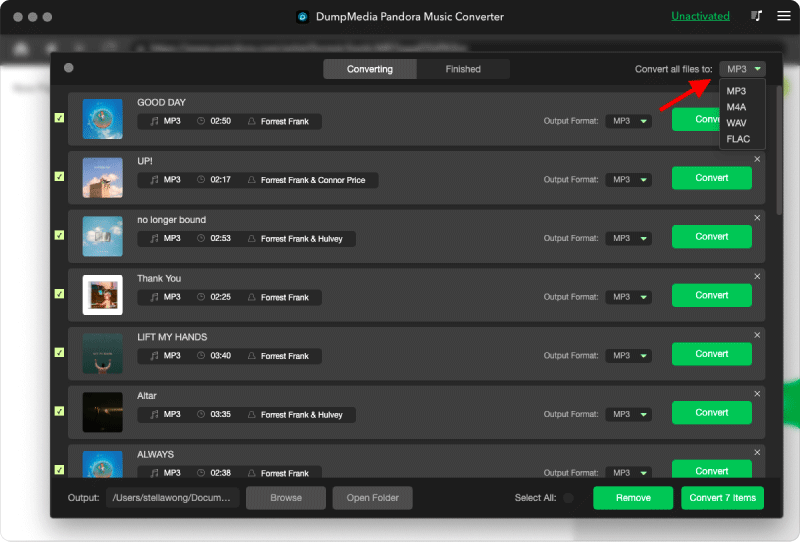
ステップ3.選択した曲に満足したら、お好みのオーディオファイル形式を選択できます。
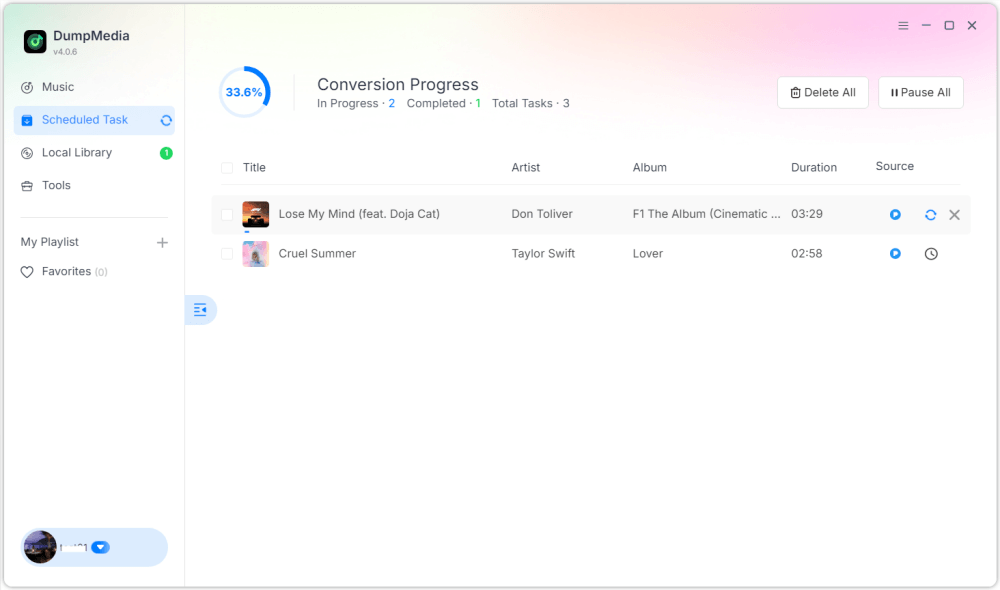
ステップ 4: 設定が完了したら、ユーザーは「変換」アイコンをクリックして変換処理を開始できます。 DumpMedia Pandoraの曲を変換するために実行します MP3 その超高速性により、数秒以内に。
パート4. FAQ
Q1: Pandoraの曲を MP3 無料で?
はい、無料トライアルを提供するツールもありますが、プレミアムコンバーターは DumpMedia 処理速度の向上とバッチ変換を実現します。
DumpMedia 頻繁にプロモーションキャンペーンを実施しています。 DumpMedia 追加の割引や特典については、カスタマーサポートにお問い合わせください。
Q2: Pandoraの曲を MP3?
個人的なオフライン利用のための変換は一般的に許容されると考えられているが、配布や商業利用は著作権法に違反する可能性がある。
Q3: Pandoraのプレイリスト全体を変換できますか? MP3 一気に?
Yes. DumpMedia Pandora Music Converterは、プレイリストとアルバムの一括変換に対応しています。
Q4: MP3 曲の情報を保持する?
はい、コンバーターはタイトル、アーティスト、アルバム、アートワークなどのメタデータを保持します。
パート5:結論
Pandoraの曲を MP3 お気に入りの音楽をオフラインで楽しむ最良の方法であり、永続的なバックアップを維持し、デバイス間で再生を完全に制御できます。Pandoraの曲を変換する方法 MP3? 使用する DumpMedia Pandora Music Converter を使用すると、曲、アルバム、プレイリストをすばやく簡単に変換できます。 MP3 音質やメタデータを損なうことなく、大切な音楽コレクションを永久に保存できます。今すぐ変換を開始しましょう。